Skip to Content

How to Get macOS Sequoia 15.1 Beta With Apple Intelligence

by

Apple has made available the second developer beta of macOS Sequoia 15.1, which includes the ability to test Apple Intelligence features. If you have an Apple silicon Mac and don't live in China, you can try Apple Intelligence features for yourself, even if you're not a developer. Keep reading to learn how.

macOS Sequoia Night Feature
Apple has split Apple Intelligence into a separate set of betas for Macs because these features will not be available in the initial launch version of ‌macOS Sequoia‌ 15. Apple Intelligence will be available to the public later in the fall with the release of macOS Sequoia 15.1.

This point release will add several of the Apple Intelligence features, such as Writing Tools, an updated Siri design, Safari and Mail summaries, Reduce Interruptions Focus mode, and more. Other features, including Image Playground, Genmoji, and the Siri personal context and onscreen awareness will be coming later and are not in the macOS Sequoia 15.1 beta. You can learn more about what's available and when in our macOS 15 roundup.

The good news is that Apple has already seeded the second developer beta of macOS 15.1, which means you can try some of the AI features out for yourself by signing up for macOS beta access. Signing up to get the macOS Sequoia beta is simple, and can be done by following the steps below. Be sure to back up your Mac using Time Machine before going on to follow the beta software installation steps, otherwise you won't be able to revert back to your previous version of macOS if you need to.

Things to Remember Before You Start

  • Back up Your Mac.
  • Apple Intelligence requires a Mac with an M1 Apple silicon processor or later.
  • Apple Intelligence is only available in US English.
  • Apple Intelligence for Mac is not available in China, but appears to be available in the EU and everywhere else when region and language settings are changed to United States (see below).
  • Apple Intelligence is not available if macOS 15.1 is installed on an external drive.

Register for Developer Beta Access

You can skip this first set of steps if you have previously joined the Apple Developer Program with your Apple ID. Note that registering in this way is free, and does not require paying for an Apple Developer Program membership.

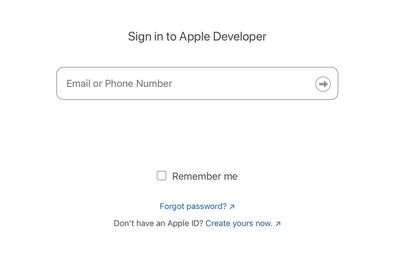
  1. Go to the Apple Developer website (developer.apple.com/account) and sign in with your Apple ID.
  2. Check the box to accept the terms and conditions, then tap the Submit button.
apple developer

That's all there is to it. You can now proceed to the next steps to download and install the macOS Sequoia 15.1 developer beta.

Download macOS 15.1 Beta

To download and install the macOS Sequoia 15.1 Developer beta, follow these steps on your Mac.

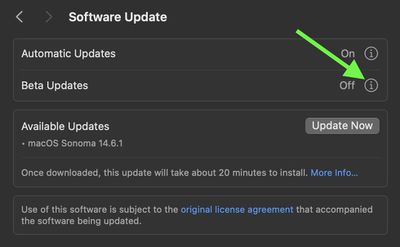
  1. Go to System Settings ➝ General ➝ Software Update.
  2. Click the info button ⓘ next to "Beta updates."
    settings

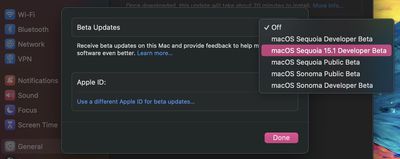
  3. Choose the macOS Sequoia 15.1 Developer Beta option, then click Done.
    settings

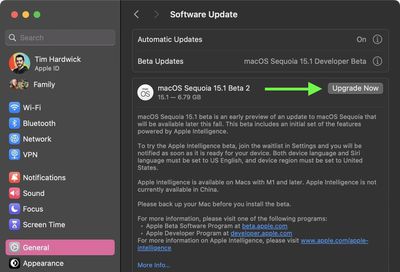
  4. When the macOS 15 Sequoia 15.1 Beta update appears, click the Upgrade Now button to start downloading and installing it on your Mac.
    settings

Activate Apple Intelligence

The following steps explain how to join the Apple Intelligence waitlist, which usually grants you access to the AI features in just a few minutes.

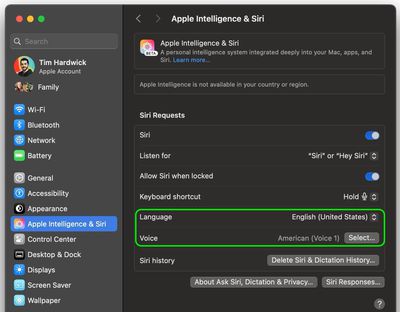
  1. Go to System Settings ➝ Apple Intelligence & Siri.
  2. Set Siri's language to English (United States), and decline to restart your Mac at the prompt for now.
  3. Set Voice to American.
    settings

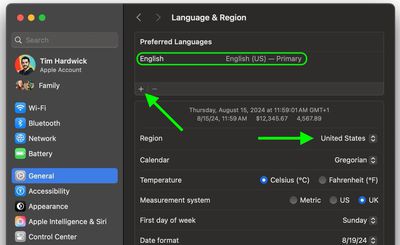
  4. Next, go to System Settings ➝ General ➝ Language & Region.
  5. Click the "Region" selector and choose United States.
  6. Under "Preferred Languages," click + and add English (US), then set English (US) as the Primary language by dragging it above your other language(s).
  7. Restart your Mac when prompted.
    settings

  8. After restarting, go to Settings ➝ Apple Intelligence & Siri.
  9. Click the option to Join the Apple Intelligence waitlist. You will be notified when Apple Intelligence features are available for your Mac. In most cases this should take only a few minutes, but don't rule out waiting a couple of hours.
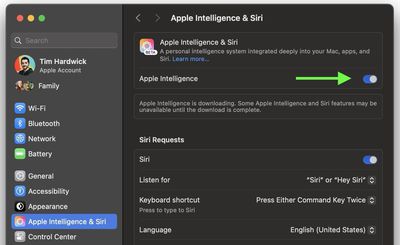
  10. When Apple Intelligence is available, toggle the switch to enable it.
    settings

Note that Apple Intelligence will not be in the initial launch version of iOS 18 that comes out in September alongside new iPhones. It will instead be introduced in a separate iOS 18.1 update that is likely to come out a few weeks after ‌iOS 18‌ debuts. Have you had a chance to try out Apple Intelligence features on Mac? Let us know of your experience in the comments.

Related Forum: macOS Sequoia

Top Rated Comments

GuruZac Avatar
30 months ago

Too bad I can't install it on my MacBook Pro M1, the VPN server I need to connect for work doesn't allow Sequoia at this time.
I have found all the Sequoia releases (currently on 15.1.2) have been extremely stable, both on my M1 MacBook Air and M3 Pro MacBook Pro. Pretty impressed to be honest. No discernible changes to battery life, app stability, etc.
Score: 4 Votes (Like | Disagree)
30 months ago
Good article. But not installing any betas. Waiting to try it out later this year.
Score: 1 Votes (Like | Disagree)
ramileo Avatar
30 months ago
I've been running Sequoia 15.1 since it was released. I soon thereafter was taken off the waitlist and had been using Apple Intelligence until this morning.

My first hint something was wrong was that Writing Tools, which I'd been using extensively, disappeared. I tried in another app, and it wasn't there, either.

I then looked at the Siri icon in my menu bar - which is different under Apple Intelligence - and it had been reverted to the old icon.

I then checked my Apple Intelligence settings and, sure enough, not only was it off, but I'd been returned to the waitlist.

My iOS and iPadOS devices continue working just fine with Apple Intelligence. Only my MacBook Pro is experiencing this issue.

Has anyone else seen this?
Score: 1 Votes (Like | Disagree)
ipedro Avatar
30 months ago

I have found all the Sequoia releases (currently on 15.1.2) have been extremely stable, both on my M1 MacBook Air and M3 Pro MacBook Pro. Pretty impressed to be honest. No discernible changes to battery life, app stability, etc.
Thanks for this. Having started using Apple Intelligence on my iPad Pro, I'm getting eager to extending its use into my MacBookPro. Sounds like it's safe to go ahead with it.

Apple has done a good job of integrating AI seamlessly into practical uses through the OS, not just a chatbot. Siri falls far short of chatGPT (in use, it feels a decade behind to be frank) but the tradeoff is that Apple Intelligence has access to my personal info and acts on it seamlessly. Email subject summaries are one thing I already don't want to go back on.
Score: 1 Votes (Like | Disagree)
30 months ago

Some nice updates to Sequoia. AI doesn't feel that revolutionary at this point but maybe much more function comes in future 15.x updates. My favorite updates are the new Sequoia wallpapers 😀 and iPhone Mirroring.
Yeah, very early on not much of the features touted are going to be available

That being said, aside from those features (of which I will be able to take advantage of with having an M2 machine) I too love the iPhone mirroring feature and use it all the time now

Even with being in beta, it works almost perfectly already
Score: 1 Votes (Like | Disagree)
BigBrotherNowWatching Avatar
30 months ago
Why would I want that on my Mac ?

Smartphones made us not smarter.
What do you think an "artificial intelligence" will do to you?

Exactly 🫡.
Score: 1 Votes (Like | Disagree)

Popular Stories

iOS 27

Apple Says iOS 27.3 Beta Coming Next Week

Friday October 30, 2026 2:45 pm PDT by
Apple today announced that the first iOS 27.3 developer beta will be released next week and enable some Apple Intelligence features in China. In a press release shared on the Apple Newsroom website in China, Apple said the beta will be released on Wednesday, November 4, but that likely means Tuesday, November 3 in the U.S. due to time zone differences. Apple said iOS 27.3 will then be...
General iCloud App Feature

Apple Says iCloud+ Plans Will Not Include Increased Siri AI Usage in UK

Tuesday November 17, 2026 7:07 am PST by
Apple on Monday announced that it is implementing daily usage limits on Siri AI and select other Apple Intelligence features that rely on "powerful server models" starting with iOS 27.3 and corresponding software updates, but increased access will be included with most iCloud+ plans at no additional cost in most countries, with one notable exception. In a support document, Apple said...
Siri AI Icon

Apple Continues to Say Some AI Features Will Have Fees for Extra Usage

Monday November 9, 2026 9:45 am PST by
Apple continues to advise customers that certain Apple Intelligence features that rely on its server-side Private Cloud Compute system have daily usage limits, with expanded access to such features to be "available for a fee in the future." Apple has repeatedly mentioned these upcoming fees in press releases over the past several months, but it has yet to provide any specific details about...
Latest Stories
The 50+ Best Apple Black Friday Deals Still Available on AirPods, iPads, and More
22 minutes ago
Apple's M6 and PROLED MacBook Pro Reach New Low Prices for Black Friday
5 hours ago
The MacRumors Show: iPhone Air 2 and iPhone 18 Are Coming
5 hours ago
Apple Store in Brisbane Reopening Next Month With New Design
5 hours ago
The 60+ Best Black Friday Accessory Deals on iPhone Chargers, TVs, Headphones, and More
6 hours ago
GTA VI Now (Barely) Running on Apple Silicon Macs
6 hours ago
The Best Black Friday Streaming Deals on Apple TV, Disney+, and More
7 hours ago
Apple TV's 'Carême' Wins International Emmy for Best Drama
7 hours ago
iPhone 18 Production Delay Leaves Apple Little Time Before Launch
8 hours ago
The Best Black Friday AirPods Deals Still Available
18 minutes ago
The Best Black Friday Deals on Apple Home Products
9 hours ago
The Best Black Friday iPhone Deals Still Available
18 minutes ago
The Best Black Friday iPad Deals Still Available
17 minutes ago
The Best Black Friday Apple Watch Deals Still Available
17 minutes ago
The Best Black Friday AirTag Deals Still Available
16 minutes ago
The Best Black Friday Mac Deals Still Available
16 minutes ago
iPhone Share of US Smartphone Market Hits 57% as Rivals Slip
10 hours ago
iPhone 20 Pro Rumored to Feature 3D-Printed Titanium Frame
12 hours ago
Apple's Official 2026 Black Friday Offer Starts Rolling Out
1 day ago
Halide Adds Fill Light Feature for iPhone Duo
1 day ago
MacBook Air Black Friday Deals Now Live With Massive $399 Savings
1 day ago
Amazon Discounts All MacBook Neo Models by $99 for Black Friday
1 day ago
Kodak Launches Unique AirTag Rival With E-Ink Display
1 day ago
Here's Why the Apple Store is Going Down
1 day ago
Apple Still Working on Giant Foldable iPad That Could Cost $5,000
1 day ago
iPhones Dominate China's Weak Singles' Day Smartphone Sales
1 day ago
iPhone 20 Pro Could Feature Ceramic in Limited-Edition Model
1 day ago
Apple Faces Korean Regulator Review Over iPhone 16 AI Advertising
1 day ago
Apple Watch Ultra 4 Hits New Best-Ever Price of $649.99 for Black Friday
1 day ago
New Apple Store Opening in India, Download the Special Wallpaper Now
2 days ago
Related Apple News: South Africa | World News | Iphone | Reviews | Iphone