

Apple has released the first iOS 26 beta to developers, but even non-developers have the opportunity to download beta software updates on their iPhones for free. Keep reading to learn how it's done.
Traditionally, when Apple announced a major new operating system update, the first wave of betas would only be available to download by paying subscribers to Apple's Developer Program, which costs $99 a year. Public betas would then become available to users enrolled in Apple's Public Beta Software Program after a delay of a few days or weeks after the developer beta has been released. That all changed in 2023, and these days iPhone users no longer have to wait for a publicly released beta to test what's new.
Indeed, anyone who signs in to Apple's developer account website with their Apple Account credentials gets access to developer beta releases as well, even if they are not a paying member of Apple's Developer Program. This means anyone with an Apple Account can download and install the new iOS 26, iPadOS 26, and macOS Tahoe betas without waiting for the public betas to launch.
Is My iPhone Compatible With iOS 26?
iOS 26 is compatible with the iPhone 11 series and newer. In other words, the following models are supported:
- iPhone 16e
- iPhone 16
- iPhone 16 Plus
- iPhone 16 Pro
- iPhone 16 Pro Max
- iPhone 15
- iPhone 15 Plus
- iPhone 15 Pro
- iPhone 15 Pro Max
- iPhone 14
- iPhone 14 Plus
- iPhone 14 Pro
- iPhone 14 Pro Max
- iPhone 13
- iPhone 13 mini
- iPhone 13 Pro
- iPhone 13 Pro Max
- iPhone 12
- iPhone 12 mini
- iPhone 12 Pro
- iPhone 12 Pro Max
- iPhone 11
- iPhone 11 Pro
- iPhone 11 Pro Max
- iPhone SE (2nd generation and later)
Should I Install iOS 26 Developer Beta?
Great question! Before downloading the update, it's worth noting that Apple does not recommend installing iOS 26 beta updates on your main iPhone, so if you have a secondary device, use that. This is beta software, which means there are often bugs and issues that pop up that can prevent software from working properly or cause other problems. Apple undoubtedly has plenty of fixes to make before the final release.
Make an Archived Backup of Your Device First
Before installing the beta, make sure to back up your iOS device before installing the software using the following method, otherwise you won't be able to revert back to iOS 18 if things go wrong.
- Plug your iPhone into your Mac using the supplied cable.
- Allow the accessory to connect by clicking Allow in the dialog prompt.
- Open a Finder window by clicking the Finder icon in the Dock.
- Click your iOS device's name in the sidebar.

- If this is the first time connecting your device to your Mac, click Trust in the Finder window.
- Tap Trust on your device when prompted, then enter your passcode to confirm.
- In the General tab, click the circle next to where it says Back up all of the data on your iPad to this Mac.
- If you want to encrypt the backup, check the box next to Encrypt local backup, then enter a password to protect your data.
- If you don't want to create an encrypted backup, or you've already set up encrypted backups, click Back Up Now.
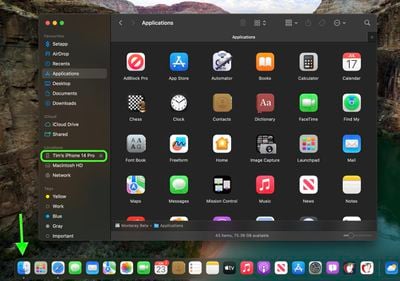
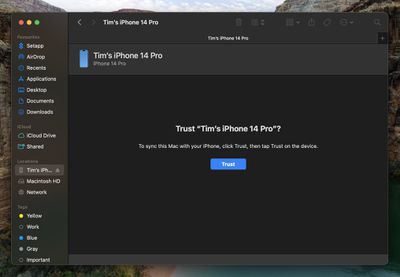
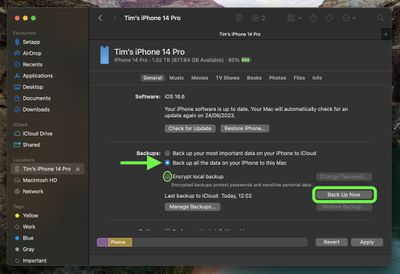
When the backup is finished, you can find the date and time of the last backup in the General tab, just above the Manage Backups button. Remember that this backup will not be overwritten when you manually or automatically back up your iPhone in the future, so you can restore it at any time by using the Restore Backup... option in the same Finder screen.
How to Download iOS 26 Developer Betas
The option to download and install the iOS 26 Developer Beta is immediately available for users who have previously enrolled on Apple's Beta Software Program. If you're currently enrolled to receive Public Betas, you can skip to step 6, otherwise follow these steps.
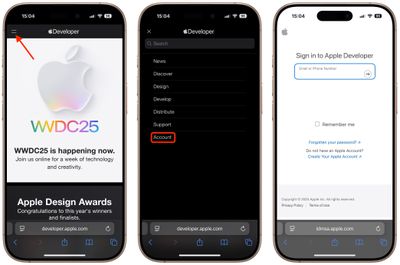
- Open Safari on your iPhone and visit developer.apple.com.
- Tap the menu icon in the top-left corner of the page, then tap Account.
- Under "Sign in to Apple Developer," enter and submit your Apple Account credentials using the arrow buttons, then enter the two-factor authentication code sent to your devices.
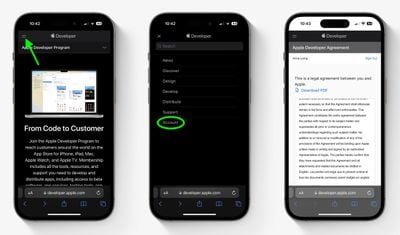
- Tap the top-left menu icon again, then tap Account.
- Accept the legal terms of the Apple Developer Agreement by scrolling down the page, checking the box, and tapping I Agree. You'll then be directed to a payment screen, but you can quit out of your browser from here – you don't need to pay anything.
- Make sure your iPhone is running iOS 16.4 or later by going to Settings -> General -> Software Update. If it is, and you have just completed steps 1-5 to register a developer account, restart your iPhone. If it isn't, download and install the latest update to your device, then wait for it to restart.
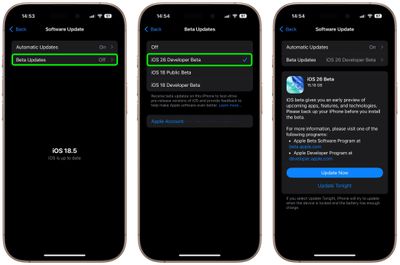
- Now go back to Settings ➝ General ➝ Software Update.
- Tap Beta Updates. If you don't see the option, try switching off Download iOS Updates (Automatic Updates ➝ Download iOS Updates), then tap Back and it should appear.
- Select iOS 26 Developer Beta in the list, then tap Back.
- Wait for the Software Update screen to check Apple's servers. When the iOS 26 Developer Beta appears, tap Download and Install, then follow the instructions and wait for installation to complete.
iOS 26 Features
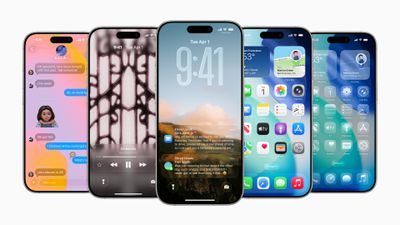
iOS 26 introduces a striking system-wide redesign built around Liquid Glass, a translucent material that reflects and refracts ambient content and dynamically responds to user input. The new aesthetic applies across the Lock Screen, Home Screen, toolbar controls, navigation elements, app icons, and widgets.
The update also brings new Apple Intelligence features. With Live Translation available in Messages, FaceTime, and Phone, conversations across languages are now seamless and entirely on-device to ensure privacy. New Visual Intelligence capabilities mean you can ask questions about screen content. There are also smarter Shortcuts with intelligent actions to make automation easier.
Communication apps gain smart upgrades too. The revamped Phone app now combines Favorites, Recents, and Voicemails in one view, adds Call Screening, and includes a clever Hold Assist feature. Messages gains filtered inboxes for unknown senders, typing indicators in group chats, custom backgrounds and polls, and Apple Cash transfers.
CarPlay gets a visual refresh aligned with the Liquid Glass design and now includes compact call notifications, tappable Message reactions, pinned conversations, widgets, and Live Activities support.
Apple has also updated some of its key apps: Apple Music adds Lyrics Translation and Pronunciation plus AutoMix DJ-style transitions; Maps introduces privacy-protected "Visited Places" and smarter route preferences; Wallet supports installment/rewards payments, refreshed boarding passes with Live Activities, and deeper integrations with Maps and Find My. Lastly, a new Games app debuts as a central hub for mobile gaming, featuring a unified library, Apple Arcade support, event tracking, and friend status updates.
For a full breakdown of what's new, be sure to check out our dedicated iOS 26 roundup.


































Top Rated Comments
Don't listen to anyone saying things like "YOLO".
Just wait and steer clear.