Skip to Content

How to Get a MacBook or MacBook Pro Keyboard Repaired Free Under Apple's Service Program

by

Apple has initiated a new worldwide service program offering free repairs of MacBook and MacBook models equipped with low-profile, butterfly mechanism keyboards, after the company determined that "a small percentage" of the keyboards may develop one or more of the following issues:

  • Letters or characters repeat unexpectedly

  • Letters or characters do not appear

  • Key(s) feel "sticky" or do not respond in a consistent manner

Apple or Apple Authorized Service Providers will service eligible MacBook and MacBook Pro keyboards free of charge. Apple says the process may involve the replacement of one or more keys or the whole keyboard.
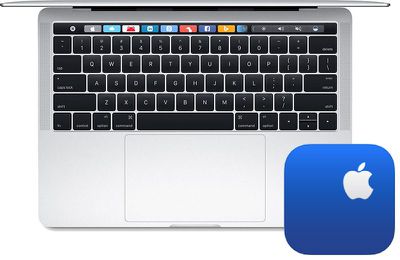
macbook keyboard apple support
The following MacBook and MacBook Pro models are eligible for the program:

  • MacBook (Retina, 12-­inch, Early 2015)

  • MacBook (Retina, 12­-inch, Early 2016)

  • MacBook (Retina, 12-­inch, 2017)

  • MacBook Pro (13­-inch, 2016, Two Thunderbolt 3 Ports)

  • MacBook Pro (13-­inch, 2016, Four Thunderbolt 3 Ports)

  • MacBook Pro (15-­inch, 2016)

  • MacBook Pro (13-­inch, 2017, Two Thunderbolt 3 Ports)

  • MacBook Pro (13-­inch, 2017, Four Thunderbolt 3 Ports)

  • MacBook Pro (15-­inch, 2017)

All other MacBook, MacBook Air, and MacBook Pro models are not equipped with butterfly mechanism keyboards, and thus are ineligible.

To identify your MacBook or MacBook Pro model to see if it is eligible for this program, click on the Apple logo in the top-left corner of the screen and select About This Mac. A window should open, and in the Overview tab, the model should be listed, such as MacBook Pro (15-inch, 2016).

Apple or an Apple Authorized Service Provider will examine the MacBook or MacBook Pro prior to any service to verify that it is eligible for this program. If the notebook has any damage which impairs the service, that issue will need to be repaired first, and in some cases, there may be repair fees.

Step-by-step instructions ahead…

MacRumors obtained an internal service document from Apple that outlines exactly which pre-existing damage is eligible for this program:

Eligible physical damage includes:
• keyboard damage due to attempted keycap repair
• physical top case damage unrelated to the keyboard

Ineligible physical damage includes:
• liquid damage
• physical keyboard damage unrelated to keycap repair

Apple's service program is valid for four years after an eligible MacBook or MacBook Pro was originally purchased, meaning all of the models listed above remain eligible until at least April 10, 2019, four years after the original 12-inch MacBook, the first model with a butterfly keyboard, was released.

An eligible MacBook or MacBook Pro purchased today, meanwhile, would be eligible for coverage under this program until June 2022.

How to Initiate a Free Repair

Remember to back up your Mac prior to sending it in for service.

There are three ways to take advantage of Apple's service program: book an appointment with an Apple Store or Apple Authorized Service Provider, or mail in the notebook to Apple's repair center.

Apple Store or Apple Authorized Service Provider via Web
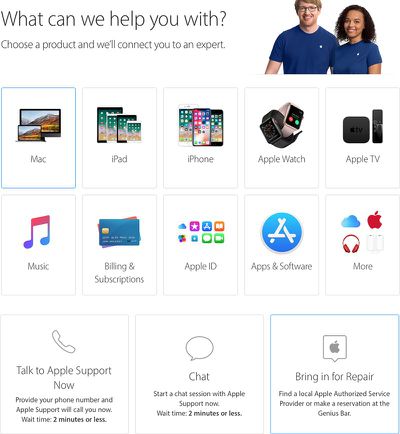
apple support mac
These steps are web-based, so they work across Mac, iPhone, iPad, and other devices.

  1. Navigate to the Get Support page on Apple's website.

  2. Select "Mac."

  3. Select "Mac notebooks."

  4. Select "Hardware Issues."

  5. Select "Keyboard not working as expected."

  6. Select "Bring in for Repair."

  7. Sign in with your Apple ID.

  8. Specify your location.

  9. Sort by "Availability" or "Distance."

  10. Select an Apple Store or Apple Authorized Service Provider.

  11. Select an available day and time slot for the appointment.

  12. Arrive at the Apple Store or Apple Authorized Service Provider when your appointment is scheduled. Bring your affected MacBook or MacBook Pro and government-issued photo ID.

Apple Store or Apple Authorized Service Provider via Apple Support App
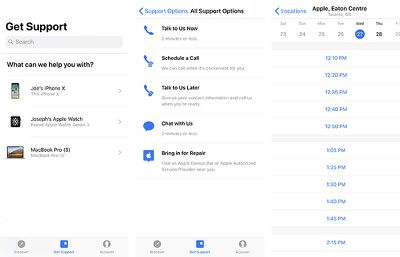
apple support app macbook keyboard
These steps are based on the Apple Support app for iPhone and iPad.

  1. Open the Apple Support app.

  2. If necessary, tap on the "Account" tab and sign in with your Apple ID.

  3. Tap on the "Get Support" tab.

  4. Tap on your affected MacBook or MacBook Pro.

  5. Tap on "Hardware Issues."

  6. Tap on "Keyboard not working as expected."

  7. Tap on "See all" to the right of "Get More Help."

  8. Tap on "Bring in for Repair."

  9. Select an Apple Store or Apple Authorized Service Provider.

  10. Select an available day and time slot for the appointment.

  11. Arrive at the Apple Store or Apple Authorized Service Provider when your appointment is scheduled. Bring your affected MacBook or MacBook Pro and government-issued photo ID.

Mail-in to Apple Repair Center

  1. Navigate to the Get Support page on Apple's website.

  2. Select "Mac."

  3. Select "Mac notebooks."

  4. Select "Hardware Issues."

  5. Select "Keyboard not working as expected."

  6. Select "Talk to Apple Support Now" or "Chat" to speak with an Apple support representative by phone or online chat.

  7. Inform the representative that you would like to mail in your affected MacBook or MacBook Pro to Apple's repair center.

  8. Follow further instructions as advised.

Apple's internal document for this program advises that mail-in service will take five to seven business days to be completed, but Apple's public-facing page about the program notes that service turn-around time may vary depending upon the type of service and availability of replacement parts.

How to Initiate a Refund

Apple's website notes that customers who believe their MacBook or MacBook Pro was affected by this issue, and who paid to have their keyboard repaired prior to this program, can contact the company about a refund.

  1. Navigate to the Get Support page on Apple's website.

  2. Select "Mac."

  3. Select "Mac notebooks."

  4. Select "Hardware Issues."

  5. Select "Keyboard not working as expected."

  6. Select "Talk to Apple Support Now" or "Chat" to speak with an Apple support representative by phone or online chat.

  7. Inform the representative that you would like a refund.

  8. Follow further instructions as advised.

MacRumors first highlighted customer complaints about the 2016 MacBook Pro keyboard over a year ago, including non-functional keys, strange high-pitched sounds on some keys, and keys with a non-uniform feel. The issues are believed to result from small amounts of dust or debris accumulating under keys.

Apple has been hit with at least three class action lawsuits over the keyboards in the United States, after the company charged some customers with out-of-warranty fees as high as $700 to replace the keyboard on affected MacBook Pro models, as the process requires replacing the entire top case assembly.

Until now, Apple had not publicly acknowledged the keyboard issues, and only offered cleaning instructions to affected customers.

More Details on Apple.com: Keyboard Service Program for MacBook and MacBook Pro

Related Roundup: MacBook Pro

Buyer's Guide: MacBook Pro (Buy Now)

Related Forums: MacBook Neo, MacBook Pro

Top Rated Comments

Royksöpp Avatar
110 months ago
It's a lemon replacing a lemon. I don't understand why anyone would be excited about getting your faulty keyboard replace with the exact same thing. If it failed once it will surely fail again. It has noting to do with the user because this issue is widespread.
Score: 8 Votes (Like | Disagree)
110 months ago
So is it an update to the butterfly mechanism, or are they just using the same defective 2017 parts in the replacements?
Score: 8 Votes (Like | Disagree)
110 months ago
Thnks pple!
Score: 7 Votes (Like | Disagree)
dannyyankou Avatar
110 months ago
This is why I haven’t upgraded my 2012 MacBook yet, it seems every model since then has its’ own issue.
Score: 3 Votes (Like | Disagree)
A7ibaba Avatar
110 months ago
So is it an update to the butterfly mechanism, or are they just using the same defective 2017 parts in the replacements?
There is no "updated keyboard". You will get a new whole bottom case depending on your macbook model with the same keyboard but functional one.
Score: 3 Votes (Like | Disagree)
Bananas Ananas Avatar
110 months ago
Thinking about the current MBP for school. I won’t be doing a lot of heavy lifting so a base MBP will work. With this keyboard issue, I am wondering if I should get it now or wait for the newer models to come out?
Do yourself a favor and wait.
Score: 2 Votes (Like | Disagree)

Popular Stories

MacBook Pro Glowing Apple Logo

'Backglow' Lets You Customize New MacBook Pro's Glowing Apple Logo

Saturday November 7, 2026 12:44 pm PST by
A new "Backglow" app created by designer Juan Buis lets you customize the illuminated Apple logo on the lid of the new MacBook Pro models. The free version of the app allows you to manually adjust the brightness level of the Apple logo, independent of the MacBook Pro's display brightness level. You can also turn it off entirely with a single click, rather than having to use Terminal....

MacBook Pro with PROLED XDR Display First Impressions Thumb

Hands-On With Apple's New OLED Touchscreen MacBook Pro

Friday November 6, 2026 2:05 pm PST by
Happy touch your Mac day! Apple's new PROLED MacBook Pro is now in the hands of customers. We picked up one of the new machines to get our greasy fingerprints all over that pristine OLED display. Subscribe to the MacRumors YouTube channel for more videos. It's been five years since Apple last redesigned the MacBook Pro, so it was due for an update. The PROLED MacBook Pro looks a lot like the...
MacBook Pro PROLED Touch 1

MacBook Pro PROLED XDR Reviews Are In: Is the Touchscreen Worth It?

Thursday November 5, 2026 7:35 am PST by
The first reviews of the new 14-inch and 16-inch MacBook Pro models with PROLED XDR displays have been published ahead of the laptops launching on Friday. One of the key new features is a touchscreen. Is it worth it, though? Here's what reviews say. The Verge's David Pierce said that, in his testing so far, touch input has not been something that "meaningfully changes the laptop...
Latest Stories
Here Are the Best Apple Black Friday Leftover Deals You Can Get Today
7 hours ago
HomePod Mini 2 in (RED) Seemingly Spotted Ahead of Announcement
18 hours ago
Apple's M6 and PROLED MacBook Pro Reach New Low Prices for Black Friday
1 day ago
The MacRumors Show: iPhone Air 2 and iPhone 18 Are Coming
1 day ago
Apple Store in Brisbane Reopening Next Month With New Design
1 day ago
The 60+ Best Black Friday Accessory Deals on iPhone Chargers, TVs, Headphones, and More
7 hours ago
GTA VI Now (Barely) Running on Apple Silicon Macs
1 day ago
The Best Black Friday Streaming Deals on Apple TV, Disney+, and More
1 day ago
Apple TV's 'Carême' Wins International Emmy for Best Drama
1 day ago
iPhone 18 Production Delay Leaves Apple Little Time Before Launch
1 day ago
The Best Black Friday AirPods Deals Still Available
1 day ago
The Best Black Friday Deals on Apple Home Products
1 day ago
The Best Black Friday iPhone Deals Still Available
1 day ago
The Best Black Friday iPad Deals Still Available
1 day ago
The Best Black Friday Apple Watch Deals Still Available
1 day ago
The Best Black Friday AirTag Deals Still Available
1 day ago
The Best Black Friday Mac Deals Still Available
1 day ago
iPhone Share of US Smartphone Market Hits 57% as Rivals Slip
1 day ago
iPhone 20 Pro Rumored to Feature 3D-Printed Titanium Frame
2 days ago
The 50+ Best Apple Black Friday Deals Still Available on AirPods, iPads, and More
8 hours ago
Apple's Official 2026 Black Friday Offer Starts Rolling Out
2 days ago
Halide Adds Fill Light Feature for iPhone Duo
2 days ago
MacBook Air Black Friday Deals Now Live With Massive $399 Savings
2 days ago
Amazon Discounts All MacBook Neo Models by $99 for Black Friday
2 days ago
Kodak Launches Unique AirTag Rival With E-Ink Display
2 days ago
Here's Why the Apple Store is Going Down
2 days ago
Apple Still Working on Giant Foldable iPad That Could Cost $5,000
2 days ago
iPhones Dominate China's Weak Singles' Day Smartphone Sales
2 days ago
iPhone 20 Pro Could Feature Ceramic in Limited-Edition Model
2 days ago
Apple Faces Korean Regulator Review Over iPhone 16 AI Advertising
2 days ago
Related Apple News: Motoring | Iphone 18 Pro Record Time Lapse Video 4k | How To | Apple Vision Pro Review | Apple Tv Deals