Skip to Content

How to Force Quit a Frozen Mac App

by

Macs aren't infallible, and at some point during your time using them you'll come across a situation in macOS where an app has become unresponsive, leaving you without access to its contents and functions, and only a continually revolving beachball for your troubles.

MacBook Pro 2021 SharePlay Feature
If the beachball stays on the screen for more than a few minutes and you can't interact with the app's interface, this usually indicates the app in question has crashed, which means it's time to force quit it and restart the app to see if you can pick up where you left off in the hope it won't crash again. Read on to learn how.

How to Force Quit An App - Method 1

If the app is acting up, hold down the Option key and right-click its icon in the Dock to reveal a Force Quit action in the popup menu.
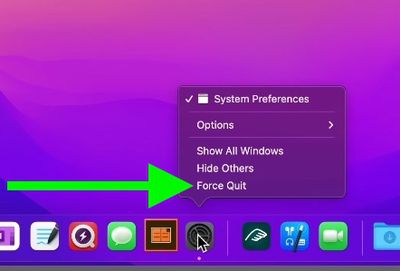
force quit

How to Force Quit an App - Method 2

There's a second option for quitting an unresponsive app, and it may be one of the more intuitive solutions.

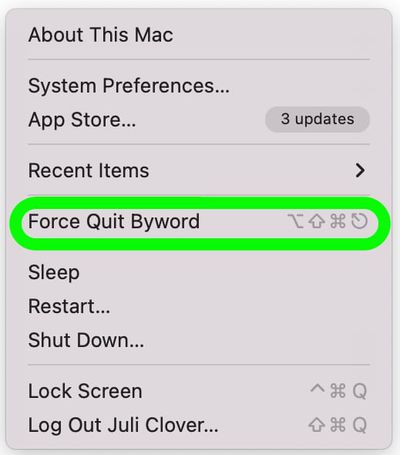
  1. Click on the Apple logo in the menu bar.
  2. Select the "Force Quit" option. force quit mac 1
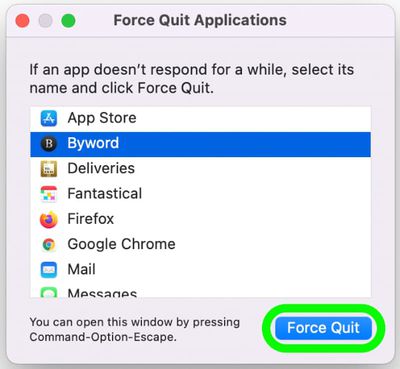
  3. Click the app that you want to quit. Unresponsive apps will have a "Not Responding" designation next to them.
  4. After selecting the offending app, click on Force Quit to shut it down. force quit mac 2
Alternatively, you can open the Force Quit applications interface by pressing Command + Option + Escape all at once.

How to Force Quit An App - Method 3

You can also force quit misbehaving Mac apps using Activity Monitor. You can find it in the /Applications/Utilities folder.
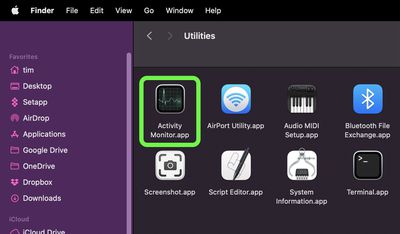
finder
The main window lists all the apps and processes currently running on your Mac. You'll notice the order jumps around a lot. That's because you're seeing the list being updated every five seconds to show changes in individual app usage statistics.

  1. Under the Process Name list, select the app or process you want to quit. To make finding the culprit easier, click Process Name in the column header to sort them alphabetically, or use the Search field in the top-right corner of the window to find the app or process. Note that an unresponsive process is labelled with (Not Responding).
    how to force quit apps using activity monitor 1

  2. Make sure the app or process is highlighted, then click the Quit (X) button in the top-left corner of the Activity Monitor window.

  3. Select Quit (this is the same as choosing File -> Quit within an app) or Force Quit, which quits the process immediately.

    how to force quit apps using activity monitor 2

Note that if the app or process has files open, force quitting it may cause you to lose data. Also, bear in mind that if the process you force quit is used by other apps or processes, those apps or processes may experience issues.

If your work in the crashed app hasn't been saved recently either manually or automatically, then there's not much you can do to retrieve your work other than check Time Machine.


Popular Stories

1password deal blue

1Password Security Breach: What Was Accessed and What Wasn't

Wednesday November 25, 2026 1:09 pm PST by
Popular password management app 1Password today said it experienced a security breach earlier this month. 1Password says some customer names and email addresses were accessed, but no customer vault contents were compromised. On November 19, 1Password saw indications that an employee's GitHub account had been breached and began investigating. The company says the breached GitHub account was...
apple design award 2025

Apple Announces 2025 Design Award Winners Ahead of WWDC 2025

Tuesday June 3, 2025 10:14 am PDT by
As we wait for WWDC to kick off next Monday, Apple today announced the winners of its annual Apple Design Awards, recognizing apps and games for their innovation, ingenuity, and technical achievement. The 2025 Apple Design Award winners are listed below, with one app and one game selected per category: Delight and Fun - CapWords (App) and Balatro (Game) Innovation - Play (App) and PBJ -...
ipad pro prime

Apple Has iPads Running macOS Internally, Says Gurman

Wednesday November 25, 2026 4:55 am PST by
Apple has iPads running macOS internally and has had them "for some time," according to Bloomberg's Mark Gurman, although he says no work is currently being done to bring the Mac operating system to iPads. Speaking on his latest Power On podcast, Gurman said there is "no work being done to consumerize macOS on the iPad." Rather, Apple will continue to bring Mac features and apps like Final Cut ...
Latest Stories
The 50+ Best Apple Black Friday Deals on AirPods, iPads, MacBooks, and More
2 hours ago
Apple's M6 and PROLED MacBook Pro Reach New Low Prices for Black Friday
2 hours ago
The MacRumors Show: iPhone Air 2 and iPhone 18 Are Coming
2 hours ago
Apple Store in Brisbane Reopening Next Month With New Design
2 hours ago
The 60+ Best Black Friday Accessory Deals on iPhone Chargers, TVs, Headphones, and More
3 hours ago
GTA VI Now (Barely) Running on Apple Silicon Macs
3 hours ago
The Best Black Friday Streaming Deals on Apple TV, Disney+, and More
4 hours ago
Apple TV's 'Carême' Wins International Emmy for Best Drama
5 hours ago
iPhone 18 Production Delay Leaves Apple Little Time Before Launch
5 hours ago
The Best Black Friday AirPods Deals
6 hours ago
The Best Black Friday Deals on Apple Home Products
6 hours ago
The Best Black Friday iPhone Deals
6 hours ago
The Best Black Friday iPad Deals
6 hours ago
The Best Black Friday Apple Watch Deals
6 hours ago
The Best Black Friday AirTag Deals
6 hours ago
The Best Black Friday Mac Deals
7 hours ago
iPhone Share of US Smartphone Market Hits 57% as Rivals Slip
7 hours ago
iPhone 20 Pro Rumored to Feature 3D-Printed Titanium Frame
9 hours ago
Apple's Official 2026 Black Friday Offer Starts Rolling Out
1 day ago
Halide Adds Fill Light Feature for iPhone Duo
1 day ago
MacBook Air Black Friday Deals Now Live With Massive $399 Savings
1 day ago
Amazon Discounts All MacBook Neo Models by $99 for Black Friday
1 day ago
Kodak Launches Unique AirTag Rival With E-Ink Display
1 day ago
Here's Why the Apple Store is Going Down
1 day ago
Apple Still Working on Giant Foldable iPad That Could Cost $5,000
1 day ago
iPhones Dominate China's Weak Singles' Day Smartphone Sales
1 day ago
iPhone 20 Pro Could Feature Ceramic in Limited-Edition Model
1 day ago
Apple Faces Korean Regulator Review Over iPhone 16 AI Advertising
1 day ago
Apple Watch Ultra 4 Hits New Best-Ever Price of $649.99 for Black Friday
1 day ago
New Apple Store Opening in India, Download the Special Wallpaper Now
2 days ago
Related Apple News: Ipad | Business | Iphone | Culture | Local News