Skip to Content

Stay Focused or Chill Out With This Hidden iPhone Feature

by

Do you sometimes struggle to maintain focus while you're working, or find it difficult to unwind and relax at the end of the day? Believe it or not, your iPhone could help with that. Keep reading to learn how.

airpods pro adaptive audio
If you are looking to minimize distractions when you focus on something, or just want to zone out after a hard day's work, it's well worth checking out the Background Sounds feature on your iPhone or iPad. Whether you are at home or in a public place, you can play calming sounds with just a few taps on your device to help you concentrate or rest.

In iOS and iPadOS, Apple's Background Sounds include balanced, bright, and dark noise, as well as natural sounds like ocean, rain, and stream. All of the sounds can be set to play in the background to mask unwanted environmental or external noise, and the sounds mix into or duck under other audio and system sounds, so you don't have to drown out what's important to you.

Enable Background Sounds on iPhone and iPad

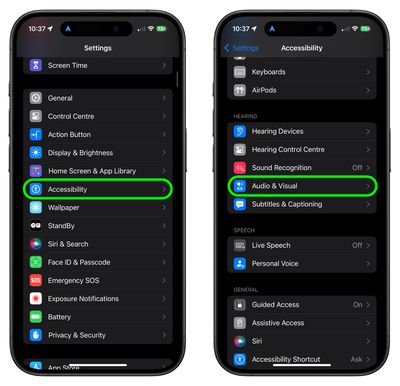
  1. Launch the Settings app on your iPhone or iPad.
  2. Tap Accessibility.
  3. Under "Hearing," tap Audio & Visual.
    accessibility

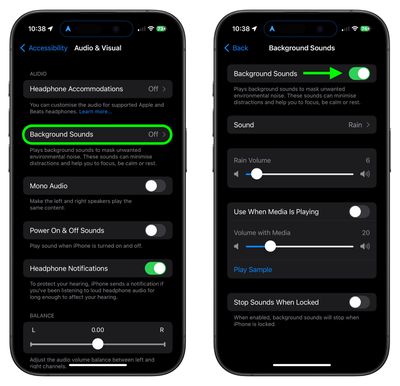
  4. Tap Background Sounds, then tap the switch to turn on Background Sounds on the next screen.
  5. Tap Sound to choose a sound effect. Choose from Balanced Noise, Bright Noise, Dark Noise, Ocean, Rain, and Stream.
    settings

Your device will need to download individual sound effects when you play them for the first time, so make sure you have an internet connection, but after that you can play the background sound wherever you are.

Note that the last screen in the steps optionally lets you set the volume of the sound, and includes an additional option to automatically stop the sound when you lock your device.

Accessibility Shortcut Access

Once you have downloaded the background sounds, you can quickly start and stop the audio via an Accessibility Shortcut. Here's how to set one up.

Set Up the Accessibility Shortcut

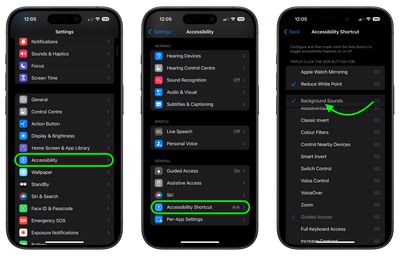
  1. Tap through to Settings ➝ Accessibility.
  2. Select Accessibility Shortcut near the bottom of the menu.
  3. Tap Background Sounds to select it. You can also drag the three lines icon at the far right to change the order in which it appears in the shortcuts menu.
settings

You can triple click your iPhone's Side button to access the Accessibility Shortcut at any time. Alternatively, you can add an Accessibility Shortcut button to your device's Control Center in the following way.

Access Accessibility Shortcut

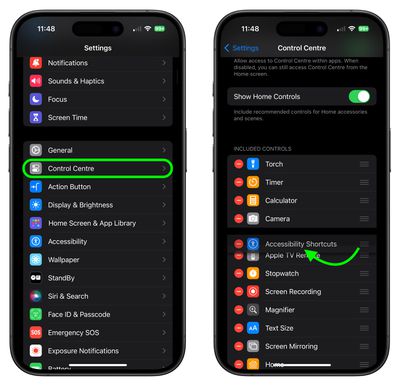
  1. Tap through to Settings ➝ Control Center.
  2. Find Accessibility Shortcuts under the "More Controls" list and then tap the entry to include it in Control Center.
settings
Once that's done, swipe from the top-right corner of your screen to bring up Control Center, then simply tap Accessibility Shortcut button and then tap Background Sounds to turn the audio on or off.
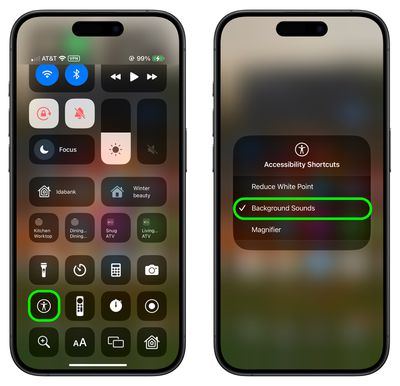
settings

Background sounds are also available on Macs running macOS Ventura or later. Check out our dedicated how-to article for all the details.


Top Rated Comments

diego.c Avatar
34 months ago
Alternatively, you can add the Hearing icon to Control Center and activate the sounds by long pressing it.
Plus, you get the decibel meter to see if you are using a sound volume past recommended levels.


Attachment Image
Score: 27 Votes (Like | Disagree)
klasma Avatar
34 months ago

Do you sometimes struggle to maintain focus while you're working, or find it difficult to unwind and relax at the end of the day?
Yes, and it’s because of the damn phone.


Believe it or not, your iPhone could help with that.
Nah.
Score: 19 Votes (Like | Disagree)
34 months ago
Literally no idea this existed.
Score: 11 Votes (Like | Disagree)
34 months ago
An underrated feature for sure. I bet many have downloaded separate apps providing exactly this.
Score: 10 Votes (Like | Disagree)
iLuddite Avatar
34 months ago
Or just add Hearing to Control Center—I have mine positioned so that it’s right under the volume slider. As an added bonus it also lets you know if your music volume goes over 80 decibels when using headphones.

Attachment Image

Attachment Image

Attachment Image
Score: 7 Votes (Like | Disagree)
Ntombi Avatar
34 months ago
I use background sounds when I’m getting certain medical procedures done. For example, I get infusions at a local cancer center, and, though we’re each in separate areas, the curtains can only do so much to drown out noises. Dark Noise combined with ANC on my AirPods are a godsend.
Score: 7 Votes (Like | Disagree)

Popular Stories

apple design award 2025

Apple Announces 2025 Design Award Winners Ahead of WWDC 2025

Tuesday June 3, 2025 10:14 am PDT by
As we wait for WWDC to kick off next Monday, Apple today announced the winners of its annual Apple Design Awards, recognizing apps and games for their innovation, ingenuity, and technical achievement. The 2025 Apple Design Award winners are listed below, with one app and one game selected per category: Delight and Fun - CapWords (App) and Balatro (Game) Innovation - Play (App) and PBJ -...
1password deal blue

1Password Security Breach: What Was Accessed and What Wasn't

Wednesday November 25, 2026 1:09 pm PST by
Popular password management app 1Password today said it experienced a security breach earlier this month. 1Password says some customer names and email addresses were accessed, but no customer vault contents were compromised. On November 19, 1Password saw indications that an employee's GitHub account had been breached and began investigating. The company says the breached GitHub account was...
apple store down feature

Here's Why the Apple Store is Going Down

Thursday November 26, 2026 5:49 am PST by
Apple's online store is going down for a few hours on a rolling country-by-country basis right now, but do not get your hopes up for new products. Apple takes its online store down for a few hours ahead of Black Friday every year to tease its annual gift card offer with the purchase of select products. The store is down in Australia, New Zealand, and Thailand, right now, and it will...
Latest Stories
The 50+ Best Apple Black Friday Deals Still Available on AirPods, iPads, and More
9 hours ago
HomePod Mini 2 in (RED) Seemingly Spotted Ahead of Announcement
6 hours ago
Apple's M6 and PROLED MacBook Pro Reach New Low Prices for Black Friday
16 hours ago
The MacRumors Show: iPhone Air 2 and iPhone 18 Are Coming
16 hours ago
Apple Store in Brisbane Reopening Next Month With New Design
17 hours ago
The 60+ Best Black Friday Accessory Deals on iPhone Chargers, TVs, Headphones, and More
18 hours ago
GTA VI Now (Barely) Running on Apple Silicon Macs
18 hours ago
The Best Black Friday Streaming Deals on Apple TV, Disney+, and More
19 hours ago
Apple TV's 'Carême' Wins International Emmy for Best Drama
19 hours ago
iPhone 18 Production Delay Leaves Apple Little Time Before Launch
20 hours ago
The Best Black Friday AirPods Deals Still Available
12 hours ago
The Best Black Friday Deals on Apple Home Products
20 hours ago
The Best Black Friday iPhone Deals Still Available
12 hours ago
The Best Black Friday iPad Deals Still Available
12 hours ago
The Best Black Friday Apple Watch Deals Still Available
12 hours ago
The Best Black Friday AirTag Deals Still Available
12 hours ago
The Best Black Friday Mac Deals Still Available
12 hours ago
iPhone Share of US Smartphone Market Hits 57% as Rivals Slip
22 hours ago
iPhone 20 Pro Rumored to Feature 3D-Printed Titanium Frame
23 hours ago
Apple's Official 2026 Black Friday Offer Starts Rolling Out
2 days ago
Halide Adds Fill Light Feature for iPhone Duo
2 days ago
MacBook Air Black Friday Deals Now Live With Massive $399 Savings
2 days ago
Amazon Discounts All MacBook Neo Models by $99 for Black Friday
2 days ago
Kodak Launches Unique AirTag Rival With E-Ink Display
2 days ago
Here's Why the Apple Store is Going Down
2 days ago
Apple Still Working on Giant Foldable iPad That Could Cost $5,000
2 days ago
iPhones Dominate China's Weak Singles' Day Smartphone Sales
2 days ago
iPhone 20 Pro Could Feature Ceramic in Limited-Edition Model
2 days ago
Apple Faces Korean Regulator Review Over iPhone 16 AI Advertising
2 days ago
Apple Watch Ultra 4 Hits New Best-Ever Price of $649.99 for Black Friday
2 days ago
Related Apple News: Health | Politics | South Africa | Iphone | Iphone