Skip to Content

How to Use the New Files App in iOS 11

by

The new Files app in iOS 11 replaces iCloud Drive, offers a lot more functionality than its predecessor, and provides perhaps the best argument yet for using an iPad as your go-to mobile computer.

In Files, you have access not only to the files stored on your device and in iCloud, but also to those stored in third-party services that support integration with the app. Files also exploits all of the new multitasking gestures in iOS 11, making its file organization capabilities even more powerful.

The Files Interface

The Files app interface is very straightforward, although it varies from device to device and based on orientation, with various combinations using multiple columns, single columns with pages, or pop-overs. For the purposes of this overview, we'll look at using an iPad in landscape orientation, the most common setup for those doing productivity work.

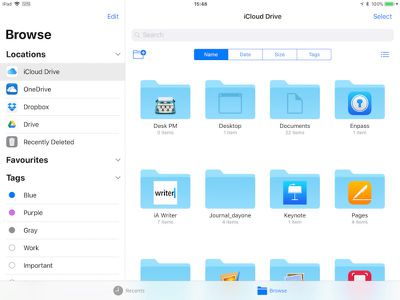
Down the left side of the screen, in the Browse column, are links to your file sources, Favorites, and Tags to view files that are tagged with a particular color.
IMG 323500CABE8A 1
Over in the main window you'll see the files and folders in the selected location, which you can view by name, date, size, or tags. There's a button on the right of these options that you can tap to switch between list and icon view, while the button on the left lets you create a new folder.

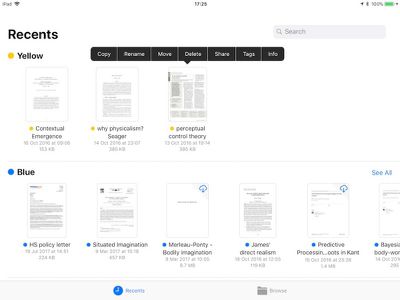
At the bottom of the screen are two buttons to switch between the default Browse view and a Recents view, which is useful for returning to the files you were last working with.
IMG 0084
In either view, you can open a file in the main window simply by tapping it, or you can perform a long press on a file or folder to access a range of options, including rename, share, tag, favorite, and more. However, the best thing about the Files app is that you can organize multiple files quickly and easily by utilizing the new drag-and-drop features exclusive to iOS 11.

Moving Files With Drag and Drop
IMG 31B1ECA18F22 1

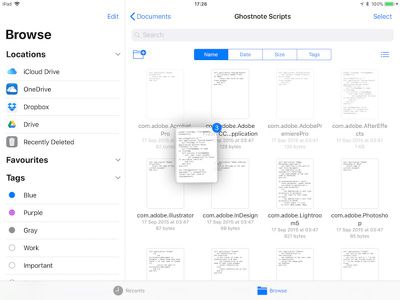
  1. Tap and hold a file you want to move, and it will expand slightly, ready to follow your finger around the screen.
  2. To move additional files, tap them while holding the original file and they will stack up underneath your finger.
  3. Keeping the same finger on the screen, use another finger – preferably one on your other hand – to browse the Files interface and locate a destination folder for the selected files.
  4. With the destination folder open, simply lift your finger from the screen to drop the files inside.

There's nothing to stop you from using iOS 11 drag-and-drop gestures to take files out of the Files app and move them into other iOS apps, as long as the app in question supports the file type. You might drag an image file into the Photos app to add it to your Photos Library, for example.

Organizing Your Files Manually

If you're uncomfortable using drag-and-drop gestures, you can organize your files using more traditional touch controls. Here's how.
IMG EDB71E7264A5 1

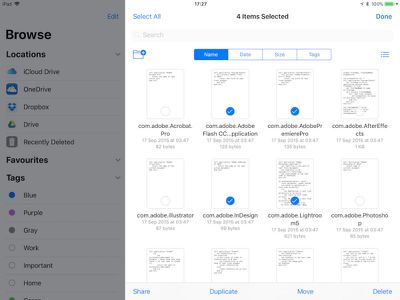
  1. Navigate to the folder containing the files you want to work with, and tap the Select button at the top-right of the screen.
  2. The Browse column will dim to put the focus on the currently selected folder. From here, you can tap one or more files to add a check mark against them indicating they've been selected for an action. A list of possible actions will appear along the bottom of the screen, including the option to duplicate or delete the file(s).
  3. Tap "Share" to bring up the iOS Share sheet, where you can send the file(s) to other people or apps, as well as access copy, print, and other actions.
  4. Tap the "Move" option and the Files app will present you with a directory tree, allowing you to navigate to the desired location for the file or files you've selected.

Tagging Documents

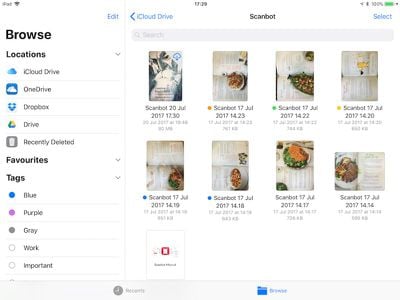
Using tags in the new Files app will help you locate particular files more easily, and they work much the same as tags do in macOS. As you'd expect, tapping a colored tag in the Browse column shows you all the files you've assigned that particular tag. To tag a file or folder, simply tap and hold it, and then drag it onto a tag in the sidebar.
IMG AE53E6EEC574 1

Linking Third-Party Storage Services

If you install a third-party storage app on your iOS device, it should automatically appear in the Files app under the Locations list. If the service doesn't appear, then it doesn't yet support Files integration. Services that do support Files app integration include Google Drive, Box, Dropbox, OneDrive, and Transmit, with more to come soon.


Tag: Files
Related Forum: iOS 11

Top Rated Comments

120 months ago
I guess slowly teaching them.
Hey sonny, we're old, not stupid. Many of us were working on computers before you were born! :-)
Score: 14 Votes (Like | Disagree)
tkermit Avatar
120 months ago
It still feels like Apple has managed to make file management a whole lot more confusing. Who really knows where things are stored anymore, how you get to them and what results in them (not) being copied/moved/opened in place. With traditional file management, at least there was a chance I could explain it to my mom or dad (whether they would listen is another matter), now even I have no idea what's going on. I suppose at least Apple has created a level playing field where nobody has an intuition about how things work anymore.
Score: 11 Votes (Like | Disagree)
nnoble Avatar
120 months ago
I wonder how elders are gonna figure out stuff with these complex features.
What d’you mean by elders - anyone over 18? I’m heading for 70 and I’ve no choice but to keep up. My elder brother is 80 next year and he can’t operate without accessing his stuff. I think motivation and maybe patience, rather than age, is the driver for coping with change.
Score: 10 Votes (Like | Disagree)
artfossil Avatar
120 months ago
I wonder how elders are gonna figure out stuff with these complex features.
It’s not that hard. Really. Sometimes we even, you know, read an article that points out the new features.

This elder loves the new Files app. Especially the iCloud files management—much better than the old iCloud Drive.
Score: 8 Votes (Like | Disagree)
Booch21 Avatar
120 months ago
Hey sonny, we're old, not stupid. Many of us were working on computers before you were born! :)
Back in our day, a file system was as good as the rubber band holding the stack of punch cards together!

I think any of us who worked with punch cards and large floppy disks can handle a phone file system.
Score: 4 Votes (Like | Disagree)
melchior Avatar
120 months ago
crazy that we've gone full circle on file management and ended up with a much more complex environment that if we had access to the underlying file system.
Score: 4 Votes (Like | Disagree)

Popular Stories

1password deal blue

1Password Security Breach: What Was Accessed and What Wasn't

Wednesday November 25, 2026 1:09 pm PST by
Popular password management app 1Password today said it experienced a security breach earlier this month. 1Password says some customer names and email addresses were accessed, but no customer vault contents were compromised. On November 19, 1Password saw indications that an employee's GitHub account had been breached and began investigating. The company says the breached GitHub account was...
apple design award 2025

Apple Announces 2025 Design Award Winners Ahead of WWDC 2025

Tuesday June 3, 2025 10:14 am PDT by
As we wait for WWDC to kick off next Monday, Apple today announced the winners of its annual Apple Design Awards, recognizing apps and games for their innovation, ingenuity, and technical achievement. The 2025 Apple Design Award winners are listed below, with one app and one game selected per category: Delight and Fun - CapWords (App) and Balatro (Game) Innovation - Play (App) and PBJ -...
ipad pro prime

Apple Has iPads Running macOS Internally, Says Gurman

Wednesday November 25, 2026 4:55 am PST by
Apple has iPads running macOS internally and has had them "for some time," according to Bloomberg's Mark Gurman, although he says no work is currently being done to bring the Mac operating system to iPads. Speaking on his latest Power On podcast, Gurman said there is "no work being done to consumerize macOS on the iPad." Rather, Apple will continue to bring Mac features and apps like Final Cut ...
Latest Stories
The 50+ Best Apple Black Friday Deals on AirPods, iPads, MacBooks, and More
4 hours ago
GTA VI Now (Barely) Running on Apple Silicon Macs
14 minutes ago
The Best Black Friday Streaming Deals on Apple TV, Disney+, and More
53 minutes ago
Apple TV's 'Carême' Wins International Emmy for Best Drama
1 hour ago
iPhone 18 Production Delay Leaves Apple Little Time Before Launch
2 hours ago
The Best Black Friday AirPods Deals
3 hours ago
The Best Black Friday Deals on Apple Home Products
3 hours ago
The Best Black Friday iPhone Deals
3 hours ago
The Best Black Friday iPad Deals
3 hours ago
The Best Black Friday Apple Watch Deals
3 hours ago
The Best Black Friday AirTag Deals
3 hours ago
The Best Black Friday Mac Deals
3 hours ago
iPhone Share of US Smartphone Market Hits 57% as Rivals Slip
4 hours ago
iPhone 20 Pro Rumored to Feature 3D-Printed Titanium Frame
6 hours ago
Apple's Official 2026 Black Friday Offer Starts Rolling Out
23 hours ago
Halide Adds Fill Light Feature for iPhone Duo
1 day ago
MacBook Air Black Friday Deals Now Live With Massive $399 Savings
1 day ago
Amazon Discounts All MacBook Neo Models by $99 for Black Friday
1 day ago
Kodak Launches Unique AirTag Rival With E-Ink Display
1 day ago
Here's Why the Apple Store is Going Down
1 day ago
Apple Still Working on Giant Foldable iPad That Could Cost $5,000
1 day ago
iPhones Dominate China's Weak Singles' Day Smartphone Sales
1 day ago
iPhone 20 Pro Could Feature Ceramic in Limited-Edition Model
1 day ago
Apple Faces Korean Regulator Review Over iPhone 16 AI Advertising
1 day ago
Apple Watch Ultra 4 Hits New Best-Ever Price of $649.99 for Black Friday
1 day ago
New Apple Store Opening in India, Download the Special Wallpaper Now
2 days ago
Redesigned OLED MacBook Air Could Launch in 2027 or 2028
2 days ago
AirPods Pro 3 for $149 is One of The Best Black Friday Deals This Year
2 days ago
1Password Security Breach: What Was Accessed and What Wasn't
2 days ago
WhatsApp Finally Adds Scheduled Messages
2 days ago
Related Apple News: Iphone | Culture | Ipad | Politics | Iphone






























