Skip to Content

How to Erase and Factory Reset Your Mac

by

This article explains how to erase and factory reset your Mac if you plan to give it away, sell it, or trade it in. Apple silicon Macs and Intel Macs with a T2 security chip (2017-2020 models) have an "Erase All Content and Settings" option available in macOS Monterey and later. If you have an older pre-2017 Mac, it's a more convoluted process – follow this link instead to erase and factory reset your machine.


Traditionally, wiping a Mac and returning it to factory settings involved manually signing out of a range of services, erasing your Mac's internal drive, then reinstalling macOS. These steps are quite involved when you consider how easy it is to wipe an iPhone or iPad (Settings -> General -> Transfer or Reset iPhone -> Erase All Content and Settings).

Fortunately, Apple includes the same option on newer Macs running macOS Monterey and later. Erase All Content and Settings in macOS offers a very simple and straightforward way to erase your Mac without needing to reinstall the operating system. Thanks to the way storage is encrypted on Macs with Apple silicon or the T2 chip, the option is able to instantly and securely "erase" all user date by destroying the encryption keys.

Not only does this effectively erase all user data and user-installed apps from your Mac without reinstalling macOS, it also signs out your Apple Account from a range of services, removes any Touch ID fingerprints, purchases, and all Apple Wallet items, and turns off Find My and Activation Lock, making it far easier to restore your Mac to like-new factory settings.

The following steps show you how it's done. Whether you simply want to start fresh with your Mac or are planning to sell or gift your computer to another person, after erasing it using this option, your Mac will display the Setup Assistant and be ready to be set up like new.

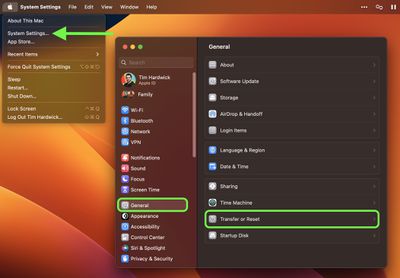
  1. Click the Apple () symbol in the menu bar and select System Settings (System Preferences... if you're not running macOS Ventura or later).
  2. If you're running macOS Ventura or later, select General in the sidebar, then choose Transfer or Reset -> Erase All Content and Settings.... Otherwise, select System Preferences -> Erase All Content and Settings from the menu bar.
    settings

  3. Enter your admin password in the Erase Assistant dialog prompt and click OK.
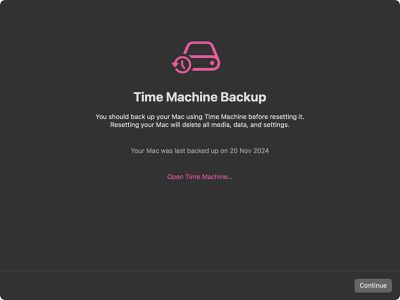
  4. If you haven't already backed up your important data, heed the onscreen Time Machine advice. Otherwise, click Continue.
    erase content settings mac

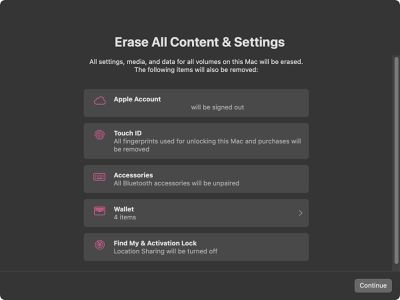
  5. Note all the settings, data, media, and other items that will be removed. Click Continue if you're sure.
    erase

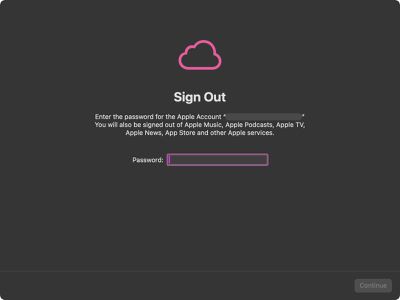
  6. Enter the password for your Apple Account to sign out, click Continue, then click Erase All Content & Settings in the prompt to confirm.
    erase

After following these steps, allow the erase process to complete. Your Mac may restart more than once during the process. Once finished, you'll see the "hello" message on your Mac's screen, indicating that your Mac has been restored to factory settings and Setup Assistant is ready to start anew.


Top Rated Comments

heystu Avatar
26 months ago
Sorry I’m just too paranoid to trust it, I have to clean format the drive, overwrite it with zeros 50 times, smash it to pieces with a sledgehammer, encase it in magma and bury it 200 feet underground. I’m still confused though why I never seem to get a decent trade in price.
Score: 16 Votes (Like | Disagree)
26 months ago

There are some restore utilities that can walk a hard drive and find all kinds of documents and files and photos, it’s good to at least do one secure pass. :rolleyes:
I think you're a bit clueless how this feature works. It tosses out the keys in the secure enclave and generates new ones. It makes no attempt to erase your data, because it's no longer readable without the original keys.
Score: 6 Votes (Like | Disagree)
WarmWinterHat Avatar
26 months ago

If you are going to sell the Mac, be careful. Buyer may revive the erased contents. Use secureErase utility to erase permanently.
I don't think that is really the case anymore with Filevault. Once the encryption keys are wiped, it's unrecoverable.
Score: 6 Votes (Like | Disagree)
Weaselboy Avatar
26 months ago

Question......I assume if we want to just revert to factory settings for our own use, just to go back to a clean state or to regain performance from the degradation that comes with general use, these steps would apply also. Correct?
Correct... this gives you the same end result as the old wipe/erase and reinstall OS routine.
Score: 5 Votes (Like | Disagree)
Fishrrman Avatar
26 months ago
I used this procecure recently on my 2021 MacBook Pro (m1pro), and it went quickly -- seems like less than 5 minutes (might have been only a minute or two, I should've had a stopwatch going).

Then... restored from a CarbonCopyCloner backup. That, too, went quickly (about 10 minutes), but I don't keep lots "of stuff" on it, and the backup was on a USB3.1 gen2 SSD.

A VERY nice improvement by Apple over "the old way of doing things"...
Score: 4 Votes (Like | Disagree)
26 months ago

A couple years ago, during a major purge of old tech I had in the basement, I had about twenty spinning-platter hard drives to get rid of. Didn't want to bother wiping them so I took them outside and used my oxy-acetylate cutting torch to blow holes though every one of them.

Good luck!
Not enough. Any competent law enforcement or "hacker" group from a movie or TV show will be able to reconstruct pictures of your dog from them.
Score: 4 Votes (Like | Disagree)

Popular Stories

apple design award 2025

Apple Announces 2025 Design Award Winners Ahead of WWDC 2025

Tuesday June 3, 2025 10:14 am PDT by
As we wait for WWDC to kick off next Monday, Apple today announced the winners of its annual Apple Design Awards, recognizing apps and games for their innovation, ingenuity, and technical achievement. The 2025 Apple Design Award winners are listed below, with one app and one game selected per category: Delight and Fun - CapWords (App) and Balatro (Game) Innovation - Play (App) and PBJ -...
Apple 2026 Black Friday Event Hero

Apple's Official 2026 Black Friday Offer Starts Rolling Out

Thursday November 26, 2026 8:37 am PST by
Apple's annual four-day Black Friday through Cyber Monday shopping event is now live in Australia, New Zealand, and Thailand, and it will continue to roll out across Europe, the U.S., and Canada as the calendar turns to Friday, November 27 around the world. In the U.S., Apple's terms and conditions say the promotion begins on November 27 at 12 a.m. Pacific Time and ends on November 30 at...
1password deal blue

1Password Security Breach: What Was Accessed and What Wasn't

Wednesday November 25, 2026 1:09 pm PST by
Popular password management app 1Password today said it experienced a security breach earlier this month. 1Password says some customer names and email addresses were accessed, but no customer vault contents were compromised. On November 19, 1Password saw indications that an employee's GitHub account had been breached and began investigating. The company says the breached GitHub account was...
Latest Stories
The 50+ Best Apple Black Friday Deals Still Available on AirPods, iPads, and More
1 hour ago
HomePod Mini 2 in (RED) Seemingly Spotted Ahead of Announcement
11 hours ago
Apple's M6 and PROLED MacBook Pro Reach New Low Prices for Black Friday
22 hours ago
The MacRumors Show: iPhone Air 2 and iPhone 18 Are Coming
22 hours ago
Apple Store in Brisbane Reopening Next Month With New Design
22 hours ago
The 60+ Best Black Friday Accessory Deals on iPhone Chargers, TVs, Headphones, and More
23 hours ago
GTA VI Now (Barely) Running on Apple Silicon Macs
23 hours ago
The Best Black Friday Streaming Deals on Apple TV, Disney+, and More
1 day ago
Apple TV's 'Carême' Wins International Emmy for Best Drama
1 day ago
iPhone 18 Production Delay Leaves Apple Little Time Before Launch
1 day ago
The Best Black Friday AirPods Deals Still Available
17 hours ago
The Best Black Friday Deals on Apple Home Products
1 day ago
The Best Black Friday iPhone Deals Still Available
17 hours ago
The Best Black Friday iPad Deals Still Available
17 hours ago
The Best Black Friday Apple Watch Deals Still Available
17 hours ago
The Best Black Friday AirTag Deals Still Available
17 hours ago
The Best Black Friday Mac Deals Still Available
17 hours ago
iPhone Share of US Smartphone Market Hits 57% as Rivals Slip
1 day ago
iPhone 20 Pro Rumored to Feature 3D-Printed Titanium Frame
1 day ago
Apple's Official 2026 Black Friday Offer Starts Rolling Out
2 days ago
Halide Adds Fill Light Feature for iPhone Duo
2 days ago
MacBook Air Black Friday Deals Now Live With Massive $399 Savings
2 days ago
Amazon Discounts All MacBook Neo Models by $99 for Black Friday
2 days ago
Kodak Launches Unique AirTag Rival With E-Ink Display
2 days ago
Here's Why the Apple Store is Going Down
2 days ago
Apple Still Working on Giant Foldable iPad That Could Cost $5,000
2 days ago
iPhones Dominate China's Weak Singles' Day Smartphone Sales
2 days ago
iPhone 20 Pro Could Feature Ceramic in Limited-Edition Model
2 days ago
Apple Faces Korean Regulator Review Over iPhone 16 AI Advertising
2 days ago
Apple Watch Ultra 4 Hits New Best-Ever Price of $649.99 for Black Friday
2 days ago
Related Apple News: News | Opinion | Health | Ipad | Iphone