Skip to Content

How to Encrypt a USB Flash Drive in macOS Mojave

by

finder padlockIn macOS Mojave, you can choose to encrypt and decrypt disks on the fly right from the desktop. Using this convenient Finder option, we're going to show you how to encrypt a USB flash drive (or "thumb drive"), which is useful if you're traveling light and want to take sensitive data with you for use on another Mac.

Finder uses XTS-AES encryption, the same encryption that FileVault 2 uses to prevent access to data on a Mac's startup disk without a password. Note that the following method is only compatible with Macs – you won't be able to access data on the encrypted drive using a Windows machine.

If this is a requirement, you'll need to use a third-party encryption solution like VeraCrypt. With that in mind, here's how to securely encrypt your USB flash drive.
how to encrypt a usb stick in macos mojave 01
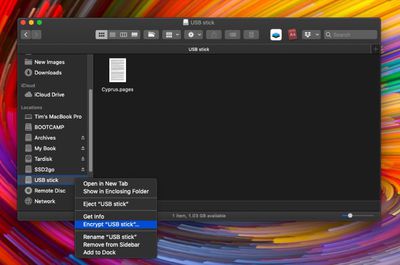
Attach the USB flash drive to your Mac and locate its disk icon on your desktop, in a Finder window, or in the Finder sidebar, then right-click (or Ctrl-click) it and select Encrypt "[USB stick name]"... from the contextual menu.

(Note that if you don't see the Encrypt option in the dropdown menu, your USB flash drive hasn't been formatted with a GUID partition map. To resolve this, you'll need to erase and encrypt the USB drive in Disk Utility – before that though, copy any data on the drive to another location for temporary safekeeping.)
how to encrypt a usb stick in macos mojave 02
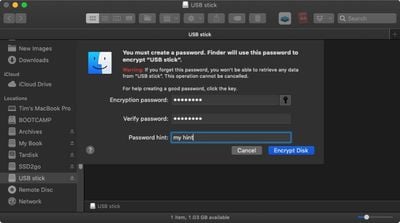
When you select Encrypt, Finder will prompt you to create a password, which you'll need to enter the next time you attach the USB flash drive to a Mac. (Don't forget this, otherwise you'll lose access to any data stored on the USB drive!) Once you've chosen a password, verify it, add a meaningful hint if desired, and click Encrypt Disk.

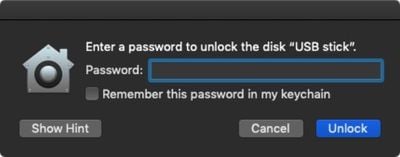
The encryption process depends on how much data you have on the USB flash drive, but you'll know it's completed when its disk icon disappears and re-mounts. You'll now be able to access the contents of the USB flash drive as usual, but if you physically detach it and re-attach it to your Mac you'll be prompted to enter the password.
how to encrypt a usb stick in macos mojave 03
Note that the prompt includes an option for macOS to remember this password in my keychain. Check the box, and whenever you attach the USB stick to your Mac again you won't be prompted to enter the password and you'll have automatic access to it, just like any other drive.
how to encrypt a usb stick in macos mojave 03b
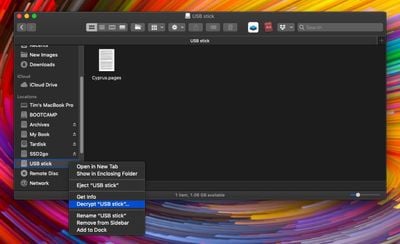
If you ever want to decrypt the USB flash drive in future, right-click (or Ctrl-click) its disk icon, select Decrypt "[USB stick name]" from the contextual menu, and enter the password to turn off encryption protection.

How to Encrypt a USB Flash Drive in Disk Utility

Before proceeding, make sure you've copied any data on the USB flash drive to a safe location, like your Mac's internal disk.

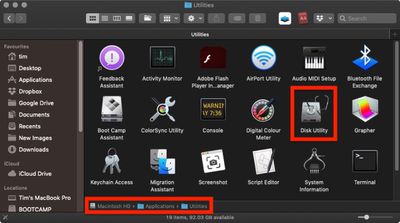
  1. Launch Disk Utility, located on your Mac in Applications/Utilities.
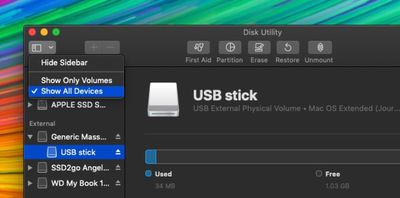
    how to encrypt a usb stick in macos mojave 04

  2. In the Disk Utility toolbar, click the View button and select Show All Devices if it isn't already ticked.
    how to encrypt a usb stick in macos mojave 05

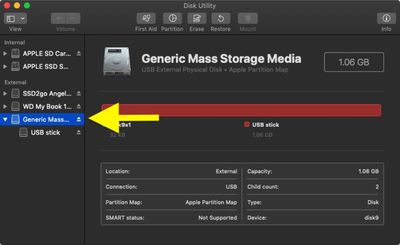
  3. Select your USB flash drive in the sidebar by clicking its top-level device name (i.e. not the volume name that's listed beneath it).
    how to encrypt a usb stick in macos mojave 06

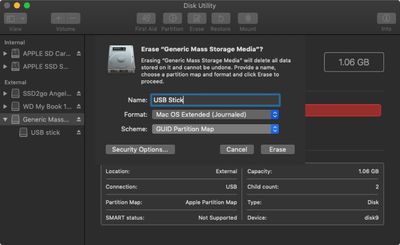
  4. Click the Erase button in the toolbar.
  5. Give the USB flash drive a name.
  6. Next, click the Scheme dropdown menu and select GUID Partition Map. (It's important to do this first before the next step, otherwise you won't see the encryption option in the Format dropdown.)
    how to encrypt a usb stick in macos mojave 07

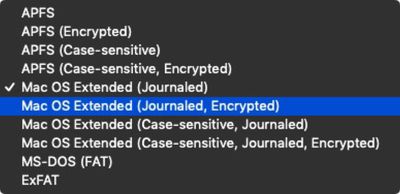
  7. Now click the Format dropdown menu and select Mac OS Extended (Journaled, Encrypted).
    how to encrypt a usb stick in macos mojave 08

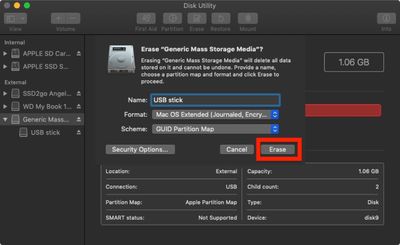
  8. Click Erase.
    how to encrypt a usb stick in macos mojave 07

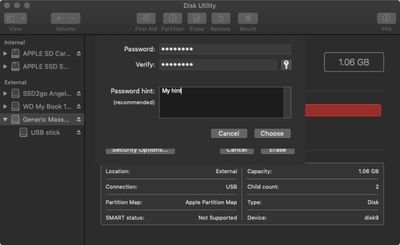
  9. Enter your new password, enter it once more to verify, include a password hint if desired, then click Choose.
    how to encrypt a usb stick in macos mojave 09

  10. Click Erase once again, and wait for your disk to be formatted and encrypted.
    how to encrypt a usb stick in macos mojave 10

Once the process is complete, copy across your sensitive data to the blank USB flash drive, where it will be automatically encrypted and secured with a password.


Top Rated Comments

104 months ago
Using Dark Mode for screenshots isn‘t a good choice for tutorials.

I‘m sorry!
Score: 13 Votes (Like | Disagree)
104 months ago
Disagree. It’s an official feature in Mojave and one can still follow the exact same options despite it being in dark mode.
It’s not that the process is different. It’s that black text on a white background is easier to read. Heck, some of the text is grey on black; how in the world could that ever be seen as anything close to desirable for tutorials for the masses? With my vision I’m having difficulty reading it. Let what’s stood the test of time be displayed for the vast majority, and run dark mode on your own machine on your own time.
Score: 6 Votes (Like | Disagree)
104 months ago
Using Dark Mode for screenshots isn‘t a good choice for tutorials.

I‘m sorry!
Disagree. It’s an official feature in Mojave and one can still follow the exact same options despite it being in dark mode.
Score: 5 Votes (Like | Disagree)
nate13 Avatar
104 months ago
Using Dark Mode for screenshots isn‘t a good choice for tutorials.

I‘m sorry!
Exactly why I came to comment. In a dark environment, with dark surroundings, I believe dark mode is awesome. In a bright context (mac rumors home page for example), its just terrible. MR editors take note!!
Score: 3 Votes (Like | Disagree)
Weaselboy Avatar
100 months ago
Thank you,

There is no "scheme dropdown" option as it is possible to see on the image I uploaded above. :(


Make sure you have enables show all devices, then select the drive itself like in my photo and not one of the volumes below it.

Attachment Image
Score: 2 Votes (Like | Disagree)
Weaselboy Avatar
104 months ago
Is there a way to force this to back up to iCloud?
Thanks
I played around with it, and it looks like you can copy the entry from the login Keychain and paste it into the iCloud Keychain. But instead of keeping the drive name, it changes it to the UUID # of the drive.


Here is the login Keychain entry.


I right clicked and copied it from login then right clicked and pasted in iCloud Keychain and it made the new entry you see here in the iCloud Keychain. Presumably this would sync along with everything else in the iCloud Keychain.

I have not tested if you delete this entry from login Keychain if this iCloud entry will unlock the drive.

Attachment Image

Attachment Image
Score: 2 Votes (Like | Disagree)

Popular Stories

apple design award 2025

Apple Announces 2025 Design Award Winners Ahead of WWDC 2025

Tuesday June 3, 2025 10:14 am PDT by
As we wait for WWDC to kick off next Monday, Apple today announced the winners of its annual Apple Design Awards, recognizing apps and games for their innovation, ingenuity, and technical achievement. The 2025 Apple Design Award winners are listed below, with one app and one game selected per category: Delight and Fun - CapWords (App) and Balatro (Game) Innovation - Play (App) and PBJ -...
1password deal blue

1Password Security Breach: What Was Accessed and What Wasn't

Wednesday November 25, 2026 1:09 pm PST by
Popular password management app 1Password today said it experienced a security breach earlier this month. 1Password says some customer names and email addresses were accessed, but no customer vault contents were compromised. On November 19, 1Password saw indications that an employee's GitHub account had been breached and began investigating. The company says the breached GitHub account was...
apple store down feature

Here's Why the Apple Store is Going Down

Thursday November 26, 2026 5:49 am PST by
Apple's online store is going down for a few hours on a rolling country-by-country basis right now, but do not get your hopes up for new products. Apple takes its online store down for a few hours ahead of Black Friday every year to tease its annual gift card offer with the purchase of select products. The store is down in Australia, New Zealand, and Thailand, right now, and it will...
Latest Stories
The 50+ Best Apple Black Friday Deals Still Available on AirPods, iPads, and More
9 hours ago
HomePod Mini 2 in (RED) Seemingly Spotted Ahead of Announcement
6 hours ago
Apple's M6 and PROLED MacBook Pro Reach New Low Prices for Black Friday
16 hours ago
The MacRumors Show: iPhone Air 2 and iPhone 18 Are Coming
16 hours ago
Apple Store in Brisbane Reopening Next Month With New Design
17 hours ago
The 60+ Best Black Friday Accessory Deals on iPhone Chargers, TVs, Headphones, and More
17 hours ago
GTA VI Now (Barely) Running on Apple Silicon Macs
18 hours ago
The Best Black Friday Streaming Deals on Apple TV, Disney+, and More
18 hours ago
Apple TV's 'Carême' Wins International Emmy for Best Drama
19 hours ago
iPhone 18 Production Delay Leaves Apple Little Time Before Launch
20 hours ago
The Best Black Friday AirPods Deals Still Available
12 hours ago
The Best Black Friday Deals on Apple Home Products
20 hours ago
The Best Black Friday iPhone Deals Still Available
12 hours ago
The Best Black Friday iPad Deals Still Available
12 hours ago
The Best Black Friday Apple Watch Deals Still Available
12 hours ago
The Best Black Friday AirTag Deals Still Available
12 hours ago
The Best Black Friday Mac Deals Still Available
12 hours ago
iPhone Share of US Smartphone Market Hits 57% as Rivals Slip
22 hours ago
iPhone 20 Pro Rumored to Feature 3D-Printed Titanium Frame
23 hours ago
Apple's Official 2026 Black Friday Offer Starts Rolling Out
2 days ago
Halide Adds Fill Light Feature for iPhone Duo
2 days ago
MacBook Air Black Friday Deals Now Live With Massive $399 Savings
2 days ago
Amazon Discounts All MacBook Neo Models by $99 for Black Friday
2 days ago
Kodak Launches Unique AirTag Rival With E-Ink Display
2 days ago
Here's Why the Apple Store is Going Down
2 days ago
Apple Still Working on Giant Foldable iPad That Could Cost $5,000
2 days ago
iPhones Dominate China's Weak Singles' Day Smartphone Sales
2 days ago
iPhone 20 Pro Could Feature Ceramic in Limited-Edition Model
2 days ago
Apple Faces Korean Regulator Review Over iPhone 16 AI Advertising
2 days ago
Apple Watch Ultra 4 Hits New Best-Ever Price of $649.99 for Black Friday
2 days ago
Related Apple News: Buyers Guide | Education | Mac | Lifestyle | Ipad