Skip to Content

How to Enable Low Power Mode on Apple Watch

by

In watchOS 9, Apple has added a new Low Power Mode for Apple Watch Series 4 and later that is designed to extend the battery life of your device beyond the usual "up to 18 hours" of life on a single charge in normal use that Apple advertises. Keep reading to learn how the function works and how to enable it.
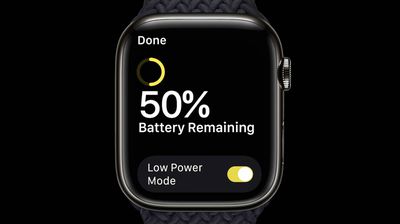
Apple Watch Low Power Mode watchOS 9
For some years now, many Apple Watch fans have been clamoring for a new model that offers significantly more battery life than "up to 18 hours," which is the life that Apple has advertised ever since the first Apple Watch model was launched.

In 2022, Apple finally answered those calls with Apple Watch Ultra, which offers up to 36 hours of battery life on a single charge in normal use.

Truthfully though, the Apple Watch Ultra is a fairly niche device with many more features (and a significantly higher price tag) than the average user is going to need, but the good news is that with watchOS 9, Apple also introduced a new Low Power Mode for Apple Watch Series 4 and later models that can eke out more life from these more commonly used devices.

The new Low Power Mode is separate from the Apple Watch's existing Power Reserve mode that only displays the clock when enabled. It's also important to know that the new Low Power Mode works by disabling or affecting a number of specific features on Apple Watch that we've detailed below. Make sure you carefully read the list so that you know what is not functional when the mode is turned on. The steps for enabling Low Power Mode in general use and for workouts can be found below.

Features Turned Off by Low Power Mode

  • Always On display
  • Heart rate notifications for irregular rhythm, high heart rate, and low heart rate
  • Background heart rate measurements
  • Background blood oxygen measurements
  • Start workout reminder

Features Turned Off When iPhone Isn't Nearby

  • Wi-Fi and cellular connections
  • Incoming phone calls and notifications

Features Affected by Low Power Mode

  • Making a phone call can take longer
  • Background app refresh happens less frequently
  • Complications update less frequently
  • Siri can take longer to process a request
  • Some animations and scrolling might appear less smooth

Note that Fall Detection continues to work in Low Power Mode.

How to Enable Low Power Mode on Apple Watch

When your Apple Watch's battery percentage drops to 10%, a Low Power Mode alert will ask if you want to turn on the feature. Note that Low Power Mode turns off automatically when an Apple Watch is charged to 80%, unless users manually turn it on for a set number of days. Bear in mind that you can have Low Power Mode turn on automatically when you begin a workout, with metrics such as heart rate and pace still measured.

Here's how to turn the feature on manually on an Apple Watch Series 4 or later running watchOS 9 or later.

  1. Swipe up on the watch face of your Apple Watch to bring up Control Center.
  2. Tap the battery percentage button.
    watch

  3. Tap the switch next to Low Power Mode.
  4. After reading the on-screen prompt, scroll to the bottom and select from the following: Turn On, Turn On For..., and Dismiss.
    watch

  5. If you tapped Turn On For..., select On for 1 Day, On for 2 Days, or On for 3 Days on the second screen.
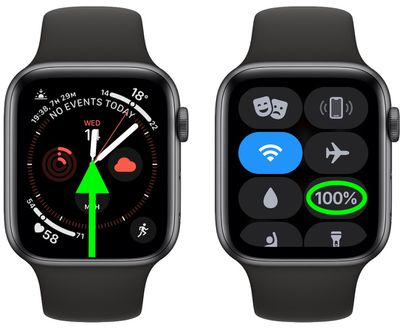
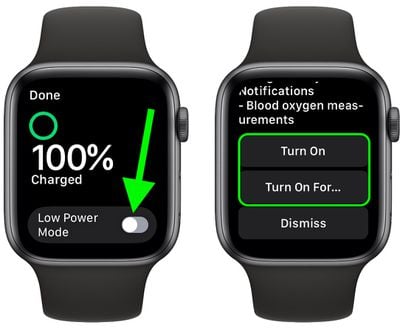
When your Apple Watch is in Low Power Mode, a yellow circle icon appears at the top of the screen. Also, the battery percentage button in Control Center, the charging animation, and the time in Nightstand mode all turn yellow.

How to Enable Low Power Mode for Workouts

You can also set your Apple Watch to automatically enter Low Power Mode whenever you start a workout, which is particularly useful if you plan to work out for a long time without it draining battery. Note that when you use the Workout app in Low Power Mode, metrics such as heart rate and pace are still measured.

  1. Launch the Settings app on your Apple Watch.
  2. Scroll down, then tap Workout.
  3. Tap the switch next to Low Power Mode to enable the automation.
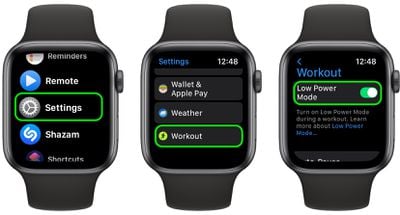
settings

Note that when Low Power Mode is enabled without your iPhone nearby, and you open an app that requires a data connection, Wi-Fi or cellular connectivity will resume so that the app can function properly, which can cause "significant battery consumption," according to Apple. Also, bear in mind that missed phone calls and notifications are retrieved periodically whenever your Apple Watch is in Low Power Mode.


Related Forum: Apple Watch

Popular Stories

apple watch series 3 design

Apple Offers Steps to Fix Daylight Saving Time Bug on Apple Watch

Sunday November 1, 2026 3:34 am PST by
Apple has published a support document describing what to do if your Apple Watch continues to show time that's off by one hour after daylight savings time changes. "This incorrect time appears only on the Always On display when your wrist is down," says Apple. "When you activate the display by tapping it or raising your wrist, the time changes to the correct hour." To fix the issue, Apple says ...
muse apple watch app

Meta's Muse AI Agent Comes to Apple Watch

Monday November 9, 2026 1:55 pm PST by
Meta today updated the Muse app for iOS to add Apple Watch support, which means Muse users can access the proactive AI agent from the watch. The app adds the Muse character to the watch with an option to text it, dictate text to it, or call it. There's also a Muse complication for quick access. Muse is Meta's personal AI agent that can complete tasks for users. It is available as a...
siri recap live rewind

watchOS 27.3 Brings Live Rewind and Siri Recap to Apple Watch

Tuesday November 3, 2026 10:35 am PST by
With the first beta of watchOS 27.3, Apple is introducing new Audio Intelligence features it previewed for the Apple Watch Series 12 and Ultra 4 earlier this year. Powered by the S11 chip, Audio Intelligence includes Live Rewind, Siri Recap, Sound Recognition, and Shazam Music Recognition. Sound Recognition and Shazam are already on the watch, but Live Rewind and Siri Recap are now available ...
Latest Stories
The 50+ Best Apple Black Friday Deals Still Available on AirPods, iPads, and More
2 hours ago
Here Are the Best Apple Black Friday Leftover Deals You Can Get Today
24 minutes ago
HomePod Mini 2 in (RED) Seemingly Spotted Ahead of Announcement
12 hours ago
Apple's M6 and PROLED MacBook Pro Reach New Low Prices for Black Friday
22 hours ago
The MacRumors Show: iPhone Air 2 and iPhone 18 Are Coming
22 hours ago
Apple Store in Brisbane Reopening Next Month With New Design
23 hours ago
The 60+ Best Black Friday Accessory Deals on iPhone Chargers, TVs, Headphones, and More
17 minutes ago
GTA VI Now (Barely) Running on Apple Silicon Macs
1 day ago
The Best Black Friday Streaming Deals on Apple TV, Disney+, and More
1 day ago
Apple TV's 'Carême' Wins International Emmy for Best Drama
1 day ago
iPhone 18 Production Delay Leaves Apple Little Time Before Launch
1 day ago
The Best Black Friday AirPods Deals Still Available
18 hours ago
The Best Black Friday Deals on Apple Home Products
1 day ago
The Best Black Friday iPhone Deals Still Available
18 hours ago
The Best Black Friday iPad Deals Still Available
18 hours ago
The Best Black Friday Apple Watch Deals Still Available
18 hours ago
The Best Black Friday AirTag Deals Still Available
18 hours ago
The Best Black Friday Mac Deals Still Available
18 hours ago
iPhone Share of US Smartphone Market Hits 57% as Rivals Slip
1 day ago
iPhone 20 Pro Rumored to Feature 3D-Printed Titanium Frame
1 day ago
Apple's Official 2026 Black Friday Offer Starts Rolling Out
2 days ago
Halide Adds Fill Light Feature for iPhone Duo
2 days ago
MacBook Air Black Friday Deals Now Live With Massive $399 Savings
2 days ago
Amazon Discounts All MacBook Neo Models by $99 for Black Friday
2 days ago
Kodak Launches Unique AirTag Rival With E-Ink Display
2 days ago
Here's Why the Apple Store is Going Down
2 days ago
Apple Still Working on Giant Foldable iPad That Could Cost $5,000
2 days ago
iPhones Dominate China's Weak Singles' Day Smartphone Sales
2 days ago
iPhone 20 Pro Could Feature Ceramic in Limited-Edition Model
2 days ago
Apple Faces Korean Regulator Review Over iPhone 16 AI Advertising
2 days ago
Related Apple News: News | Iphone | Business | Lifestyle | Mac






























