Skip to Content

Enable Lockdown Mode on iPhone, iPad, and Mac

by

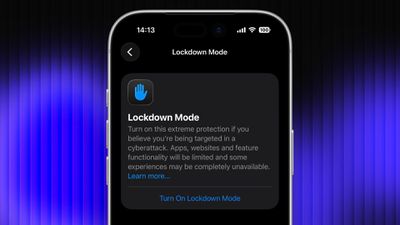
Lockdown Mode is an optional security feature designed by Apple to provide maximum protection against highly sophisticated digital threats. When enabled on your Apple device, it greatly reduces exposure to complex attacks by restricting certain features and network connections. Keep reading to learn how to use it across iPhone, iPad, and Mac.
lockdown
For most users of Apple devices, the standard iOS, iPadOS, and macOS security protections should be sufficient, whereas Lockdown Mode is aimed at users who could be targets of cyberattacks, such as journalists, activists, and government employees. That said, any user can enable it on their device for what Apple calls an "extreme" level of security.

Lockdown Mode Protections

When enabled, Lockdown Mode strictly limits or disables the functionality of features, apps, and websites. Lockdown Mode protections include the following:

  • In the Messages app, most message attachment types other than images are blocked, and some features like link previews are unavailable.
  • Incoming FaceTime calls from people you have not previously called are blocked. Incoming invitations for other Apple services from people you have not previously invited are also blocked.
  • Some complex web technologies and browsing features, including just-in-time (JIT) JavaScript compilation, are disabled unless the user excludes a trusted site from Lockdown Mode. This protection applies to Safari and all other web browsers using WebKit across the ‌iPhone‌, ‌iPad‌, and Mac.
  • Shared albums will be removed from the Photos app, and new shared album invitations will be blocked.
  • When a device is locked, wired connections with other devices/accessories are blocked.
  • Configuration profiles cannot be installed, and the device cannot enroll into mobile device management (MDM), while Lockdown Mode is turned on.
  • Certain network protocols and services are restricted.

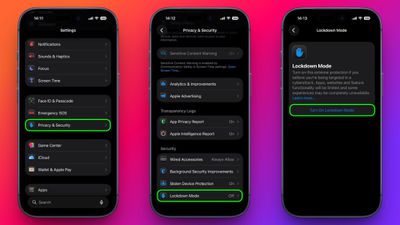
How to Enable Lockdown Mode on iPhone and iPad

Lockdown Mode is turned off by default on ‌iPhone‌ and ‌iPad‌, but you can enable it by following these steps.

  1. Open the Settings app.
  2. Scroll down and tap Privacy & Security.
  3. Scroll to the bottom and tap Lockdown Mode.
  4. Tap Turn On Lockdown Mode.
  5. Review the information about what features are restricted, then tap Turn On & Restart.
settings

After the restart, Lockdown Mode will be active. You can confirm this by returning to Settings ➝ Privacy & Security ➝ Lockdown Mode, where a toggle will show that it's on.

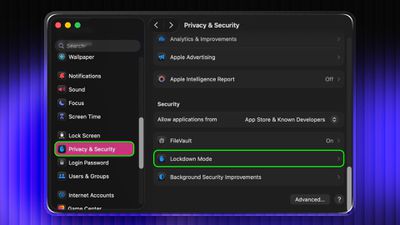
How to Enable Lockdown Mode on Mac

  1. Open System Settings.
  2. Click Privacy & Security in the sidebar.
  3. Under the "Security" section at the bottom, click Lockdown Mode.
  4. Click Turn On Lockdown Mode.
  5. Review the protections and click Turn On & Restart.
settings

Your Mac will restart and Lockdown Mode will be enabled when it boots up.

How to Turn Off Lockdown Mode

Whether you're on iPhone, iPad, or Mac, these are the steps to follow:

  1. In Settings on iPhone/iPad (or System Settings on Mac) go to Privacy & Security ➝ Lockdown Mode.
  2. Tap or click the Lockdown Mode toggle to turn it off.
  3. Confirm that you want to turn it off. Your device will restart to leave Lockdown Mode.

Configuring Allowed Websites and App Exceptions

While Lockdown Mode is active, some websites and certain app features may be blocked for security. Apple allows you to add exceptions in some areas.

For example, in Safari, if a site is blocked by Lockdown Mode, you may be offered an option to allow website exceptions. This lets specific sites load normally while Lockdown Mode remains enabled.

Some third-party apps may also appear in a list in Settings ➝ Privacy & Security ➝ Lockdown Mode ➝ Configure Web Browsing, and you can turn off Lockdown Mode for those apps individually. This lets an app continue to function normally if it was being restricted by Lockdown Mode's web content limitations.


Top Rated Comments

11 months ago

Its not a new feature, just a lame feature. If u dont want ppl stealing info then maybe dont put it in your phone. Common sense goes a long way. Too bad apple lacks this.
Better yet: when you get your iPhone, just leave it in the factory default state and don’t sign into anything on it or add any contacts or any other data whatsoever. Don’t text anyone and don’t make any calls. Common sense.
Score: 13 Votes (Like | Disagree)
11 months ago

Its not a new feature, just a lame feature. If u dont want ppl stealing info then maybe dont put it in your phone. Common sense goes a long way. Too bad apple lacks this.
Is that common sense? Leave your doors and windows open when you leave your house? If you don't want ppl stealing your stuff, maybe don't put any stuff in your house! Is that common sense, too?
Score: 7 Votes (Like | Disagree)
Genelec8341 Avatar
11 months ago
One of those features you hope you never have to use, but glad it's there if you do.
Maybe the only one.
Score: 7 Votes (Like | Disagree)
newton4000 Avatar
11 months ago

I mean, I am kind of a big deal so this is super-duper helpful
Is that you Donnie?
Score: 4 Votes (Like | Disagree)
11 months ago

Why aren't thee 'safety features' the default. And user has to enable them . rather than the opposite of enable, and then this lockdown mode. Security should be DENY first, with selected enable. Not full ALLOW with a tacked on DENY mode. weird. more ***** from apple i guess.
"DENY first" is a great strategy for firewalls...not so much for consumers who no nothing about the technicality of those features, let alone know whether they should be on or off. It would be a support nightmare to make those features the default on every iPhone.
Score: 4 Votes (Like | Disagree)
It’s always something Avatar
11 months ago

One of those features you hope you never have to use, but glad it's there if you do.
Maybe the only one.
Advanced Data Protection is probably another
Score: 4 Votes (Like | Disagree)

Popular Stories

apple design award 2025

Apple Announces 2025 Design Award Winners Ahead of WWDC 2025

Tuesday June 3, 2025 10:14 am PDT by
As we wait for WWDC to kick off next Monday, Apple today announced the winners of its annual Apple Design Awards, recognizing apps and games for their innovation, ingenuity, and technical achievement. The 2025 Apple Design Award winners are listed below, with one app and one game selected per category: Delight and Fun - CapWords (App) and Balatro (Game) Innovation - Play (App) and PBJ -...
1password deal blue

1Password Security Breach: What Was Accessed and What Wasn't

Wednesday November 25, 2026 1:09 pm PST by
Popular password management app 1Password today said it experienced a security breach earlier this month. 1Password says some customer names and email addresses were accessed, but no customer vault contents were compromised. On November 19, 1Password saw indications that an employee's GitHub account had been breached and began investigating. The company says the breached GitHub account was...
apple store down feature

Here's Why the Apple Store is Going Down

Thursday November 26, 2026 5:49 am PST by
Apple's online store is going down for a few hours on a rolling country-by-country basis right now, but do not get your hopes up for new products. Apple takes its online store down for a few hours ahead of Black Friday every year to tease its annual gift card offer with the purchase of select products. The store is down in Australia, New Zealand, and Thailand, right now, and it will...
Latest Stories
The 50+ Best Apple Black Friday Deals Still Available on AirPods, iPads, and More
3 hours ago
HomePod Mini 2 in (RED) Seemingly Spotted Ahead of Announcement
31 minutes ago
Apple's M6 and PROLED MacBook Pro Reach New Low Prices for Black Friday
11 hours ago
The MacRumors Show: iPhone Air 2 and iPhone 18 Are Coming
11 hours ago
Apple Store in Brisbane Reopening Next Month With New Design
11 hours ago
The 60+ Best Black Friday Accessory Deals on iPhone Chargers, TVs, Headphones, and More
12 hours ago
GTA VI Now (Barely) Running on Apple Silicon Macs
13 hours ago
The Best Black Friday Streaming Deals on Apple TV, Disney+, and More
13 hours ago
Apple TV's 'Carême' Wins International Emmy for Best Drama
14 hours ago
iPhone 18 Production Delay Leaves Apple Little Time Before Launch
15 hours ago
The Best Black Friday AirPods Deals Still Available
7 hours ago
The Best Black Friday Deals on Apple Home Products
15 hours ago
The Best Black Friday iPhone Deals Still Available
7 hours ago
The Best Black Friday iPad Deals Still Available
7 hours ago
The Best Black Friday Apple Watch Deals Still Available
7 hours ago
The Best Black Friday AirTag Deals Still Available
7 hours ago
The Best Black Friday Mac Deals Still Available
7 hours ago
iPhone Share of US Smartphone Market Hits 57% as Rivals Slip
16 hours ago
iPhone 20 Pro Rumored to Feature 3D-Printed Titanium Frame
18 hours ago
Apple's Official 2026 Black Friday Offer Starts Rolling Out
2 days ago
Halide Adds Fill Light Feature for iPhone Duo
2 days ago
MacBook Air Black Friday Deals Now Live With Massive $399 Savings
2 days ago
Amazon Discounts All MacBook Neo Models by $99 for Black Friday
2 days ago
Kodak Launches Unique AirTag Rival With E-Ink Display
2 days ago
Here's Why the Apple Store is Going Down
2 days ago
Apple Still Working on Giant Foldable iPad That Could Cost $5,000
2 days ago
iPhones Dominate China's Weak Singles' Day Smartphone Sales
2 days ago
iPhone 20 Pro Could Feature Ceramic in Limited-Edition Model
2 days ago
Apple Faces Korean Regulator Review Over iPhone 16 AI Advertising
2 days ago
Apple Watch Ultra 4 Hits New Best-Ever Price of $649.99 for Black Friday
2 days ago
Related Apple News: World News | Culture | News | South Africa | Travel






























