Skip to Content

How to Enable the Optimal Audio Codec for Your Bluetooth Headphones in macOS

by

How good your digital music sounds often comes down to which file format it's encoded in. Be that as it may, every Mac audio setup is only as strong as it's weakest link, and if your Bluetooth connection isn't up to scratch, even the best BT headphones will fail to deliver a decent wireless listening experience.

By design, all Bluetooth devices support the low-power SBC audio compression codec as standard. Fortunately, modern Macs also support AAC (Apple's preferred iTunes codec) and aptX, which Android devices often use. These two codecs offer higher quality audio and generally lower latency than SBC, which is why most third-party wireless headphones on the market support one or the other, and sometimes both.
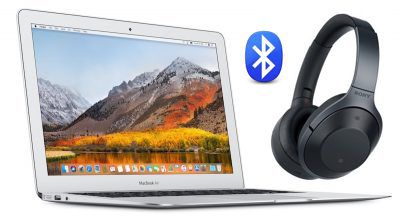
mac bluetooth audio codec aptx aac
Yet for whatever reason, despite their AAC/aptX support, some headphones fall back to the bog-standard SBC codec when connected to a Mac. This can lead to a particularly underwhelming audio experience, not to mention latency-related sync issues, which will be a distinct concern if you use your headphones while gaming or watching movies.

Thankfully, it's possible to force macOS to connect to your headphones using one of the two superior codecs. In this article, we'll show you how to do so using Apple's Bluetooth Explorer utility. (And if you're comfortable opening a Terminal window, we've included a couple of commands at the end that do the same thing.)

Bluetooth audio codecs
But first, it's worth checking which codecs your brand of headphones actually supports: Look for codec logos on the box, and make sure to check for references to codecs in the manual and any accompanying/online spec sheets.

Once you've established that your headphones support aptX and/or AAC, you'll want to identify which codec is being activated when you connect the headphones to your Mac. Follow these steps to find out.

How to Identify Which Bluetooth Codec is Active

  1. Establish a Bluetooth connection between your Mac and headphones in the normal manner.

  2. Play some audio on your Mac so that it's streaming to the headphones.

  3. Now hold down the Option (Alt) key and click on the Bluetooth symbol in the menu bar. (If you don't see it there, you need to check Show Bluetooth in menu bar in System Preferences -> Bluetooth.)

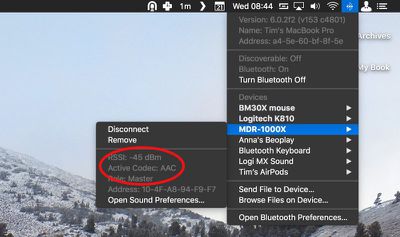
  4. Hover your mouse cursor over the headphones in the connection list. You should see the headphones' Active Codec shown in grey.
    active bluetooth codec macos

If your headphones are using AAC or aptX, you don't need to do anything. Without going into the technical details, both standards provide relatively stable wireless connections and – as far as Bluetooth goes – comparably decent sound quality. However, if the codec shown is SBC, you'll probably want to change it. Here's how.

How to Force-Enable aptX and AAC Codecs in macOS

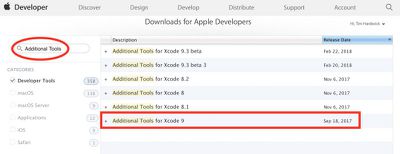
  1. Open a web browser, navigate to Apple's developer downloads page, and download Additional Tools for Xcode 9 [Direct Link] which contains Apple's Bluetooth Explorer utility. Note that to access the page you'll need to register for a free Apple developer account if you don't already have one. Alternatively, use Google to find the Bluetooth Explorer utility hosted elsewhere and skip to step 5, but if you're not downloading from Apple, be sure to screen the file for malware.
    xcode developer tools

  2. Once downloaded, double-click the Additional Tools dmg file to mount it on your desktop.

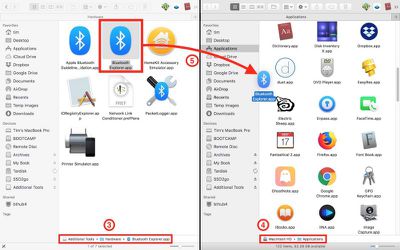
  3. Open the Additional Tools drive and navigate to the Hardware folder.

  4. Open your Mac's Applications folder in another Finder window or tab.
    Bluetooth Explorer copy

  5. Drag Bluetooth Explorer into your Mac's Applications folder and launch the app from there.

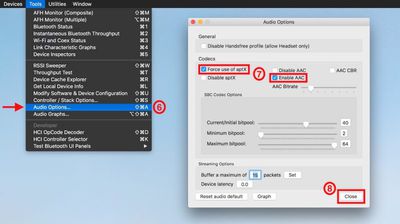
  6. From the Bluetooth Explorer menu bar, select Tools -> Audio Options.

  7. In the Codecs section, tick the checkboxes alongside Enable AAC and/or Force use of aptX (depending on your issue). Make sure Disable AAC and Disable aptX are left unchecked.
    Bluetooth Utility codec enable

  8. Click Close to finish.

  9. Restart your Mac, or reset the Bluetooth module.
When your Mac reboots, you can confirm that the codec change has been applied by following the first series of steps in this article.

Terminal commands for enabling AAC and aptX Codecs

To enable aptX, input the following command, press Enter, and type your user password if prompted:
sudo defaults write bluetoothaudiod "Enable AptX codec" -bool true

Alternatively, to enable AAC, input the following and press Enter:
sudo defaults write bluetoothaudiod "Enable AAC codec" -bool true

To disable either codec via Terminal, simply replace -bool true with -bool false at the end of the command.


Top Rated Comments

113 months ago
What I always wanted to know is: when listening to iTunes music already encoded in AAC, will it pass-through or re-encode in AAC? Because you potentially loose the benefits of good compression if you recompress. This came to my mind when finding out about albums that sound bad because they are recompressed themselves.
I have read in multiple sources that all audio is reencoded to AAC whether it comes from itunes as AAC or not. However, all the sources say that this reencoding does not cause much of a quality loss because AAC as a codec is transparent even after 100 reencodings. I use beoplay e8 and the sound is the best I have ever listened to with Bluetooth headsets that I have used so far and I have used quite a few aptx headsets by Sennheiser. The only problem with the above tutorial is that the setting are lost when reconnect your beoplay e8. I used sudo and normal user to change the plist instead of using the gui and the settings seem to be saved now. here is the commands that I used:
defaults write bluetoothaudiod "Enable AAC codec" -bool true

defaults write bluetoothaudiod "AAC Bitrate" 320

sudo defaults write bluetoothaudiod "Enable AAC codec" -bool true

sudo defaults write bluetoothaudiod "AAC Bitrate" 320
Score: 8 Votes (Like | Disagree)
113 months ago
Sadly, Apple doesn't seem to support aptX on iOS :(
Score: 8 Votes (Like | Disagree)
113 months ago
iPhones don’t support APTX which blows.
Score: 5 Votes (Like | Disagree)
Lasermoon Avatar
78 months ago

Anyone know if there is a way to verify which codec us being used in big sur? The option click on blueooth does not bring up the codec option like it used to in previous versions of mac OS.
Yes. I had to use bluetooth explorer > Audio Graphs
Score: 4 Votes (Like | Disagree)
RedGala Avatar
113 months ago
Great article. This is what macrumors is all about.
Score: 4 Votes (Like | Disagree)
timmyh Avatar
113 months ago
Interesting! I suspect Apple’s own audio devices, such as AirPods, and all of their newer OSs, support AAC?
Correct!
Score: 4 Votes (Like | Disagree)

Popular Stories

apple design award 2025

Apple Announces 2025 Design Award Winners Ahead of WWDC 2025

Tuesday June 3, 2025 10:14 am PDT by
As we wait for WWDC to kick off next Monday, Apple today announced the winners of its annual Apple Design Awards, recognizing apps and games for their innovation, ingenuity, and technical achievement. The 2025 Apple Design Award winners are listed below, with one app and one game selected per category: Delight and Fun - CapWords (App) and Balatro (Game) Innovation - Play (App) and PBJ -...
Apple 2026 Black Friday Event Hero

Apple's Official 2026 Black Friday Offer Starts Rolling Out

Thursday November 26, 2026 8:37 am PST by
Apple's annual four-day Black Friday through Cyber Monday shopping event is now live in Australia, New Zealand, and Thailand, and it will continue to roll out across Europe, the U.S., and Canada as the calendar turns to Friday, November 27 around the world. In the U.S., Apple's terms and conditions say the promotion begins on November 27 at 12 a.m. Pacific Time and ends on November 30 at...
1password deal blue

1Password Security Breach: What Was Accessed and What Wasn't

Wednesday November 25, 2026 1:09 pm PST by
Popular password management app 1Password today said it experienced a security breach earlier this month. 1Password says some customer names and email addresses were accessed, but no customer vault contents were compromised. On November 19, 1Password saw indications that an employee's GitHub account had been breached and began investigating. The company says the breached GitHub account was...
Latest Stories
The 50+ Best Apple Black Friday Deals Still Available on AirPods, iPads, and More
55 minutes ago
HomePod Mini 2 in (RED) Seemingly Spotted Ahead of Announcement
11 hours ago
Apple's M6 and PROLED MacBook Pro Reach New Low Prices for Black Friday
21 hours ago
The MacRumors Show: iPhone Air 2 and iPhone 18 Are Coming
21 hours ago
Apple Store in Brisbane Reopening Next Month With New Design
22 hours ago
The 60+ Best Black Friday Accessory Deals on iPhone Chargers, TVs, Headphones, and More
23 hours ago
GTA VI Now (Barely) Running on Apple Silicon Macs
23 hours ago
The Best Black Friday Streaming Deals on Apple TV, Disney+, and More
1 day ago
Apple TV's 'Carême' Wins International Emmy for Best Drama
1 day ago
iPhone 18 Production Delay Leaves Apple Little Time Before Launch
1 day ago
The Best Black Friday AirPods Deals Still Available
17 hours ago
The Best Black Friday Deals on Apple Home Products
1 day ago
The Best Black Friday iPhone Deals Still Available
17 hours ago
The Best Black Friday iPad Deals Still Available
17 hours ago
The Best Black Friday Apple Watch Deals Still Available
17 hours ago
The Best Black Friday AirTag Deals Still Available
17 hours ago
The Best Black Friday Mac Deals Still Available
17 hours ago
iPhone Share of US Smartphone Market Hits 57% as Rivals Slip
1 day ago
iPhone 20 Pro Rumored to Feature 3D-Printed Titanium Frame
1 day ago
Apple's Official 2026 Black Friday Offer Starts Rolling Out
2 days ago
Halide Adds Fill Light Feature for iPhone Duo
2 days ago
MacBook Air Black Friday Deals Now Live With Massive $399 Savings
2 days ago
Amazon Discounts All MacBook Neo Models by $99 for Black Friday
2 days ago
Kodak Launches Unique AirTag Rival With E-Ink Display
2 days ago
Here's Why the Apple Store is Going Down
2 days ago
Apple Still Working on Giant Foldable iPad That Could Cost $5,000
2 days ago
iPhones Dominate China's Weak Singles' Day Smartphone Sales
2 days ago
iPhone 20 Pro Could Feature Ceramic in Limited-Edition Model
2 days ago
Apple Faces Korean Regulator Review Over iPhone 16 AI Advertising
2 days ago
Apple Watch Ultra 4 Hits New Best-Ever Price of $649.99 for Black Friday
2 days ago
Related Apple News: Lifestyle | Entertainment | Buyers Guide | Iphone | South Africa