Skip to Content

Enable End-to-End Encryption for Your iCloud Backups

by

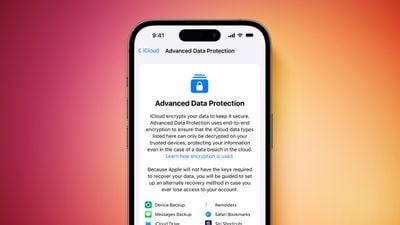
Apple's Advanced Data Protection for iCloud feature uses end-to-end encryption to provide the highest level of cloud data security that Apple offers. Here's everything you need to know about enabling it on your devices.
Apple advanced security Advanced Data Protection screen Feature Orange
The encrypted security feature gives you the choice to further protect your important iCloud data, including iCloud Backup, Photos, Notes, and more.

Apple's use of end-to-end encryption means the vast majority of your most sensitive iCloud data can only be decrypted on your trusted Apple devices where you're signed in with your Apple ID account, ensuring that the data remains secure even in the case of a data breach in the cloud. In other words, no-one – not even Apple – can access your data except you.

iCloud already protects 14 sensitive data categories using end-to-end encryption by default, including passwords in iCloud Keychain and Health data. For users who enable Advanced Data Protection, the total number of data categories protected using end-to-end encryption rises to 23, including iCloud Backup, Notes, and Photos.

Advanced Data Protection provides end-to-end encryption for the following additional iCloud categories:

  • Device Backups and Messages Backups
  • iCloud Drive
  • Notes
  • Photos
  • Reminders
  • Voice Memos
  • Safari Bookmarks
  • Siri Shortcuts
  • Wallet Passes

The only major iCloud data categories that are not covered are iCloud Mail, Contacts, and Calendar because of the need to interoperate with the global email, contacts, and calendar systems.

Crucially, Advanced Data Protection for iCloud is an opt-in feature, so you must enable it yourself using the steps below. Note that if you lose access to your account, you can only recover your data using your device passcode or password, a recovery contact, or a recovery key. (You will be guided to set up at least one recovery contact or recovery key before Advanced Data Protection is enabled.)

It's also worth bearing in mind that when Advanced Data Protection is enabled, access to your data via iCloud.com is disabled by default, although you will have the option to turn on data access on iCloud.com, which allows the web browser to have temporary access to data-specific encryption keys.

Before you enable Advanced Data Protection, you'll first have to update all your devices to the latest software versions, otherwise you'll have to remove these devices from your account as they won't support end-to-end encryption. Advanced Data Protection is available globally on the iPhone, iPad, and Mac, running iOS 16.3 or later, iPadOS 16.3 or later, and macOS 13.2 or later, respectively.

How to Enable Account Recovery on iPhone, iPad, and Mac

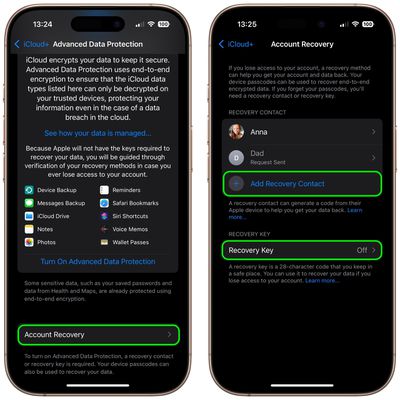
Before turning on Advanced Data Protection, you'll need to set up Account Recovery. This ensures you can recover your data if you forget your password.

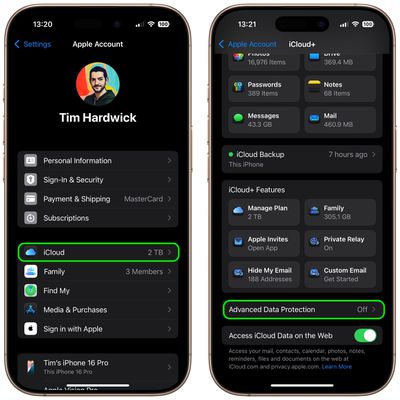
  1. Open Settings on your iPhone or iPad (or System Settings on Mac), and then select your Apple Account banner at the top of the menu.
  2. Select iCloud.
  3. Select Advanced Data Protection.
    settings

  4. Select Account Recovery.
  5. Add a Recovery Contact, and set a Recovery Key if desired.
    settings

A recovery contact should be a trusted person such as a family member or friend who also owns an Apple device. They will receive recovery codes if you ever forget your password. If you opt to set a 28-character recovery key, you'll need to print it out and keep it somewhere safe, or store it in a password manager.

How to Enable Advanced Data Protection on iPhone, iPad, and Mac

Once Account Recovery is set up, you can enable Advanced Data Protection for iCloud Backups.

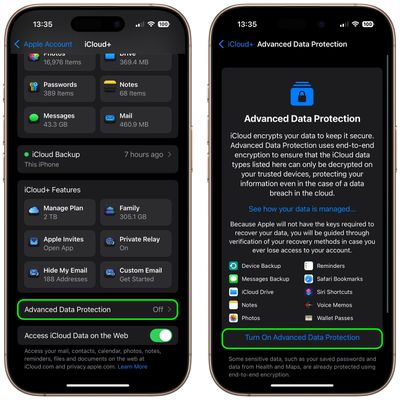
  1. Open Settings on iPhone or iPad (System Settings on Mac) and then select your Apple Account banner at the top of the menu.
  2. Select iCloud.
  3. Select Advanced Data Protection.
  4. Toggle on the switch for Advanced Data Protection to turn it on.
settings

That's it. Your iCloud backups are now protected with end-to-end encryption.

You can turn off Advanced Data Protection at any time. Upon doing so, your device will securely upload the required encryption keys to Apple servers, and your account will revert to a standard level of protection.
Top Rated Comments

PBG4 Dude Avatar
24 months ago

Not everyone has your level of paranoia. None of the 10 things this encrypts do I care whatsoever if someone sees. I always wonder what people talk about when they chat on encrypted apps? Criminal activity? Sexting? What?
The point is, it isn’t anyone else’s business. Doesn’t matter if I’m talking about my favorite movie or where I’m investing next week, you shouldn’t be able to see it if I didn’t send it to you.

This whole “if you’re doing nothing wrong what are you worried about?” Argument is specious at best.
Score: 20 Votes (Like | Disagree)
turbineseaplane Avatar
24 months ago

Not everyone has your level of paranoia. None of the 10 things this encrypts do I care whatsoever if someone sees. I always wonder what people talk about when they chat on encrypted apps? Criminal activity? Sexting? What? Why does everything need to be encrypted? Some data needs to be encrypted for sure, but for most people, most of this doesn't need to be so having this ON by default, as you suggest, is not a good idea.
For anyone interested, Wikipedia has well covered the "nothing to hide argument"

Link ('https://en.wikipedia.org/wiki/Nothing_to_hide_argument')
Score: 17 Votes (Like | Disagree)
Mr_Ed Avatar
24 months ago

For anyone interested, Wikipedia has well covered the "nothing to hide argument"

Link ('https://en.wikipedia.org/wiki/Nothing_to_hide_argument')
“It’s not that I have something to hide, I have nothing I want you to see”

A movie quote I like.
Score: 11 Votes (Like | Disagree)
24 months ago

Not everyone has your level of paranoia. None of the 10 things this encrypts do I care whatsoever if someone sees. I always wonder what people talk about when they chat on encrypted apps? Criminal activity? Sexting? What? Why does everything need to be encrypted? Some data needs to be encrypted for sure, but for most people, most of this doesn't need to be so having this ON by default, as you suggest, is not a good idea.
Since you don’t care about encryption I assume you’d be totally fine with sharing your complete medical history (physical and mental health included), your personal and business finances, your full browser history, every private conversation you’ve ever had (family drama, work discussions, all of it), your location, any legal matters you’ve been involved in (divorce, accidents, disputes, etc)?

I don’t get why you wouldn’t think anyone would not want to protect their personal data from hackers, corporations selling their information, government mass surveillance, identity theft, or even just nosy people who have no business knowing their private affairs? Clearly you think encryption is only for criminals and intimate conversation. Not like you know, useful for literally every person who doesn’t want their life to be an open book for strangers. But sure.. let’s just assume privacy is useless because you personally don’t think you need it. Great logic!

This should just be on by default really shouldn’t it.. without us even needing to even consider enabling it!
Score: 11 Votes (Like | Disagree)
WarmWinterHat Avatar
24 months ago

Not everyone has your level of paranoia. None of the 10 things this encrypts do I care whatsoever if someone sees. I always wonder what people talk about when they chat on encrypted apps? Criminal activity? Sexting? What?
The point is that no one should have to think about it. If it's enabled by everyone, always, and by default, then it becomes the norm. Your data should your business and yours alone, not available for marketing, curious people, companies or anyone else without a warrant.

I'm not particularly paranoid and don't think anyone is trying to get anything I have, I just don't like carrying data around with me and prefer a quieter and less connected life. My wife, on the other hand, is a prominent local attorney and has ran for office a few times..people have actively tried to get into her accounts, and routinely still do. It can be a battle with the fishing attempts, and she isn't tech savvy. She also doesn't use an iPhone, and doesn't like Apple devices.
Score: 9 Votes (Like | Disagree)
24 months ago

Not everyone has your level of paranoia. None of the 10 things this encrypts do I care whatsoever if someone sees. I always wonder what people talk about when they chat on encrypted apps? Criminal activity? Sexting? What? Why does everything need to be encrypted? Some data needs to be encrypted for sure, but for most people, most of this doesn't need to be so having this ON by default, as you suggest, is not a good idea.
If you don’t care, please post it all here. We are curious to see what you don’t have to hide. It will be fun. And you have nothing to hide.
Score: 6 Votes (Like | Disagree)

Popular Stories

General iCloud App Feature

Apple Says iCloud+ Plans Will Not Include Increased Siri AI Usage in UK

Tuesday November 17, 2026 7:07 am PST by
Apple on Monday announced that it is implementing daily usage limits on Siri AI and select other Apple Intelligence features that rely on "powerful server models" starting with iOS 27.3 and corresponding software updates, but increased access will be included with most iCloud+ plans at no additional cost in most countries, with one notable exception. In a support document, Apple said...
iCloud Link Harmful Content Feature 1

Apple Will Check Public iCloud Links for Harmful Content Starting in iOS 27.3

Wednesday November 4, 2026 11:12 am PST by
Apple says it will start checking public iCloud links for harmful content in iOS 27.3, iPadOS 27.3, macOS 27.3, and visionOS 27.3. Images in iCloud Photos and files in iCloud Drive shared using the "Anyone with the link" option will be "made accessible to Apple" for a content check. Apple doesn't define harmful content, but it could mean malware, malicious files, and/or child sexual abuse...
Siri AI Icon

Apple Continues to Say Some AI Features Will Have Fees for Extra Usage

Monday November 9, 2026 9:45 am PST by
Apple continues to advise customers that certain Apple Intelligence features that rely on its server-side Private Cloud Compute system have daily usage limits, with expanded access to such features to be "available for a fee in the future." Apple has repeatedly mentioned these upcoming fees in press releases over the past several months, but it has yet to provide any specific details about...
Latest Stories
The 50+ Best Apple Black Friday Deals Still Available on AirPods, iPads, and More
11 hours ago
HomePod Mini 2 in (RED) Seemingly Spotted Ahead of Announcement
8 hours ago
Apple's M6 and PROLED MacBook Pro Reach New Low Prices for Black Friday
18 hours ago
The MacRumors Show: iPhone Air 2 and iPhone 18 Are Coming
18 hours ago
Apple Store in Brisbane Reopening Next Month With New Design
19 hours ago
The 60+ Best Black Friday Accessory Deals on iPhone Chargers, TVs, Headphones, and More
19 hours ago
GTA VI Now (Barely) Running on Apple Silicon Macs
20 hours ago
The Best Black Friday Streaming Deals on Apple TV, Disney+, and More
20 hours ago
Apple TV's 'Carême' Wins International Emmy for Best Drama
21 hours ago
iPhone 18 Production Delay Leaves Apple Little Time Before Launch
22 hours ago
The Best Black Friday AirPods Deals Still Available
14 hours ago
The Best Black Friday Deals on Apple Home Products
22 hours ago
The Best Black Friday iPhone Deals Still Available
14 hours ago
The Best Black Friday iPad Deals Still Available
14 hours ago
The Best Black Friday Apple Watch Deals Still Available
14 hours ago
The Best Black Friday AirTag Deals Still Available
14 hours ago
The Best Black Friday Mac Deals Still Available
14 hours ago
iPhone Share of US Smartphone Market Hits 57% as Rivals Slip
1 day ago
iPhone 20 Pro Rumored to Feature 3D-Printed Titanium Frame
1 day ago
Apple's Official 2026 Black Friday Offer Starts Rolling Out
2 days ago
Halide Adds Fill Light Feature for iPhone Duo
2 days ago
MacBook Air Black Friday Deals Now Live With Massive $399 Savings
2 days ago
Amazon Discounts All MacBook Neo Models by $99 for Black Friday
2 days ago
Kodak Launches Unique AirTag Rival With E-Ink Display
2 days ago
Here's Why the Apple Store is Going Down
2 days ago
Apple Still Working on Giant Foldable iPad That Could Cost $5,000
2 days ago
iPhones Dominate China's Weak Singles' Day Smartphone Sales
2 days ago
iPhone 20 Pro Could Feature Ceramic in Limited-Edition Model
2 days ago
Apple Faces Korean Regulator Review Over iPhone 16 AI Advertising
2 days ago
Apple Watch Ultra 4 Hits New Best-Ever Price of $649.99 for Black Friday
2 days ago
Related Apple News: World News | Health | Mac | Iphone | Ipad