Skip to Content

iOS 14.5: How to Automatically Download New Podcast Episodes and Follow Shows

by

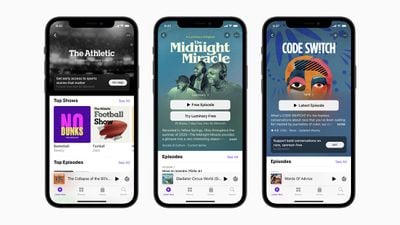
In iOS 14.5, Apple has made some notable changes to its native Podcasts app. Some of these changes reflect the fact that Apple announced an optional paid podcast subscription service (beginning May 2021), while others are interface improvements to make it easier to find, follow, and listen to new episodes.
Apple Podcasts iOS 14 5
One example of these changes is the new Smart play button, which is designed to help you automatically start episodic shows from the latest episode and serialized shows from the beginning of each series. The Smart play button also display Resume if you've already listened to some of an episode but have yet to finish it.

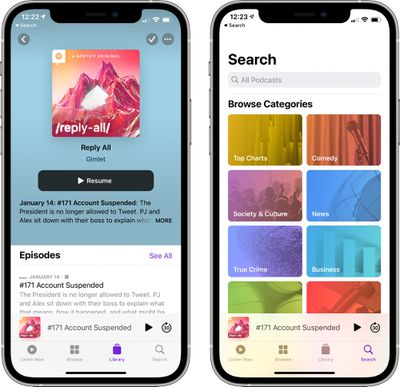
Another notable change is in the Search tab, which now offers quick access to Top Charts and categories below the search input field, much like Apple Music search. Other tweaks include larger podcast artwork and a rejigged show page that has a more logical arrangement and is more aesthetically appealing.
podcast app design changes
Perhaps most importantly, the way you "subscribe" to shows and download episodes has changed. Keep reading to learn how.

How to Follow Shows

In previous versions of iOS, you could "subscribe" to shows in Apple's Podcasts app. But now that Apple offers a paid podcast subscription mode, it has removed the "subscribe" language from the app entirely and replaced it with Follow options, which should make things less confusing.

Despite the new terminology, following a podcast offers the same functionality as subscribing had before it. Namely, it means that you'll stay up-to-date with new show episodes as they're published and you'll be able to download them individually.
ios 14 5 podcasts
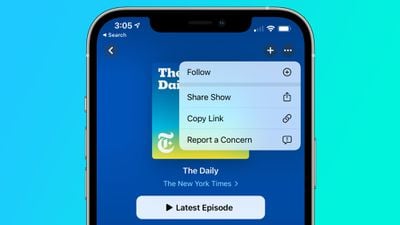
To follow a show, select one by browsing the Podcasts section, or search for one using the Search tab, then tap the plus (+) icon in the top-right corner of the Show's page.
podcast app ios 14 5
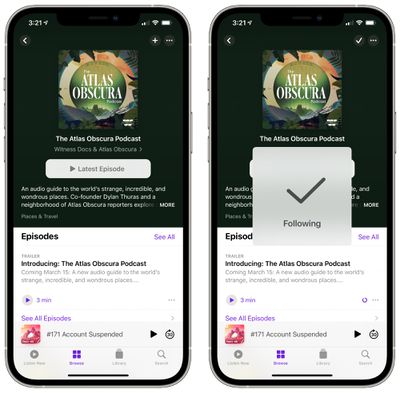
To stop following a show, tap the tick icon and select Unfollow Show. You can also follow or unfollow shows by using the dropdown options that appear when you tap the More icon (three dots in a circle).

How to Automatically Download New Episodes

In previous versions of the Podcasts app, you had to add a show to your library before you could download new episodes. In iOS 14.5 and later, that's no longer the case, and you can download individual episodes right from a show's page.

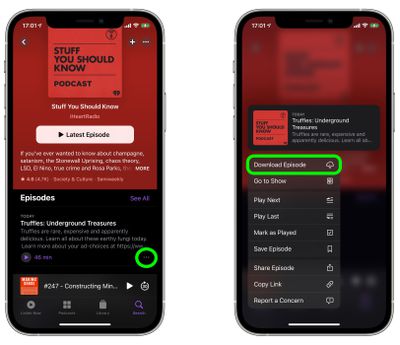
To download an episode, tap the ellipsis icon (three dots) to the right of its card and select Download Episode from the pop-up menu.
podcasts
Alternately, you can long press on an episode and the same pop-up menu will appear with the Download Episode option at the bottom. If the episode is already downloaded, the option appears as Remove Download instead.

If you're already following a show, you can turn off automatic downloads: Tap the tick icon at the top of a show page and select Turn Off Automatic Downloads. To turn them back on again, tap the down arrow icon that replaced the tick icon, and select Turn On Automatic Downloads.

Related Forum: iOS 14

Top Rated Comments

Desmondhuz Avatar
73 months ago
The updated podcast app downloaded about 50 old episodes of shows I had already listened to and I had to manually delete them. Smh
Score: 8 Votes (Like | Disagree)
Jaro65 Avatar
73 months ago
At what point will we say, "enough with the darn subscriptions!"?
Score: 8 Votes (Like | Disagree)
FloatingBones Avatar
73 months ago
Overcast works just fine for me. No thanks.
Score: 7 Votes (Like | Disagree)
73 months ago
Visually, the update is nice. However, as someone who did not subscribe to podcasts before, but rather had them in my library and I could manually add the episodes I wanted, I'm not loving the new "follow" feature. Despite going into Settings and turning off automatic downloads, every episode I play is downloaded.
I also really don't like that you can't delete episodes of "followed" podcasts from your feed. You can only mark them as played.
Score: 5 Votes (Like | Disagree)
macfacts Avatar
73 months ago

The updated podcast app downloaded about 50 old episodes of shows I had already listened to and I had to manually delete them. Smh
Apple respects your privacy, they have no idea what you listened to.
Score: 3 Votes (Like | Disagree)
73 months ago

Visually, the update is nice. However, as someone who did not subscribe to podcasts before, but rather had them in my library and I could manually add the episodes I wanted, I'm not loving the new "follow" feature. Despite going into Settings and turning off automatic downloads, every episode I play is downloaded.
I also really don't like that you can't delete episodes of "followed" podcasts from your feed. You can only mark them as played.
Glad I'm not the only one that hates this. Did Apple actually let people try this out before launching it? This update sucks.
Score: 3 Votes (Like | Disagree)

Popular Stories

Apple Podcasts Show of the Year 2026

Apple Names 'Baby, This Is Keke Palmer' Podcast of the Year

Tuesday November 17, 2026 4:30 am PST by
Apple today named "Baby, this is Keke Palmer" its 2026 Show of the Year, recognizing the interview podcast for its quality and cultural impact. Produced by Wondery and executive produced by Palmer, the show features guests including Oprah Winfrey and Anderson .Paak. Apple said it consistently ranks among the platform's top video and comedy podcasts. Last year's award went to "The Rest Is...
apple design award 2025

Apple Announces 2025 Design Award Winners Ahead of WWDC 2025

Tuesday June 3, 2025 10:14 am PDT by
As we wait for WWDC to kick off next Monday, Apple today announced the winners of its annual Apple Design Awards, recognizing apps and games for their innovation, ingenuity, and technical achievement. The 2025 Apple Design Award winners are listed below, with one app and one game selected per category: Delight and Fun - CapWords (App) and Balatro (Game) Innovation - Play (App) and PBJ -...
1password deal blue

1Password Security Breach: What Was Accessed and What Wasn't

Wednesday November 25, 2026 1:09 pm PST by
Popular password management app 1Password today said it experienced a security breach earlier this month. 1Password says some customer names and email addresses were accessed, but no customer vault contents were compromised. On November 19, 1Password saw indications that an employee's GitHub account had been breached and began investigating. The company says the breached GitHub account was...
Latest Stories
The 50+ Best Apple Black Friday Deals Still Available on AirPods, iPads, and More
4 hours ago
HomePod Mini 2 in (RED) Seemingly Spotted Ahead of Announcement
43 minutes ago
Apple's M6 and PROLED MacBook Pro Reach New Low Prices for Black Friday
11 hours ago
The MacRumors Show: iPhone Air 2 and iPhone 18 Are Coming
11 hours ago
Apple Store in Brisbane Reopening Next Month With New Design
12 hours ago
The 60+ Best Black Friday Accessory Deals on iPhone Chargers, TVs, Headphones, and More
12 hours ago
GTA VI Now (Barely) Running on Apple Silicon Macs
13 hours ago
The Best Black Friday Streaming Deals on Apple TV, Disney+, and More
13 hours ago
Apple TV's 'Carême' Wins International Emmy for Best Drama
14 hours ago
iPhone 18 Production Delay Leaves Apple Little Time Before Launch
15 hours ago
The Best Black Friday AirPods Deals Still Available
7 hours ago
The Best Black Friday Deals on Apple Home Products
15 hours ago
The Best Black Friday iPhone Deals Still Available
7 hours ago
The Best Black Friday iPad Deals Still Available
7 hours ago
The Best Black Friday Apple Watch Deals Still Available
7 hours ago
The Best Black Friday AirTag Deals Still Available
7 hours ago
The Best Black Friday Mac Deals Still Available
7 hours ago
iPhone Share of US Smartphone Market Hits 57% as Rivals Slip
17 hours ago
iPhone 20 Pro Rumored to Feature 3D-Printed Titanium Frame
18 hours ago
Apple's Official 2026 Black Friday Offer Starts Rolling Out
2 days ago
Halide Adds Fill Light Feature for iPhone Duo
2 days ago
MacBook Air Black Friday Deals Now Live With Massive $399 Savings
2 days ago
Amazon Discounts All MacBook Neo Models by $99 for Black Friday
2 days ago
Kodak Launches Unique AirTag Rival With E-Ink Display
2 days ago
Here's Why the Apple Store is Going Down
2 days ago
Apple Still Working on Giant Foldable iPad That Could Cost $5,000
2 days ago
iPhones Dominate China's Weak Singles' Day Smartphone Sales
2 days ago
iPhone 20 Pro Could Feature Ceramic in Limited-Edition Model
2 days ago
Apple Faces Korean Regulator Review Over iPhone 16 AI Advertising
2 days ago
Apple Watch Ultra 4 Hits New Best-Ever Price of $649.99 for Black Friday
2 days ago
Related Apple News: Technology | Mac | Buyers Guide | Travel | Motoring






























