Skip to Content

How to Downgrade From iOS 27 Beta to iOS 26

by

If you installed iOS 27 Beta or iPadOS 27 Beta through Apple's Developer Program, you may decide you want to downgrade because of usability or stability issues. Keep reading to learn how it's done.
How to Downgrade From iOS 27 Beta to iOS 26 Feature
Apple's beta versions of its major software updates can be buggy, especially the early releases. While that isn't necessarily the case for the latest iOS 27 beta, you may still find apps not working properly, poor battery life, device crashes, and features that don't do what they're supposed to. Fortunately, you can restore your iPhone or iPad to the previous version of iOS.

If you made an archived backup before you installed the iOS 27 beta, you can remove the ‌beta and restore the backup. If you don't have an archived backup that was created before installing the beta, you can still downgrade, but you'll need to set up your device as new or restore from an older compatible backup. Only an archived backup made before installing the beta can be restored after downgrading.

Also, bear in mind that if you've installed watchOS 27 beta on your Apple Watch, you won't be able to use it with your ‌iPhone‌ once you've gone back to iOS 26. And downgrading an Apple Watch to a previous version of watchOS can't be done manually – if you want to remove ‌watchOS 27 beta, you'll have to send your watch in to Apple.

How to Downgrade From iOS 27 Beta or iPadOS 27 Beta

  1. Launch Finder on your Mac. On Windows, open the Apple Devices app (or iTunes if you're using an older setup).
  2. Connect your iPhone or iPad to your computer using a Lightning or USB-C cable.
  3. Put your device into recovery mode. The method of doing this depends on your device, so check the list below these steps to find your model. Apple also provides more information on Recovery mode in this support article.
    restore

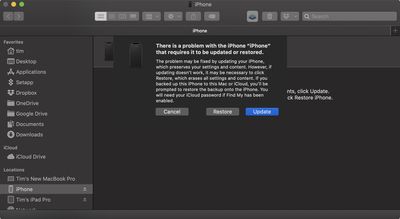
  4. A dialog will pop up asking if you want to restore your device. Click Restore when prompted. Your computer will erase the device and install the latest publicly available version of iOS or iPadOS that's still being signed by Apple.
  5. Wait while the restore process completes.
How to Enter Recovery Mode on Your iOS Device

  • iPad models with Face ID or a Touch ID power button: Press and quickly release the Volume Up button. Press and quickly release the Volume Down button. Press and hold the Top button until your device begins to restart. Continue holding the Top button until your device goes into recovery mode.

  • iPhone XS or later: Press and quickly release the Volume Up button. Press and quickly release the Volume Down button. Then, press and hold the Side button until you see the recovery mode screen.

Once you've followed the above steps, you can restore a backup of your device from iOS 26 or iPadOS 26 using your Mac or iCloud.

Related Roundups: iOS 26, iPadOS 26, iOS 27, iPadOS 27
Related Forums: iOS 26, iOS 27

Top Rated Comments

19 weeks ago
iOS 18 is better than both of them
Very sad iPhone 17 didn’t came with iOS 18 🥺
I don’t have much faith that iOS 27 will be as good as iOS 18 when it’s out of beta. Better than iOS 26 but still not as easy going and smooth as 18.
Score: 7 Votes (Like | Disagree)
19 weeks ago
On my iPhone 17 Pro, iOS 27 public beta has been far superior to 26.5.2. Battery life is great, phone doesn't get hot anymore. A couple small bugs but nothing show stopping. Using it on my main device and no regrets whatsoever.
Score: 4 Votes (Like | Disagree)
mrat93 Avatar
19 weeks ago
The iOS 27 beta gave my iPhone 15 Pro a new lease on life. It feels more stable than iOS 26 ever did.

If I remember correctly, 26.3 was the best update for me. Very little lag, didn’t overheat, etc.

Then with iOS 26.4 onward, it was slow, and was hot nearly all the time when it was charging or in use.

Now with the iOS 27 beta, my phone feels nearly brand new — even while in the process of indexing. I’m considering keeping this phone for a fourth year now.
Score: 2 Votes (Like | Disagree)
mrmoobs Avatar
19 weeks ago
Be careful downgrading, you can lose iCloud data like I did lost passwords all of them and photos plus notes data missing
Score: 1 Votes (Like | Disagree)
I7guy Avatar
19 weeks ago

iOS 18 is better than both of them
Very sad iPhone 17 didn’t came with iOS 18 🥺
I don’t have much faith that iOS 27 will be as good as iOS 18 when it’s out of beta. Better than iOS 26 but still not as easy going and smooth as 18.
iOS 18 while there is little inherently wrong with it is just boring compared to iOS 26, which again has little inherently wrong with. YMMV.
Score: 1 Votes (Like | Disagree)
vertsix Avatar
19 weeks ago
Improved headline:

"You ****ed Up Updating to iOS 27 beta? Here's How to Downgrade to iOS 26"

Come on, MacRumors. Do better! /s
Score: 1 Votes (Like | Disagree)

Popular Stories

iphone duo yellow hand

Apple Adds Facial Unlock Option on iPhone Duo in iOS 27.3

Monday November 16, 2026 10:17 am PST by
Apple today added a new option for unlocking the iPhone Duo using the front-facing camera, giving device users multiple ways to access their content. The feature is available in the second iOS 27.3 beta. The option to unlock with facial recognition is only available on the Lock Screen, and authentication via Touch ID is still needed for Apple Pay purchases, adding passwords and logins, and...
bug security vulnerability issue fix larry

Here's What Apple Fixed in iOS 27.2.1 and macOS 27.2.1

Monday November 9, 2026 3:07 pm PST by
The iOS 27.2.1, iPadOS 27.2.1, and macOS 27.2.1 updates Apple released today fix a handful of security vulnerabilities. With the security fixes implemented, it's a good idea to update as soon as you can. A bug with iMessage could let a remote attacker join a group chat to receive its messages, and another could let users see messages sent before they joined a group chat. Most of the...
iOS 27

Apple Releases iOS 27.2.1 With Bug Fixes

Monday November 9, 2026 10:09 am PST by
Apple today released iOS 27.2.1, a minor update to the iOS 27 operating system. iOS 27.2.1 comes two weeks after the launch of iOS 27.2. iOS 27.2.1 includes addresses bugs and patches security vulnerabilities according to Apple's release notes for the update. You can download iOS 27.2.1 over the air by going to Settings > General > Software Update. Apple has also released iOS 26.7.3...
Latest Stories
The 50+ Best Apple Black Friday Deals Still Available on AirPods, iPads, and More
11 hours ago
HomePod Mini 2 in (RED) Seemingly Spotted Ahead of Announcement
8 hours ago
Apple's M6 and PROLED MacBook Pro Reach New Low Prices for Black Friday
18 hours ago
The MacRumors Show: iPhone Air 2 and iPhone 18 Are Coming
18 hours ago
Apple Store in Brisbane Reopening Next Month With New Design
19 hours ago
The 60+ Best Black Friday Accessory Deals on iPhone Chargers, TVs, Headphones, and More
20 hours ago
GTA VI Now (Barely) Running on Apple Silicon Macs
20 hours ago
The Best Black Friday Streaming Deals on Apple TV, Disney+, and More
21 hours ago
Apple TV's 'Carême' Wins International Emmy for Best Drama
21 hours ago
iPhone 18 Production Delay Leaves Apple Little Time Before Launch
22 hours ago
The Best Black Friday AirPods Deals Still Available
14 hours ago
The Best Black Friday Deals on Apple Home Products
22 hours ago
The Best Black Friday iPhone Deals Still Available
14 hours ago
The Best Black Friday iPad Deals Still Available
14 hours ago
The Best Black Friday Apple Watch Deals Still Available
14 hours ago
The Best Black Friday AirTag Deals Still Available
14 hours ago
The Best Black Friday Mac Deals Still Available
14 hours ago
iPhone Share of US Smartphone Market Hits 57% as Rivals Slip
1 day ago
iPhone 20 Pro Rumored to Feature 3D-Printed Titanium Frame
1 day ago
Apple's Official 2026 Black Friday Offer Starts Rolling Out
2 days ago
Halide Adds Fill Light Feature for iPhone Duo
2 days ago
MacBook Air Black Friday Deals Now Live With Massive $399 Savings
2 days ago
Amazon Discounts All MacBook Neo Models by $99 for Black Friday
2 days ago
Kodak Launches Unique AirTag Rival With E-Ink Display
2 days ago
Here's Why the Apple Store is Going Down
2 days ago
Apple Still Working on Giant Foldable iPad That Could Cost $5,000
2 days ago
iPhones Dominate China's Weak Singles' Day Smartphone Sales
2 days ago
iPhone 20 Pro Could Feature Ceramic in Limited-Edition Model
2 days ago
Apple Faces Korean Regulator Review Over iPhone 16 AI Advertising
2 days ago
Apple Watch Ultra 4 Hits New Best-Ever Price of $649.99 for Black Friday
2 days ago
Related Apple News: Mac | Travel | Education | Sport | Politics