
Skip to Content

How to Divide Your Apple Watch Workouts into Segments

by

workout appUsing the Segments feature in the Apple Watch Workout app is a great way to track changes in exercise intensity over the course of a workout. It can also help you find out which activities in a mixed session push your body the most.

If your regular running route includes a hilly section, for example, using segments to indicate where it begins and/or ends lets you review how much time it takes to complete compared to the rest of your workout.

Or maybe you use your Apple Watch to track gym sessions that include various high-intensity strength training or mixed cardio exercises. Marking a new segment every time you move to another piece of equipment or perform a different exercise will give you a better idea of how effective each activity is at burning calories.

How to Mark a Segment During a Workout

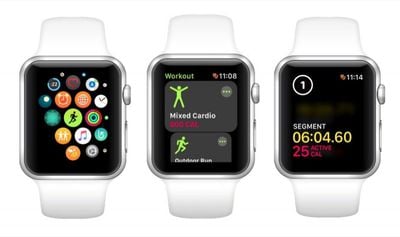
  1. Launch the Workout app on your Apple Watch.

  2. Choose a workout type to track from the list, then go ahead and start your workout.
    segments in an apple watch workout

  3. To divide your workout into two segments, simply raise your wrist and double-tap on the screen. The time elapsed becomes Segment 1 of your workout, while the remaining time becomes Segment 2.

  4. To create a third segment in your workout, just double-tap on the screen again. Repeat this action as many times as you want.
How to View Segment Metrics on Your iPhone

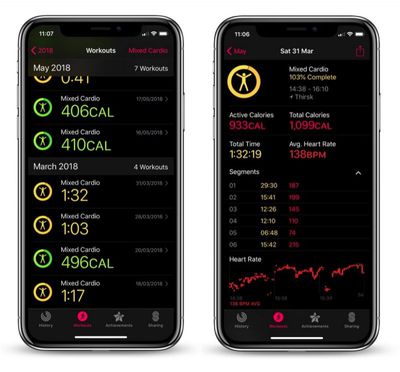
  1. Launch the Activity app on your iPhone.

  2. Tap the Workouts tab.
    activity app segments iphone

  3. Select the workout in which you recorded segments.

  4. In the workout summary screen, locate the Segments section just above the heart rate graph, and tap the chevron alongside it to reveal your numbered segments with stats for duration and calories burned.
Related Roundup: Apple Watch 12
Buyer's Guide: Apple Watch (Buy Now)
Related Forum: Apple Watch

Top Rated Comments

JRobinsonJr Avatar
110 months ago
I was looking for that too but it seems like these are splits rather than a multi-event training that's needed for a triathlon, am I missing something?
Nope. These are just splits.

I've sent Apple a long tirade of feature requests around this. In the "good ol' days" even the electronic trackers were essentially dumb. With the Watch, IMO, there is zero technical reason it could not be location / speed / altitude / cadence / movement aware... and integrate that into the exercise app. For example, there are exercise tracking programs for both indoor and outdoor walking AND running... as four separate activities. Given that the watch has a built-in accelerometer, plus GPS and altitude info, it could easily detect the difference between walking, jogging and running (based on speed), plus note the difference in performance metrics on flat land, up-hill, down-hill, etc. In theory it should even be able to detect the rapid back-and-forth movements of doing cardio on machines, such as elliptical, treadmills, perhaps even rowing machines.

I've even suggested opening the exercise app to 3rd party add-ons. Imagine integrating "track my X" into the exercise app. Not only would it track body metrics, but actually show your efforts on a map. This could permit extending the watch's capabilities to support many different movement-based exercises.

For the triathlon scenario, the watch should already be able to detect the difference in movement types between running, swimming and cycling.

Sure, we're still early in the Watch development cycle, and I'm very happy with what is does now. With continued evolution the future could be great!
Score: 3 Votes (Like | Disagree)
roncito Avatar
110 months ago
I wish there was a way to turn this off. When I’m running in the winter or fall and wearing a long sleeve shirt it messes with the watch and I end up with these segments scattered through my run. To to avoid this, sometimes if I remember, I start the workout then I have to go to the home screen and then flip up the control center and turn on the water mode to lock the screen all while starting to run. Pretty annoying. Just wish they had and option to turn them off in the watch app.
Why don't you just swipe once you start the workout and tap lock?
Score: 2 Votes (Like | Disagree)
JRobinsonJr Avatar
110 months ago
Garmin already has the ability to switch events for triathlon scenario and their users make fun of the Apple Watch all the time due to the lack of it; it's even a meme at this point :(
Ha! Well then... it's time for Apple to be courageous and follow the leader!
Score: 1 Votes (Like | Disagree)
110 months ago
Why don't you just swipe once you start the workout and tap lock?
Oh man! They must have added this in watch os 4?! I’ve never noticed the lock water droplet there before!! I always just swipe over there to select end or pause! Thank you!
Score: 1 Votes (Like | Disagree)
110 months ago
Thanks MacRumors for this tip! I learn something new from you every day!

I agree that the Apple Watch could be so much more. If only Apple would focus less on emojis, Animojis, and other ojis, and simply focused on things that really matter instead. The Apple Watch has so much potential as an exercise device, hopefully they will devote more attention to it one day.
Score: 1 Votes (Like | Disagree)
110 months ago
I was looking for that too but it seems like these are splits rather than a multi-event training that's needed for a triathlon, am I missing something?
No, these are just splits. To properly track a triathlon, you would swipe over and select New, then select the proper activity for that stage of the event. But that takes time. It's a lot quicker to select a more generic cardio work out and use splits to indicate the boundaries of the activities. You know whats up with that, and can use that info later to track progress from one event to the next.
Score: 1 Votes (Like | Disagree)

Popular Stories

apple watch series 3 design

Apple Offers Steps to Fix Daylight Saving Time Bug on Apple Watch

Sunday November 1, 2026 3:34 am PST by
Apple has published a support document describing what to do if your Apple Watch continues to show time that's off by one hour after daylight savings time changes. "This incorrect time appears only on the Always On display when your wrist is down," says Apple. "When you activate the display by tapping it or raising your wrist, the time changes to the correct hour." To fix the issue, Apple says ...
muse apple watch app

Meta's Muse AI Agent Comes to Apple Watch

Monday November 9, 2026 1:55 pm PST by
Meta today updated the Muse app for iOS to add Apple Watch support, which means Muse users can access the proactive AI agent from the watch. The app adds the Muse character to the watch with an option to text it, dictate text to it, or call it. There's also a Muse complication for quick access. Muse is Meta's personal AI agent that can complete tasks for users. It is available as a...
siri recap live rewind

watchOS 27.3 Brings Live Rewind and Siri Recap to Apple Watch

Tuesday November 3, 2026 10:35 am PST by
With the first beta of watchOS 27.3, Apple is introducing new Audio Intelligence features it previewed for the Apple Watch Series 12 and Ultra 4 earlier this year. Powered by the S11 chip, Audio Intelligence includes Live Rewind, Siri Recap, Sound Recognition, and Shazam Music Recognition. Sound Recognition and Shazam are already on the watch, but Live Rewind and Siri Recap are now available ...
Latest Stories
The 50+ Best Apple Black Friday Deals Still Available on AirPods, iPads, and More
4 hours ago
Here Are the Best Apple Black Friday Leftover Deals You Can Get Today
3 hours ago
HomePod Mini 2 in (RED) Seemingly Spotted Ahead of Announcement
14 hours ago
Apple's M6 and PROLED MacBook Pro Reach New Low Prices for Black Friday
1 day ago
The MacRumors Show: iPhone Air 2 and iPhone 18 Are Coming
1 day ago
Apple Store in Brisbane Reopening Next Month With New Design
1 day ago
The 60+ Best Black Friday Accessory Deals on iPhone Chargers, TVs, Headphones, and More
3 hours ago
GTA VI Now (Barely) Running on Apple Silicon Macs
1 day ago
The Best Black Friday Streaming Deals on Apple TV, Disney+, and More
1 day ago
Apple TV's 'Carême' Wins International Emmy for Best Drama
1 day ago
iPhone 18 Production Delay Leaves Apple Little Time Before Launch
1 day ago
The Best Black Friday AirPods Deals Still Available
20 hours ago
The Best Black Friday Deals on Apple Home Products
1 day ago
The Best Black Friday iPhone Deals Still Available
20 hours ago
The Best Black Friday iPad Deals Still Available
20 hours ago
The Best Black Friday Apple Watch Deals Still Available
20 hours ago
The Best Black Friday AirTag Deals Still Available
20 hours ago
The Best Black Friday Mac Deals Still Available
20 hours ago
iPhone Share of US Smartphone Market Hits 57% as Rivals Slip
1 day ago
iPhone 20 Pro Rumored to Feature 3D-Printed Titanium Frame
1 day ago
Apple's Official 2026 Black Friday Offer Starts Rolling Out
2 days ago
Halide Adds Fill Light Feature for iPhone Duo
2 days ago
MacBook Air Black Friday Deals Now Live With Massive $399 Savings
2 days ago
Amazon Discounts All MacBook Neo Models by $99 for Black Friday
2 days ago
Kodak Launches Unique AirTag Rival With E-Ink Display
2 days ago
Here's Why the Apple Store is Going Down
2 days ago
Apple Still Working on Giant Foldable iPad That Could Cost $5,000
2 days ago
iPhones Dominate China's Weak Singles' Day Smartphone Sales
2 days ago
iPhone 20 Pro Could Feature Ceramic in Limited-Edition Model
2 days ago
Apple Faces Korean Regulator Review Over iPhone 16 AI Advertising
2 days ago
Related Apple News: Entertainment | Sport | Health | Politics | Culture
































