Skip to Content

How to Customize Apple's Magic Mouse

by

While the Magic Mouse has been around for quite some time, Apple recently updated the accessory with an integrated rechargeable battery and other changes, so some MacRumors readers deciding to give the device a try may be new to it. If you're coming from a more traditional mouse, you should know there's a lot the Magic Mouse can do that might not be obvious. Rather than merely serving as a point and click device, the Magic Mouse and Magic Mouse 2 use swiping and tapping gestures along with the traditional clicks.

Because the Magic Mouse incorporates taps and swipes, some of its features may be hidden or confusing to someone that's never used one before. We've created this quick how-to guide for readers who are new to the Magic Mouse, covering the ins and outs of the device to help you get the most out of it.

Magic Mouse 5
First off, we want to note that tapping is not the same as clicking. The latter, as with traditional mouse buttons, requires that you press on the mouse until you hear a clicking noise or feel a clicking action.

Tapping is not a common feature on a traditional mouse, but is one of Apple's Magic Mouse specialties. When you tap on the mouse lightly, as if you were tapping on your iPhone screen, you are triggering a different action than clicking.

The Magic Mouse supports tapping or double tapping with one finger and tapping or double tapping with two fingers, all of which trigger different actions, depending on what you have enabled.

The Magic Mouse also supports swiping gestures with one or two fingers. Swiping up or down with one finger triggers the scrolling function. When enabled, swiping left or right with one finger allows you to switch between pages that you've visited in Safari, and lets you swipe between full screen apps when using two fingers.

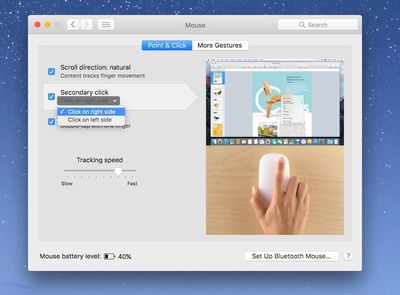
For those who have recently begun using a Magic Mouse for the first time, it is possible to "right-click." The feature isn't missing. It's just not enabled by default.

You can also reverse the direction of the scrolling action that your finger uses. If you are used to scrolling up to move the content on the screen up, you will want to enable natural scrolling.
Magic Mouse 2
To enable right-clicking and natural scrolling:

  1. Click on the Apple logo in the upper left corner of the screen and select System Preferences from the drop down menu.
  2. Click on Mouse.
  3. Select the Point & Click section.
  4. To enable natural scrolling, check the box next to "Scroll direction: natural."
  5. To enable right clicking, select "Secondary click." Once enable, you can switch from right to left click if you prefer that option.

In this section, you can also enable Smart Zoom, which lets you zoom into compatible documents and apps by double tapping the mouse with one finger in compatible applications. For example, you can double tap to zoom in Safari and Chrome, but it does not work with Pages or Mail.

If you find that your pointer doesn't seem to move as fast as you'd like, you can adjust the tracking speed in this section as well. This will make the pointer move across the screen faster or slower, depending on your preference.

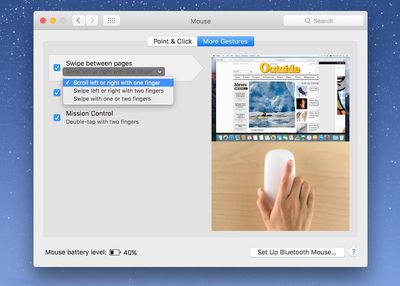
To enable additional swiping and tapping features:
Magic Mouse 3

  1. Click on the Apple logo in the upper left corner of the screen and select System Preferences from the drop down menu.
  2. Click on Mouse.
  3. Select the More Gestures section.

You can enable the ability to swipe between web pages in Safari by checking the box next to "Swipe between pages." You can also choose to swipe left or right with one finger, two fingers, or both. If you want the option to swipe between full-screen apps, chose the one finger option.

When enabled, you can swipe between full screen apps. If you have multiple apps open in full screen, swipe with two fingers on the Magic Mouse to switch from one to another.

You can also enable the ability to quickly access Mission Control by double tapping the Magic Mouse with two fingers.

Magic Mouse 7
With the double-tap feature enabled, you can further execute Mission Control commands by double tapping a specific open app in the Dock. If a window is already displayed on your screen, double tap the app's icon in the dock to select it in Mission Control. That window will appear on screen and you can click on it to bring it to the front of your working area.

Being a new Magic Mouse user, you may find that some of these swiping and tapping features accidentally get in the way of your computing experience. For example, you might accidentally tend to tap on the mouse, causing it to zoom in on a website when you didn't want it to, or double tap on an app icon in the dock.

If these gestures cause you more harm than good, simply disable them by following the instructions above and unchecking the boxes for the gestures you no longer wish to use.

Magic Mouse 4
Incidentally, if you're wondering how to tell how much charge your Magic Mouse (and keyboard and trackpad) have left, you can see the battery percentage by clicking on the Bluetooth icon on the Menu bar in the upper right corner of the screen. Then, click on the peripheral you wish to check to see the remaining battery percentage.

The Magic Mouse takes a bit of getting used to when you've been working with a more traditional mouse for most of your life, but once you get the hang of it, the added swiping and tapping features will likely become something you don't want to live without.


Top Rated Comments

joshwenke Avatar
143 months ago
Next up in your MacRumors Tutorials, how to use a toaster!
Score: 4 Votes (Like | Disagree)
Markoth Avatar
143 months ago
Next up in your MacRumors Tutorials, how to use a toaster!
Do you honestly think that using a toaster is easy? https://www.embeddedarm.com/software/arm-netbsd-toaster.php
A toaster with a login prompt! It also toasts bread!
Score: 2 Votes (Like | Disagree)
Morod Avatar
143 months ago
Using a Mighty Mouse and Trackpad with my iMac for years.
The Magic Mouse never felt comfortable to me.
Score: 1 Votes (Like | Disagree)
groovyd Avatar
143 months ago
love the magic mouse... hard to appreciate any other mouse after using it for over 5 years now. tapping to zoom in and out of web page sections and it's speed and sensitivity to scroll swipes is without equal.
Score: 1 Votes (Like | Disagree)

Popular Stories

apple design award 2025

Apple Announces 2025 Design Award Winners Ahead of WWDC 2025

Tuesday June 3, 2025 10:14 am PDT by
As we wait for WWDC to kick off next Monday, Apple today announced the winners of its annual Apple Design Awards, recognizing apps and games for their innovation, ingenuity, and technical achievement. The 2025 Apple Design Award winners are listed below, with one app and one game selected per category: Delight and Fun - CapWords (App) and Balatro (Game) Innovation - Play (App) and PBJ -...
1password deal blue

1Password Security Breach: What Was Accessed and What Wasn't

Wednesday November 25, 2026 1:09 pm PST by
Popular password management app 1Password today said it experienced a security breach earlier this month. 1Password says some customer names and email addresses were accessed, but no customer vault contents were compromised. On November 19, 1Password saw indications that an employee's GitHub account had been breached and began investigating. The company says the breached GitHub account was...
apple store down feature

Here's Why the Apple Store is Going Down

Thursday November 26, 2026 5:49 am PST by
Apple's online store is going down for a few hours on a rolling country-by-country basis right now, but do not get your hopes up for new products. Apple takes its online store down for a few hours ahead of Black Friday every year to tease its annual gift card offer with the purchase of select products. The store is down in Australia, New Zealand, and Thailand, right now, and it will...
Latest Stories
The 50+ Best Apple Black Friday Deals Still Available on AirPods, iPads, and More
3 hours ago
Apple's M6 and PROLED MacBook Pro Reach New Low Prices for Black Friday
7 hours ago
The MacRumors Show: iPhone Air 2 and iPhone 18 Are Coming
7 hours ago
Apple Store in Brisbane Reopening Next Month With New Design
8 hours ago
The 60+ Best Black Friday Accessory Deals on iPhone Chargers, TVs, Headphones, and More
9 hours ago
GTA VI Now (Barely) Running on Apple Silicon Macs
9 hours ago
The Best Black Friday Streaming Deals on Apple TV, Disney+, and More
10 hours ago
Apple TV's 'Carême' Wins International Emmy for Best Drama
10 hours ago
iPhone 18 Production Delay Leaves Apple Little Time Before Launch
11 hours ago
The Best Black Friday AirPods Deals Still Available
3 hours ago
The Best Black Friday Deals on Apple Home Products
11 hours ago
The Best Black Friday iPhone Deals Still Available
3 hours ago
The Best Black Friday iPad Deals Still Available
3 hours ago
The Best Black Friday Apple Watch Deals Still Available
3 hours ago
The Best Black Friday AirTag Deals Still Available
3 hours ago
The Best Black Friday Mac Deals Still Available
3 hours ago
iPhone Share of US Smartphone Market Hits 57% as Rivals Slip
13 hours ago
iPhone 20 Pro Rumored to Feature 3D-Printed Titanium Frame
14 hours ago
Apple's Official 2026 Black Friday Offer Starts Rolling Out
1 day ago
Halide Adds Fill Light Feature for iPhone Duo
1 day ago
MacBook Air Black Friday Deals Now Live With Massive $399 Savings
1 day ago
Amazon Discounts All MacBook Neo Models by $99 for Black Friday
1 day ago
Kodak Launches Unique AirTag Rival With E-Ink Display
1 day ago
Here's Why the Apple Store is Going Down
1 day ago
Apple Still Working on Giant Foldable iPad That Could Cost $5,000
2 days ago
iPhones Dominate China's Weak Singles' Day Smartphone Sales
2 days ago
iPhone 20 Pro Could Feature Ceramic in Limited-Edition Model
2 days ago
Apple Faces Korean Regulator Review Over iPhone 16 AI Advertising
2 days ago
Apple Watch Ultra 4 Hits New Best-Ever Price of $649.99 for Black Friday
2 days ago
New Apple Store Opening in India, Download the Special Wallpaper Now
2 days ago
Related Apple News: Business | Politics | Mac | Local News | Iphone






























