Skip to Content

How to Customize Favorite Contacts in iOS

by

2013 08 26 09 38 25  Phone iOS7 App Icon RoundedOn iPhone, Apple has a neat way to organize your favorite contacts and even access them quickly, thanks to its Home screen widget system. In addition to adding one-tap phone calling icons, you can customize whether each contact icon will call, FaceTime, text, or email the person you tap on.

Note that the basic communication preferences stored within each contact card on your iPhone will come into play when customizing your new favorites widget, so be sure to add in any phone numbers and email addresses before you start if you haven't done so already.

Customize Favorites in the Phone App

Follow these steps to navigate through the new way you can customize favorites in the phone app.

  1. Launch the Phone app on your iPhone.
  2. The app should open on the Favorites tab, but if not tap to it.
  3. Tap the "+" button in the top-left corner of the screen.
  4. Search for the contact you want to add and tap it.
    phone app

  5. Choose between Message, Call, Video, or Mail as your shortcut.
  6. To pick a number or email other than the one shown as default, tap the small down arrow to the right of Message, Call, Video, or Mail to pick from any number/email already stored in your phone for this contact.
  7. Return to the Favorites tab and your new quick access contact will be at the bottom of your Favorites list.
  8. Tap Edit in the top-right corner to delete or reprioritize contacts. You can also swipe left on a favorite in your Favorites list and tap Delete to remove it.
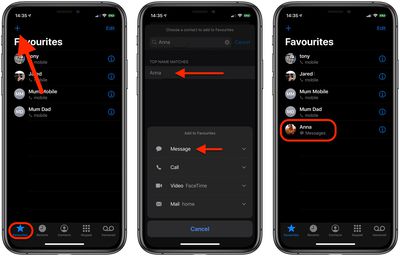
When organizing your new favorite contacts, be sure to note that the first four contacts will receive top billing in the favorites widget, but a total of eight can fit.

Setting Up the Favorites Widget

The favorites list's granular settings allow you to jump into the contacts you only text with, while still accommodating those people you more often speak with on the phone. The personalization doesn't stop there, however. Follow the next few steps to get your favorites widget up and running.

  1. Navigate to the widgets screen by swiping right on your iPhone's main Home screen, Notification Center, or Lock screen.
  2. Scroll all the way down to the bottom of your widgets and tap Edit.
  3. Find Favorites and tap the small green plus button to add it to your widgets.
    widgets

  4. Use the triple bar or "hamburger" icon on the right side of the screen to move favorites further up or down the list.
  5. Hit Done to save your changes.
  6. You'll see your favorite contacts as a widget, with the top four contacts getting premium placement.
  7. Tap the little chevron in the top-right corner of the widget to expand it for a total of eight contacts.
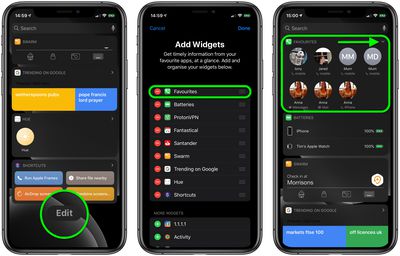
Since the favorites widget can show up to eight contacts, you can return to the phone app to add and rearrange your most important friends, family members, and co-workers to see the changes reflected in the widget.

Your customization options include: adding multiple methods of communication for one person (all four if you contact one person multiple ways frequently), removing the default phone call options for message-focused contacts, and setting your top four most used contacts to save room on the widgets screen, without needing to use the "Show More" option.


Top Rated Comments

insomniac86 Avatar
133 months ago
The widget is a better idea, but it just needs 3D Touch support so you don't have to pin multiple of the same person. It should also keep the functionality to pin the same contact multiple times for people that do not have 3D Touch. Better yet, why not just allow it so that non-3D Touch users can just hold for two seconds to see other choices.
Score: 3 Votes (Like | Disagree)
133 months ago
Ah speed dial is back after 9 years
The Favorites have been in the Phone app for a long time.
[doublepost=1474143244][/doublepost]
Thanks. I've noticed the emergency bypass, but that makes the phone ring, even when you have silent switched on, so only a true emergency option.

So it doesn't just bypass DND but even the silent/vibrate setting and always rings for calls and plays a tone for messages even if the phone is on silent/vibrate?
[doublepost=1474143285][/doublepost]
I thought iOS 10 was going to bring other messaging/calling ways into the fold in this area. For instance, we would have the ability to select What's App instead of iMessage. What am I missing?
Updated calling apps can have their calls show up as normal calls would (rather than as just an app notification).
Score: 2 Votes (Like | Disagree)
133 months ago
Does this then allow all these favourites through the DND feature regardless of the method of contact, or just favourites where phone is selected?
Depends on the setup of your DND, of course!

If you haven't checked out the supplementary new feature in the Contact app buried under the Ringtone toggle option named "Emergency Bypass", one can turn off "Favorites" in DND and still designate one or more people to get through by toggling on that Bypass for each relevant Contact.
Score: 1 Votes (Like | Disagree)
133 months ago
Does this then allow all these favourites through the DND feature regardless of the method of contact, or just favourites where phone is selected?
Score: 1 Votes (Like | Disagree)
insomniac86 Avatar
133 months ago
Yeah Apple software has really gone downhill with its inconsistency. I will say iOS 10 as a whole is pretty dam good though. Whoever designed the new maps app deserves a medal. It's super simple and clutter free. Yet it retains all its power and adds more. That app is an example of something well designed. Knowing my luck they will re-design it in iOS 11 to become a turd. Lol
Score: 1 Votes (Like | Disagree)
chriscl Avatar
133 months ago
As I have an iPhone 6 - no 3d Touch - the "Favourites" widget method is going to be a useful time saver for me.
Score: 1 Votes (Like | Disagree)

Popular Stories

apple design award 2025

Apple Announces 2025 Design Award Winners Ahead of WWDC 2025

Tuesday June 3, 2025 10:14 am PDT by
As we wait for WWDC to kick off next Monday, Apple today announced the winners of its annual Apple Design Awards, recognizing apps and games for their innovation, ingenuity, and technical achievement. The 2025 Apple Design Award winners are listed below, with one app and one game selected per category: Delight and Fun - CapWords (App) and Balatro (Game) Innovation - Play (App) and PBJ -...
Apple 2026 Black Friday Event Hero

Apple's Official 2026 Black Friday Offer Starts Rolling Out

Thursday November 26, 2026 8:37 am PST by
Apple's annual four-day Black Friday through Cyber Monday shopping event is now live in Australia, New Zealand, and Thailand, and it will continue to roll out across Europe, the U.S., and Canada as the calendar turns to Friday, November 27 around the world. In the U.S., Apple's terms and conditions say the promotion begins on November 27 at 12 a.m. Pacific Time and ends on November 30 at...
1password deal blue

1Password Security Breach: What Was Accessed and What Wasn't

Wednesday November 25, 2026 1:09 pm PST by
Popular password management app 1Password today said it experienced a security breach earlier this month. 1Password says some customer names and email addresses were accessed, but no customer vault contents were compromised. On November 19, 1Password saw indications that an employee's GitHub account had been breached and began investigating. The company says the breached GitHub account was...
Latest Stories
The 50+ Best Apple Black Friday Deals Still Available on AirPods, iPads, and More
1 hour ago
Here Are the Best Apple Black Friday Leftover Deals You Can Get Today
3 minutes ago
HomePod Mini 2 in (RED) Seemingly Spotted Ahead of Announcement
11 hours ago
Apple's M6 and PROLED MacBook Pro Reach New Low Prices for Black Friday
22 hours ago
The MacRumors Show: iPhone Air 2 and iPhone 18 Are Coming
22 hours ago
Apple Store in Brisbane Reopening Next Month With New Design
22 hours ago
The 60+ Best Black Friday Accessory Deals on iPhone Chargers, TVs, Headphones, and More
23 hours ago
GTA VI Now (Barely) Running on Apple Silicon Macs
23 hours ago
The Best Black Friday Streaming Deals on Apple TV, Disney+, and More
1 day ago
Apple TV's 'Carême' Wins International Emmy for Best Drama
1 day ago
iPhone 18 Production Delay Leaves Apple Little Time Before Launch
1 day ago
The Best Black Friday AirPods Deals Still Available
17 hours ago
The Best Black Friday Deals on Apple Home Products
1 day ago
The Best Black Friday iPhone Deals Still Available
17 hours ago
The Best Black Friday iPad Deals Still Available
17 hours ago
The Best Black Friday Apple Watch Deals Still Available
17 hours ago
The Best Black Friday AirTag Deals Still Available
17 hours ago
The Best Black Friday Mac Deals Still Available
17 hours ago
iPhone Share of US Smartphone Market Hits 57% as Rivals Slip
1 day ago
iPhone 20 Pro Rumored to Feature 3D-Printed Titanium Frame
1 day ago
Apple's Official 2026 Black Friday Offer Starts Rolling Out
2 days ago
Halide Adds Fill Light Feature for iPhone Duo
2 days ago
MacBook Air Black Friday Deals Now Live With Massive $399 Savings
2 days ago
Amazon Discounts All MacBook Neo Models by $99 for Black Friday
2 days ago
Kodak Launches Unique AirTag Rival With E-Ink Display
2 days ago
Here's Why the Apple Store is Going Down
2 days ago
Apple Still Working on Giant Foldable iPad That Could Cost $5,000
2 days ago
iPhones Dominate China's Weak Singles' Day Smartphone Sales
2 days ago
iPhone 20 Pro Could Feature Ceramic in Limited-Edition Model
2 days ago
Apple Faces Korean Regulator Review Over iPhone 16 AI Advertising
2 days ago
Related Apple News: South Africa | Culture | Opinion | Politics | Education





























