Skip to Content

How to Customize Apple TV to Show Only the Channels You Use

by

We've been waiting for the fourth-generation Apple TV for at least two years now, and we've been teased with vague comments, leaks from the supply chain, and analyst predictions for several years running. We thought we’d get a look at it this year at the Worldwide Developers Conference, but Apple was still not ready to show it off.
How to Customize Apple TV 4
Until we get a whole new model with, hopefully, a brand new look to the operating system, we have to stick with what we've got. The number of media channels is not getting any smaller, with Apple adding new content on a regular basis. For example, Apple recently added NatGeo TV. Content options are great, but sifting through dozens of channels can be a pain sometimes.

If you're tired of scrolling through the nearly seven dozen channels looking for the ones you use most, you can hide everything you don’t want to access, making it much easier to get to the content you want. We've got a quick tutorial to show you how.

Customizing Channels on the Main Menu
How to Customize Apple TV 2

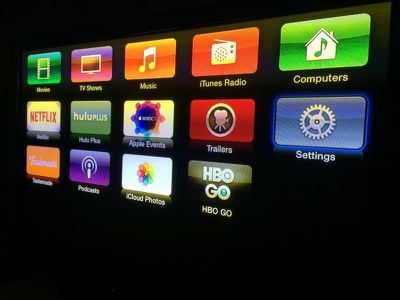
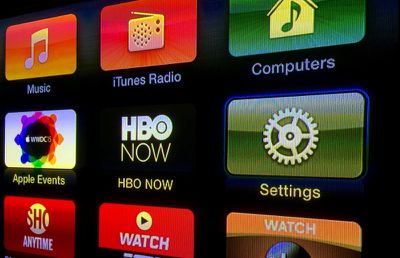
  1. On Apple TV, go to your Settings app, which is always in the second row below your iTunes and shared computer channels.
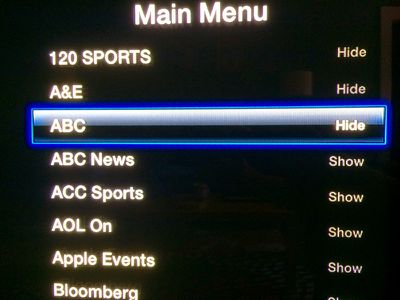
  2. Select Main Menu from the list.
  3. Select "Hide" for every channel that you don't want showing by selecting the channel and clicking the center select button on the Apple TV remote. Channels that will be visible on the Apple TV are listed as "Show," while channels that will no longer show up are listed as "Hide."
How to Customize Apple TV 3
New channels will appear on the Main Menu whenever they are added to Apple TV. If you don't want to see them, follow the steps above for the new channel.

You can also go back and add channels to Main Menu whenever you like by clicking on it until it has "Show" next to it instead.

Troubleshooting

If your Apple TV is running slowly, shuts off randomly, or is otherwise working poorly, one way to fix it is to restart it.

  1. Unplug the connection to your television set.
  2. Unplug the power cable from the box.
  3. Plug the TV cable back in.
  4. Plug the power cable back in.
  5. Wait for Apple TV to finish reloading.
How to Customize Apple TV 6
There may be deeper issues with your set-top box that a simple restart can't fix. If so, you may need to reset it to factory settings.

  1. On Apple TV, go to the Settings app.
  2. Select General.
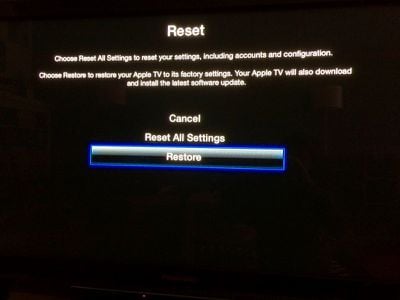
  3. Scroll down to select Reset.
  4. Select Restore.

This will restore Apple TV to its factory settings, removing all passwords you have entered for all of your channels. The restoration will take a while. Don't unplug your Apple TV during the process.

If you can't restore Apple TV to its factory settings from the Main Menu (like, if your box is frozen and just stops working altogether), you can perform the process via iTunes by connecting your Apple TV to your computer.

You will need a micro-USB cable and the latest version of iTunes running on your Internet-connected computer for this process.

  1. Disconnect the power and television cables from Apple TV.
  2. Open iTunes on your computer. Then connect Apple TV to your computer using the micro-USB cable. If you have the third-generation Apple TV, you will also need to plug the box into a power source.
  3. Once connected, Go to the Apple TV summary page in iTunes and select "Restore Apple TV."
  4. When the restoration process is finished, disconnect Apple TV from your computer and reconnect it to your television set.

Hopefully, we wont be waiting around for too much longer before Apple finally presents us with the next big thing for television. But, until then, at least we can organize our channels the way we want to.

Related Roundup: Apple TV
Buyer's Guide: Apple TV (Buy Now)

Top Rated Comments

Mike Oxard Avatar
149 months ago
An alternative is to move away from the U.S., the rest of the world don't get enough channels to make it worth hiding any.
Score: 8 Votes (Like | Disagree)
149 months ago
@MacRumors

An easier way to hide channels is to simple stay on the home screen - Hold down the middle button - they'll start to "jiggle" - then hit "play" and you'll be prompted to hide the channel.

This way is much quicker.
Score: 4 Votes (Like | Disagree)
Sandstorm Avatar
149 months ago
On some fronts Apple is so pathetic and slow. This is one of them.
Score: 4 Votes (Like | Disagree)
149 months ago
Removing the channels you never watch or access is not the problem but the ugly UI it is like scrolling through huge wall of bricks which causes scan lines issue with my TV. Not sure why Apple just can not change the UI for the current Apple TV for the time being.
Score: 2 Votes (Like | Disagree)
Mike Oxard Avatar
149 months ago
Highly disagree, your overlooking regulatory and "deals in place" within other countries that prevent Apple from delivering the consistency of product found in the U.S.A. across other countries.

Channel choice is not a "black & white" situation as it should be.
Eh? My point ( though meant light-heartedly) was that other countries have less channels, I wasn't commenting on why that is so.
Score: 1 Votes (Like | Disagree)
donniedarko Avatar
149 months ago
@MacRumors

An easier way to hide channels is to simple stay on the home screen - Hold down the middle button - they'll start to "jiggle" - then hit "play" and you'll be prompted to hide the channel.

This way is much quicker.
Yep nailed it. This is much better, the other quicker.
Score: 1 Votes (Like | Disagree)

Popular Stories

Apple Event Logo

Apple Releasing Yet Another Two New Products Next Week

Friday November 6, 2026 7:36 am PST by
Apple's massive wave of product launches will finally end next week, with its all-new HomeView smart home hub and the fourth-generation Apple TV 4K set to be released on Friday, November 13 and no other major hardware releases expected for the remainder of the year. Since late August, Apple has announced more than 25 new devices and accessories in one of its busiest stretches...
Apple TV 4K 4th Generation Top View5

New Apple TV 4K and iPad Mini: RAM Amounts Revealed

Thursday October 29, 2026 5:50 pm PDT by
Apple today released Xcode 27.2, and it reveals how much RAM is in the new fourth-generation Apple TV 4K and the new iPad mini with an OLED display. As expected, the new Apple TV 4K with the A19 chip is equipped with 8GB of RAM, while the new iPad mini with the A20 Pro chip has 12GB of RAM. For good measure, Xcode shows the iPhone Duo is equipped with 12GB of RAM. None of these RAM...
Apple TV Silo

Apple TV Reportedly Planning 'Silo' Spinoff

Wednesday November 4, 2026 8:56 am PST by
Apple TV is developing a "Silo" spinoff tied to Hugh Howey's upcoming Silo book trilogy, according to Apple TV commentator and podcaster Sigmund Judge. He said pre-production will begin later this year, with the books expected next summer. Hiring has apparently begun and some sets remain standing after season four wrapped in March. The reported project would follow the show's fourth and final...
Latest Stories
The 50+ Best Apple Black Friday Deals Still Available on AirPods, iPads, and More
3 hours ago
Here Are the Best Apple Black Friday Leftover Deals You Can Get Today
1 hour ago
HomePod Mini 2 in (RED) Seemingly Spotted Ahead of Announcement
12 hours ago
Apple's M6 and PROLED MacBook Pro Reach New Low Prices for Black Friday
23 hours ago
The MacRumors Show: iPhone Air 2 and iPhone 18 Are Coming
23 hours ago
Apple Store in Brisbane Reopening Next Month With New Design
23 hours ago
The 60+ Best Black Friday Accessory Deals on iPhone Chargers, TVs, Headphones, and More
1 hour ago
GTA VI Now (Barely) Running on Apple Silicon Macs
1 day ago
The Best Black Friday Streaming Deals on Apple TV, Disney+, and More
1 day ago
Apple TV's 'Carême' Wins International Emmy for Best Drama
1 day ago
iPhone 18 Production Delay Leaves Apple Little Time Before Launch
1 day ago
The Best Black Friday AirPods Deals Still Available
19 hours ago
The Best Black Friday Deals on Apple Home Products
1 day ago
The Best Black Friday iPhone Deals Still Available
19 hours ago
The Best Black Friday iPad Deals Still Available
19 hours ago
The Best Black Friday Apple Watch Deals Still Available
19 hours ago
The Best Black Friday AirTag Deals Still Available
19 hours ago
The Best Black Friday Mac Deals Still Available
19 hours ago
iPhone Share of US Smartphone Market Hits 57% as Rivals Slip
1 day ago
iPhone 20 Pro Rumored to Feature 3D-Printed Titanium Frame
1 day ago
Apple's Official 2026 Black Friday Offer Starts Rolling Out
2 days ago
Halide Adds Fill Light Feature for iPhone Duo
2 days ago
MacBook Air Black Friday Deals Now Live With Massive $399 Savings
2 days ago
Amazon Discounts All MacBook Neo Models by $99 for Black Friday
2 days ago
Kodak Launches Unique AirTag Rival With E-Ink Display
2 days ago
Here's Why the Apple Store is Going Down
2 days ago
Apple Still Working on Giant Foldable iPad That Could Cost $5,000
2 days ago
iPhones Dominate China's Weak Singles' Day Smartphone Sales
2 days ago
iPhone 20 Pro Could Feature Ceramic in Limited-Edition Model
2 days ago
Apple Faces Korean Regulator Review Over iPhone 16 AI Advertising
2 days ago
Related Apple News: Health | News | World News | Mac | Reviews