Skip to Content

How to Customize Mail App Inbox Gestures on iPhone and iPad

by

ios 11 mail icon pnIn iOS 11, Apple's Mail app includes a handful of neat swipe gestures that can help significantly reduce the amount of time you spend managing messages in your inbox on iPhone and iPad. In this article, we'll show you how to perform these gestures and how to customize some of the actions they reveal according to your personal preference.

The basic inbox gestures are swiping right or left on an email to reveal tappable actions that you can perform instantly, without having to call up additional menus.

For example, swiping left on an email reveals three options: the default Flag action which can be customized, a Delete or Archive button (depending on the account), and a More option that takes you to a pop-up menu with additional email management functions.

Swiping right on an email reveals a single customizable action. By default, this is either Archive or Delete (again, depending on the account). This can be a tad confusing, but basically, accounts that include Archive in the swipe left menu will by default show Delete when swiping right.
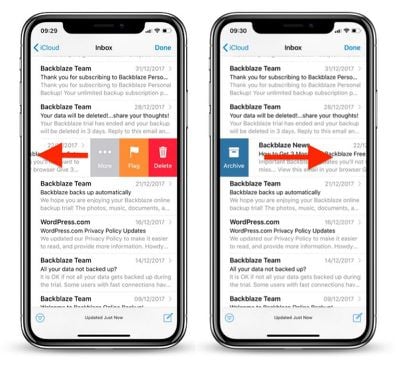
mail inbox swipe gestures iphone1
Tip: The right swipe menu action and the Archive/Delete action on the left swipe menu can both be performed without having to tap them at all. For example, to delete (or archive) an email, swipe left all the way across the message in one continuous sweep and it will vanish from your inbox instantly.

This single extended swipe action is nice and swift, but it can leave you open to deleting emails a bit too hastily. Fortunately, you can shake your iOS device to bring up the Undo button and revert the last action. (Make sure the option is toggled on in the Settings app, under General -> Accessibility -> Shake to Undo.)

Finally, don't forget that a tap of the Edit button in the upper right of your inbox lets you select multiple emails in the messages list, allowing you to Mark, Move, or Delete them all in one go.

How to Change Mail Swipe Gestures in iOS

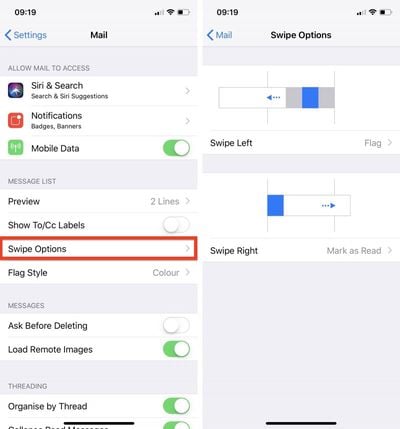
  1. Launch the Settings app on your iPhone or iPad.

  2. Scroll down and tap Mail.

  3. Tap Swipe Options.
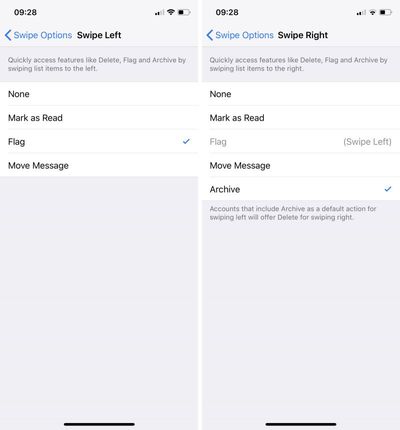
    customize mail gestures 1

  4. Tap Swipe Left or Swipe Right under the gesture example images.
    customize mail gestures2

  5. Tap a function to assign it to the selected swipe gesture. Your options include None, Mark as Read, Flag, Move Message, and Archive.
Related Forum: iOS 11

Top Rated Comments

Ritmo Avatar
111 months ago
And why the heck swipe left doesn’t have delete option? That’s how the whole damn OS works by default.
Score: 2 Votes (Like | Disagree)
B60boy Avatar
111 months ago
Also need to add a reminder feature that ties into the Reminder app. I can’t belive in this day and age that it’s so difficult to turn an email into a task or reminder.

Yes, I know that you can do this with Siri, but adding it to the slider here is what is needed.
Score: 2 Votes (Like | Disagree)
Kangastu Avatar
111 months ago
Hoping for snooze to be added in MacOS iOS 12 this year. Spark is nice - but I’d prefer to be using native apps.
Score: 2 Votes (Like | Disagree)
thefourthpope Avatar
111 months ago
There are some very meagre swipe options ('http://osxdaily.com/2015/12/02/change-mail-swipe-gesture-mac-os-x/') in MacOS Mail. I have never for the life of me been able to figure out why we can't have more options here.
Absolutely. At least have consistent options across both platforms. Maybe this is where they’ll go with the more universal apps said to be coming?
Score: 1 Votes (Like | Disagree)
111 months ago
Like many, I prefer to use the native iOS email app, but cant because of all its problems. No push notifications with Gmail or paid G Suite Gmail...even when configured as an Exchange account (which causes you to lose STARRED messages). And even worse, it will not notify you of new email until you open the app. Then all new email comes into the inbox and the app icon badge for new mail is finally displayed. This used to work fine before iOS 11 broke it. Come on, Apple...is this abomination of an email app the best you can do?
Score: 1 Votes (Like | Disagree)

Popular Stories

apple design award 2025

Apple Announces 2025 Design Award Winners Ahead of WWDC 2025

Tuesday June 3, 2025 10:14 am PDT by
As we wait for WWDC to kick off next Monday, Apple today announced the winners of its annual Apple Design Awards, recognizing apps and games for their innovation, ingenuity, and technical achievement. The 2025 Apple Design Award winners are listed below, with one app and one game selected per category: Delight and Fun - CapWords (App) and Balatro (Game) Innovation - Play (App) and PBJ -...
1password deal blue

1Password Security Breach: What Was Accessed and What Wasn't

Wednesday November 25, 2026 1:09 pm PST by
Popular password management app 1Password today said it experienced a security breach earlier this month. 1Password says some customer names and email addresses were accessed, but no customer vault contents were compromised. On November 19, 1Password saw indications that an employee's GitHub account had been breached and began investigating. The company says the breached GitHub account was...
apple store down feature

Here's Why the Apple Store is Going Down

Thursday November 26, 2026 5:49 am PST by
Apple's online store is going down for a few hours on a rolling country-by-country basis right now, but do not get your hopes up for new products. Apple takes its online store down for a few hours ahead of Black Friday every year to tease its annual gift card offer with the purchase of select products. The store is down in Australia, New Zealand, and Thailand, right now, and it will...
Latest Stories
The 50+ Best Apple Black Friday Deals Still Available on AirPods, iPads, and More
7 hours ago
HomePod Mini 2 in (RED) Seemingly Spotted Ahead of Announcement
4 hours ago
Apple's M6 and PROLED MacBook Pro Reach New Low Prices for Black Friday
15 hours ago
The MacRumors Show: iPhone Air 2 and iPhone 18 Are Coming
15 hours ago
Apple Store in Brisbane Reopening Next Month With New Design
15 hours ago
The 60+ Best Black Friday Accessory Deals on iPhone Chargers, TVs, Headphones, and More
16 hours ago
GTA VI Now (Barely) Running on Apple Silicon Macs
16 hours ago
The Best Black Friday Streaming Deals on Apple TV, Disney+, and More
17 hours ago
Apple TV's 'Carême' Wins International Emmy for Best Drama
18 hours ago
iPhone 18 Production Delay Leaves Apple Little Time Before Launch
18 hours ago
The Best Black Friday AirPods Deals Still Available
10 hours ago
The Best Black Friday Deals on Apple Home Products
19 hours ago
The Best Black Friday iPhone Deals Still Available
10 hours ago
The Best Black Friday iPad Deals Still Available
10 hours ago
The Best Black Friday Apple Watch Deals Still Available
10 hours ago
The Best Black Friday AirTag Deals Still Available
10 hours ago
The Best Black Friday Mac Deals Still Available
10 hours ago
iPhone Share of US Smartphone Market Hits 57% as Rivals Slip
20 hours ago
iPhone 20 Pro Rumored to Feature 3D-Printed Titanium Frame
22 hours ago
Apple's Official 2026 Black Friday Offer Starts Rolling Out
2 days ago
Halide Adds Fill Light Feature for iPhone Duo
2 days ago
MacBook Air Black Friday Deals Now Live With Massive $399 Savings
2 days ago
Amazon Discounts All MacBook Neo Models by $99 for Black Friday
2 days ago
Kodak Launches Unique AirTag Rival With E-Ink Display
2 days ago
Here's Why the Apple Store is Going Down
2 days ago
Apple Still Working on Giant Foldable iPad That Could Cost $5,000
2 days ago
iPhones Dominate China's Weak Singles' Day Smartphone Sales
2 days ago
iPhone 20 Pro Could Feature Ceramic in Limited-Edition Model
2 days ago
Apple Faces Korean Regulator Review Over iPhone 16 AI Advertising
2 days ago
Apple Watch Ultra 4 Hits New Best-Ever Price of $649.99 for Black Friday
2 days ago
Related Apple News: World News | Local News | Sport | Lifestyle | Entertainment