Skip to Content

Create a Custom Pass in the Wallet App on iPhone

by

In iOS 27, Apple's Wallet app lets you create custom passes for things like event tickets, gift cards, loyalty cards, and more. Here's how it works.
wallet app create a pass
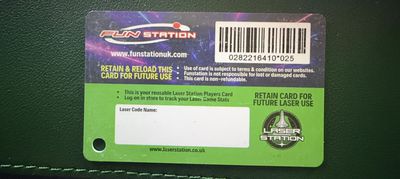
If you have a ticket for an event and there's not a digital version available for the Wallet app, you can create one using the physical pass you have. The same goes for other cards, like a membership card, for example.

The Wallet app can use ‌Visual Intelligence‌ to scan your card, and it will match it to a template with corresponding fields that you can tweak before adding it to your Wallet.

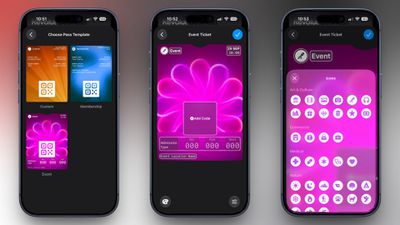
Alternatively, you can create the pass manually, choose a template ("Membership," "Event," or "Custom") and then adjust the color and other details. All you need to do then is scan the barcode or QR code from your physical pass.

Each template includes relevant information like name, location, or admission type. There are 12 background colors to choose from, or seven custom backgrounds for categories like theater, music, sports, and movies.

Fields can be added or removed when creating a custom pass, with options like label, date, membership, contact, coupon code, VIN, insurance, and more, so most physical cards should be able to be stored digitally.

Here's how you create a pass with ‌Visual Intelligence‌:

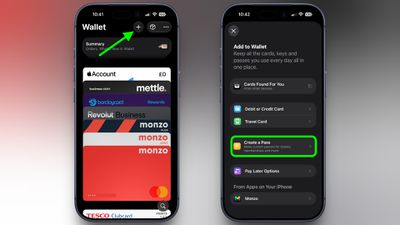
  1. Open the Wallet app on your iPhone and tap the + button at the top.
  2. Choose Create a Pass.
    wallet

  3. To let Visual Intelligence scan the pass, tap Continue, then take a photo of it in the next screen.
    pass example scaled

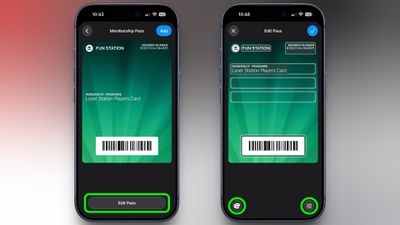
  4. After Visual Intelligence matches the pass to a template, tap Edit Pass.
  5. Use the palette icon in the bottom-left corner to change the look of the pass – you can the background colour, or use an image from your Photos library. Tap the icon in the bottom-right corner to add or remove fields.
    wallet

  6. Tap the blue checkmark at the top when you're done.
Your custom pass will now be added to your Wallet, ready for use. To edit it at any time, simply select it in Wallet, tap the three dots in the top-right corner of the screen, then tap Edit Pass.

Top Rated Comments

adrianlondon Avatar
9 weeks ago

Why would any venue or business accept a modified document?
It's just a way to put an email / pdf containing a QR code or barcode into the wallet.

Of course, for things which regularly regenerate the code in its own app, this won't work. Or if the ticket requires someone to actually look at it rather than just scan it, it also won't work, as you say.
Score: 10 Votes (Like | Disagree)
Rockanrolero Avatar
9 weeks ago
What everyone wants to know is how to do their Costco card… show us that and done 👍🏻
Score: 8 Votes (Like | Disagree)
NightFox Avatar
9 weeks ago

Finally! I was taking photos of these until now. The time has come to finally have my Tesco clubcard in the Wallet app and get discounts on cheap wine.
I've had my Clubcard in my Wallet for years - can't remember how though!


Attachment Image
Score: 6 Votes (Like | Disagree)
CLS9 Avatar
9 weeks ago
Well, that was a complete waste of time. There is no prompt to take a photo of my gym pass and when I tried to enter it manually, it wouldn't recognized the QR code and that's what they scan at the gym.
Score: 6 Votes (Like | Disagree)
9 weeks ago
This is definitely a nice feature to have although maybe a bit bitter-sweet for me.

I really longed for this feature 5 years ago, even more so 10 years ago, but at least in the UK most reasonable-sized businesses have now got much better about making it possible to add their loyalty cards, event tickets etc into Apple Wallet.

I'm sure that I'll still find it useful but I wish it had been introduced years ago.
Score: 6 Votes (Like | Disagree)
dannys1 Avatar
9 weeks ago
I remember I created custom passes a couple of years ago for going on holiday to Dominican Republic - everything that had a QR code on I created - I put in the address so it'd come on local screen automatically.

I had my little QR immigration form and my fast track through security ticket.

The queue staff at the airport didn't accept my immigration pass as proof i'd filled it in, so I had to get up the PDF anyway - and at the other end in the actual country it was for - they don't even scan the QR code, it's all linked to your passport number so you don't even need it!

The fast track staff gate keeper wouldn't accept my QR pass to get into the line, despite it working fine at the actual turn style, so I had to show her the PDF as well.

The normal person isn't ready for custom made QR code passes - they only know what they see 100 times and most of the time they don't even scan the code. It's really annoying.
Score: 5 Votes (Like | Disagree)

Popular Stories

apple wallet drivers license feature iPhone 15 pro

Apple Wallet Driver's License Feature Coming to Connecticut

Monday November 23, 2026 7:37 am PST by
Starting next year, residents of Connecticut will be able to add their driver's license or state ID to the Apple Wallet app on the iPhone and Apple Watch. The digital ID can be used to display proof of identity or age at TSA checkpoints in select airports, at select businesses, and in select iPhone apps, but acceptance is still very limited. Last week, Connecticut released a mobile ID app on ...
apple design award 2025

Apple Announces 2025 Design Award Winners Ahead of WWDC 2025

Tuesday June 3, 2025 10:14 am PDT by
As we wait for WWDC to kick off next Monday, Apple today announced the winners of its annual Apple Design Awards, recognizing apps and games for their innovation, ingenuity, and technical achievement. The 2025 Apple Design Award winners are listed below, with one app and one game selected per category: Delight and Fun - CapWords (App) and Balatro (Game) Innovation - Play (App) and PBJ -...
1password deal blue

1Password Security Breach: What Was Accessed and What Wasn't

Wednesday November 25, 2026 1:09 pm PST by
Popular password management app 1Password today said it experienced a security breach earlier this month. 1Password says some customer names and email addresses were accessed, but no customer vault contents were compromised. On November 19, 1Password saw indications that an employee's GitHub account had been breached and began investigating. The company says the breached GitHub account was...
Latest Stories
The 50+ Best Apple Black Friday Deals Still Available on AirPods, iPads, and More
12 hours ago
HomePod Mini 2 in (RED) Seemingly Spotted Ahead of Announcement
9 hours ago
Apple's M6 and PROLED MacBook Pro Reach New Low Prices for Black Friday
20 hours ago
The MacRumors Show: iPhone Air 2 and iPhone 18 Are Coming
20 hours ago
Apple Store in Brisbane Reopening Next Month With New Design
20 hours ago
The 60+ Best Black Friday Accessory Deals on iPhone Chargers, TVs, Headphones, and More
21 hours ago
GTA VI Now (Barely) Running on Apple Silicon Macs
21 hours ago
The Best Black Friday Streaming Deals on Apple TV, Disney+, and More
22 hours ago
Apple TV's 'Carême' Wins International Emmy for Best Drama
23 hours ago
iPhone 18 Production Delay Leaves Apple Little Time Before Launch
23 hours ago
The Best Black Friday AirPods Deals Still Available
15 hours ago
The Best Black Friday Deals on Apple Home Products
1 day ago
The Best Black Friday iPhone Deals Still Available
15 hours ago
The Best Black Friday iPad Deals Still Available
15 hours ago
The Best Black Friday Apple Watch Deals Still Available
15 hours ago
The Best Black Friday AirTag Deals Still Available
15 hours ago
The Best Black Friday Mac Deals Still Available
15 hours ago
iPhone Share of US Smartphone Market Hits 57% as Rivals Slip
1 day ago
iPhone 20 Pro Rumored to Feature 3D-Printed Titanium Frame
1 day ago
Apple's Official 2026 Black Friday Offer Starts Rolling Out
2 days ago
Halide Adds Fill Light Feature for iPhone Duo
2 days ago
MacBook Air Black Friday Deals Now Live With Massive $399 Savings
2 days ago
Amazon Discounts All MacBook Neo Models by $99 for Black Friday
2 days ago
Kodak Launches Unique AirTag Rival With E-Ink Display
2 days ago
Here's Why the Apple Store is Going Down
2 days ago
Apple Still Working on Giant Foldable iPad That Could Cost $5,000
2 days ago
iPhones Dominate China's Weak Singles' Day Smartphone Sales
2 days ago
iPhone 20 Pro Could Feature Ceramic in Limited-Edition Model
2 days ago
Apple Faces Korean Regulator Review Over iPhone 16 AI Advertising
2 days ago
Apple Watch Ultra 4 Hits New Best-Ever Price of $649.99 for Black Friday
2 days ago
Related Apple News: Travel | Iphone | Lifestyle | Iphone 16 | Iphone Duo Separate Lock Screen Rotation