Skip to Content

How to Convert Several Images into a Single PDF Using Preview

by

Preview appOver the years, Adobe's PDF file type has become a universally accepted method for sharing digital documents. The format's cross-platform adoption means the documents can be viewed on almost any mobile device or computer, so it's no surprise to find that macOS includes native support for viewing and creating PDF files.

In the Preview app, for example, it's possible to create a single multi-page PDF document out of several separate image files. The feature is particularly useful if you need to share a number of scanned documents over email or digitize something for reference. Keep reading to learn how it's done.

How to Convert Several Images into a Single PDF

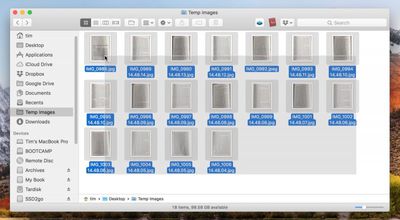
  1. In Finder, select all the images you want to include in the PDF. To do this, drag a box over several images files using your mouse cursor, or select them individually by holding the Command key and clicking them one by one.
    1 select images to pdf

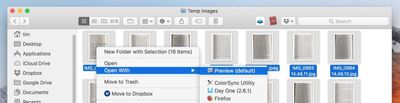
  2. Right-click (or Ctrl-click) one of the highlighted files and select Open With -> Preview in the contextual dropdown menu.
    2 open images in preview to pdf

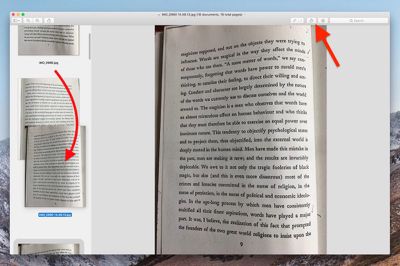
  3. In Preview's sidebar, drag the thumbnail images into the order that you want them to appear in the PDF document. Use the Rotate button in Preview's toolbar to change the orientation of individual pages (drag a selection over multiple pages to rotate several at once).
    3 rearrange images to pdf

  4. In the Preview menu bar, select File -> Print..., or use the Command+P keyboard shortcut to bring up the Print dialog.

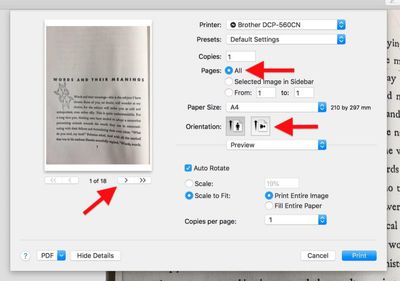
  5. Click Show Details to expand the Print dialog and browse the full set of options. Make sure the All button is selected in the Pages options. Note that you can double-check the orientation of each image by clicking the arrows below the print preview, and use the Orientation buttons to correct any if required.
    4 print options to pdf

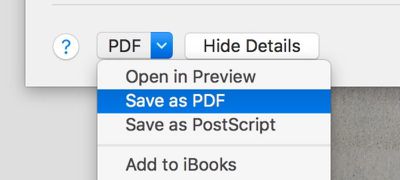
  6. Select Save as PDF from the PDF dropdown menu in the lower left of the Print dialog.
    5 save as pdf

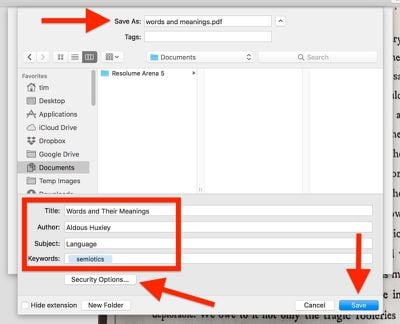
  7. The Save dialog will appear. Give your new PDF a name and choose a save location. Fill in the Title, Author, Subject, and Keywords fields if desired (these details are searchable in Spotlight). The Security Options... button also lets you optionally set a password to open the document, copy from it, and/or print it.
    6 name saved pdf

  8. Click Save when you're done.

Note that the Save as PDF option can be accessed from the Print dialog window within a number of macOS apps, not just Preview. You can use it to create PDFs of web pages viewed in Safari, or Word documents opened in Pages, for example.


Tag: Preview

Top Rated Comments

111 months ago
you guys ever get 2 preview windows when opening a bunch of .jpgs for example? i dont get why that happens to me sometimes. All images could be taken from same camera in same session too
Preferences > Images > Open all files in one window.
Score: 9 Votes (Like | Disagree)
philosopherdog Avatar
111 months ago
Preview is one of the most powerful apps that comes with MacOS. So many people who started on Windows think they need adobe PDF reader. Preview will do it all without opening your Mac to adobes insecure reader.
Score: 7 Votes (Like | Disagree)
Xavier Avatar
111 months ago
That sounds handy, mind sharing how you did it?
Sure. And you can change the values to what you'd like.

Attachment Image
Score: 5 Votes (Like | Disagree)
Solomani Avatar
111 months ago
Very useful tip, thanks MR. IMHO, this one single tip is more valuable than the last 50 rumor articles on this website.
Score: 3 Votes (Like | Disagree)
111 months ago
Neat tip! Reorganising and merging pages in Preview needs to be advertised more. So many people think you need Adobe Acrobat.
Score: 3 Votes (Like | Disagree)
111 months ago
I agreed with that statement until High Sierra. Several features are broken and PDF scaling is a blurry mess. There have been countless bug reports but no fixes. The majority of Apple's development resources have been reassigned to iOS and it is starting to show.
I'm not sure about that. This went around the Trolliverse awhile back, and came back as not true. Many people are using Preview with no problems at all.

So, unless you can more clearly state the problem as you see it and provide some way of duplicating it, I am going to have to say that I do not believe this statement.
[doublepost=1526751694][/doublepost]
Another thought about PDF on the Mac. It is not (as intimated by the article) merely a file format supported by Preview that was added because it is useful across platforms. The integration of PDF into the Mac is much deeper than that. One of the best design decisions Apple made with the development of OS X was creating Quartz as a display technology. Quartz is essentially Apple's implementation of PDF. Native outputting of virtually any document to PDF has been a feature of OS X from day one because it's integrated into the OS. At one point early in the OS X development process Apple even demonstrated a PDF editing tool. That app disappeared pretty quickly though. I suspect they ran into trouble with Adobe.
Copyright lawyers rule the world!
[doublepost=1526752307][/doublepost]
Very nice tip. Not around my Mac so can't test. Does it tip only work for images? I would like to combine some pdf files. And can it delete pdf pages? That's the only feature I miss when I stop using adobe acrobat.
its easy to combine pdf files in Preview. One way is to have both files open in separate windows, display the thumbnails in the sidebar, and drag or copy and paste from one to the other. you can also change the order of pages and and delete pages fro thumbnails. You can even create an automator workflow to select the pdfs and then combine them into one.
[doublepost=1526752361][/doublepost]
Neat. How do you get it to arrange the order of images in the pdf?
view thumbnails, and drag
[doublepost=1526753307][/doublepost]
Anyone know of a way to create the PDF in B&W so the size isn't gargantuan?
you can file print, then select pdf, this "flattens" the file and makes it very small. but not in black and white.

if you really want that, select file Export, use "quartz filter" to select Black and White
[doublepost=1526753610][/doublepost]
I wrote a native MacOS app in Swift that does the same! Was a fun project. Workflow is much simpler if all you want to do it convert images to a PDF.

Search Concat in Mac App Store (sorry on phone and cannot provide link)
Sounds fun. I wrote an Automator Action, that I also save as a service to Preview. This program annotates widgets (example was forms using fillable fields). It has multiple modes. Reset to clear widgets, index to number the widgets, import to load widgets from csv, and paste to paste widgets from Numbers (I guess could also be Excel or others too). Very fun, contact me if you want code, I also aim to post on GitHub. Love to see someone pick it up and go commercial
[doublepost=1526754694][/doublepost]
Very timely for me. I have been trying to do this from my Win machine, but the resulting PDF is too large for email. Does anyone know if Preview will compress the images or resulting PDF to a manageable size?

Also, is there an equivalent workflow in iOS? My source images are all pictures taken from my iPhone. Would be a huge timesaver to dump them into a single PDF for sharing by email on my iPhone.
Many ways to compress pdfs. "Flatten", by file print, then select PDF. file Export, choose format, save as images. Automator to compress images.

iOS: https://thesweetsetup.com/apps/best-pdf-manager-editor-ipad/. this reviews many PDF editor apps. I personally used PDF Expert by Readle - excellent app.
Score: 2 Votes (Like | Disagree)

Popular Stories

apple design award 2025

Apple Announces 2025 Design Award Winners Ahead of WWDC 2025

Tuesday June 3, 2025 10:14 am PDT by
As we wait for WWDC to kick off next Monday, Apple today announced the winners of its annual Apple Design Awards, recognizing apps and games for their innovation, ingenuity, and technical achievement. The 2025 Apple Design Award winners are listed below, with one app and one game selected per category: Delight and Fun - CapWords (App) and Balatro (Game) Innovation - Play (App) and PBJ -...
1password deal blue

1Password Security Breach: What Was Accessed and What Wasn't

Wednesday November 25, 2026 1:09 pm PST by
Popular password management app 1Password today said it experienced a security breach earlier this month. 1Password says some customer names and email addresses were accessed, but no customer vault contents were compromised. On November 19, 1Password saw indications that an employee's GitHub account had been breached and began investigating. The company says the breached GitHub account was...
apple store down feature

Here's Why the Apple Store is Going Down

Thursday November 26, 2026 5:49 am PST by
Apple's online store is going down for a few hours on a rolling country-by-country basis right now, but do not get your hopes up for new products. Apple takes its online store down for a few hours ahead of Black Friday every year to tease its annual gift card offer with the purchase of select products. The store is down in Australia, New Zealand, and Thailand, right now, and it will...
Latest Stories
The 50+ Best Apple Black Friday Deals Still Available on AirPods, iPads, and More
4 minutes ago
Apple's M6 and PROLED MacBook Pro Reach New Low Prices for Black Friday
4 hours ago
The MacRumors Show: iPhone Air 2 and iPhone 18 Are Coming
4 hours ago
Apple Store in Brisbane Reopening Next Month With New Design
5 hours ago
The 60+ Best Black Friday Accessory Deals on iPhone Chargers, TVs, Headphones, and More
6 hours ago
GTA VI Now (Barely) Running on Apple Silicon Macs
6 hours ago
The Best Black Friday Streaming Deals on Apple TV, Disney+, and More
7 hours ago
Apple TV's 'Carême' Wins International Emmy for Best Drama
7 hours ago
iPhone 18 Production Delay Leaves Apple Little Time Before Launch
8 hours ago
The Best Black Friday AirPods Deals Still Available
1 minute ago
The Best Black Friday Deals on Apple Home Products
9 hours ago
The Best Black Friday iPhone Deals
9 hours ago
The Best Black Friday iPad Deals
9 hours ago
The Best Black Friday Apple Watch Deals
9 hours ago
The Best Black Friday AirTag Deals
9 hours ago
The Best Black Friday Mac Deals
9 hours ago
iPhone Share of US Smartphone Market Hits 57% as Rivals Slip
10 hours ago
iPhone 20 Pro Rumored to Feature 3D-Printed Titanium Frame
11 hours ago
Apple's Official 2026 Black Friday Offer Starts Rolling Out
1 day ago
Halide Adds Fill Light Feature for iPhone Duo
1 day ago
MacBook Air Black Friday Deals Now Live With Massive $399 Savings
1 day ago
Amazon Discounts All MacBook Neo Models by $99 for Black Friday
1 day ago
Kodak Launches Unique AirTag Rival With E-Ink Display
1 day ago
Here's Why the Apple Store is Going Down
1 day ago
Apple Still Working on Giant Foldable iPad That Could Cost $5,000
1 day ago
iPhones Dominate China's Weak Singles' Day Smartphone Sales
1 day ago
iPhone 20 Pro Could Feature Ceramic in Limited-Edition Model
1 day ago
Apple Faces Korean Regulator Review Over iPhone 16 AI Advertising
1 day ago
Apple Watch Ultra 4 Hits New Best-Ever Price of $649.99 for Black Friday
1 day ago
New Apple Store Opening in India, Download the Special Wallpaper Now
2 days ago
Related Apple News: Travel | Reviews | Local News | Technology | South Africa