Skip to Content

How to Control the Active Noise Cancellation Feature on AirPods Max

by

This article explains how to control the Active Noise Cancellation feature on Apple's AirPods Max headphones. Bear in mind that iOS devices need to be running iOS 14.3 or later in order to support ‌AirPods Max. You can check that your device is updated by launching the Settings app and going to General -> Software Update.

airpods max on head

What is the Active Noise Cancellation Feature on AirPods Max?

‌AirPods Max are Apple's first own-brand over-ear headphones with Active Noise Cancellation (ANC), which is designed to block out the outside world so you can focus on what you're listening to. Several microphones on the outside of the headphones listen to the noise around you and then create an inverse wave to reduce the volume of the incoming sound.

In contrast, Transparency mode allows you to simultaneously listen to music while still hearing the environment around you – whether that's to hear traffic during a walk or an important train announcement during the morning commute. It uses the same external microphones as ANC to monitor the sound, but that sound is then passed through the headphones just like any other audio, while advanced software ensures that your own voice sounds natural as your audio continues to play perfectly.

How to Control Active Noise Cancellation on AirPods Max

There are three ways of controlling Active Noise Cancellation on ‌AirPods Max. The first method involves using a physical button on the ‌headphones themselves that offers default settings, while the second and third methods are accessed via onscreen menus on the connected iOS device.

Method 1:

  1. Allow your ‌AirPods‌ Max to connect to your iPhone or iPad in the usual way, by taking them out of the Smart Case and putting them over your ears.
  2. Press the noise control button on the top of the right ear cup to cycle between Noise Cancellation and Transparency, depending on your preference.
    airpods max digital crown

  3. You'll hear a tone when switching between the two functions.
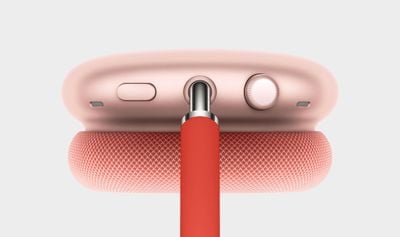
If you want, you can customize the noise control button on the ‌AirPods Max, and even use it to turn off the noise control features completely.

Method 2:

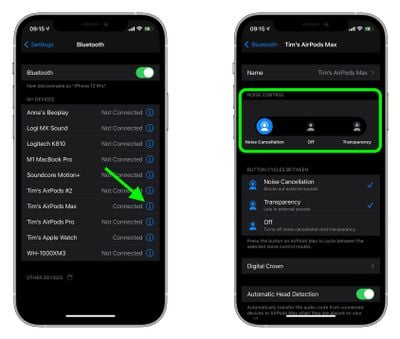
  1. Allow your ‌AirPods‌ Max to connect to your iPhone or ‌iPad‌ in the usual way, by taking them out of the Smart Case and putting them over your ears.
  2. Launch the Settings app on your iOS device.
  3. Tap Bluetooth.
    settings

  4. Under My Devices, tap the information icon (the circled "i") next to AirPods Max in the list.
  5. Under Noise Control, tap Noise Cancellation, Off, or Transparency, depending on your preference.
Method 3:

  1. Allow your AirPods Max to connect to your iPhone or ‌iPad‌ in the usual way, by taking them out of the Smart Case and putting them over your ears.
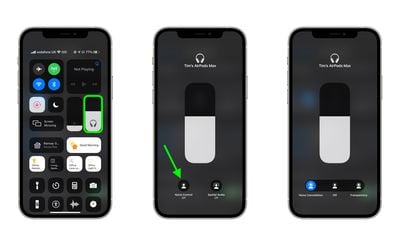
  2. Open Control Center on your iOS device: On an ‌iPad‌ with a Home button, double-tap the Home button; on iPhone 8 or earlier, swipe up from the bottom of the screen; and on a 2018 iPad Pro or iPhone X and later, swipe down from the upper right of the screen.

  3. Press and hold the Control Center volume bar (pair of earbuds will be visible inside of it to indicate the AirPods Max are connected.)
  4. Tap the Noise Control button.
    control center

  5. Use the strip of buttons to switch between Noise Cancellation, Off, or Transparency, depending on your preference.
How to Control Active Noise Cancellation on Mac

If you've got your AirPods Max connected to a Mac running macOS Catalina or later, you can also control noise cancellation from the volume icon in the menu bar. Simply hover over your AirPods Max in the Output Device list to reveal a submenu, where you can click Transparency, Noise Cancellation, and Off.
Related Roundup: AirPods Max 2
Buyer's Guide: AirPods Max (Buy Now)
Related Forum: AirPods

Popular Stories

airpods 5 new blue

Apple Releases New AirPods Firmware

Tuesday November 10, 2026 12:11 pm PST by
Apple today released new firmware for the AirPods Pro 2, AirPods Pro 3, AirPods 4, AirPods 5, and AirPods Max 2. The firmware has a build number of 9B47, up from 9A348/9A350. Apple has been beta testing the new firmware for the last several weeks. In a support document, Apple merely mentioned the new firmware contains "bug fixes and other improvements." Firmware updates can be downloaded...
AirPods Max and HomePod mini Red Mock 2

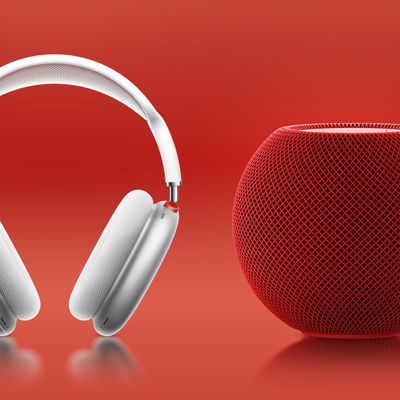
Apple Bringing Back (PRODUCT)RED With Red HomePod Mini 2 and AirPods Max 2

Monday November 23, 2026 11:27 am PST by
Apple plans to release (PRODUCT)RED versions of the HomePod mini 2 and AirPods Max 2, reports Bloomberg. The new products will be part of Apple's annual fundraiser for The Global Fund to Fight AIDS, Tuberculosis and Malaria in developing countries. The red HomePod mini 2 and AirPods Max 2 could be introduced on World AIDS Day, which falls on Tuesday, December 1. The HomePod mini will have ...
AirPods Max and HomePod mini Red Mock 2

Apple to Release Four (RED) Products by Next Week

Tuesday November 24, 2026 6:33 am PST by
Bloomberg's Mark Gurman this week reported that Apple plans to release (PRODUCT)RED versions of the existing AirPods Max 2 and HomePod mini 2 on or around Tuesday, December 1, which is World AIDS Day. The new color will likely be the only change. AirPods Max 2 and HomePod mini 2 in (PRODUCT)RED (concept) Gurman said the (PRODUCT)RED version of the HomePod mini 2 will have a red mesh exterior, ...
Latest Stories
The 50+ Best Apple Black Friday Deals Still Available on AirPods, iPads, and More
7 hours ago
HomePod Mini 2 in (RED) Seemingly Spotted Ahead of Announcement
4 hours ago
Apple's M6 and PROLED MacBook Pro Reach New Low Prices for Black Friday
14 hours ago
The MacRumors Show: iPhone Air 2 and iPhone 18 Are Coming
14 hours ago
Apple Store in Brisbane Reopening Next Month With New Design
15 hours ago
The 60+ Best Black Friday Accessory Deals on iPhone Chargers, TVs, Headphones, and More
16 hours ago
GTA VI Now (Barely) Running on Apple Silicon Macs
16 hours ago
The Best Black Friday Streaming Deals on Apple TV, Disney+, and More
17 hours ago
Apple TV's 'Carême' Wins International Emmy for Best Drama
17 hours ago
iPhone 18 Production Delay Leaves Apple Little Time Before Launch
18 hours ago
The Best Black Friday AirPods Deals Still Available
10 hours ago
The Best Black Friday Deals on Apple Home Products
19 hours ago
The Best Black Friday iPhone Deals Still Available
10 hours ago
The Best Black Friday iPad Deals Still Available
10 hours ago
The Best Black Friday Apple Watch Deals Still Available
10 hours ago
The Best Black Friday AirTag Deals Still Available
10 hours ago
The Best Black Friday Mac Deals Still Available
10 hours ago
iPhone Share of US Smartphone Market Hits 57% as Rivals Slip
20 hours ago
iPhone 20 Pro Rumored to Feature 3D-Printed Titanium Frame
21 hours ago
Apple's Official 2026 Black Friday Offer Starts Rolling Out
2 days ago
Halide Adds Fill Light Feature for iPhone Duo
2 days ago
MacBook Air Black Friday Deals Now Live With Massive $399 Savings
2 days ago
Amazon Discounts All MacBook Neo Models by $99 for Black Friday
2 days ago
Kodak Launches Unique AirTag Rival With E-Ink Display
2 days ago
Here's Why the Apple Store is Going Down
2 days ago
Apple Still Working on Giant Foldable iPad That Could Cost $5,000
2 days ago
iPhones Dominate China's Weak Singles' Day Smartphone Sales
2 days ago
iPhone 20 Pro Could Feature Ceramic in Limited-Edition Model
2 days ago
Apple Faces Korean Regulator Review Over iPhone 16 AI Advertising
2 days ago
Apple Watch Ultra 4 Hits New Best-Ever Price of $649.99 for Black Friday
2 days ago
Related Apple News: Iphone | Entertainment | Ipad | Mac | Iphone





























