Skip to Content

How to Close Apps on iPhone 12, 11, XS, XR and X

by

When Apple launched iPhones without Home buttons, a whole new set of gestures were introduced, changing the way that we were used to interacting with our iPhones.

One of these changes involved the App Switcher and the way open apps are found, with Apple introducing a gesture to reach the App Switcher on devices with a Home button.
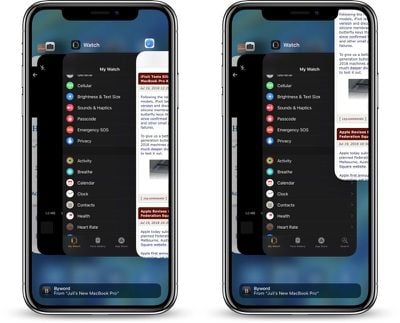
closing apps on iPhone

How to close an app on iPhone X, XS, XS Max, XR, iPhone 11, 11 Pro, or 11 Pro Max, iPhone 12, 12 Mini, 12 Pro, or 12 Pro Max

  1. At the Home screen of the iPhone, or while in an app, swipe up from the bottom of the screen and pause while still pressing the screen.
  2. When the App Switcher comes up, swipe left and right through the different app cards to find the app that you want to close.
  3. Use a quick swipe upwards to close the app.

Using this gesture exits out of an app and effectively closes it, which is useful if you need to restart an app for some reason. There's generally no need to close your apps to improve performance, though, as Apple has built-in management systems for dealing with all of the apps that you have open on your device.

Most apps that are not active are in a suspended state and are not using up any resources, but some apps can run in the background for a period of time if background refresh is activated.

According to Apple, force quitting an app will not improve your battery life, and it's possible that doing so can actually drain battery because it causes the iPhone to load it all over again.


Related Forums: iOS 11, iOS 12, iOS 13

Top Rated Comments

shamino Avatar
109 months ago
Here's proof right from Craig Federighi:

https://www.macrumors.com/2016/03/10/force-quitting-apps-doesnt-help-battery/
Apple has been saying that for years, but it doesn't change the fact that some apps (especially Facebook) are notorious for running in the background and draining your battery when (according to Apple press releases) they are supposed to be suspended.

Killing the offending app is the only way to make it stop. And since you have no way of knowing which apps are good and which are bad, it's far easier to just kill them all when you're done with a session.
Score: 15 Votes (Like | Disagree)
dynAdZ Avatar
109 months ago
iPhone X user here. It was never necessary to press the red minus. Once it appears, swiping up to close apps works as well. This just eliminates one step in between which is welcomed!
Score: 6 Votes (Like | Disagree)
jclo Avatar
109 months ago
Interesting...

Quitting apps used to be a thing which folks weren’t really aware off. As a somehow geek person, I used to advise people to do so. It became an act that showed that someone knew the logic of background activity draining battery performance, especially apps that were using GPS, or that were constantly connected to the internet to receive push updates.

I am somehow sceptical about the text in the OP, since perhaps the OS is smarter att handling performance, but ... some principles must pertain with regards to battery performance and awareness of apps, with regards to being able to log your online presence or your location or whatnot.

Can we take the statements above with a grain of salt, or do I really need to rethink my understanding on the matter?
Here's proof right from Craig Federighi:

https://www.macrumors.com/2016/03/10/force-quitting-apps-doesnt-help-battery/

Edit: More documentation from Apple.

https://developer.apple.com/library/archive/documentation/iPhone/Conceptual/iPhoneOSProgrammingGuide/TheAppLifeCycle/TheAppLifeCycle.html#//apple_ref/doc/uid/TP40007072-CH2-SW1
Score: 5 Votes (Like | Disagree)
jclo Avatar
109 months ago
Thanks for the references. I can conclude that my scepticism belongs to those threads instead.

Nevertheless: users should use common sense and close apps as they feel for doing. The principle of the oposite being true (it would more drain your battery than preserve it) is a long shot. If you relaunch an app, you are intentionally adding load to the processor and therewith asking for battery power. I can never believe that the loss of power trough intentional processes would be higher than the gain of battery by not doing so for a good while.

Off course, if you pick up the phone every minute, open an app and close it, it would not be so smart for battery life.

My point being: we as a user should be fully entitled to close apps to our likings, as you never know what happens when they are lurking in the background.

For macrumors to pertinently stress on a statement by Frederigi, is quite off the hook. Commons sense will prevail amongst us users.
Of course, that's why the feature exists. You can close apps, and there are absolutely valid reasons to do. In the post, I'm just saying that you don't *need* to for reasons like preserving battery life because it is a common myth that if you don't close apps they're constantly running in the background or eating up too much memory.
[doublepost=1532119816][/doublepost]
EXACTLY.

You absolutely do and can save battery by closing the apps that use background battery (aka, facebook and instagram among others, but those are the two worst offenders). They are 100% NOT in a frozen state and they 100% use resources.
I'd argue that it's ultimately more efficient to turn off background refresh on these apps rather than to worry about closing them each time you use them. I have background refresh off for Facebook and some other apps that are notorious for using system resources.
Score: 4 Votes (Like | Disagree)
iapplelove Avatar
109 months ago
Apple has been saying that for years, but it doesn't change the fact that some apps (especially Facebook) are notorious for running in the background and draining your battery when (according to Apple press releases) they are supposed to be suspended.

Killing the offending app is the only way to make it stop. And since you have no way of knowing which apps are good and which are bad, it's far easier to just kill them all when you're done with a session.
I don’t care what anyone says, I usually kill all the apps running each morning,pretty much from the day before and start clean..

Why keep apps running if they don’t need to be.
Score: 4 Votes (Like | Disagree)
bob122989 Avatar
109 months ago
Killing the offending app is the only way to make it stop. And since you have no way of knowing which apps are good and which are bad, it's far easier to just kill them all when you're done with a session.
Restarting the device, in my opinion, does much more towards system resource recovery than force closing all apps, with the added benefit of not losing the recently used order of apps in the switcher.

I can agree with you on a per-app basis, I close certain offending apps such as YouTube and Safari, they both tend to hog RAM longer than they should. But I only close them if I don’t intend to reopen them for several hours.

Why waste the battery life completely reopening all apps all the time?
Score: 3 Votes (Like | Disagree)

Popular Stories

apple design award 2025

Apple Announces 2025 Design Award Winners Ahead of WWDC 2025

Tuesday June 3, 2025 10:14 am PDT by
As we wait for WWDC to kick off next Monday, Apple today announced the winners of its annual Apple Design Awards, recognizing apps and games for their innovation, ingenuity, and technical achievement. The 2025 Apple Design Award winners are listed below, with one app and one game selected per category: Delight and Fun - CapWords (App) and Balatro (Game) Innovation - Play (App) and PBJ -...
1password deal blue

1Password Security Breach: What Was Accessed and What Wasn't

Wednesday November 25, 2026 1:09 pm PST by
Popular password management app 1Password today said it experienced a security breach earlier this month. 1Password says some customer names and email addresses were accessed, but no customer vault contents were compromised. On November 19, 1Password saw indications that an employee's GitHub account had been breached and began investigating. The company says the breached GitHub account was...
Apple 2026 Black Friday Event Hero

Apple's Official 2026 Black Friday Offer Starts Rolling Out

Thursday November 26, 2026 8:37 am PST by
Apple's annual four-day Black Friday through Cyber Monday shopping event is now live in Australia, New Zealand, and Thailand, and it will continue to roll out across Europe, the U.S., and Canada as the calendar turns to Friday, November 27 around the world. In the U.S., Apple's terms and conditions say the promotion begins on November 27 at 12 a.m. Pacific Time and ends on November 30 at...
Latest Stories
The 50+ Best Apple Black Friday Deals Still Available on AirPods, iPads, and More
12 hours ago
HomePod Mini 2 in (RED) Seemingly Spotted Ahead of Announcement
9 hours ago
Apple's M6 and PROLED MacBook Pro Reach New Low Prices for Black Friday
20 hours ago
The MacRumors Show: iPhone Air 2 and iPhone 18 Are Coming
20 hours ago
Apple Store in Brisbane Reopening Next Month With New Design
20 hours ago
The 60+ Best Black Friday Accessory Deals on iPhone Chargers, TVs, Headphones, and More
21 hours ago
GTA VI Now (Barely) Running on Apple Silicon Macs
21 hours ago
The Best Black Friday Streaming Deals on Apple TV, Disney+, and More
22 hours ago
Apple TV's 'Carême' Wins International Emmy for Best Drama
23 hours ago
iPhone 18 Production Delay Leaves Apple Little Time Before Launch
23 hours ago
The Best Black Friday AirPods Deals Still Available
15 hours ago
The Best Black Friday Deals on Apple Home Products
1 day ago
The Best Black Friday iPhone Deals Still Available
15 hours ago
The Best Black Friday iPad Deals Still Available
15 hours ago
The Best Black Friday Apple Watch Deals Still Available
15 hours ago
The Best Black Friday AirTag Deals Still Available
15 hours ago
The Best Black Friday Mac Deals Still Available
15 hours ago
iPhone Share of US Smartphone Market Hits 57% as Rivals Slip
1 day ago
iPhone 20 Pro Rumored to Feature 3D-Printed Titanium Frame
1 day ago
Apple's Official 2026 Black Friday Offer Starts Rolling Out
2 days ago
Halide Adds Fill Light Feature for iPhone Duo
2 days ago
MacBook Air Black Friday Deals Now Live With Massive $399 Savings
2 days ago
Amazon Discounts All MacBook Neo Models by $99 for Black Friday
2 days ago
Kodak Launches Unique AirTag Rival With E-Ink Display
2 days ago
Here's Why the Apple Store is Going Down
2 days ago
Apple Still Working on Giant Foldable iPad That Could Cost $5,000
2 days ago
iPhones Dominate China's Weak Singles' Day Smartphone Sales
2 days ago
iPhone 20 Pro Could Feature Ceramic in Limited-Edition Model
2 days ago
Apple Faces Korean Regulator Review Over iPhone 16 AI Advertising
2 days ago
Apple Watch Ultra 4 Hits New Best-Ever Price of $649.99 for Black Friday
2 days ago
Related Apple News: News | Iphone | South Africa | Buyers Guide | Reviews






























