Skip to Content

How to Perform a Clean Installation of macOS 10.14 Mojave

by

This article guides you through the process of performing a clean installation of macOS 10.14 Mojave using the bootable USB drive method, rather than upgrading your Mac using Apple's standard installation package, which retains existing user data and any user-installed apps.
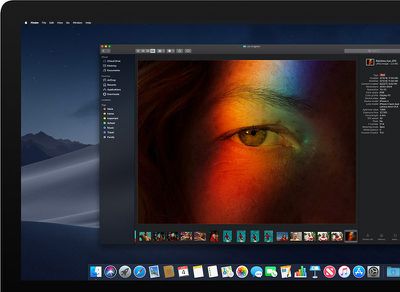
macosmojavedarkmode
Creating a bootable USB drive provides you with a convenient way to install a fresh copy of macOS Mojave on multiple Macs. Performing a clean install can also remove annoying quirks and strange behaviors that your Mac may have inherited over time, and often helps to reclaim disk space caused by junk files left by third-party apps.

The following procedure works with the latest public beta of macOS Mojave, which you can download by enrolling in the Apple Beta Software Program. It will also work with the final version of Mojave, once it's released in the fall. To follow the steps, you'll need an empty 8GB or larger USB thumb drive (USB-C or USB-A, depending on your Mac) and an hour or two of downtime while the installation procedure completes.

Also, be sure to perform a full backup of your Mac beforehand using Time Machine, so that you can restore your original system from the Recovery partition if something goes wrong.

Compatibility Check

macOS Mojave is a major update that introduces a range of new features like a Dark Mode, Desktop and Finder improvements, new apps, and a revamped Mac App Store, but not every Mac that can run macOS High Sierra will run macOS Mojave. The full list of compatible Mac models is as follows:

  • MacBook (Early 2015 or newer)
  • MacBook Air (Mid 2012 or newer)
  • MacBook Pro (Mid 2012 or newer)
  • Mac mini (Late 2012 or newer)
  • iMac (Late 2012 or newer)
  • iMac Pro (2017)
  • Mac Pro (Late 2013, plus mid 2010 and mid 2012 models with recommended Metal-capable GPU)

To check if your Mac is compatible, open the Apple () menu in the upper left corner of your Mac's screen and select About This Mac. Look just below the OS X version number in the Overview tab – if the Mac model name is the same or a later model year than the one shown in the compatibility list above, your Mac is compatible with macOS Mojave.

How to Perform a Clean Install of macOS Mojave

  1. Download macOS Mojave, either via Apple's Public Beta Program or from the Mac App Store (once it's available).
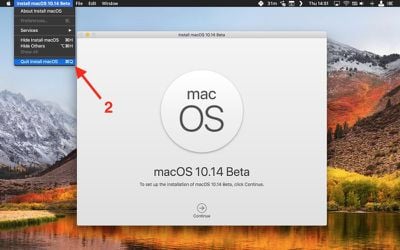
  2. Once the download is complete, close the installer window by selecting the Quit Install macOS option in the menu bar or using the keyboard shortcut Command (⌘) + Q.
    mojave clean install 1

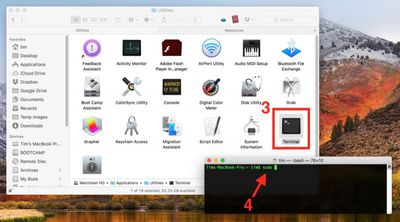
  3. Launch the Terminal app (found in Applications/Utilities/Terminal).
  4. At the Terminal command prompt, type sudo followed by a space.
    mojave clean install 2

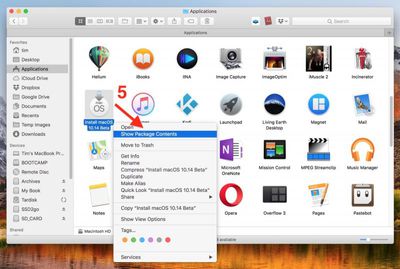
  5. Next, open a Finder window, navigate to your Applications folder, right-click (or Ctrl-click) on the macOS 10.14 installer, and select Show Package Contents from the contextual dropdown menu.
    mojave clean install 3

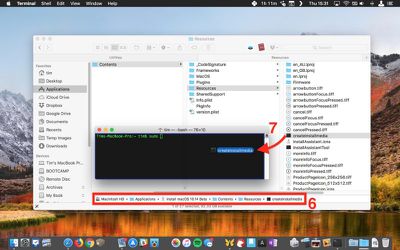
  6. Navigate to Contents -> Resources within the installer package.
  7. Drag the createinstallmedia file into the Terminal window.
    mojave clean install 4

  8. Still in the Terminal window, type --volume followed by a space.
    mojave clean install 5

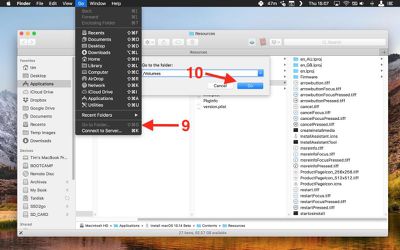
  9. Click the open Finder window to bring it to the front, and in the Finder menu bar select Go -> Go To Folder....
  10. In the Go to the folder input box, type /Volumes and click Go.
    mojave clean install 6

  11. Connect your USB thumbnail drive to your Mac.
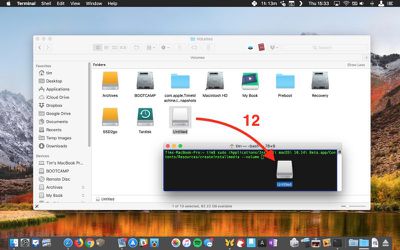
  12. Drag the USB drive's icon from Finder into the Terminal window.
    mojave clean install 7 1

  13. Press the Enter key on your keyboard to run the completed Terminal command.
  14. Enter your administrator password when prompted.
    mojave clean install 8

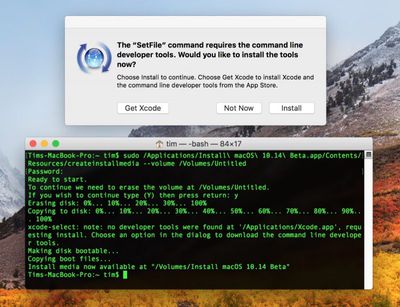
  15. Type Y and press Enter when prompted, and the command will create your bootable Mojave installer on the USB drive. This will take a few minutes to complete, so leave it running. Note that if you're asked whether you want to install Xcode during this time, you can safely click Not Now and the process will complete successfully regardless.
Restart and Install

Once the USB installer has been created, restart your Mac and hold down the Option (⌥) key as soon as you hear the reboot tone. Then follow these steps:

  1. Use the mouse pointer or the arrow keys on your keyboard to select the disk called Install macOS Mojave in the drive list that appears on the screen.
  2. Once the USB drive has booted, select Disk Utility from the Utilities window, choose your Mac's startup drive from the list, and click Erase.
  3. When your Mac's startup disk is formatted, return to the Utilities window and select Install macOS, choose your freshly erased startup drive when asked where to install the OS, and follow the onscreen prompts to complete the installation.

Related Forum: macOS Mojave

Top Rated Comments

Urbanpixels Avatar
107 months ago
Step 4 - Scream profanities when half your software doesn't work or you need to buy the yearly new version
Score: 16 Votes (Like | Disagree)
107 months ago
I've come to realize clean installs are just pedantic, a rudiment of the Windows era.

Goes in the same bin as memory cleaners, defragmentation etc.

Unless you have a serious problem, just upgrade.
Score: 11 Votes (Like | Disagree)
chucker23n1 Avatar
107 months ago
If you’re on APFS, none of this is necessary. Just create an additional APFS volume in Disk Utility (it won’t take up its own space), then install to that destination.
Score: 5 Votes (Like | Disagree)
107 months ago
Won't ⌘⌥R do the same? Just launch disk utility in Recovery mode to erase the drive, then let it install.
Score: 5 Votes (Like | Disagree)
wesley96 Avatar
107 months ago
Saying iMacs can’t use APFS is a misnomer. The culprit is the Fusion Drive, not any particular style of Mac. There are plenty of non-Fusion Drive iMacs out there. My 2017 iMac is running on APFS, too, and no, it does not use a Fusion Drive.
Score: 4 Votes (Like | Disagree)
EdT Avatar
107 months ago
If you're using an iMac or a fusion drive, then you can't use APFS
I thought that this OS would allow APFS with Fusion Drives/iMacs.
Score: 4 Votes (Like | Disagree)

Popular Stories

apple design award 2025

Apple Announces 2025 Design Award Winners Ahead of WWDC 2025

Tuesday June 3, 2025 10:14 am PDT by
As we wait for WWDC to kick off next Monday, Apple today announced the winners of its annual Apple Design Awards, recognizing apps and games for their innovation, ingenuity, and technical achievement. The 2025 Apple Design Award winners are listed below, with one app and one game selected per category: Delight and Fun - CapWords (App) and Balatro (Game) Innovation - Play (App) and PBJ -...
Apple 2026 Black Friday Event Hero

Apple's Official 2026 Black Friday Offer Starts Rolling Out

Thursday November 26, 2026 8:37 am PST by
Apple's annual four-day Black Friday through Cyber Monday shopping event is now live in Australia, New Zealand, and Thailand, and it will continue to roll out across Europe, the U.S., and Canada as the calendar turns to Friday, November 27 around the world. In the U.S., Apple's terms and conditions say the promotion begins on November 27 at 12 a.m. Pacific Time and ends on November 30 at...
1password deal blue

1Password Security Breach: What Was Accessed and What Wasn't

Wednesday November 25, 2026 1:09 pm PST by
Popular password management app 1Password today said it experienced a security breach earlier this month. 1Password says some customer names and email addresses were accessed, but no customer vault contents were compromised. On November 19, 1Password saw indications that an employee's GitHub account had been breached and began investigating. The company says the breached GitHub account was...
Latest Stories
The 50+ Best Apple Black Friday Deals Still Available on AirPods, iPads, and More
6 hours ago
Here Are the Best Apple Black Friday Leftover Deals You Can Get Today
4 hours ago
HomePod Mini 2 in (RED) Seemingly Spotted Ahead of Announcement
15 hours ago
Apple's M6 and PROLED MacBook Pro Reach New Low Prices for Black Friday
1 day ago
The MacRumors Show: iPhone Air 2 and iPhone 18 Are Coming
1 day ago
Apple Store in Brisbane Reopening Next Month With New Design
1 day ago
The 60+ Best Black Friday Accessory Deals on iPhone Chargers, TVs, Headphones, and More
4 hours ago
GTA VI Now (Barely) Running on Apple Silicon Macs
1 day ago
The Best Black Friday Streaming Deals on Apple TV, Disney+, and More
1 day ago
Apple TV's 'Carême' Wins International Emmy for Best Drama
1 day ago
iPhone 18 Production Delay Leaves Apple Little Time Before Launch
1 day ago
The Best Black Friday AirPods Deals Still Available
22 hours ago
The Best Black Friday Deals on Apple Home Products
1 day ago
The Best Black Friday iPhone Deals Still Available
22 hours ago
The Best Black Friday iPad Deals Still Available
22 hours ago
The Best Black Friday Apple Watch Deals Still Available
22 hours ago
The Best Black Friday AirTag Deals Still Available
22 hours ago
The Best Black Friday Mac Deals Still Available
22 hours ago
iPhone Share of US Smartphone Market Hits 57% as Rivals Slip
1 day ago
iPhone 20 Pro Rumored to Feature 3D-Printed Titanium Frame
1 day ago
Apple's Official 2026 Black Friday Offer Starts Rolling Out
2 days ago
Halide Adds Fill Light Feature for iPhone Duo
2 days ago
MacBook Air Black Friday Deals Now Live With Massive $399 Savings
2 days ago
Amazon Discounts All MacBook Neo Models by $99 for Black Friday
2 days ago
Kodak Launches Unique AirTag Rival With E-Ink Display
2 days ago
Here's Why the Apple Store is Going Down
2 days ago
Apple Still Working on Giant Foldable iPad That Could Cost $5,000
2 days ago
iPhones Dominate China's Weak Singles' Day Smartphone Sales
2 days ago
iPhone 20 Pro Could Feature Ceramic in Limited-Edition Model
2 days ago
Apple Faces Korean Regulator Review Over iPhone 16 AI Advertising
2 days ago
Related Apple News: South Africa | Mac | Health | Iphone | Culture