Skip to Content

How to Batch Convert Images Using macOS Preview

by

Preview appThere are many third-party apps available for Mac that will batch convert images for you (Permute is one example). And then there's Preview, the powerful file viewer that's built into macOS.

Preview will happily convert several images for you in one go. If you have lots of photos on your Mac in Apple's HEIC format, for instance, you can use Preview to quickly convert them to the more accessible JPEG format.

In fact, what's not obvious to many users is that Preview is capable of converting files in 18 different image formats, including the following:

  • GIF
  • HEIC
  • ICNS
  • JPEG
  • JEPG-2000
  • KTX
  • Microsoft BMP
  • Microsoft Icon
  • OpenEXR
  • PBM/PGM/PPM
  • PDF
  • PNG
  • PVRTC
  • Photoshop
  • PostScript
  • QuickTime Movie
  • TGA
  • TIFF

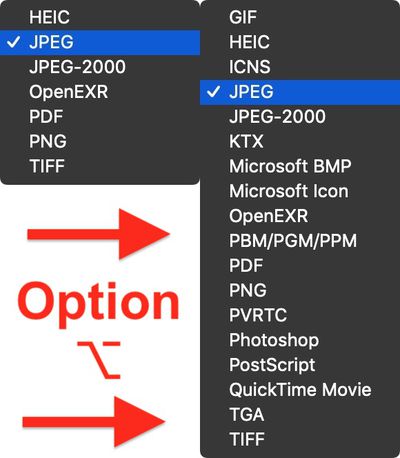
The secret to accessing all of the available format export options in Preview is with the Option (⌥) key. Keep reading to learn how it's done.

How to Batch Convert Images in Preview

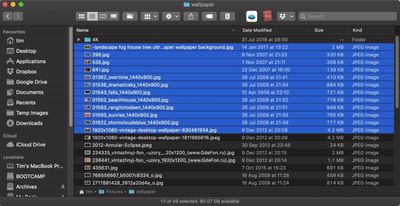
  1. In a Finder window, hold down the Command (⌘) key and individually click all the images you want to convert; if they're grouped together consecutively, hold down Shift and click the first and then the last file, and all of them will be selected.
    how to batch convert images in preview03

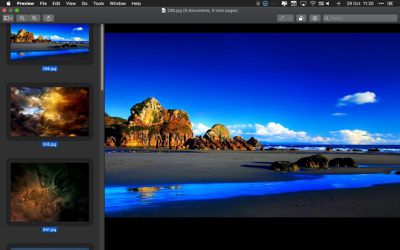
  2. Double-click one of the selected images to open them all in Preview. If Preview isn't your default image viewer, right-click (Ctrl-click) instead and choose Open With -> Preview from the dropdown menu.
  3. Click inside the Preview sidebar. (if it's not showing, click the View Menu button and select Thumbnails.) Alternatively, if you're using the Contact Sheet view, drag a box over all the images to select them.
    batch convert images in Preview

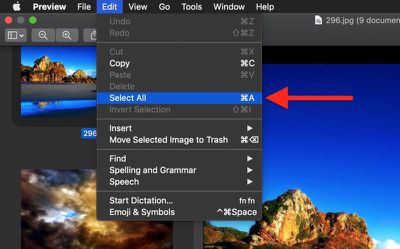
  4. Select Edit -> Select All from the Preview menu bar, or use the Command-A keyboard shortcut to select all the open images.
    how to batch convert images in preview 03

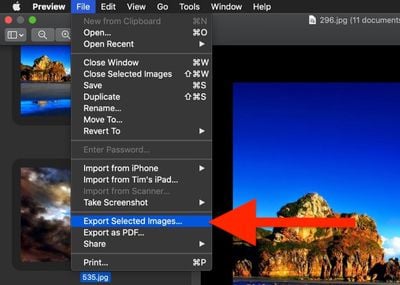
  5. Select File -> Export Selected Images... from the menu bar.
    how to batch convert images in preview02

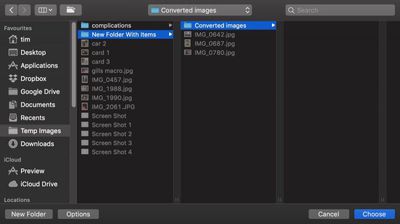
  6. Choose a location to export your converted images.
    how to batch convert images in preview 08

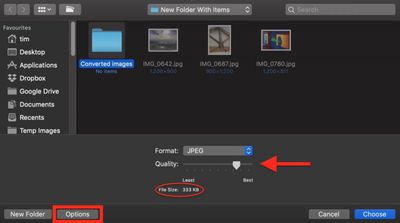
  7. Click the Options button in the Export window.
    how to batch convert images in preview04

  8. Drag the Quality slider to the desired level (keep an eye on the file size).
  9. Select an image type from the Format dropdown. Pro tip: Hold down the Option (⌥) key when you click the Format button to reveal several more image formats available to you.
    how to batch convert images in preview05

  10. Click Choose.

A progress indicator bar will replace Preview's Export window. Once it has completed you'll find your exported images in the chosen location and format, ready for use in your projects.

Note that you can also batch resize images using the method outlined above. After Step 4, select Tools -> Adjust Size... from the menu bar, input the resolution you want all the selected images to take, and click Resize. Note: You may need to select all the images again for export.


Tag: Preview

Top Rated Comments

fairuz Avatar
106 months ago
Preview is one of those secretly really powerful Mac apps for which there's no good replacement elsewhere. At least not that I've seen.
Score: 3 Votes (Like | Disagree)
106 months ago
Is there a way to do file conversions like this that preserves the meta data (original image date, etc.)?
Score: 3 Votes (Like | Disagree)
106 months ago
These How-To articles are the best of MacRumors.
Agreed. I would totally visit a MacRumors spinoff site... MacHints (or maybe something catchier?)

@MacRumors: could you guys at least tag these all with "Hints" or something?
Score: 3 Votes (Like | Disagree)
Solomani Avatar
106 months ago
These How-To articles are the best of MacRumors.
Score: 3 Votes (Like | Disagree)
outskirtsofinfinity Avatar
106 months ago
How do you know which buttons have "hidden" features that are revealed using the Option button? Is there a GUI style convention (say, the way the button is shaded when you hover over it, or something?) that suggests that more hidden options are available? Or is it just impossible to tell and you have to try the Option button everywhere you go to try to reveal hidden treasure... i.e., is it considered more of an "easter egg" kind of thing to delight the ones that stumble across these treasures and allow them to write a 'macOS Secrets revealed' kind of book or article? It just seems so stupid... it's something I'd expect from some hopeless nerd Android programmer (or the self indulgent programmers of the Tesla user interface), not from Apple. E.g., how's my mother in law supposed to figure it out?
Score: 2 Votes (Like | Disagree)
AlumaMac Avatar
106 months ago
If anyone can tell me how to access all of Preview's format conversion options in Automator, I'd be very grateful.

Looks like Automator hasn't been updated and I doubt it will. You could add a terminal command to your Automator Workflow that runs the 'sips' command to do additional filetype conversions. (i.e. sips -s format jpeg filename.gif --out newfilename.jpg)
Score: 2 Votes (Like | Disagree)

Popular Stories

apple design award 2025

Apple Announces 2025 Design Award Winners Ahead of WWDC 2025

Tuesday June 3, 2025 10:14 am PDT by
As we wait for WWDC to kick off next Monday, Apple today announced the winners of its annual Apple Design Awards, recognizing apps and games for their innovation, ingenuity, and technical achievement. The 2025 Apple Design Award winners are listed below, with one app and one game selected per category: Delight and Fun - CapWords (App) and Balatro (Game) Innovation - Play (App) and PBJ -...
1password deal blue

1Password Security Breach: What Was Accessed and What Wasn't

Wednesday November 25, 2026 1:09 pm PST by
Popular password management app 1Password today said it experienced a security breach earlier this month. 1Password says some customer names and email addresses were accessed, but no customer vault contents were compromised. On November 19, 1Password saw indications that an employee's GitHub account had been breached and began investigating. The company says the breached GitHub account was...
apple store down feature

Here's Why the Apple Store is Going Down

Thursday November 26, 2026 5:49 am PST by
Apple's online store is going down for a few hours on a rolling country-by-country basis right now, but do not get your hopes up for new products. Apple takes its online store down for a few hours ahead of Black Friday every year to tease its annual gift card offer with the purchase of select products. The store is down in Australia, New Zealand, and Thailand, right now, and it will...
Latest Stories
The 50+ Best Apple Black Friday Deals Still Available on AirPods, iPads, and More
8 minutes ago
Apple's M6 and PROLED MacBook Pro Reach New Low Prices for Black Friday
8 hours ago
The MacRumors Show: iPhone Air 2 and iPhone 18 Are Coming
8 hours ago
Apple Store in Brisbane Reopening Next Month With New Design
8 hours ago
The 60+ Best Black Friday Accessory Deals on iPhone Chargers, TVs, Headphones, and More
9 hours ago
GTA VI Now (Barely) Running on Apple Silicon Macs
9 hours ago
The Best Black Friday Streaming Deals on Apple TV, Disney+, and More
10 hours ago
Apple TV's 'Carême' Wins International Emmy for Best Drama
11 hours ago
iPhone 18 Production Delay Leaves Apple Little Time Before Launch
11 hours ago
The Best Black Friday AirPods Deals Still Available
3 hours ago
The Best Black Friday Deals on Apple Home Products
12 hours ago
The Best Black Friday iPhone Deals Still Available
3 hours ago
The Best Black Friday iPad Deals Still Available
3 hours ago
The Best Black Friday Apple Watch Deals Still Available
3 hours ago
The Best Black Friday AirTag Deals Still Available
3 hours ago
The Best Black Friday Mac Deals Still Available
3 hours ago
iPhone Share of US Smartphone Market Hits 57% as Rivals Slip
13 hours ago
iPhone 20 Pro Rumored to Feature 3D-Printed Titanium Frame
15 hours ago
Apple's Official 2026 Black Friday Offer Starts Rolling Out
1 day ago
Halide Adds Fill Light Feature for iPhone Duo
1 day ago
MacBook Air Black Friday Deals Now Live With Massive $399 Savings
1 day ago
Amazon Discounts All MacBook Neo Models by $99 for Black Friday
1 day ago
Kodak Launches Unique AirTag Rival With E-Ink Display
1 day ago
Here's Why the Apple Store is Going Down
1 day ago
Apple Still Working on Giant Foldable iPad That Could Cost $5,000
2 days ago
iPhones Dominate China's Weak Singles' Day Smartphone Sales
2 days ago
iPhone 20 Pro Could Feature Ceramic in Limited-Edition Model
2 days ago
Apple Faces Korean Regulator Review Over iPhone 16 AI Advertising
2 days ago
Apple Watch Ultra 4 Hits New Best-Ever Price of $649.99 for Black Friday
2 days ago
New Apple Store Opening in India, Download the Special Wallpaper Now
2 days ago
Related Apple News: Entertainment | Buyers Guide | Local News | Mac | Business