Skip to Content

How to Set Up Your New iPhone or iPad Using Automatic Setup

by

If you got a new iPhone or iPad for Christmas and you already have at least one iOS device that's running iOS 11, setting up the new device is simple and quick with Automatic Setup.

Introduced in iOS 11, Automatic Setup streamlines the setup process for new iPhones and iPads, transferring over Apple ID info, your WiFi network credentials, your preferred settings, and your iCloud Keychain.
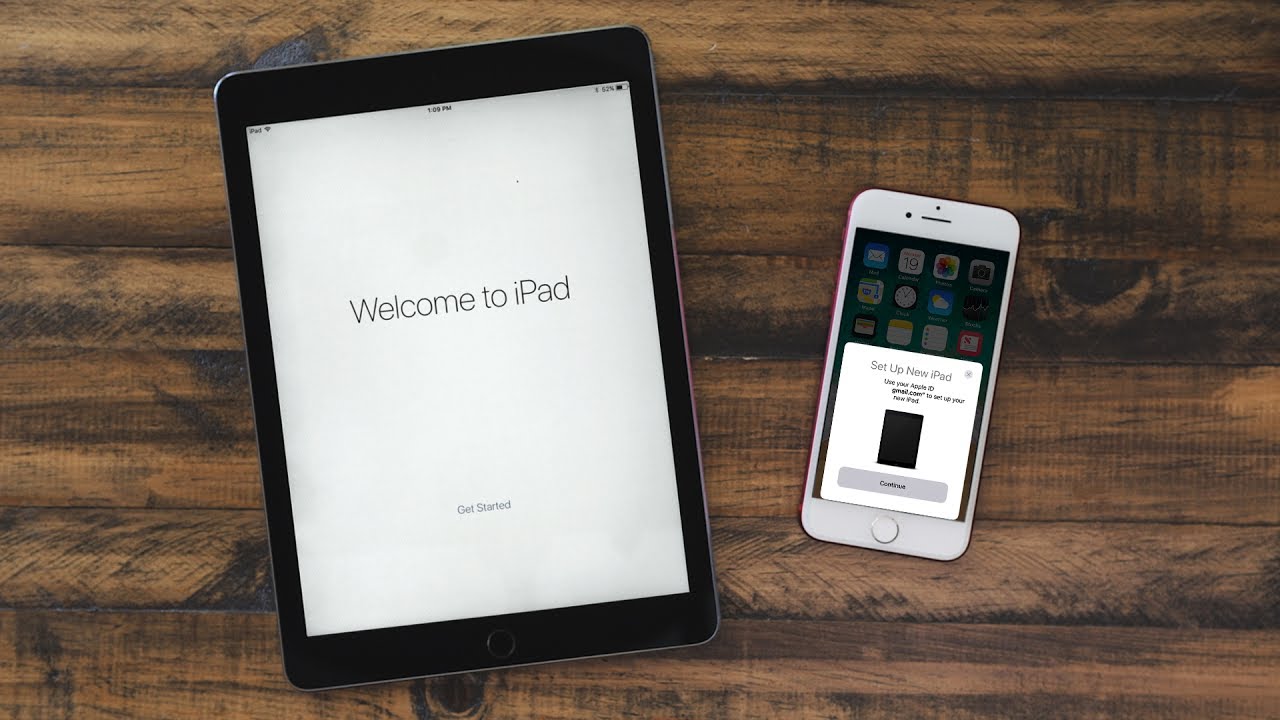

Automatic Setup is meant to be used in tandem with a restore from an iCloud backup, because while it transfers many settings, it does not offer full device-to-device content transfer. When you buy a new device, Automatic Setup will pop up automatically, but there are some steps to follow to get everything transferred over:

  1. Power on your new device, which will open up to a menu asking you to pick a language.
  2. After choosing a language, you'll see a "Set Up Your iPhone (or iPad)" prompt.
  3. When this appears, place your existing iOS device near the new device to initiate Automatic Setup.
  4. Your existing device will show a pop up letting you know you can use Automatic Setup. Tap "Continue" to start. appleautomaticsetup
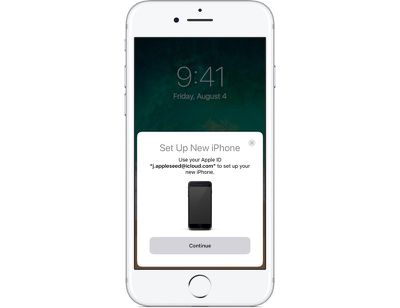
  5. An Apple Watch-style pairing image will appear on the new device, and you'll be instructed to scan it with the camera on your existing device.
  6. In an area with decent lighting, hold the existing device's camera over the image on the new device to pair the two together.
  7. Enter the passcode from your existing device on the new device.
  8. From there, all of your data will start transferring from the old device to the new device.

When the first few Automatic Setup steps are complete, your iPhone or iPad will walk you through setting up Touch ID/Face ID, Siri, and Apple Pay, which are separate steps.

An additional "Express Settings" feature following Automatic Setup is designed to speed up new device activation even further. Express Setup automatically enables Find My iPhone, location services, and analytics, so if you don't want these features on, make sure to tap "Customize Settings" to change them.

Once you've transferred all of your settings with Automatic Setup, you can restore from an iCloud backup to get all of your apps transferred over. If you want to set up a device as new without downloading all of your old content, though, you're finished once Automatic Setup is completed.

If you don't have an iOS device running iOS 11, you'll need to go through a more traditional setup process. The steps are a lot like Automatic Setup, but instead of choosing an existing device after setting a language, you'll need to manually enter data like your Apple ID and your WiFi password.


Top Rated Comments

117 months ago
I love this new automatic set-up. Thanks, Apple to make it easy for your customers setting up new devices.
Score: 3 Votes (Like | Disagree)
117 months ago
Look. From the get go this article is wrong and will lead to many many agrovated people.

tl;dr

Upgrade and then backup old phone and Apple Watch BEFORE starting express update.
NOTE your paid content WILLNOT be copied over via express update.


First things first.
If you have a phone and a watch they MUST both be running the very latest revs of software. Remember always Apple never gives you anything for free - you have to upgrade first. After that you can use express setup to move your basic configs over AND still save your Apple Watch content. Follow another path and you prob loose all your existing Apple Watch data, even if you use Apple cloud or encrypted local backup.

That’s right. Any other path and your one or two years of Apple Watch Data is gone.

It won’t move your music or other content. Not even if it’s backed up in Apple cloud in your latest backup. And not even if you bought it on iTunes - though you can download it again after you are all setup. More on that later.

Remember second. Macrumors should never assume it’s readers are running the latest revs. iPhone6 and 6s battery slow down issue anyone? We have lots of reasons not to chase Apple down it’s rabit hole of “progression”. We have found time and again that we are not best served if we own a device more than a year old.

Third. Although your iCloud based backup, that you pay Apple for every month, contains all of your music. They will NOT move your music or other content to the new device. You still need to use iTunes for that. So why bother downloading from iTunes Store again, since you already have it in your library and will need to reload all that music from your computer anyway.

Watch were the ball is headed. Apple wants you to subscribe to services, not use your already owned music. If you are fine with that and always own the latest devices with the latest revs of code - then express setup could be for you.

Macrumors needs to learn how to be critical. Not just a smoke factory.

Before folks point out. Sure it’s my first post. Nope, I’m not anti apple. Yet. I’ve got shares (held for a long time). Had macs (also for a long time, though only intel based so not that long). iPads (normal and pro and pencil). Obv I have an older iPhone (4,5 and latest 6 plus). Have a Apple Watch (gen 0). Yup use their cloud too.

Nope express setup is an extremely poor way for Apple to “help” move an existing user from one device to another. They are experimenting on their use base. And they force you to use it if you want to continue using your original Apple Watch with your new iPhone X.

They can do better laying out the upgrade process. And macrumors can do better being critical of Apple. We all could be getting better service.
Score: 2 Votes (Like | Disagree)
117 months ago
This makes it so easy to restore software on an iPhone or iPad. I’ve been having some battery issues lately (who hasn’t) and wanted to make sure that everything was up to date. I used my iPhone 6 to restore my iPad Mini 2 and then my iPad to restore my iPhone shortly thereafter.

Connecting to WiFi is automatic and after about 10 mins, my phone is just how I like it. I do wish I could keep Apple Watch and health info in iCloud and move to new devices but I like the local storage for privacy implications.

Re:etgg
It’s MacRumors, not the New York Times. It’s not going to be critical. And this is an informational article to get readership from people with new devices.

Use iCloud music library all of the music just shows up again. And purchases can be re-downloaded.

MacRumors is a smoke factory, that’s the reason it’s called MacRumors.


...
Upgrade and then backup old phone and Apple Watch BEFORE starting express update.
NOTE your paid content WILLNOT be copied over via express update.
...
That’s right. Any other path and your one or two years of Apple Watch Data is gone.

It won’t move your music or other content. Not even if it’s backed up in Apple cloud in your latest backup. And not even if you bought it on iTunes - though you can download it again after you are all setup. More on that later.
...
Third. Although your iCloud based backup, that you pay Apple for every month, contains all of your music. They will NOT move your music or other content to the new device. You still need to use iTunes for that. So why bother downloading from iTunes Store again, since you already have it in your library and will need to reload all that music from your computer anyway.

Macrumors needs to learn how to be critical. Not just a smoke factory.
...
Score: 1 Votes (Like | Disagree)
spazzcat Avatar
117 months ago
In my opinion it is no good for replacing devices.
I used it twice for migration. It was a pain both times.
At some point the process askes if a backup should be restored.
The iOS in the box was always older than the iOS on the old device.
Therefore iTunes couldn’t restore the backup onto the new device.
This the last piece of this puzzle they need to solve. Setting up my new phone was nice until I forgot I have the beta on my old phone. First thing it should do is part of this automatic set up is check to see if the phones have the save version of the OS.
Score: 1 Votes (Like | Disagree)
2013.1 Avatar
117 months ago
In my opinion it is no good for replacing devices.
I used it twice for migration. It was a pain both times.
At some point the process askes if a backup should be restored.
The iOS in the box was always older than the iOS on the old device.
Therefore iTunes couldn’t restore the backup onto the new device.
Score: 1 Votes (Like | Disagree)
MH01 Avatar
117 months ago
This is an excellent feature
Score: 1 Votes (Like | Disagree)

Popular Stories

1password deal blue

1Password Security Breach: What Was Accessed and What Wasn't

Wednesday November 25, 2026 1:09 pm PST by
Popular password management app 1Password today said it experienced a security breach earlier this month. 1Password says some customer names and email addresses were accessed, but no customer vault contents were compromised. On November 19, 1Password saw indications that an employee's GitHub account had been breached and began investigating. The company says the breached GitHub account was...
apple design award 2025

Apple Announces 2025 Design Award Winners Ahead of WWDC 2025

Tuesday June 3, 2025 10:14 am PDT by
As we wait for WWDC to kick off next Monday, Apple today announced the winners of its annual Apple Design Awards, recognizing apps and games for their innovation, ingenuity, and technical achievement. The 2025 Apple Design Award winners are listed below, with one app and one game selected per category: Delight and Fun - CapWords (App) and Balatro (Game) Innovation - Play (App) and PBJ -...
ipad pro prime

Apple Has iPads Running macOS Internally, Says Gurman

Wednesday November 25, 2026 4:55 am PST by
Apple has iPads running macOS internally and has had them "for some time," according to Bloomberg's Mark Gurman, although he says no work is currently being done to bring the Mac operating system to iPads. Speaking on his latest Power On podcast, Gurman said there is "no work being done to consumerize macOS on the iPad." Rather, Apple will continue to bring Mac features and apps like Final Cut ...
Latest Stories
The 50+ Best Apple Black Friday Deals on AirPods, iPads, MacBooks, and More
3 hours ago
GTA VI Now (Barely) Running on Apple Silicon Macs
2 minutes ago
The Best Black Friday Streaming Deals on Apple TV, Disney+, and More
41 minutes ago
Apple TV's 'Carême' Wins International Emmy for Best Drama
1 hour ago
iPhone 18 Production Delay Leaves Apple Little Time Before Launch
2 hours ago
The Best Black Friday AirPods Deals
3 hours ago
The Best Black Friday Deals on Apple Home Products
3 hours ago
The Best Black Friday iPhone Deals
3 hours ago
The Best Black Friday iPad Deals
3 hours ago
The Best Black Friday Apple Watch Deals
3 hours ago
The Best Black Friday AirTag Deals
3 hours ago
The Best Black Friday Mac Deals
3 hours ago
iPhone Share of US Smartphone Market Hits 57% as Rivals Slip
4 hours ago
iPhone 20 Pro Rumored to Feature 3D-Printed Titanium Frame
5 hours ago
Apple's Official 2026 Black Friday Offer Starts Rolling Out
23 hours ago
Halide Adds Fill Light Feature for iPhone Duo
1 day ago
MacBook Air Black Friday Deals Now Live With Massive $399 Savings
1 day ago
Amazon Discounts All MacBook Neo Models by $99 for Black Friday
1 day ago
Kodak Launches Unique AirTag Rival With E-Ink Display
1 day ago
Here's Why the Apple Store is Going Down
1 day ago
Apple Still Working on Giant Foldable iPad That Could Cost $5,000
1 day ago
iPhones Dominate China's Weak Singles' Day Smartphone Sales
1 day ago
iPhone 20 Pro Could Feature Ceramic in Limited-Edition Model
1 day ago
Apple Faces Korean Regulator Review Over iPhone 16 AI Advertising
1 day ago
Apple Watch Ultra 4 Hits New Best-Ever Price of $649.99 for Black Friday
1 day ago
New Apple Store Opening in India, Download the Special Wallpaper Now
2 days ago
Redesigned OLED MacBook Air Could Launch in 2027 or 2028
2 days ago
AirPods Pro 3 for $149 is One of The Best Black Friday Deals This Year
2 days ago
1Password Security Breach: What Was Accessed and What Wasn't
2 days ago
WhatsApp Finally Adds Scheduled Messages
2 days ago
Related Apple News: Entertainment | Culture | Sport | Iphone | Ipad






























