Skip to Content

What You Can Do With Apple Watch When Your Paired iPhone is Out of Range

by

Apple Watch uses both Wi-Fi and Bluetooth to transfer data to the iPhone. It defaults to a Bluetooth connection whenever possible because it conserves power, but if your iPhone is not in Bluetooth range, Apple Watch will switch over to compatible Wi-Fi if it is available.

For Wi-Fi to work on Apple Watch, it needs to be 802.11b/g/n on a 2.4GHz band. It will not connect to the faster speed 5GHz Wi-Fi, nor will it connect to public networks requiring logins, subscriptions, or profiles. It will also not work if your paired iPhone has never connected to the local Wi-Fi network before. This is because Apple Watch cannot configure new Wi-Fi networks on its own. It can connect to networks that you have set up on the paired phone.
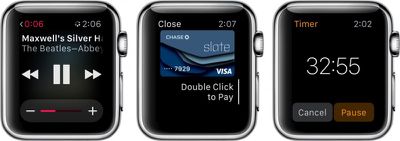
Apple Watch Out of Bluethooth Range
When your paired iPhone is out of range, and it is not connected to the same Wi-Fi network, there are a number of features that are still available:

  • You can play music from a synced playlist. Add music via the Apple Watch app on your iPhone and sync Apple Watch by placing it on the charger. You can store up to 2GB of music.
  • You can use the clock, alarm, timer, and stopwatch. All functions for each of those apps are available when your iPhone is out of range.
  • You can track stand, move, and exercise actions through the Activity app. This information will sync with your iPhone when you are back in range.
  • You can track workouts in the Workout app. It is a good idea to calibrate your Apple Watch first in order to get the most accurate reading.
  • You can display photos from a synced photo album. Add albums via the Apple Watch app on your iPhone. Photos sync immediately.
  • Use Apple Pay at participating retail stores to make purchases. When the payment kiosk is in range, open the Apple Pay app to make a transaction.

There are also a few additional things you can do if your paired iPhone is out of range but you are still on the same Wi-Fi network. For example, if your phone was at your desk, but you are five flights up in the same office building on the same network, or if you were on campus and you left your phone in your locker (assuming the Wi-Fi is compatible and doesn't require logins, subscriptions, or profiles).

  • You can send and receive texts via iMessage.
  • If you know someone else with an Apple Watch, you can send and receive Digital Touch messages.
  • You can use Siri to check your calendar, set reminders, and more.
  • You can check Weather, Email, Reminders, the Calendar app, and all native apps.
  • Check your current location using Apple Maps.
  • You can also access most third-party apps.
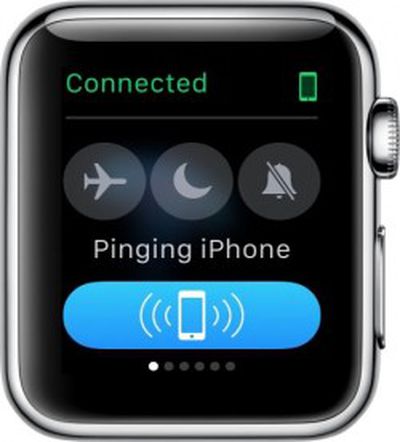
Apple Watch Ping 1If you forget where you left your iPhone while wandering the halls, you can ping it using Apple Watch. Swipe up from the watch face and swipe to the first Glances screen. Then, tap the Ping button. This will activate a loud audio signal on your iPhone, even if the ringer is set to silent. If you use a long tap, it'll also cause the flash on the iPhone to trigger. This feature is great for times when you’ve lost your iPhone. Keep in mind that Apple Watch must be connected to your iPhone either via Bluetooth or Wi-Fi for this feature to work.

If, for some reason, your Apple Watch disconnects from your paired iPhone, follow our how-to guide to fix the problem.

Apple Watch works best when paired to your iPhone via Bluetooth. Data transfers between both devices are smoother, faster, and take up less energy. However, you can still work when your paired iPhone is not in Bluetooth range, as long as they are both on the same Wi-Fi network. An added bonus is that Apple Watch has about a half-dozen useful features that work, even when it is not connected to your iPhone at all.


Related Roundup: Apple Watch 12
Buyer's Guide: Apple Watch (Buy Now)
Related Forum: Apple Watch

Top Rated Comments

ck2875 Avatar
150 months ago
If only I could still get important notifications when my paired iPhone is out of range of my Apple Watch.

Score: 3 Votes (Like | Disagree)
150 months ago
This device shouldn't even need the iPhone paired to do any of these wifi tasks, you log in with your Apple ID and you're golden.

If I'm a masochist I should be able to run about with a bluetooth 3G dongle and just use the watch independently, as my sole communications device.

Apple will never do this though.
This actually will work. As long as your iPhone has connected to the dongle once and has stored the Wifi credentials... those credentials will get passed to your Watch and your Watch will connect on its own to the dongle and use it.

EDIT: It depends on what you mean by "sole communications device". You won't be able to make cellular phone calls. But you will be able to use iMessage and receive emails.
Score: 1 Votes (Like | Disagree)
150 months ago
So if my home network is 5ghz, it won't work? Even if I have a 2.4ghz network with the same name and password on the same router?
Yes, it works. This is my setup at home.

People are wrong about logins. The Watch can login to any network that your iPhone automatically logs in on... even without your iPhone. I've done quite a lot of testing of this.
Score: 1 Votes (Like | Disagree)
Iconoclysm Avatar
150 months ago
How does the Apple Watch communicate for Apple Pay without an iPhone? I thought Apple Pay relied on NFC and the watch doesn't have built-in NFC?

(I'm sure there's an answer... I just don't know it.)
Answer - the watch has built in NFC
Score: 1 Votes (Like | Disagree)
Alonso Quijano Avatar
150 months ago
How does the Apple Watch communicate for Apple Pay without an iPhone? I thought Apple Pay relied on NFC and the watch doesn't have built-in NFC?

(I'm sure there's an answer... I just don't know it.)
The Apple Watch has the same NFC chip as the iPhone 6 and 6+, so it is capable of NFC payments on its own.

This enables people who have the iPhone 5 (like me) and above to use Apple Pay.
Score: 1 Votes (Like | Disagree)

Popular Stories

apple watch series 3 design

Apple Offers Steps to Fix Daylight Saving Time Bug on Apple Watch

Sunday November 1, 2026 3:34 am PST by
Apple has published a support document describing what to do if your Apple Watch continues to show time that's off by one hour after daylight savings time changes. "This incorrect time appears only on the Always On display when your wrist is down," says Apple. "When you activate the display by tapping it or raising your wrist, the time changes to the correct hour." To fix the issue, Apple says ...
muse apple watch app

Meta's Muse AI Agent Comes to Apple Watch

Monday November 9, 2026 1:55 pm PST by
Meta today updated the Muse app for iOS to add Apple Watch support, which means Muse users can access the proactive AI agent from the watch. The app adds the Muse character to the watch with an option to text it, dictate text to it, or call it. There's also a Muse complication for quick access. Muse is Meta's personal AI agent that can complete tasks for users. It is available as a...
siri recap live rewind

watchOS 27.3 Brings Live Rewind and Siri Recap to Apple Watch

Tuesday November 3, 2026 10:35 am PST by
With the first beta of watchOS 27.3, Apple is introducing new Audio Intelligence features it previewed for the Apple Watch Series 12 and Ultra 4 earlier this year. Powered by the S11 chip, Audio Intelligence includes Live Rewind, Siri Recap, Sound Recognition, and Shazam Music Recognition. Sound Recognition and Shazam are already on the watch, but Live Rewind and Siri Recap are now available ...
Latest Stories
The 50+ Best Apple Black Friday Deals Still Available on AirPods, iPads, and More
2 hours ago
Here Are the Best Apple Black Friday Leftover Deals You Can Get Today
47 minutes ago
HomePod Mini 2 in (RED) Seemingly Spotted Ahead of Announcement
12 hours ago
Apple's M6 and PROLED MacBook Pro Reach New Low Prices for Black Friday
22 hours ago
The MacRumors Show: iPhone Air 2 and iPhone 18 Are Coming
23 hours ago
Apple Store in Brisbane Reopening Next Month With New Design
23 hours ago
The 60+ Best Black Friday Accessory Deals on iPhone Chargers, TVs, Headphones, and More
40 minutes ago
GTA VI Now (Barely) Running on Apple Silicon Macs
1 day ago
The Best Black Friday Streaming Deals on Apple TV, Disney+, and More
1 day ago
Apple TV's 'Carême' Wins International Emmy for Best Drama
1 day ago
iPhone 18 Production Delay Leaves Apple Little Time Before Launch
1 day ago
The Best Black Friday AirPods Deals Still Available
18 hours ago
The Best Black Friday Deals on Apple Home Products
1 day ago
The Best Black Friday iPhone Deals Still Available
18 hours ago
The Best Black Friday iPad Deals Still Available
18 hours ago
The Best Black Friday Apple Watch Deals Still Available
18 hours ago
The Best Black Friday AirTag Deals Still Available
18 hours ago
The Best Black Friday Mac Deals Still Available
18 hours ago
iPhone Share of US Smartphone Market Hits 57% as Rivals Slip
1 day ago
iPhone 20 Pro Rumored to Feature 3D-Printed Titanium Frame
1 day ago
Apple's Official 2026 Black Friday Offer Starts Rolling Out
2 days ago
Halide Adds Fill Light Feature for iPhone Duo
2 days ago
MacBook Air Black Friday Deals Now Live With Massive $399 Savings
2 days ago
Amazon Discounts All MacBook Neo Models by $99 for Black Friday
2 days ago
Kodak Launches Unique AirTag Rival With E-Ink Display
2 days ago
Here's Why the Apple Store is Going Down
2 days ago
Apple Still Working on Giant Foldable iPad That Could Cost $5,000
2 days ago
iPhones Dominate China's Weak Singles' Day Smartphone Sales
2 days ago
iPhone 20 Pro Could Feature Ceramic in Limited-Edition Model
2 days ago
Apple Faces Korean Regulator Review Over iPhone 16 AI Advertising
2 days ago
Related Apple News: Iphone Duo Split Keyboard Landscape Mode | Aqara W200 Thermostat | Apple Vision Pro Review | Iphone Duo Let Someone Join Facetime Outer Display | Iphone 18 Pro






























