Skip to Content

Apple Watch Ultra: How to Activate, Cancel, and Disable the Siren

by

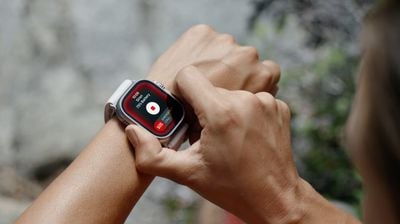
If you ever become lost, injured, or have some other emergency situation and want to draw attention to your location, ‌Apple Watch Ultra‌ includes an 86-decibel siren that you can use.
ultra siren watch
The siren uses a unique sound signature that incorporates two distinct alternating patterns, which can repeat for several hours. The first pattern suggests distress, while the second mimics the universally recognized SOS pattern, and the siren can be heard up to 600 feet or 180 meters away.

As such, it's pretty loud, so don't turn it on in enclosed environments or hold your watch close to your ears when the Siren is sounding.

How to Turn on Siren on Apple Watch Ultra

You can turn on the Siren using the Action button or the side button.

Using the Action Button:

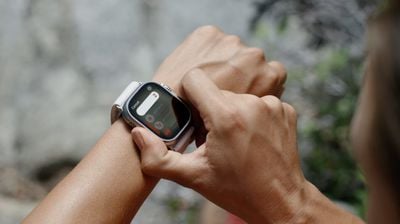
  1. Press and hold the Action button until the Siren slider appears.
  2. Drag the Siren slider to start a countdown.
  3. After the countdown, the Siren starts.

Alternatively, you can press and hold the Action button to start the countdown, then continue holding the Action button until Siren starts. If you don't want the Siren going off using this continual hold action, go to Settings -> Action Button, and switch off the toggle next to Hold to Turn On.
siren countdown

Using the Side Button

  1. Press and hold the Side button until the Siren slider appears.
  2. Drag the Siren slider to start a countdown.
  3. After the countdown, the Siren starts.

How to Cancel the Siren on Apple Watch Ultra

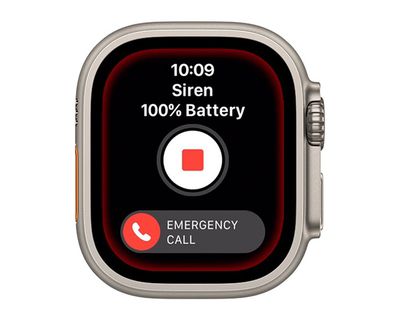
You can cancel the Siren during the countdown. If you're holding the Action button, simply release it to cancel. If you initiated the countdown by dragging the Siren slider, cover the watch display with the palm of your hand for at least three seconds to cancel.
watch
To cancel the Siren while it's sounding, simply tap the central Stop button in the Siren app.

How to Disable the Siren Action Button Function

If you're concerned about the possibility of accidentally activating the Siren via a long press of the Action button, you can disable the function. Here's how.

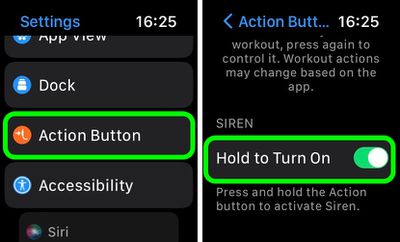
  1. Launch the Settings app on your Apple Watch Ultra.
  2. Tap Action Button.
  3. Scroll down and under "Siren" toggle off the switch next to Hold to Turn On.
settings

Once that's done, holding down the Action button won't activate the Siren. Note that you can still activate the Siren by way of the Action Button, but now you have to hold the button and then swipe across the Siren slider, making it much harder to unintentionally sound the alert.


Related Roundup: Apple Watch Ultra 4
Related Forum: Apple Watch

Top Rated Comments

AlexisV Avatar
55 months ago


Attachment Image
Score: 4 Votes (Like | Disagree)
55 months ago

This seems like a feature that could and should be included in every Apple Watch
Survival is an apple watch ultra exclusive feature
Score: 2 Votes (Like | Disagree)
FloridaScrubJay Avatar
55 months ago
Hope it is not used as an alternative for the flight attendant call button on airplanes. 😳
Score: 2 Votes (Like | Disagree)
OliOliOliOli Avatar
55 months ago

If you ever become lost, injured, or have some other emergency situation and want to draw attention to your location, ‌Apple Watch Ultra‌ includes an 86-decibel siren that you can use.


The siren uses a unique sound signature that incorporates two distinct alternating patterns, which can repeat for several hours. The first pattern suggests distress, while the second mimics the universally recognized SOS pattern, and the siren can be heard up to 600 feet or 180 meters away.

As such, it's pretty loud, so don't turn it on in enclosed environments or hold your watch close to your ears when the Siren is sounding.

How to Turn on Siren on Apple Watch Ultra

You can turn on the Siren using the Action button or the side button.
Using the Action Button:

[LIST=1]
* Press and hold the Action button until the Siren slider appears.
* Drag the Siren slider to start a countdown.
* After the countdown, the Siren starts.

Alternatively, you can press and hold the Action button to start the countdown, then continue holding the Action button until Siren starts. If you don't want the Siren going off using this continual hold action, go to Settings -> Action Button, and switch off the toggle next to Hold to Turn On.


Using the Side Button

[LIST=1]
* Press and hold the Side button until the Siren slider appears.
* Drag the Siren slider to start a countdown.
* After the countdown, the Siren starts.

How to Cancel the Siren on Apple Watch Ultra

You can cancel the Siren during the countdown. If you're holding the Action button, simply release it to cancel. If you initiated the countdown by dragging the Siren slider, cover the watch display with the palm of your hand for at least three seconds to cancel.


To cancel the Siren while it's sounding, simply tap the central Stop button in the Siren app.

Article Link: Apple Watch Ultra: How to Use the Built-In Siren to Signal for Help ('https://www.macrumors.com/how-to/apple-watch-ultra-use-siren/')
It’s strange, that’s is also a great option for womens in dangerous situations and no one mention it…
Score: 1 Votes (Like | Disagree)
Madhatter32 Avatar
55 months ago
If you actually need this feature you are in a world of hurt.
Score: 1 Votes (Like | Disagree)
55 months ago
A great feature to obnoxiously let everyone in your surrounding know you bought an apple Watch ultra
Score: 1 Votes (Like | Disagree)

Popular Stories

apple watch series 3 design

Apple Offers Steps to Fix Daylight Saving Time Bug on Apple Watch

Sunday November 1, 2026 3:34 am PST by
Apple has published a support document describing what to do if your Apple Watch continues to show time that's off by one hour after daylight savings time changes. "This incorrect time appears only on the Always On display when your wrist is down," says Apple. "When you activate the display by tapping it or raising your wrist, the time changes to the correct hour." To fix the issue, Apple says ...
siri recap live rewind

watchOS 27.3 Brings Live Rewind and Siri Recap to Apple Watch

Tuesday November 3, 2026 10:35 am PST by
With the first beta of watchOS 27.3, Apple is introducing new Audio Intelligence features it previewed for the Apple Watch Series 12 and Ultra 4 earlier this year. Powered by the S11 chip, Audio Intelligence includes Live Rewind, Siri Recap, Sound Recognition, and Shazam Music Recognition. Sound Recognition and Shazam are already on the watch, but Live Rewind and Siri Recap are now available ...
apple design award 2025

Apple Announces 2025 Design Award Winners Ahead of WWDC 2025

Tuesday June 3, 2025 10:14 am PDT by
As we wait for WWDC to kick off next Monday, Apple today announced the winners of its annual Apple Design Awards, recognizing apps and games for their innovation, ingenuity, and technical achievement. The 2025 Apple Design Award winners are listed below, with one app and one game selected per category: Delight and Fun - CapWords (App) and Balatro (Game) Innovation - Play (App) and PBJ -...
Latest Stories
The 50+ Best Apple Black Friday Deals Still Available on AirPods, iPads, and More
6 hours ago
Here Are the Best Apple Black Friday Leftover Deals You Can Get Today
4 hours ago
HomePod Mini 2 in (RED) Seemingly Spotted Ahead of Announcement
16 hours ago
Apple's M6 and PROLED MacBook Pro Reach New Low Prices for Black Friday
1 day ago
The MacRumors Show: iPhone Air 2 and iPhone 18 Are Coming
1 day ago
Apple Store in Brisbane Reopening Next Month With New Design
1 day ago
The 60+ Best Black Friday Accessory Deals on iPhone Chargers, TVs, Headphones, and More
4 hours ago
GTA VI Now (Barely) Running on Apple Silicon Macs
1 day ago
The Best Black Friday Streaming Deals on Apple TV, Disney+, and More
1 day ago
Apple TV's 'Carême' Wins International Emmy for Best Drama
1 day ago
iPhone 18 Production Delay Leaves Apple Little Time Before Launch
1 day ago
The Best Black Friday AirPods Deals Still Available
22 hours ago
The Best Black Friday Deals on Apple Home Products
1 day ago
The Best Black Friday iPhone Deals Still Available
22 hours ago
The Best Black Friday iPad Deals Still Available
22 hours ago
The Best Black Friday Apple Watch Deals Still Available
22 hours ago
The Best Black Friday AirTag Deals Still Available
22 hours ago
The Best Black Friday Mac Deals Still Available
22 hours ago
iPhone Share of US Smartphone Market Hits 57% as Rivals Slip
1 day ago
iPhone 20 Pro Rumored to Feature 3D-Printed Titanium Frame
1 day ago
Apple's Official 2026 Black Friday Offer Starts Rolling Out
2 days ago
Halide Adds Fill Light Feature for iPhone Duo
2 days ago
MacBook Air Black Friday Deals Now Live With Massive $399 Savings
2 days ago
Amazon Discounts All MacBook Neo Models by $99 for Black Friday
2 days ago
Kodak Launches Unique AirTag Rival With E-Ink Display
2 days ago
Here's Why the Apple Store is Going Down
2 days ago
Apple Still Working on Giant Foldable iPad That Could Cost $5,000
2 days ago
iPhones Dominate China's Weak Singles' Day Smartphone Sales
2 days ago
iPhone 20 Pro Could Feature Ceramic in Limited-Edition Model
2 days ago
Apple Faces Korean Regulator Review Over iPhone 16 AI Advertising
2 days ago
Related Apple News: Enable Sound Recognition Apple Watch Listen | Rumors | Is It Worth Buying A Titanium Apple Watch | Iphone Mirroring Not Working In Macos Fix | Mac






























