Skip to Content

Apple Watch Ultra: How to Use the New Optimized Charge Limit Feature

by

All Apple Watch models running watchOS 7 or later include a Battery Health feature called Optimized Battery Charging that extends the total battery life of your Apple Watch by learning from your habits and waiting to finish charging all the way up until you need your ‌Apple Watch.

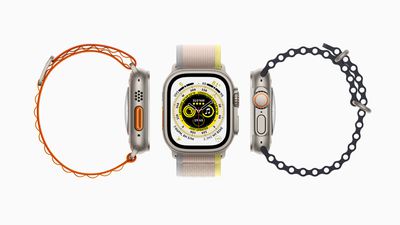
Apple Watch Ultra 3up hero 220907 Full Bleed Image
Apple Watch Ultra can last up to 36 hours on a single charge – the longest battery life of any Apple Watch – and to extend battery life even further, Apple Watch Ultra offers even more intelligent battery charge optimization with something called Optimized Charge Limit.

On by default when you set up your Apple Watch, Optimized Charge Limit use on-device machine learning to analyze your daily usage and determine when to charge to an optimized limit and when to allow a full charge. The feature changes dynamically depending on how you use your Apple Watch Ultra. For example, based on usage patterns, your watch might charge to 100% on some days, and less on others.

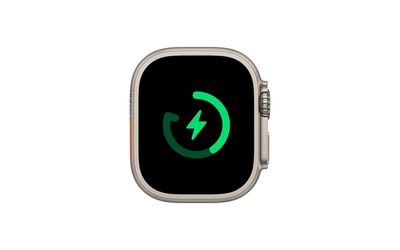
When Optimized Charge Limit is active, an open charge ring is displayed when you connect your Apple Watch Ultra to its charger. It's possible to charge your watch beyond the optimized limit by following the steps below.
watch

How to Charge Apple Watch Ultra Beyond the Optimized Charge Limit

  1. Make sure that your Apple Watch Ultra is connected to its charger.
  2. Tap the watch display to wake the charging screen, then tap the circle with the green or yellow charging icon.
  3. Tap Charge to Full Now.

How to Disable Optimized Charge Limit

If you want your Apple Watch Ultra to fully charge every time its placed on the charge, disable Optimized Battery Charging by following these simple steps.

  1. Open the Settings app on your Apple Watch Ultra.
  2. Scroll down and tap Battery.
  3. Tap Battery Health.
  4. Toggle off the switch next to Optimized Charge Limit.
  5. Choose Turn Off Until Tomorrow or Turn Off.

Help Optimized Charging Identify Locations

Optimized charging is designed to activate only in locations where you spend the most time, such as your home and place of work. The feature doesn't turn on when your usage habits are more variable, such as when you travel.

To help your Apple Watch Ultra identify situations where Optimized Charge Limit shouldn't be used, turn on the following location settings in the Settings app on your Apple Watch Ultra:

  • Privacy -> Location Services -> Location Services
  • Privacy > Location Services > System Services > System Customization
  • Privacy > Location Services > System Services > Significant Locations > Significant Locations

The location information for this feature remains on your watch and none of it is sent to Apple.

Related Roundup: Apple Watch Ultra 4
Related Forum: Apple Watch

Top Rated Comments

AMagicianNamedJOBs Avatar
55 months ago
It would be great if Apple could just give us an option “don’t charge above 80%” and leave it there. I use Al Dente on the Mac but “optimized” charging has never worked consistently for me on Watch or iOS.
Score: 10 Votes (Like | Disagree)
jclardy Avatar
55 months ago

My experience with this feature on iPhone and Mac is that, at least for me, it does nothing. I always find my devices charge to 100% as soon as I plug-in and stay fully charged all night. I have left my MacBook plugged-in for a month straight and charge was limited to 80% after week at fully charged but it only lasted a night and next morning the laptop was at 100% for another week.
I now use Aldente on MacBook, have setup automations on iPhone to manage this and disabled optimised charging on both devices.
This is a different feature (on the Ultra.) Optimized battery charging should never give you 80% battery in the morning...it just changes charging time so that it charges straight to 80%, then waits until an hour or so before it thinks you will need the device, then charges the last 20%. It'll only work if you have a semi-fast charger (Otherwise on a 5w charger you need all night to charge.) It also needs a decent amount of time to figure out your schedule (For example, my new iPhone isn't doing it yet as I've only had it for a week) because the primary objective is for you to have a full battery in the morning, the secondary objective is to improve battery performance in the long run.

On the Ultra, this new feature will only charge to 80%, since the battery life already lasts 2 days. Basically, Apple Watch users are already accustomed to charging every night, so this feature should greatly increase the longevity of the Ultra battery since those users may never need the full 100% charge.
Score: 5 Votes (Like | Disagree)
55 months ago
If the vanilla optimised charging is any indication of what to expect from this, it will break the second you dare deviate from any routine. A welcome addition but I don’t know why they can’t also give users the option to rigidly cap their maximum charge in the sprit of AlDente. We don’t all need ‘machine learning’ to babysit our decision making.
Score: 3 Votes (Like | Disagree)
richie510 Avatar
55 months ago
I welcome this new feature, and hope that Apple extends it to other products, the first targets should be the high battery capacity iPhones. These "machine learning" battery features a great for a large number of users who really don't pay that much attention to these kinds of things.

Still, there should be a power setting to not charge past 80% on all Apple devices, and a setting to not charge past 80% at "this" location. Typically, I think "this" location should be my home, but let me choose.
Score: 1 Votes (Like | Disagree)
M33-1 Avatar
55 months ago
Another feature by a company in a blackout state trying to control your power charging that best fits their viewpoint. Turn it off asap if it’s on.
Score: 1 Votes (Like | Disagree)
55 months ago
My experience with this feature on iPhone and Mac is that, at least for me, it does nothing. I always find my devices charge to 100% as soon as I plug-in and stay fully charged all night. I have left my MacBook plugged-in for a month straight and charge was limited to 80% after week at fully charged but it only lasted a night and next morning the laptop was at 100% for another week.
I now use Aldente on MacBook, have setup automations on iPhone to manage this and disabled optimised charging on both devices.
Score: 1 Votes (Like | Disagree)

Popular Stories

apple watch series 3 design

Apple Offers Steps to Fix Daylight Saving Time Bug on Apple Watch

Sunday November 1, 2026 3:34 am PST by
Apple has published a support document describing what to do if your Apple Watch continues to show time that's off by one hour after daylight savings time changes. "This incorrect time appears only on the Always On display when your wrist is down," says Apple. "When you activate the display by tapping it or raising your wrist, the time changes to the correct hour." To fix the issue, Apple says ...

siri recap live rewind

watchOS 27.3 Brings Live Rewind and Siri Recap to Apple Watch

Tuesday November 3, 2026 10:35 am PST by
With the first beta of watchOS 27.3, Apple is introducing new Audio Intelligence features it previewed for the Apple Watch Series 12 and Ultra 4 earlier this year. Powered by the S11 chip, Audio Intelligence includes Live Rewind, Siri Recap, Sound Recognition, and Shazam Music Recognition. Sound Recognition and Shazam are already on the watch, but Live Rewind and Siri Recap are now available ...
apple design award 2025

Apple Announces 2025 Design Award Winners Ahead of WWDC 2025

Tuesday June 3, 2025 10:14 am PDT by
As we wait for WWDC to kick off next Monday, Apple today announced the winners of its annual Apple Design Awards, recognizing apps and games for their innovation, ingenuity, and technical achievement. The 2025 Apple Design Award winners are listed below, with one app and one game selected per category: Delight and Fun - CapWords (App) and Balatro (Game) Innovation - Play (App) and PBJ -...
Latest Stories
The 50+ Best Apple Black Friday Deals Still Available on AirPods, iPads, and More
10 hours ago
HomePod Mini 2 in (RED) Seemingly Spotted Ahead of Announcement
7 hours ago
Apple's M6 and PROLED MacBook Pro Reach New Low Prices for Black Friday
18 hours ago
The MacRumors Show: iPhone Air 2 and iPhone 18 Are Coming
18 hours ago
Apple Store in Brisbane Reopening Next Month With New Design
18 hours ago
The 60+ Best Black Friday Accessory Deals on iPhone Chargers, TVs, Headphones, and More
19 hours ago
GTA VI Now (Barely) Running on Apple Silicon Macs
19 hours ago
The Best Black Friday Streaming Deals on Apple TV, Disney+, and More
20 hours ago
Apple TV's 'Carême' Wins International Emmy for Best Drama
21 hours ago
iPhone 18 Production Delay Leaves Apple Little Time Before Launch
21 hours ago
The Best Black Friday AirPods Deals Still Available
13 hours ago
The Best Black Friday Deals on Apple Home Products
22 hours ago
The Best Black Friday iPhone Deals Still Available
13 hours ago
The Best Black Friday iPad Deals Still Available
13 hours ago
The Best Black Friday Apple Watch Deals Still Available
13 hours ago
The Best Black Friday AirTag Deals Still Available
13 hours ago
The Best Black Friday Mac Deals Still Available
13 hours ago
iPhone Share of US Smartphone Market Hits 57% as Rivals Slip
23 hours ago
iPhone 20 Pro Rumored to Feature 3D-Printed Titanium Frame
1 day ago
Apple's Official 2026 Black Friday Offer Starts Rolling Out
2 days ago
Halide Adds Fill Light Feature for iPhone Duo
2 days ago
MacBook Air Black Friday Deals Now Live With Massive $399 Savings
2 days ago
Amazon Discounts All MacBook Neo Models by $99 for Black Friday
2 days ago
Kodak Launches Unique AirTag Rival With E-Ink Display
2 days ago
Here's Why the Apple Store is Going Down
2 days ago
Apple Still Working on Giant Foldable iPad That Could Cost $5,000
2 days ago
iPhones Dominate China's Weak Singles' Day Smartphone Sales
2 days ago
iPhone 20 Pro Could Feature Ceramic in Limited-Edition Model
2 days ago
Apple Faces Korean Regulator Review Over iPhone 16 AI Advertising
2 days ago
Apple Watch Ultra 4 Hits New Best-Ever Price of $649.99 for Black Friday
2 days ago
Related Apple News: Benq Ma320ug Display | Homepod Deals | Ipad Mini | Caldigit Ts5 Element 5 | How To