Skip to Content

How to Answer and Make Phone Calls on Apple Watch

by

Did you ever think the day would come when we could call someone right from our wrists? It still seems like the stuff that science fiction is made of, but you can, in fact, make and receive phone calls on Apple Watch. On Apple Watch, calls are routed through the iPhone, but you can answer even with your iPhone in another room or tucked away in a pocket, carrying on an entire conversation right from your watch.

Answering a Call
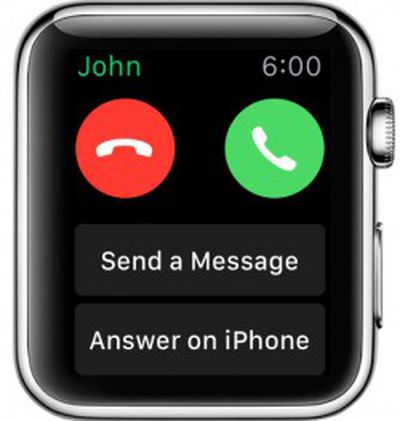
applewatchincomingcallAnswering a phone call is self-explanatory. When the call comes in, all you have to do is tap the green answer button. If you don't want to answer it, you can tap the red decline button and send the call to voicemail instead.

You can also choose to answer the call on your iPhone or send a text message. When the call comes in, turn the Digital Crown or swipe upwards to access these options.

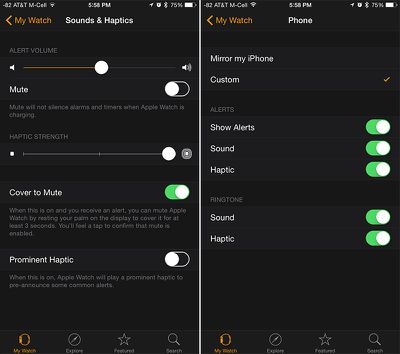
If you are in a meeting or otherwise engaged and forget to silence your Apple Watch ahead of time, you can quickly mute the sound of the incoming call by covering the Apple Watch's display with the palm of your hand for three seconds. Then tap to confirm that mute is enabled.

To Turn on the Cover to Mute feature:

  1. Open the Apple Watch app on your iPhone.
  2. Select Sounds and Haptics from the menu.
  3. Toggle the Cover to Mute switch to the On position.
applewatchphoneoptions
Turning off Sound or Haptic Alerts:
You can't set special ringtones on the Apple Watch like you can on the iPhone, but you can toggle the sound or the haptic ringtones and alerts on and off. By default, the Apple Watch is set to mirror the iPhone, but you can change alert and ringtone options using the Apple Watch app on the iPhone.

  1. Open the Apple Watch app on the iPhone
  2. Scroll down to the app section and find "Phone"
  3. To toggle off sound or haptic notifications for an incoming call, use the Ringtone toggles
  4. To control alerts (for incoming and missed calls), tap "Custom" and then choose which alerts to receive.

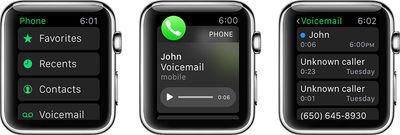
If you silence a call and the caller leaves you a voice message, you will receive a notification on Apple Watch. You can tap the voice mail notification to listen to it, or open the Phone app on Apple Watch and tap Voicemail.
applewatchvoicemail
If you answer the call on Apple Watch and decide you want to switch to your iPhone, use the Handoff feature on the iPhone's lock screen (swipe up from the phone icon in the bottom left corner). If your iPhone is already unlocked, tap the green bar at the top of the screen.

Handoff Apple Watch

Making a Call

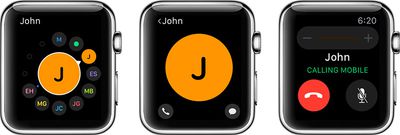
You can make phone calls to people on your Favorites list by pushing the Side button below the Digital Crown. Then, turn the Digital Crown or tap a person's initials to select. Then, tap the call icon in the bottom left corner of the screen.
makingacallapplewatch

Placing a call via the Favorites list

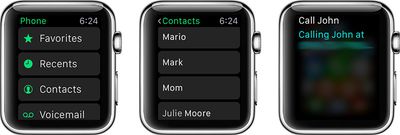
If you want to call someone who is not on your Favorites list, tap the Phone app on Apple Watch and turn the Digital Crown or swipe to the contact you wish to call. You can also ask Siri to make a phone call for you by saying "Call" and naming someone in your list of contacts. Siri will place the phone call for you.
applewatchmakingcallssiri2

Making a call via the Phone app and through Siri

Talking on Apple Watch feels a bit strange at first, and you might want to avoid it in public just because it can be difficult to hear someone from the Apple Watch speaker when there's ambient noise. Taking a call on the Apple Watch is, however, incredibly convenient if you want to talk to someone and your iPhone is not nearby. Plus, you can answer the call on Apple Watch, take your time getting to your iPhone, and simply switch over when you are ready. No more missed calls.


Related Roundup: Apple Watch 12
Buyer's Guide: Apple Watch (Buy Now)
Related Forum: Apple Watch

Top Rated Comments

CausticSoda Avatar
151 months ago
I'm waiting for all the comments complaining either of the articles' unnecessary content or how "stupid" it'll look to be talking to your wrist.

If you feel upset about either of these things please feel free to not exercise your freedom of speech about it. We've already heard.

If you feel upset about people posting their views, please feel free not to exercise your freedom of speech about it. We've already heard. Oh, hang on...
Score: 15 Votes (Like | Disagree)
CausticSoda Avatar
151 months ago
Did you ever think the day would come when we could call someone right from our wrists?

Yes. But I didn't think we'd need a lengthy article to explain how to do it.
Score: 11 Votes (Like | Disagree)
shareef777 Avatar
151 months ago
I'm waiting for all the comments complaining either of the articles' unnecessary content or how "stupid" it'll look to be talking to your wrist.

If you feel upset about either of these things please feel free to not exercise your freedom of speech about it. We've already heard.

Oh the irony of your statement. "Allow me to complain about your impending complaining" lol
Score: 9 Votes (Like | Disagree)
Candlelight Avatar
151 months ago
Receiving a call fine but if my iPhone is right beside me why would I try and make a call on my watch? Seems odd. #oldmancan'tchangehisways
Score: 6 Votes (Like | Disagree)
iBlazed Avatar
150 months ago
The call volume on the watch is utter crap, even in a quiet room.
Score: 4 Votes (Like | Disagree)
Quu Avatar
150 months ago
Can we get a guide to show us how to turn our watch on and off? Thanks.
Score: 3 Votes (Like | Disagree)

Popular Stories

apple watch series 3 design

Apple Offers Steps to Fix Daylight Saving Time Bug on Apple Watch

Sunday November 1, 2026 3:34 am PST by
Apple has published a support document describing what to do if your Apple Watch continues to show time that's off by one hour after daylight savings time changes. "This incorrect time appears only on the Always On display when your wrist is down," says Apple. "When you activate the display by tapping it or raising your wrist, the time changes to the correct hour." To fix the issue, Apple says ...
muse apple watch app

Meta's Muse AI Agent Comes to Apple Watch

Monday November 9, 2026 1:55 pm PST by
Meta today updated the Muse app for iOS to add Apple Watch support, which means Muse users can access the proactive AI agent from the watch. The app adds the Muse character to the watch with an option to text it, dictate text to it, or call it. There's also a Muse complication for quick access. Muse is Meta's personal AI agent that can complete tasks for users. It is available as a...
siri recap live rewind

watchOS 27.3 Brings Live Rewind and Siri Recap to Apple Watch

Tuesday November 3, 2026 10:35 am PST by
With the first beta of watchOS 27.3, Apple is introducing new Audio Intelligence features it previewed for the Apple Watch Series 12 and Ultra 4 earlier this year. Powered by the S11 chip, Audio Intelligence includes Live Rewind, Siri Recap, Sound Recognition, and Shazam Music Recognition. Sound Recognition and Shazam are already on the watch, but Live Rewind and Siri Recap are now available ...
Latest Stories
The 50+ Best Apple Black Friday Deals Still Available on AirPods, iPads, and More
5 hours ago
Here Are the Best Apple Black Friday Leftover Deals You Can Get Today
4 hours ago
HomePod Mini 2 in (RED) Seemingly Spotted Ahead of Announcement
15 hours ago
Apple's M6 and PROLED MacBook Pro Reach New Low Prices for Black Friday
1 day ago
The MacRumors Show: iPhone Air 2 and iPhone 18 Are Coming
1 day ago
Apple Store in Brisbane Reopening Next Month With New Design
1 day ago
The 60+ Best Black Friday Accessory Deals on iPhone Chargers, TVs, Headphones, and More
4 hours ago
GTA VI Now (Barely) Running on Apple Silicon Macs
1 day ago
The Best Black Friday Streaming Deals on Apple TV, Disney+, and More
1 day ago
Apple TV's 'Carême' Wins International Emmy for Best Drama
1 day ago
iPhone 18 Production Delay Leaves Apple Little Time Before Launch
1 day ago
The Best Black Friday AirPods Deals Still Available
21 hours ago
The Best Black Friday Deals on Apple Home Products
1 day ago
The Best Black Friday iPhone Deals Still Available
21 hours ago
The Best Black Friday iPad Deals Still Available
21 hours ago
The Best Black Friday Apple Watch Deals Still Available
21 hours ago
The Best Black Friday AirTag Deals Still Available
21 hours ago
The Best Black Friday Mac Deals Still Available
21 hours ago
iPhone Share of US Smartphone Market Hits 57% as Rivals Slip
1 day ago
iPhone 20 Pro Rumored to Feature 3D-Printed Titanium Frame
1 day ago
Apple's Official 2026 Black Friday Offer Starts Rolling Out
2 days ago
Halide Adds Fill Light Feature for iPhone Duo
2 days ago
MacBook Air Black Friday Deals Now Live With Massive $399 Savings
2 days ago
Amazon Discounts All MacBook Neo Models by $99 for Black Friday
2 days ago
Kodak Launches Unique AirTag Rival With E-Ink Display
2 days ago
Here's Why the Apple Store is Going Down
2 days ago
Apple Still Working on Giant Foldable iPad That Could Cost $5,000
2 days ago
iPhones Dominate China's Weak Singles' Day Smartphone Sales
2 days ago
iPhone 20 Pro Could Feature Ceramic in Limited-Edition Model
2 days ago
Apple Faces Korean Regulator Review Over iPhone 16 AI Advertising
2 days ago
Related Apple News: Iphone | Iphone | Ipad | South Africa | Technology






























