Skip to Content

Apple Watch Notifications or Control Center Not Working? How to Fix

by

Every watch face on Apple Watch is supposed to include a swipe up interaction to reveal the Control Center and its menu of buttons, and a swipe down interaction to reveal notifications. The only problem is, due to an undisclosed and intermittent bug, sometimes these interactions simply won't work when you try them. This article runs through some possible solutions.
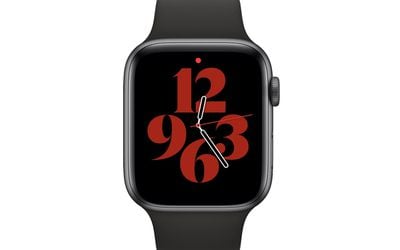
red dot apple watch
Since updating to watchOS 8.5.1, many Apple Watch users have reported instances where they are unable to access notifications or the Control Center with a swipe up or down on the watch face. In fact, the issue goes back much earlier than watchOS 8, and has been found to occur on different Apple Watch models, so it is a recurring bug that spans hardware and software versions.

Until Apple gets the watch face interaction problem fixed, you can try one of these workarounds to regain access to Control Center and your notifications.

Method 1: Switch Apple Watch Face

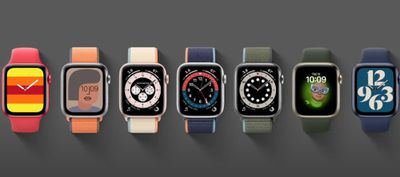
Before you attempt the other methods discussed here, simply try switching the watch face.
newapplewatchfaces
Some users have found that just swiping left or right to change the watch face has brought back the Control Center and notifications interactions for them.

Method 2: Reboot Apple Watch

Note that you can't restart an Apple Watch if it is charging, so undock it first before attempting the following steps.

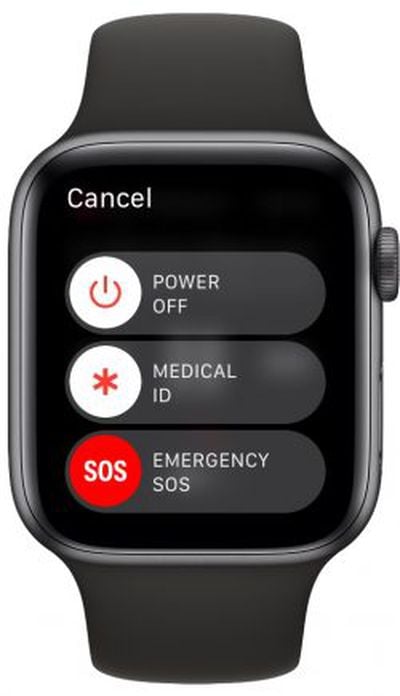
  1. Press and hold the side button until you see the Power Off slider on the screen.
  2. Drag the Power Off slider with your finger.
  3. Once your Apple Watch has turned off, press and hold the side button again until you see the Apple logo.
    apple watch power off

Method 3: Hard Reset Apple Watch

If rebooting didn't solve the issue, try a force restart on your Apple Watch. Note that this should only be used as a last resort. And whatever you do, don't perform a force restart if your Apple Watch is in the middle of an OS update.

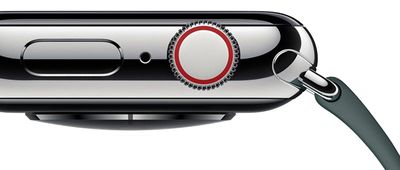
  1. Press and hold both the side button and Digital Crown for at least 10 seconds.
  2. Release both buttons when you see the Apple logo.
applewatchseries4digitalcrowndesign

Method 4: Re-Pair Apple Watch

Unpairing Apple Watch from iPhone has worked for some people suffering from the issue. It takes a bit of time, but if you're missing the gestures that reveal Control Center and notifications, it's worth it.

  1. Bring your iPhone and Apple Watch close together, then open the Watch app on your iPhone.
  2. In the My Watch tab, tap All Watches.
  3. Tap the info (i) button next to the watch that you want to unpair.
  4. Tap Unpair Apple Watch. (For GPS + Cellular models, choose to keep your cellular plan.)
  5. Tap again to confirm. You might need to enter your Apple ID password to disable Activation Lock.

Before erasing all content and settings on your Apple Watch, your iPhone creates a new backup of your Apple Watch. You can use the backup to restore a new Apple Watch. After your Apple Watch unpairs, you'll see the Start Pairing message. Then you can pair your watch to your iPhone again in the normal way.

  1. Press and hold the side button on your Apple Watch until you see the Apple logo.
  2. Wait for the "Use your iPhone to set up this Apple Watch" message to appear on your iPhone, then tap Continue. If you don't see this message, open the Watch app on your iPhone, tap All Watches, then tap Pair New Watch.
  3. Follow the on-screen instructions to re-pair your watch.

Final Thoughts

If none of the above suggestions worked for you, it could be that your Apple Watch screen has a hardware issue and you'll have to take it into an Apple Store for repair or replacement.
watchOS 9 header
If you solved the issue, it may only be temporary, and you'll have to wait for Apple to fix whatever's going wrong in a future update. Apple has solved similar issues on Apple Watch in past versions of watchOS, so hopefully we'll see a fix with the release of watchOS 8.7 or watchOS 9, due in the fall of 2022.


Related Roundups: Apple Watch 12, Apple Watch SE 3
Related Forum: Apple Watch

Top Rated Comments

raziel101 Avatar
58 months ago
Have had this issue for months. Rebooting has always resolved it so far.
Score: 6 Votes (Like | Disagree)
DanteHicks79 Avatar
58 months ago
"It just works"
Score: 4 Votes (Like | Disagree)
58 months ago
Good article. Hope the issue is completely fixed in a future update.
Score: 2 Votes (Like | Disagree)
macfacts Avatar
58 months ago
"reboot your apple car", get ready for that suggestion.
Score: 2 Votes (Like | Disagree)
tonie walker Avatar
58 months ago
…glad I wasn’t alone on this, reboot works
Score: 2 Votes (Like | Disagree)
58 months ago
Apple tried but is unable to fix this. Sorry
Score: 2 Votes (Like | Disagree)

Popular Stories

apple watch series 3 design

Apple Offers Steps to Fix Daylight Saving Time Bug on Apple Watch

Sunday November 1, 2026 3:34 am PST by
Apple has published a support document describing what to do if your Apple Watch continues to show time that's off by one hour after daylight savings time changes. "This incorrect time appears only on the Always On display when your wrist is down," says Apple. "When you activate the display by tapping it or raising your wrist, the time changes to the correct hour." To fix the issue, Apple says ...
muse apple watch app

Meta's Muse AI Agent Comes to Apple Watch

Monday November 9, 2026 1:55 pm PST by
Meta today updated the Muse app for iOS to add Apple Watch support, which means Muse users can access the proactive AI agent from the watch. The app adds the Muse character to the watch with an option to text it, dictate text to it, or call it. There's also a Muse complication for quick access. Muse is Meta's personal AI agent that can complete tasks for users. It is available as a...
siri recap live rewind

watchOS 27.3 Brings Live Rewind and Siri Recap to Apple Watch

Tuesday November 3, 2026 10:35 am PST by
With the first beta of watchOS 27.3, Apple is introducing new Audio Intelligence features it previewed for the Apple Watch Series 12 and Ultra 4 earlier this year. Powered by the S11 chip, Audio Intelligence includes Live Rewind, Siri Recap, Sound Recognition, and Shazam Music Recognition. Sound Recognition and Shazam are already on the watch, but Live Rewind and Siri Recap are now available ...
Latest Stories
The 50+ Best Apple Black Friday Deals Still Available on AirPods, iPads, and More
3 hours ago
Apple's M6 and PROLED MacBook Pro Reach New Low Prices for Black Friday
10 hours ago
The MacRumors Show: iPhone Air 2 and iPhone 18 Are Coming
10 hours ago
Apple Store in Brisbane Reopening Next Month With New Design
11 hours ago
The 60+ Best Black Friday Accessory Deals on iPhone Chargers, TVs, Headphones, and More
11 hours ago
GTA VI Now (Barely) Running on Apple Silicon Macs
12 hours ago
The Best Black Friday Streaming Deals on Apple TV, Disney+, and More
12 hours ago
Apple TV's 'Carême' Wins International Emmy for Best Drama
13 hours ago
iPhone 18 Production Delay Leaves Apple Little Time Before Launch
14 hours ago
The Best Black Friday AirPods Deals Still Available
6 hours ago
The Best Black Friday Deals on Apple Home Products
14 hours ago
The Best Black Friday iPhone Deals Still Available
6 hours ago
The Best Black Friday iPad Deals Still Available
6 hours ago
The Best Black Friday Apple Watch Deals Still Available
6 hours ago
The Best Black Friday AirTag Deals Still Available
6 hours ago
The Best Black Friday Mac Deals Still Available
6 hours ago
iPhone Share of US Smartphone Market Hits 57% as Rivals Slip
16 hours ago
iPhone 20 Pro Rumored to Feature 3D-Printed Titanium Frame
17 hours ago
Apple's Official 2026 Black Friday Offer Starts Rolling Out
1 day ago
Halide Adds Fill Light Feature for iPhone Duo
1 day ago
MacBook Air Black Friday Deals Now Live With Massive $399 Savings
2 days ago
Amazon Discounts All MacBook Neo Models by $99 for Black Friday
2 days ago
Kodak Launches Unique AirTag Rival With E-Ink Display
2 days ago
Here's Why the Apple Store is Going Down
2 days ago
Apple Still Working on Giant Foldable iPad That Could Cost $5,000
2 days ago
iPhones Dominate China's Weak Singles' Day Smartphone Sales
2 days ago
iPhone 20 Pro Could Feature Ceramic in Limited-Edition Model
2 days ago
Apple Faces Korean Regulator Review Over iPhone 16 AI Advertising
2 days ago
Apple Watch Ultra 4 Hits New Best-Ever Price of $649.99 for Black Friday
2 days ago
New Apple Store Opening in India, Download the Special Wallpaper Now
2 days ago
Related Apple News: News | Ipad | Politics | Sport | Lifestyle