Skip to Content

How to Grab Screenshots and Video From Apple TV Using Your Mac

by

Apple doesn't go out of its way to advertise the fact, but it's perfectly possible to connect a Mac to a fourth-generation Apple TV or later and grab screenshots and video output from the set-top box. In this article, we'll show you how it's done.

Note that this method can't be used to record DRM-protected content off the likes of Netflix or iTunes, but it will let you capture your driving skills in Asphalt 8: Airborne, for instance, just as it will allow you to take screenshots for use in troubleshooting, training, blogging, or any other purpose.

screenshot record apple tv on mac
The way to connect a Mac to an Apple TV used to depend on the presence of a USB-C port on the rear of the fourth-generation set-top box to establish a wired connection. But since there's no such port on the latest fifth-generation Apple TV 4K, that's no longer an option for a growing number of users.

However, thanks to macOS High Sierra and tvOS 11, it's now possible to connect your Mac wirelessly to a fourth- or fifth-generation Apple TV on the same Wi-Fi network, and you don't have to download Xcode or any other additional software to do so. Simply follow the steps below, and you should be capturing video and taking screenshots in no time.

How to Grab Images and Video From Apple TV on a Mac

  1. Turn on your Apple TV and your HDMI-connected display.

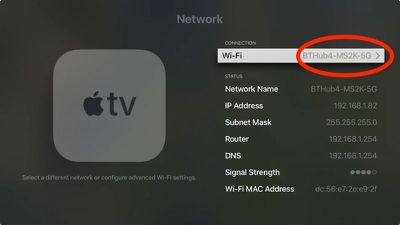
  2. On Apple TV, open Settings and select Network.

  3. Under Connection, make a note of the Wi-Fi network.
    1 Apple TV Network

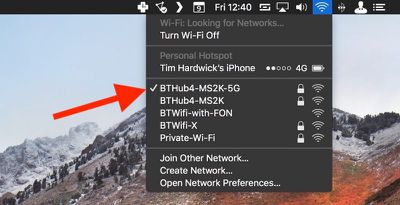
  4. Now click the Wi-Fi menu bar icon over on your Mac to make sure it's connected to the same network.
    1b Mac wireless network

  5. On Mac, launch QuickTime Player from the Applications folder.

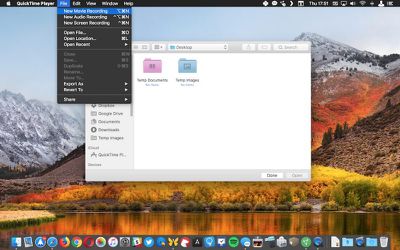
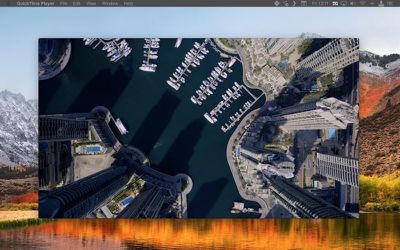
  6. In the QuickTime menu bar, click File -> New Movie Recording to open a new recording window.
    2 Quicktime apple tv video capture

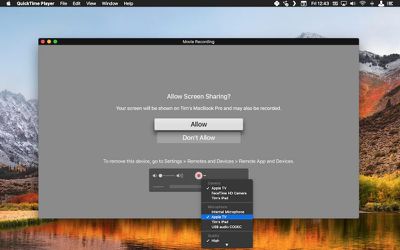
  7. Click the small down arrow to the right of the red record button.

  8. In the dropdown menu, select Apple TV under both the Camera and Microphone sections.
    3 QuickTime Apple TV recording

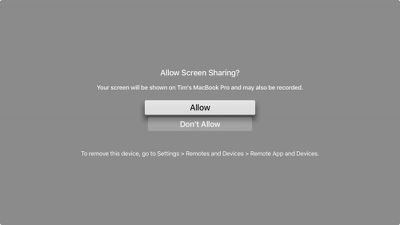
  9. A screen sharing permissions prompt will appear on your Apple TV display. Use your Siri Remote to select Allow.
    4 Apple TV screen sharing

  10. To begin recording video, simply click the red record button.

  11. To take a screenshot of the Apple TV output from your desktop, press the keyboard shortcut Command-Shift-4 and hover the cursor crosshair over the QuickTime Movie Recording window.

  12. Press the spacebar. The crosshair will turn into a camera and the QuickTime window will take on a transparent blue cast to indicate it's selected.

  13. Wait a moment for the QuickTime interface overlay and title bar to disappear, and then click to take your Apple TV screenshot. It will be automatically saved to your desktop by default.5 Apple TV QuickTime screenshot

Note: If you want to try the traditional method of taking Apple TV screenshots, you need to download Apple's Xcode developer utility from the Mac App Store. Bear in mind that it's a hefty 5.5GB download, and you might run into connection issues if you're running a beta version of tvOS.

After installing Xcode 9.2, launch the utility and select Window -> Devices and Simulators from the menu bar, and you should see the screenshot button in the Devices tab once you've successfully connected to Apple TV.


Related Roundup: Apple TV
Buyer's Guide: Apple TV (Buy Now)

Top Rated Comments

Starflyer Avatar
114 months ago
This is cool! I also think it would be nice to have a motion graphic desktop, like the Apple TV screen savers but as a desktop wallpaper replacement on the Mac.
Here is a Mac screen saver that pulls from the source videos. I've used this for a year.

https://github.com/JohnCoates/Aerial
Score: 2 Votes (Like | Disagree)
TurboPikachu Avatar
111 months ago
good tip...but where are those screenshots stored? How do you get them transferred to a Mac?
They’re automatically stored to your iCloud Photo Library, accessible from Mac, iOS Devices, and PCs.
Score: 1 Votes (Like | Disagree)
acctman Avatar
114 months ago
wow would have never found that feature on my own.
Score: 1 Votes (Like | Disagree)
114 months ago
Very cool tip, thanks MR!
Score: 1 Votes (Like | Disagree)
Xavier Avatar
114 months ago
This is cool! I also think it would be nice to have a motion graphic desktop, like the Apple TV screen savers but as a desktop wallpaper replacement on the Mac.
Score: 1 Votes (Like | Disagree)

Popular Stories

Apple Event Logo

Apple Releasing Yet Another Two New Products Next Week

Friday November 6, 2026 7:36 am PST by
Apple's massive wave of product launches will finally end next week, with its all-new HomeView smart home hub and the fourth-generation Apple TV 4K set to be released on Friday, November 13 and no other major hardware releases expected for the remainder of the year. Since late August, Apple has announced more than 25 new devices and accessories in one of its busiest stretches...
Apple TV 4K 4th Generation Top View5

New Apple TV 4K and iPad Mini: RAM Amounts Revealed

Thursday October 29, 2026 5:50 pm PDT by
Apple today released Xcode 27.2, and it reveals how much RAM is in the new fourth-generation Apple TV 4K and the new iPad mini with an OLED display. As expected, the new Apple TV 4K with the A19 chip is equipped with 8GB of RAM, while the new iPad mini with the A20 Pro chip has 12GB of RAM. For good measure, Xcode shows the iPhone Duo is equipped with 12GB of RAM. None of these RAM...
Apple TV Silo

Apple TV Reportedly Planning 'Silo' Spinoff

Wednesday November 4, 2026 8:56 am PST by
Apple TV is developing a "Silo" spinoff tied to Hugh Howey's upcoming Silo book trilogy, according to Apple TV commentator and podcaster Sigmund Judge. He said pre-production will begin later this year, with the books expected next summer. Hiring has apparently begun and some sets remain standing after season four wrapped in March. The reported project would follow the show's fourth and final...
Latest Stories
The 50+ Best Apple Black Friday Deals Still Available on AirPods, iPads, and More
5 hours ago
Here Are the Best Apple Black Friday Leftover Deals You Can Get Today
4 hours ago
HomePod Mini 2 in (RED) Seemingly Spotted Ahead of Announcement
15 hours ago
Apple's M6 and PROLED MacBook Pro Reach New Low Prices for Black Friday
1 day ago
The MacRumors Show: iPhone Air 2 and iPhone 18 Are Coming
1 day ago
Apple Store in Brisbane Reopening Next Month With New Design
1 day ago
The 60+ Best Black Friday Accessory Deals on iPhone Chargers, TVs, Headphones, and More
4 hours ago
GTA VI Now (Barely) Running on Apple Silicon Macs
1 day ago
The Best Black Friday Streaming Deals on Apple TV, Disney+, and More
1 day ago
Apple TV's 'Carême' Wins International Emmy for Best Drama
1 day ago
iPhone 18 Production Delay Leaves Apple Little Time Before Launch
1 day ago
The Best Black Friday AirPods Deals Still Available
21 hours ago
The Best Black Friday Deals on Apple Home Products
1 day ago
The Best Black Friday iPhone Deals Still Available
21 hours ago
The Best Black Friday iPad Deals Still Available
21 hours ago
The Best Black Friday Apple Watch Deals Still Available
21 hours ago
The Best Black Friday AirTag Deals Still Available
21 hours ago
The Best Black Friday Mac Deals Still Available
21 hours ago
iPhone Share of US Smartphone Market Hits 57% as Rivals Slip
1 day ago
iPhone 20 Pro Rumored to Feature 3D-Printed Titanium Frame
1 day ago
Apple's Official 2026 Black Friday Offer Starts Rolling Out
2 days ago
Halide Adds Fill Light Feature for iPhone Duo
2 days ago
MacBook Air Black Friday Deals Now Live With Massive $399 Savings
2 days ago
Amazon Discounts All MacBook Neo Models by $99 for Black Friday
2 days ago
Kodak Launches Unique AirTag Rival With E-Ink Display
2 days ago
Here's Why the Apple Store is Going Down
2 days ago
Apple Still Working on Giant Foldable iPad That Could Cost $5,000
2 days ago
iPhones Dominate China's Weak Singles' Day Smartphone Sales
2 days ago
iPhone 20 Pro Could Feature Ceramic in Limited-Edition Model
2 days ago
Apple Faces Korean Regulator Review Over iPhone 16 AI Advertising
2 days ago
Related Apple News: Iphone | Mac | South Africa | Politics | Travel