Skip to Content

Apple TV: How to Customize the Clickpad on the New Siri Remote (2nd Gen)

by

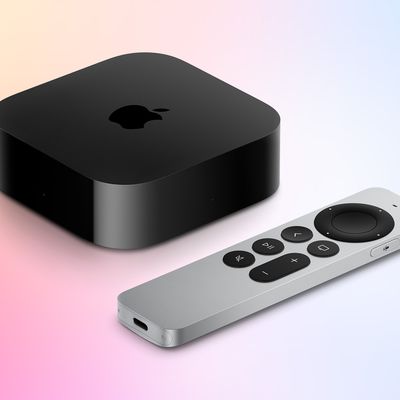
Apple's second-generation redesigned Siri Remote features a touch-sensitive clickpad that can be used to navigate menus as well as fast-forward and rewind video.
siri remote 2 clickpad settings feature
When you first start using the ‌Siri‌ Remote, touch surface tracking is on by default, but if you can't get on with the sensitivity or you're just not comfortable using touch controls on a remote, you can always customize it or turn it off.
apple tv remote settings

Change Siri Remote Clickpad Functionality

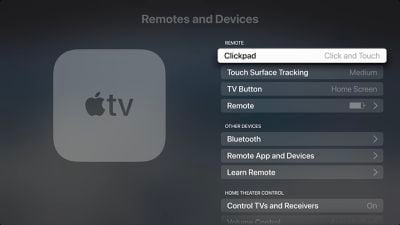
  1. Launch the Settings app on your Apple TV.
  2. Select Remotes and Devices.
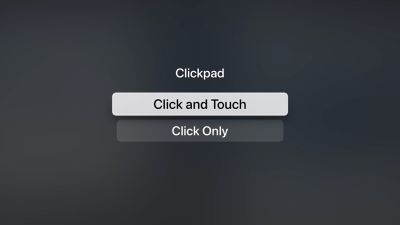
  3. Select ClickPad.
  4. Select Click and Touch to allow both clicking and touch surface tracking, or Click Only to turn off touch surface tracking.
apple tv siri remote clickpad settings

Change Siri Remote Tracking Sensitivity

  1. Launch the Settings app on your ‌Apple TV‌.
  2. Select Remotes and Devices.
  3. Select Touch Surface Tracking.
  4. Select Fast to make smaller thumb movements move farther on the ‌Apple TV‌ screen, or Slow to reduce tracking sensitivity.
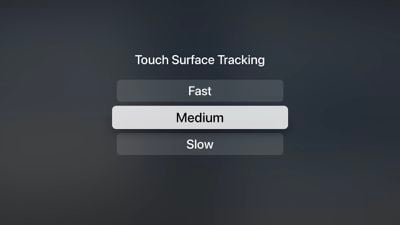
apple tv siri remote tracking settings
If you're having trouble scrubbing through video when playback is paused, check our mini guide to make sure you're using the correct clickpad gesture.

Related Roundup: Apple TV
Buyer's Guide: Apple TV (Buy Now)

Top Rated Comments

mikeyteh Avatar
72 months ago
This thread will be full of complaints by people who don’t have the remote, just like the last remote article. I have 3 new ones and they are a huge improvement from the first Siri Remote and work very well. The scrubber feature is fantastic
Score: 3 Votes (Like | Disagree)
CarlJ Avatar
72 months ago

I honestly thought Mac Rumors is/was frequented by readers who are tech savvy.

But after reading complaints on this remote like “can’t skip forward 10 seconds”, when the the new action to do that function seems like the obvious action (click the right arrow); I now feel like it’s just the general public in here. Lol
Yeah, try that in the YouTube app and tell us how well it works. But keep patting yourself on the back for being smarter than everyone else.

(YouTube seems to have swapped out their “smart tv” codebase for their “game console” codebase - it gains a few other features but loses the skip forward/back 10 seconds ability - clicking the left/right arrows will pause the video and move the cursor, and leave it sitting there with the video paused, not at all what someone used to the old function wants. The “skip forward/back 10 seconds while the video continues to run” feature seems to be heavily dependent on the underlying software.)
Score: 2 Votes (Like | Disagree)
72 months ago

Is using this remote intuitive? Or does a person need an online class on operating the remote? I don't own one yet but wondering why in the world scrubbing isn't intuitive.
I felt comfortable using it in about a minute. Just a matter of summoning some curiosity.

Still not used to the Mic button being on the side. But that's mice nuts and have pretty much adapted.

Overall it's a huge improvement.
Score: 2 Votes (Like | Disagree)
72 months ago

It’s a good remote, but it continually bugs me that the pause and mute buttons are in their current locations instead of swapped - mute is on the corner of the array in the spot that’s easier to get to without looking, but the ATV is fundamentally a streaming box, and the majority of streaming is on-demand, not live. Generally, no one wants to hurriedly mute a movie while letting it run, they want to pause the movie. Without looking, the pause button requires sliding your finger over the button above it or below it to get to the right place, while the mite button is immediately locatable by sliding your finger up from the bottom, which is a shame. They’ve made the more useful button harder to get to, and the less useful button easier to get to. Oh well, it’s still a good remote.
I would honestly like the play/pause button to be above the volume, the home/tv button to be top left, back button below it, and mute where it is.

I see it similar to how you do that most people pause instead of mute, and when watching stuff I’m really only going to use volume up/down and play/pause during viewing and prefer them stacked so they are near.

I feel the home/tv and back buttons are similar enough to be next to each other and then the mute button to me is fine where it is, mainly because I wont use it much and it’s next to the volume down button, resulting in basically what you are going for if you happen to hit the wrong button.

This is a lot of thought I’ve put into a remote with hardly any buttons lol and I’ll memorize them in the next day or so and never think about it again, but that’s how I would have preferred the remote setup.
Score: 1 Votes (Like | Disagree)
72 months ago
My only complaint with the new remote is just simply that the mute button and play/pause button should be swapped.
That’s it though, everything else is perfect.
I mean, except for the obvious, no find my integration
Score: 1 Votes (Like | Disagree)
72 months ago

Is using this remote intuitive? Or does a person need an online class on operating the remote? I don't own one yet but wondering why in the world scrubbing isn't intuitive.
Until reading previous posts about people losing and not knowing how to use remotes, I thought the remote(as in any remote) was one of the simplest items out there that most can understand relatively easily, and wow was I wrong.

I just got the new Apple TV yesterday and the scrubbing feature was exactly as easy as I expected any remote to be, but maybe that is not the case for everyone.
Score: 1 Votes (Like | Disagree)

Popular Stories

Apple Event Logo

Apple Releasing Yet Another Two New Products Next Week

Friday November 6, 2026 7:36 am PST by
Apple's massive wave of product launches will finally end next week, with its all-new HomeView smart home hub and the fourth-generation Apple TV 4K set to be released on Friday, November 13 and no other major hardware releases expected for the remainder of the year. Since late August, Apple has announced more than 25 new devices and accessories in one of its busiest stretches...
Apple TV 4K 4th Generation Top View5

New Apple TV 4K and iPad Mini: RAM Amounts Revealed

Thursday October 29, 2026 5:50 pm PDT by
Apple today released Xcode 27.2, and it reveals how much RAM is in the new fourth-generation Apple TV 4K and the new iPad mini with an OLED display. As expected, the new Apple TV 4K with the A19 chip is equipped with 8GB of RAM, while the new iPad mini with the A20 Pro chip has 12GB of RAM. For good measure, Xcode shows the iPhone Duo is equipped with 12GB of RAM. None of these RAM...
Apple TV Silo

Apple TV Reportedly Planning 'Silo' Spinoff

Wednesday November 4, 2026 8:56 am PST by
Apple TV is developing a "Silo" spinoff tied to Hugh Howey's upcoming Silo book trilogy, according to Apple TV commentator and podcaster Sigmund Judge. He said pre-production will begin later this year, with the books expected next summer. Hiring has apparently begun and some sets remain standing after season four wrapped in March. The reported project would follow the show's fourth and final...
Latest Stories
The 50+ Best Apple Black Friday Deals Still Available on AirPods, iPads, and More
6 hours ago
HomePod Mini 2 in (RED) Seemingly Spotted Ahead of Announcement
3 hours ago
Apple's M6 and PROLED MacBook Pro Reach New Low Prices for Black Friday
13 hours ago
The MacRumors Show: iPhone Air 2 and iPhone 18 Are Coming
13 hours ago
Apple Store in Brisbane Reopening Next Month With New Design
14 hours ago
The 60+ Best Black Friday Accessory Deals on iPhone Chargers, TVs, Headphones, and More
15 hours ago
GTA VI Now (Barely) Running on Apple Silicon Macs
15 hours ago
The Best Black Friday Streaming Deals on Apple TV, Disney+, and More
16 hours ago
Apple TV's 'Carême' Wins International Emmy for Best Drama
16 hours ago
iPhone 18 Production Delay Leaves Apple Little Time Before Launch
17 hours ago
The Best Black Friday AirPods Deals Still Available
9 hours ago
The Best Black Friday Deals on Apple Home Products
18 hours ago
The Best Black Friday iPhone Deals Still Available
9 hours ago
The Best Black Friday iPad Deals Still Available
9 hours ago
The Best Black Friday Apple Watch Deals Still Available
9 hours ago
The Best Black Friday AirTag Deals Still Available
9 hours ago
The Best Black Friday Mac Deals Still Available
9 hours ago
iPhone Share of US Smartphone Market Hits 57% as Rivals Slip
19 hours ago
iPhone 20 Pro Rumored to Feature 3D-Printed Titanium Frame
20 hours ago
Apple's Official 2026 Black Friday Offer Starts Rolling Out
2 days ago
Halide Adds Fill Light Feature for iPhone Duo
2 days ago
MacBook Air Black Friday Deals Now Live With Massive $399 Savings
2 days ago
Amazon Discounts All MacBook Neo Models by $99 for Black Friday
2 days ago
Kodak Launches Unique AirTag Rival With E-Ink Display
2 days ago
Here's Why the Apple Store is Going Down
2 days ago
Apple Still Working on Giant Foldable iPad That Could Cost $5,000
2 days ago
iPhones Dominate China's Weak Singles' Day Smartphone Sales
2 days ago
iPhone 20 Pro Could Feature Ceramic in Limited-Edition Model
2 days ago
Apple Faces Korean Regulator Review Over iPhone 16 AI Advertising
2 days ago
Apple Watch Ultra 4 Hits New Best-Ever Price of $649.99 for Black Friday
2 days ago
Related Apple News: World News | Mac | Health | Lifestyle | Culture