Skip to Content

How to Make an Apple Music Profile to Connect With Friends in iOS 11

by

Although Apple has fumbled with social network features within its music apps in the past, the company is trying again with an all-new social sharing ability in iOS 11. There's no exact name for the feature, but Apple describes it as a way for you to discover music that your friends are listening to through sharing playlists, artists, and albums on your own personal Apple Music profile.

If you already have an Apple Music account with a paid subscription, or if you're taking advantage of the service's free three-month trial period, follow these steps to enable the social sharing features within Apple's streaming music service. Note that this guide is specifically tailored for iOS devices, but the process is similar on macOS.

Creating a Profile on Apple Music
how to apple music friends 1

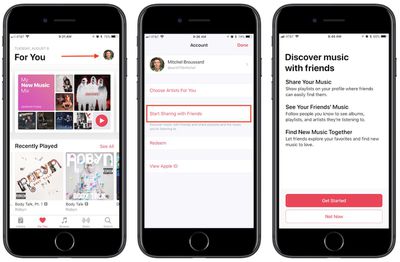
  1. Open Apple Music. (Note: opening Apple Music for the first time after installing iOS 11 should also give you a direct link to "Get Started" with friend sharing, so jump to Step 5 if you tap this button.)
  2. Tap the "For You" tab.
  3. Tap your profile picture in the top right corner.
  4. Choose "Start Sharing with Friends" and then "Get Started."
  5. Upload a profile photo, type in your name, and pick a username so other Apple Music users can find you. Tap "Next" when done.
  6. Choose "Everyone" or "People You Choose" to determine who can see your listening history.
  7. Choose the playlists to share on your profile, or "Hide all" to show none.
  8. Pick contacts to share music with.
  9. Toggle on/off "Friends" and "Artists and Shows" to choose what kind of push notifications you want. Tap "Done."

If you can't find the friend you're looking for in the recommended contacts section, navigate to Apple Music's "Search" tab. With iOS 11, this area now functions as a profile and user playlist search tool as well. Start typing in their name and you might see an "in people" recommendation, or simply tap the "Search" button and you'll see results for Songs, Albums, Playlists, Music Videos, Connect, Artists, and now People and Shared Playlists at the bottom.

With your own Apple Music profile set up, you can begin listening to music as normal, and the more you do the more your favorite albums, artists, and songs will show up in the "Friends Are Listening To" section of your followers' "For You" tabs. On your own "For You" tab, you can tap "See All" and browse a list of recent albums and playlists listened to by your friends, and then tap to add them to your own library.

If your friends allow it, this will even include their own personally created playlists. To discover and save the playlists of a specific person, follow these steps. Note that this guide assumes the friend in question has their activity shared to "Everyone," or that they have chosen you to share with.

Finding Friends' Shared Playlists on Apple Music
how to apple music friends 3

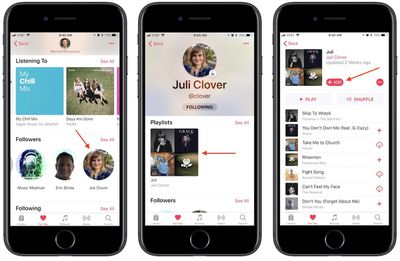
  1. Navigate to your Apple Music profile.
  2. Scroll down to "Following," then tap the friend you're looking for, or tap "See All" for a vertical list.
  3. Scroll through their "Playlists" and "Listening To" to find a collection you want to save.
  4. Tap the collection you want, then "+Add" to place it in your library.

From then on, you'll find friends' playlists taking precedence atop the playlists section of your library, alongside any Apple curated collections. The name of the playlist will be there, along with the name of your friend. Once added, it'll function in much the same way as Apple's own playlists, updating in your library when changes are made by your friend.

You can revisit your profile any time by tapping your profile picture in the top right of "For You," and here you'll see your shared playlists, content you've listened to recently, followers, and following. Tap the "Edit" button to customize items like your profile picture, name, username, follower permissions, and reorganize shared playlists.

If you ever change your mind about sharing a playlist (which also makes it searchable to anyone using Apple Music), tap on the playlist in your library, tap "Edit" in the top right corner, then toggle off "Show on My Profile and in Search." You can follow these same steps for adding a new playlist onto your profile whenever you create a new collection of songs.

Related Forum: iOS 11

Top Rated Comments

ipedro Avatar
120 months ago
Of the few attempts Apple made into social media, they seem to have learned. There’s no use trying to build an Apple branded social media platform to compete with the too entrenched dominance of Facebook. Instead, individual apps can have social features.

iMessage is their most social app and it’s implementing more and more of what we find on platforms like Snapchat. Photos has album sharing and friends can even like photos. Now, Apple Music has a social feature I think many people can get behind. I’d love to know what my friends are listening to. Odds are that because we’re friends, we have similar tastes and that’ll help me discover music I wouldn’t have otherwise found on my own.

Eventually, Apple can build an app that brings all of this together into a sort of feed where you’d be able to see what shared albums you’re a part of, what your friends are listening to, and articles they’ve favorited in Safari.

This is social media, done right.
Score: 3 Votes (Like | Disagree)
M.PaulCezanne Avatar
120 months ago
Ping!
Score: 3 Votes (Like | Disagree)
OtherJesus Avatar
120 months ago
I don't think this is an attempt at building a social network. Just a great way to share music with friends. I think if Apple Music was a thing when Ping came out it would have made much more sense.
Score: 2 Votes (Like | Disagree)
randy98mtu Avatar
120 months ago
That worked. My connection at work isn’t always the best, so maybe that’s why it didn’t work. Thanks!
Score: 1 Votes (Like | Disagree)
earthTOmitchel Avatar
120 months ago
Another interesting thing to note is before I found your fix, I had my girlfriend send me a request via iMessage to share/follow her. I thought clicking that invite would kickstart it for me. But all it did was open the Music app and give a blank error page, with no explanation the what caused the error or how to resolve it. Hopefully Apple makes that error page more helpful in a future update for others. I'm sure they are under the delusion that everyone loved Connect and anyone who would like to share with friends must have of course wanted to follow the handful of artists actually sharing content! Alas, no. Connect was useless and I had no problem turning it off. Never thought that would imply I don't want to share music with friends.
Yeah.. I kicked around the idea for a PSA blog post but it still appears like a small amount of people are facing the problem. I just know how frustrated it made me so trying to share as many place as I can online.

It makes little sense on Apple's part. Connect =/= music profiles, like you said. I want to see recc's from my friends; I don't want to see 3-month-old posts from Little Mix about a now-outdated single drop.
Score: 1 Votes (Like | Disagree)
whyamihere Avatar
120 months ago
You guys might be facing the same problem I was. Did you previously turn off the Connect features of Apple Music on earlier versions of iOS? I did, and because of that the new social profiles were hidden. Try checking: go to Settings app > General > Restrictions > make sure "Music Profiles and Posts" are toggled on.
This was my issue exactly. I had previously signed out/in, and went to "Music" in settings. Had never thought to look in Restrictions. Thank you!
Score: 1 Votes (Like | Disagree)

Popular Stories

ios 27 3 selfie sing

Apple Music's New Selfie Sing Feature Lets You Record Karaoke Videos

Tuesday November 3, 2026 4:05 pm PST by
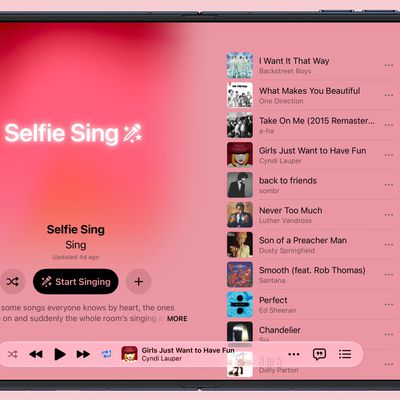
iOS 27.3 adds a new "Selfie Sing" feature in Apple Music that lets users record themselves while singing a song. There's a dedicated Selfie Sing playlist and a selfie camera view that shows lyrics on the screen while also recording a video. Apple has a description of the feature: There are some songs everyone knows by heart, the ones that come on and suddenly the whole room's singing along. ...
tidal logo

Tidal Bans AI Music, While Apple Music Sticks to Labels

Tuesday November 24, 2026 3:44 pm PST by
Streaming music service Tidal today said it plans to start blocking AI music on December 9. Any track generated entirely with AI will be removed from the platform, with Tidal rejecting AI songs in the future. Tidal lead Robert Andersen said 43 percent of tracks uploaded in the last 90 days have been flagged as AI-generated. Approximately 29 million songs will be deleted and Tidal expects...
apple music instagram

Instagram Now Lets You Save Songs to Apple Music

Wednesday November 18, 2026 5:19 pm PST by
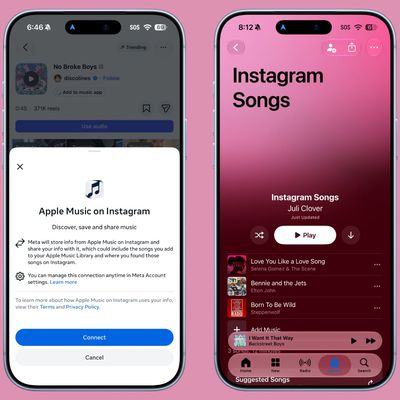
Sometime in the last week or two, Instagram added a new Apple Music feature. You can now connect an Apple Music account to the social network and save songs you come across to an Apple Music playlist. If you tap a song link on a post or a story on Instagram, you'll see a prompt to connect Instagram to Apple Music. Once your Apple Music account is linked to Instagram, you can tap a song name...
Latest Stories
The 50+ Best Apple Black Friday Deals Still Available on AirPods, iPads, and More
2 hours ago
Apple's M6 and PROLED MacBook Pro Reach New Low Prices for Black Friday
9 hours ago
The MacRumors Show: iPhone Air 2 and iPhone 18 Are Coming
10 hours ago
Apple Store in Brisbane Reopening Next Month With New Design
10 hours ago
The 60+ Best Black Friday Accessory Deals on iPhone Chargers, TVs, Headphones, and More
11 hours ago
GTA VI Now (Barely) Running on Apple Silicon Macs
11 hours ago
The Best Black Friday Streaming Deals on Apple TV, Disney+, and More
12 hours ago
Apple TV's 'Carême' Wins International Emmy for Best Drama
12 hours ago
iPhone 18 Production Delay Leaves Apple Little Time Before Launch
13 hours ago
The Best Black Friday AirPods Deals Still Available
5 hours ago
The Best Black Friday Deals on Apple Home Products
14 hours ago
The Best Black Friday iPhone Deals Still Available
5 hours ago
The Best Black Friday iPad Deals Still Available
5 hours ago
The Best Black Friday Apple Watch Deals Still Available
5 hours ago
The Best Black Friday AirTag Deals Still Available
5 hours ago
The Best Black Friday Mac Deals Still Available
5 hours ago
iPhone Share of US Smartphone Market Hits 57% as Rivals Slip
15 hours ago
iPhone 20 Pro Rumored to Feature 3D-Printed Titanium Frame
17 hours ago
Apple's Official 2026 Black Friday Offer Starts Rolling Out
1 day ago
Halide Adds Fill Light Feature for iPhone Duo
1 day ago
MacBook Air Black Friday Deals Now Live With Massive $399 Savings
1 day ago
Amazon Discounts All MacBook Neo Models by $99 for Black Friday
2 days ago
Kodak Launches Unique AirTag Rival With E-Ink Display
2 days ago
Here's Why the Apple Store is Going Down
2 days ago
Apple Still Working on Giant Foldable iPad That Could Cost $5,000
2 days ago
iPhones Dominate China's Weak Singles' Day Smartphone Sales
2 days ago
iPhone 20 Pro Could Feature Ceramic in Limited-Edition Model
2 days ago
Apple Faces Korean Regulator Review Over iPhone 16 AI Advertising
2 days ago
Apple Watch Ultra 4 Hits New Best-Ever Price of $649.99 for Black Friday
2 days ago
New Apple Store Opening in India, Download the Special Wallpaper Now
2 days ago
Related Apple News: Airpods Deals | Apple Tv | Imac | Mac | Aqara W200 Thermostat