Skip to Content

How to Add and Organize Glances on Apple Watch

by

The Glances feature of Apple Watch allows you to see an overview of content from specific apps. It is a great way to get a quick update on the day's content without having to open an app, either on your iPhone or on Apple Watch.

For those interested in learning the basics of the Glances feature, today we are going to show you how to add, remove, and organize Glances on Apple Watch so you can customize your content for a more personalized experience.

How to organize Glances in Apple Watch 4

Viewing Glances

  1. Press the Digital Crown to navigate to the watch face on Apple Watch if necessary.
  2. Swipe up from the bottom of the screen.
  3. Swipe left or right to view all of your Glances.

There are several default Glances that will be immediately available on your Apple Watch right out of the box. These include a Control Center for pinging the iPhone and controlling features like Airplane Mode/Do Not Disturb, a battery Glance that offers up current battery life plus an option for Power Reserve mode, and Glances for Weather, Calendar events, current heart rate, activity level, world clock, and stocks.
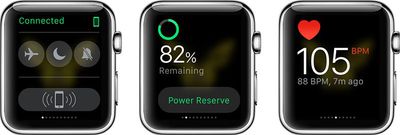
applewatchglances
You can't interact with Glances (there are no special Force Press options here) but tapping on many of the Glances with accompanying apps will open up the app. For example, tapping the Weather Glance will open up the full Weather app. You can add additional Glances through third-party apps and control which Glances are displayed and in which order, as outlined below.

Adding Glances

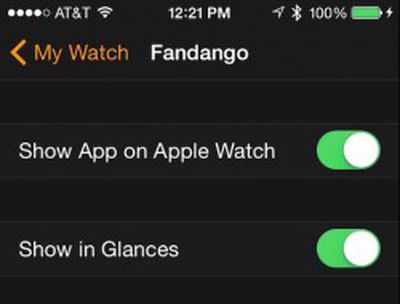
Some third-party Apple Watch apps include Glances, which need to be manually enabled using the Apple Watch companion app on your iPhone. Once turned on, you can access the Glances as you would the default Glances.
How to organize Glances in Apple Watch 1

  1. Open the Apple Watch app on your iPhone.
  2. Tap the My Watch tab.
  3. Scroll down to the list of compatible apps and select the one you wish to add.
  4. If it is not already on your Apple Watch, toggle the "Show App on Apple Watch" switch to the On position.
  5. Toggle the "Show in Glances" switch to the On position.
  6. The app will automatically be added to your list of Glances.

You can also add a Glance via the Apple Watch app on your iPhone under the Glances section in the My Watch tab. Simply scroll down to the "Do Not Include" section and tap the green add icon on the left side of the app.
How to organize Glances in Apple Watch 3

Organizing and Removing Glances

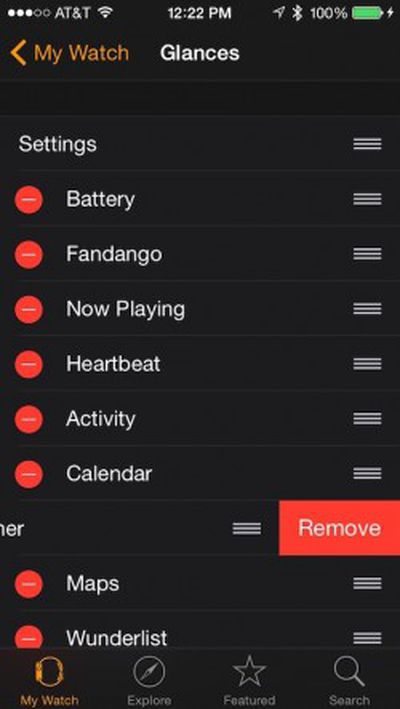
Similar to the way you organize the Today View widgets on your iPhone, you can also organize Glances for your Apple Watch.

  1. Open the Apple Watch app on your iPhone
  2. Tap the My Watch tab.
  3. Select Glances.
  4. To remove an app, tap the red remove icon on the left side of the app.
  5. To reorder apps, hold and drag the reorder icon on the right side of the app and move it to the new location on the list.

Experiment with your Glances. You may discover that some are more important to you than others, and keeping this section culled down to your most used apps can make it easy to access them quickly. Once your Glances are in order, you will be able to quickly see a short summary of the content of your most important apps.


Related Roundup: Apple Watch 12
Buyer's Guide: Apple Watch (Buy Now)
Related Forum: Apple Watch

Top Rated Comments

acctman Avatar
151 months ago
No offense to the author or macrumor but these Apple Watch how-to articles are laughable. You have videos, manual and common sense already built into the Apple Watch app and watch itself. It's not like you're teaching anything hidden. How about showing the non-common sense features.

- Like sending your location from within a watch message
- Chaning the colors of animated emojis
- Managing and controlling your storage space
- etc ... Useful stuff not saying these articles aren't useful but it more like duh we know this.
Score: 10 Votes (Like | Disagree)
151 months ago
Neat, next up, how to glance at the time on Apple Watch...
Score: 8 Votes (Like | Disagree)
151 months ago
So much for glances. How about Apple addressing glimpses, gazes, looks and the cold stare?
Score: 5 Votes (Like | Disagree)
151 months ago
The amount of articles about this watch seem disproportionate to the amount of readers that have one. Several comments are always along the lines of, "still waiting for mine...."

Maybe these articles should be held back until June or July when their watches actually ship!
Score: 2 Votes (Like | Disagree)
151 months ago
The amount of articles about this watch seem disproportionate to the amount of readers that have one. Several comments are always along the lines of, "still waiting for mine...."

Maybe these articles should be held back until June or July when their watches actually ship!
Plenty of people who read articles here don't participate in the forums or even register. Why not have the information available when the product is available so that those who might want it (no matter how many there might be) would have access to it. And when more people get the product the information will already be there. Waiting for some number or something like that doesn't make much sense.
Score: 1 Votes (Like | Disagree)
bushido Avatar
151 months ago
for some reason Apple decides to call them "Checks" in german which isn't even a German word. took me forever to realize that these are in fact the glances
Score: 1 Votes (Like | Disagree)

Popular Stories

apple watch series 3 design

Apple Offers Steps to Fix Daylight Saving Time Bug on Apple Watch

Sunday November 1, 2026 3:34 am PST by
Apple has published a support document describing what to do if your Apple Watch continues to show time that's off by one hour after daylight savings time changes. "This incorrect time appears only on the Always On display when your wrist is down," says Apple. "When you activate the display by tapping it or raising your wrist, the time changes to the correct hour." To fix the issue, Apple says ...
muse apple watch app

Meta's Muse AI Agent Comes to Apple Watch

Monday November 9, 2026 1:55 pm PST by
Meta today updated the Muse app for iOS to add Apple Watch support, which means Muse users can access the proactive AI agent from the watch. The app adds the Muse character to the watch with an option to text it, dictate text to it, or call it. There's also a Muse complication for quick access. Muse is Meta's personal AI agent that can complete tasks for users. It is available as a...
siri recap live rewind

watchOS 27.3 Brings Live Rewind and Siri Recap to Apple Watch

Tuesday November 3, 2026 10:35 am PST by
With the first beta of watchOS 27.3, Apple is introducing new Audio Intelligence features it previewed for the Apple Watch Series 12 and Ultra 4 earlier this year. Powered by the S11 chip, Audio Intelligence includes Live Rewind, Siri Recap, Sound Recognition, and Shazam Music Recognition. Sound Recognition and Shazam are already on the watch, but Live Rewind and Siri Recap are now available ...
Latest Stories
The 50+ Best Apple Black Friday Deals Still Available on AirPods, iPads, and More
3 hours ago
HomePod Mini 2 in (RED) Seemingly Spotted Ahead of Announcement
23 minutes ago
Apple's M6 and PROLED MacBook Pro Reach New Low Prices for Black Friday
11 hours ago
The MacRumors Show: iPhone Air 2 and iPhone 18 Are Coming
11 hours ago
Apple Store in Brisbane Reopening Next Month With New Design
11 hours ago
The 60+ Best Black Friday Accessory Deals on iPhone Chargers, TVs, Headphones, and More
12 hours ago
GTA VI Now (Barely) Running on Apple Silicon Macs
12 hours ago
The Best Black Friday Streaming Deals on Apple TV, Disney+, and More
13 hours ago
Apple TV's 'Carême' Wins International Emmy for Best Drama
14 hours ago
iPhone 18 Production Delay Leaves Apple Little Time Before Launch
14 hours ago
The Best Black Friday AirPods Deals Still Available
7 hours ago
The Best Black Friday Deals on Apple Home Products
15 hours ago
The Best Black Friday iPhone Deals Still Available
7 hours ago
The Best Black Friday iPad Deals Still Available
7 hours ago
The Best Black Friday Apple Watch Deals Still Available
7 hours ago
The Best Black Friday AirTag Deals Still Available
7 hours ago
The Best Black Friday Mac Deals Still Available
7 hours ago
iPhone Share of US Smartphone Market Hits 57% as Rivals Slip
16 hours ago
iPhone 20 Pro Rumored to Feature 3D-Printed Titanium Frame
18 hours ago
Apple's Official 2026 Black Friday Offer Starts Rolling Out
2 days ago
Halide Adds Fill Light Feature for iPhone Duo
2 days ago
MacBook Air Black Friday Deals Now Live With Massive $399 Savings
2 days ago
Amazon Discounts All MacBook Neo Models by $99 for Black Friday
2 days ago
Kodak Launches Unique AirTag Rival With E-Ink Display
2 days ago
Here's Why the Apple Store is Going Down
2 days ago
Apple Still Working on Giant Foldable iPad That Could Cost $5,000
2 days ago
iPhones Dominate China's Weak Singles' Day Smartphone Sales
2 days ago
iPhone 20 Pro Could Feature Ceramic in Limited-Edition Model
2 days ago
Apple Faces Korean Regulator Review Over iPhone 16 AI Advertising
2 days ago
Apple Watch Ultra 4 Hits New Best-Ever Price of $649.99 for Black Friday
2 days ago
Related Apple News: Iphone | Politics | Motoring | Reviews | Education






























