Skip to Content

How to Add a Passcode to Your Apple Watch and What to Do if You Forget it

by

There are several reasons why you should consider using a passcode on your Apple Watch. Without one, you won't be able to use Apple Pay to make contactless transactions using the device, nor will you be able to use it to automatically unlock your Mac.

But apart from losing out on functionality, not using a passcode on your watch means that anyone who got hold of it could potentially gain access to your Health and other app data, and possibly more besides.
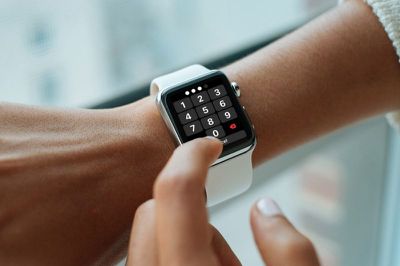
how to add an apple watch passcode
Using a passcode on your Apple Watch isn't like having one on your iPhone or iPad, because you don't have to enter it every time you use your watch. You'll only be prompted for it if you remove your Apple Watch from your wrist or if the watch is restarted. Also unlike iOS devices, if you ever forget your Apple Watch passcode, there are steps you can take to regain access.

With those benefits in mind, here's how to set up your Apple Watch passcode.

How to Add a Passcode to Your Apple Watch

  1. Launch the Settings app on your Apple Watch.

  2. Scroll down the list and tap Passcode.

  3. Tap Turn Passcode On.

  4. Enter the four-digit passcode you want to use to lock and unlock the watch.
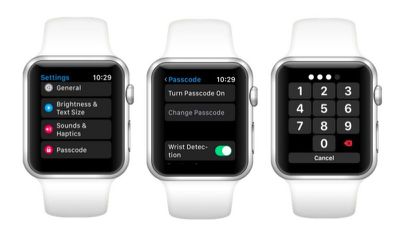
apple watch turn on passcode
You can also add a passcode to your Apple Watch through the Watch app on your iPhone. You can find the relevant setting in the My Watch tab under Passcode -> Turn Passcode On.

For an added layer of security, consider using a six-digit passcode on your Apple Watch. Six-digit passcodes offer 1 million possible combinations instead of 10,000, making the passcode harder to crack. To enable a six-digit code from within the iOS Watch app, tap My Watch -> Passcode, and toggle off Simple Passcode. You'll then be prompted to enter the new six-digit code on your Apple Watch.

Lastly, if you tend to take your watch off during the day, there's a setting in the Watch app's Passcode menu that will unlock your Apple Watch whenever you unlock your iPhone, which should make things somewhat more convenient. Toggle on the switch next to Unlock with iPhone to enable it.

What to Do if You Forget Your Passcode

If you forget your Apple Watch passcode, you'll need to erase the device and then restore from a backup. You can perform this action by launching the Watch app on your paired iPhone: tap the My Watch tab if it's not already selected, tap General -> Reset, then select Erase Apple Watch Content and Settings.
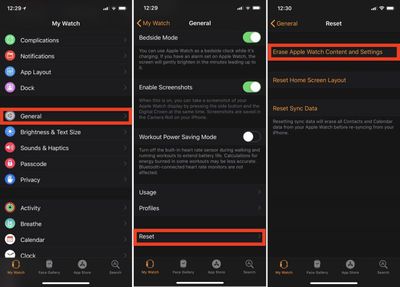
reset apple watch
Alternatively, you can start the erase and restore process on your Apple Watch by connecting the device to its charger and following these steps.

  1. Press and hold the side button until you see the Power Off screen.

  2. Hard press the Power Off slider and then let go.

  3. Tap Erase all content and settings.

  4. You'll be asked to set up your Apple Watch again when the process ends. When you do, be sure to restore from a backup.

Related Roundup: Apple Watch 12
Buyer's Guide: Apple Watch (Buy Now)
Related Forum: Apple Watch

Top Rated Comments

Telos101 Avatar
111 months ago
How do I back it up first?
Apple Watch content backs up automatically to your companion iPhone, so you can restore your Apple Watch from a backup. When you back up your iPhone to iCloud or iTunes, your iPhone backup will also include your Apple Watch data.

Score: 2 Votes (Like | Disagree)
111 months ago
I didn't realise I had 'unlock with iPhone' set to on, and every morning I would enter my passcode to unlock my watch, and then pick up my phone that was right beside it. Given that I have an iPhone X, all this time I could have been unlocking my watch with a quick glance at my phone. Today has been a learning day!
Score: 1 Votes (Like | Disagree)

Popular Stories

apple watch series 3 design

Apple Offers Steps to Fix Daylight Saving Time Bug on Apple Watch

Sunday November 1, 2026 3:34 am PST by
Apple has published a support document describing what to do if your Apple Watch continues to show time that's off by one hour after daylight savings time changes. "This incorrect time appears only on the Always On display when your wrist is down," says Apple. "When you activate the display by tapping it or raising your wrist, the time changes to the correct hour." To fix the issue, Apple says ...
muse apple watch app

Meta's Muse AI Agent Comes to Apple Watch

Monday November 9, 2026 1:55 pm PST by
Meta today updated the Muse app for iOS to add Apple Watch support, which means Muse users can access the proactive AI agent from the watch. The app adds the Muse character to the watch with an option to text it, dictate text to it, or call it. There's also a Muse complication for quick access. Muse is Meta's personal AI agent that can complete tasks for users. It is available as a...
siri recap live rewind

watchOS 27.3 Brings Live Rewind and Siri Recap to Apple Watch

Tuesday November 3, 2026 10:35 am PST by
With the first beta of watchOS 27.3, Apple is introducing new Audio Intelligence features it previewed for the Apple Watch Series 12 and Ultra 4 earlier this year. Powered by the S11 chip, Audio Intelligence includes Live Rewind, Siri Recap, Sound Recognition, and Shazam Music Recognition. Sound Recognition and Shazam are already on the watch, but Live Rewind and Siri Recap are now available ...
Latest Stories
The 50+ Best Apple Black Friday Deals on AirPods, iPads, MacBooks, and More
8 minutes ago
Apple's M6 and PROLED MacBook Pro Reach New Low Prices for Black Friday
13 minutes ago
The MacRumors Show: iPhone Air 2 and iPhone 18 Are Coming
19 minutes ago
Apple Store in Brisbane Reopening Next Month With New Design
46 minutes ago
The 60+ Best Black Friday Accessory Deals on iPhone Chargers, TVs, Headphones, and More
2 hours ago
GTA VI Now (Barely) Running on Apple Silicon Macs
2 hours ago
The Best Black Friday Streaming Deals on Apple TV, Disney+, and More
3 hours ago
Apple TV's 'Carême' Wins International Emmy for Best Drama
3 hours ago
iPhone 18 Production Delay Leaves Apple Little Time Before Launch
4 hours ago
The Best Black Friday AirPods Deals
4 hours ago
The Best Black Friday Deals on Apple Home Products
4 hours ago
The Best Black Friday iPhone Deals
5 hours ago
The Best Black Friday iPad Deals
5 hours ago
The Best Black Friday Apple Watch Deals
5 hours ago
The Best Black Friday AirTag Deals
5 hours ago
The Best Black Friday Mac Deals
5 hours ago
iPhone Share of US Smartphone Market Hits 57% as Rivals Slip
6 hours ago
iPhone 20 Pro Rumored to Feature 3D-Printed Titanium Frame
7 hours ago
Apple's Official 2026 Black Friday Offer Starts Rolling Out
1 day ago
Halide Adds Fill Light Feature for iPhone Duo
1 day ago
MacBook Air Black Friday Deals Now Live With Massive $399 Savings
1 day ago
Amazon Discounts All MacBook Neo Models by $99 for Black Friday
1 day ago
Kodak Launches Unique AirTag Rival With E-Ink Display
1 day ago
Here's Why the Apple Store is Going Down
1 day ago
Apple Still Working on Giant Foldable iPad That Could Cost $5,000
1 day ago
iPhones Dominate China's Weak Singles' Day Smartphone Sales
1 day ago
iPhone 20 Pro Could Feature Ceramic in Limited-Edition Model
1 day ago
Apple Faces Korean Regulator Review Over iPhone 16 AI Advertising
1 day ago
Apple Watch Ultra 4 Hits New Best-Ever Price of $649.99 for Black Friday
1 day ago
New Apple Store Opening in India, Download the Special Wallpaper Now
2 days ago
Related Apple News: Business | Politics | Mac | Entertainment | Opinion






























