


iOS 18: Prevent Motion Sickness With Vehicle Motion Cues
In iOS 18, Apple added several new accessibility features, and one feature in particular that is likely to have widespread appeal among car passengers is Vehicle Motion Cues, which aims to prevent motion sickness when looking at an iPhone or iPad.
According to Apple, research shows that motion sickness is commonly caused by a sensory conflict between what a person sees and what they feel,...
Read Full Article • 45 comments
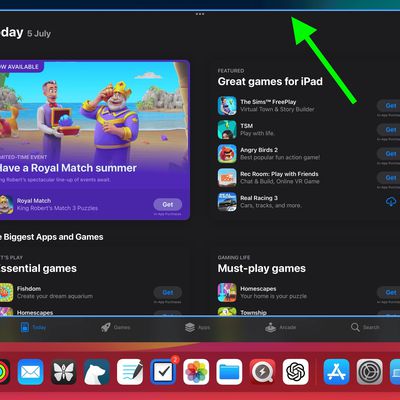
Blue Frames on iPad Screen? How to Fix
When using an iPad, you might notice blue frames appearing around the screen elements. This often happens when Full Keyboard Access is enabled. Full Keyboard Access is an accessibility feature that allows users to control the iPad using a keyboard. The blue frames indicate which element is currently focused and can be interacted with via the keyboard.
Causes of Blue Frames Appearing on iPad...

How to Reset Beats Pill (2024)
Apple's latest Beats-branded Beats Pill Bluetooth speaker has a useful reset function that returns the speaker to its factory settings. It can come in handy if you're having sound, Bluetooth, or charging issues with your speakers, or any other problem with them.
How to Reset Beats Pill
To reset your Beats Pill and keep your settings: Press and hold the system button for at least 10...
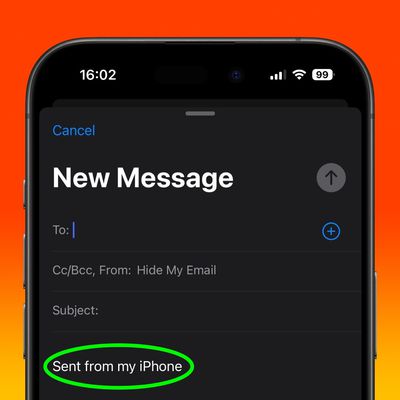
How to Change 'Sent From My iPhone' Email Signature
Fed up of seeing "Sent from my iPhone" at the end of your emails? Customizing your email signature can add a personal touch to your messages and project a professional image. Here's how to change it on iPhone and iPad.
If you're an iPhone user, you've probably noticed the default "Sent from my iPhone" signature that accompanies emails sent in the Mail app. While this signature serves as a...

How to Use Google Gemini AI on iPhone
Gemini is Google's state-of-the-art AI model, designed to compete with other large language models such as OpenAI's ChatGPT-4. On iPhones, you can chat with Gemini right within the Google app. Keep reading to learn how it's done.
Apple recently announced a partnership with OpenAI to bring ChatGPT to iOS 18 later this year, and Apple has suggested that it is looking into partnerships with...

How to Downgrade From the iOS 18 Beta to iOS 17
If you installed iOS 18 Beta or iPadOS 18 Beta through Apple's Developer Program or Software Beta Program, you may decide you want to downgrade because of usability or stability issues. Keep reading to learn how it's done.
Apple's beta versions of its major software updates can be notoriously buggy, especially the early releases. You may find apps not working properly, poor battery life,...
How to Get the iOS 18 Developer Beta on Your iPhone
Apple has released the first iOS 18 beta to developers, but even non-developers have the opportunity to download beta software updates on their iPhones for free. Keep reading to learn how it's done.
Traditionally, when Apple announced a major new operating system update, the first wave of betas would only be available to download by paying subscribers to Apple's Developer Program, which...

How to Use OpenAI's ChatGPT App for Mac
OpenAI in May 2024 announced a desktop ChatGPT app for the Mac. The generative AI company has since been rolling out the app to some ChatGPT subscribers, with a wider launch expected soon.
The app can be downloaded from OpenAI's servers, and if you are a ChatGPT Plus subscriber but still waiting for an invite, there is a very simple trick that will grant you early access. Here some of the...

How to Watch Apple's WWDC 2024 Keynote on June 10
The 2024 Worldwide Developers Conference will take place the week of June 10 to June 14, and like the last four years, it will be an online event, although select developers and students will be invited to Apple Park. To kick things off, Apple holds a keynote event on the Monday to announce new software, which is what makes it of interest to the general public.
During the keynote event on...
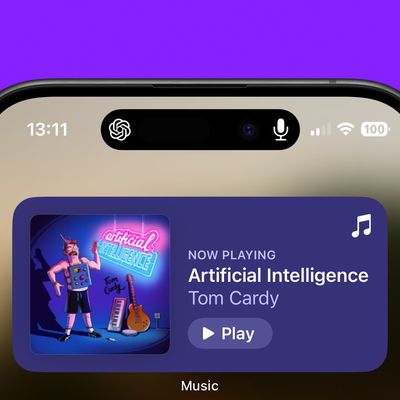
How to Speak With ChatGPT in the Background on iPhone
Apple has partnered with OpenAI to integrate its ChatGPT technology into iOS 18, which will go on general release in the fall. Until then, here's a way to interact with ChatGPT on your iPhone – whatever you're doing on it.
Last year, OpenAI launched its free-to-use ChatGPT app for iPhone and iPad. Using the app, you can interact with the AI chatbot via text input and voice, allowing you to...

How to Get Your iPhone Ready for Repair
In iOS 17.5, Apple added a "Repair State" feature that's designed to allow an iPhone to be sent in for service without having to deactivate Find My and Activation Lock. Keep reading to learn how it works and why it's worth using the next time you send an iPhone in for repair.
Before iOS 17.5 was released, sending an iPhone to Apple for repair required disabling Find My, since Apple states...

Check the Manufacture Date of Your iPad
Apple iPads released in 2024 include new battery health features, including the ability to check the month that your device was manufactured and when it was first used. Keep reading to learn how it's done.
Knowing the manufacture date of your iPad can be useful for several reasons. For one, it helps you determine the age of your device, which is essential for assessing its value, especially...
Turn a Live Photo into a Boomerang
Most iPhone users are familiar with Apple's Live Photos, which capture 1.5 seconds of video before and after you take a picture, with the aim of adding a little bit of life and movement to still images. What some users might not know is that you can also make a Live Photo bounce back and forth like a boomerang.
If you're familiar with Instagram, you probably know what a boomerang is. Since...

Speed Up iPhone Typing With This Simple Keyboard Trick
iPhone users often find themselves toggling between different keyboard layouts to type messages, emails, or fill out forms. This can slow down communication and disrupt your flow. But there are ways to streamline the process. If this quick tip is new to you, it could revolutionize the way you type on your iPhone and save you precious time.
Switching away from the alphabetic keyboard layout...

Extend M4 iPad Pro Battery Lifespan With This New Feature
Apple's new M4 iPad Pro and M2 iPad Air models feature a battery health setting that is new to iPads and when enabled prevents the devices from charging beyond 80% at all times, which can extend battery lifespan.
When the 80% hard limit is enabled, the iPad will never charge beyond that percentage, except on rare occasions to "maintain accurate battery state-of-charge estimates," according...
Check M4 iPad Pro and M2 iPad Air Battery Cycle Count
On Apple's 2024 M4 iPad Pro and M2 iPad Air models, Apple has made it possible to check the number of completed battery cycles, which is a valuable metric to determine your device's battery condition.
On the new iPad Pro and iPad Air models, Apple includes a new Battery Health menu (Settings ➝ Battery ➝ Battery Health) where you can check the "Maximum Capacity" percentage of the battery. ...

How to Fake a Dropped Call on iPhone
If you want to end a call on your iPhone without seeming rude, this handy little trick is for you. Keep reading to learn how to fake a dropped call.
Whenever you hang up a call on iPhone, the person on the other end sees a message on their phone saying "Call Ended." This indicates that you ended the call on purpose, because if the call had dropped due to poor cellular coverage, the message...

How to Straighten Your Camera Shooting Angle on iPhone
Apple in iOS 17 introduced a handy camera feature that helps to straighten up your shooting angle before you even hit the shutter. Here's how to take advantage of the "Level" option.
For a while now, Apple's Camera app has included a few optional settings that can help you line up your shots. There's a Grid that can be overlaid on the viewfinder to help apply the rule of thirds, and a somewha...
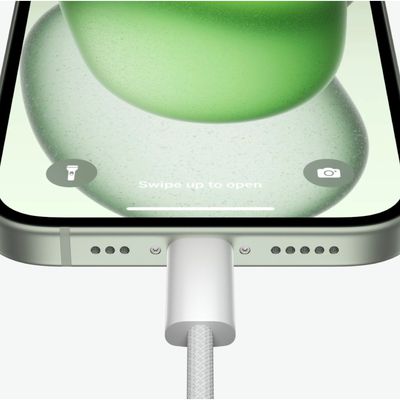
Here's How to Check Your iPhone's Battery Health
Earlier this year, Apple retested the batteries of its iPhone 15 models and updated its battery life claims for the entire series, suggesting that they offer better longevity than previously thought. Curious about the battery health of your iPhone 15? Here's how to check it.
Apple in February 2024 updated the technical specifications for the batteries in the iPhone 15, iPhone 15 Plus, iPhone ...
Separate Your iPhone Browsing Habits With Safari Profiles
With iOS 17, Safari gained a feature called Profiles that's designed to help you separate your browsing sessions into categories like Work, School, Personal, or custom categories that you find useful to have siloed. This article explains how to use it on iPhone.
Apple in iOS 17 expanded on Tab Groups with a Profile feature that lets you separate out your browsing into different use cases....
