Skip to Content

watchOS 7 Removes Force Touch Support From Your Apple Watch, Here's Everything That's Changed

With the release of watchOS 7, Apple has added several new features to compatible Apple Watch models, such as new watch faces and sleep tracking, but it also drops support for the Force Touch gesture that some users may have come to think of as a second nature interaction on their wrist.


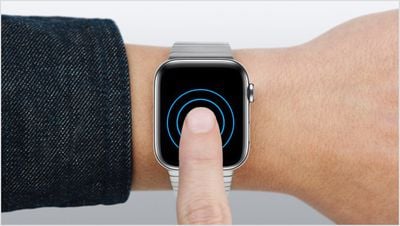
When users firmly pressed their Apple Watch screen, Force Touch technology would sense the extra pressure exertion and display additional content and controls depending on the context. But in watchOS 7, Apple has removed all Force Touch interactions from the UI, making the Force Touch sensor gasket in Apple Watch Series 5 and earlier models effectively superfluous.
apple watchos5 force touch diagram
Below, we've collected 10 new functions in watchOS 7 that replace our favorite Force Touch features on Apple's digital timepiece. Some are more well known than others, but hopefully you'll learn at least one thing about what a firm press on your Apple Watch screen used to do, and what you need to do now that it's gone.

1. Clear All Notifications

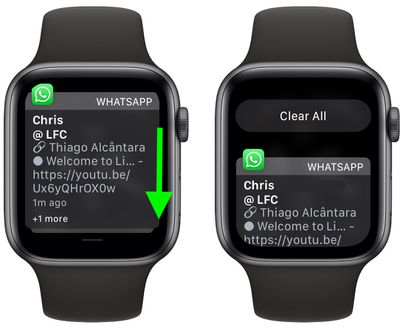
The Apple Watch's notifications dropdown can get busy pretty fast, especially if you often forget to dismiss an incoming alert after reading it. Rather than deleting notifications one by one, a Force Touch gesture let you clear them all with a tap.
notifications
Now you have to swipe down to scroll to the top of your notifications and then tap the Clear All button.

2. Create and Remove Watch Faces

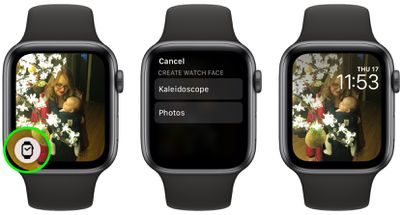
To create a custom watch face with a background picture, you still open the Apple Watch Photos app and select a photo.
watch face
Instead of pressing firmly on the display like you used to, tap the Create Watch Face icon in the bottom-left corner of the screen instead, and then select Kaleidoscope or Photos.

3. Compose a New Message

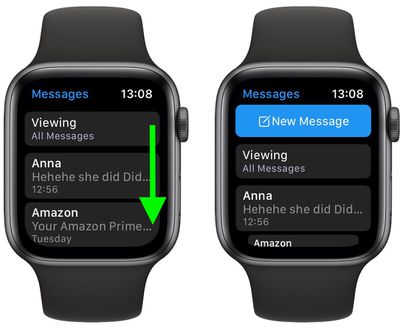
On opening the Mail and Messages apps, you used to be able to reveal the option to compose a new message with a Force Touch gesture.
messages
Now that's gone, you need to swipe down to reveal the New Message button at the top of your messages list.

4. Change Move Goal and Get a Weekly Activity Summary

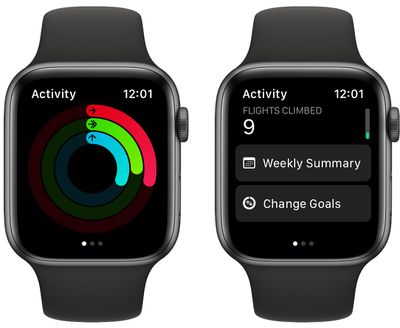
Using Force Touch on the Activity app's main screen used to reveal a Weekly Summary showing how many times you've beaten your daily move goal so far this week. Pressing down on this screen again revealed a Change Move Goal button to adjust the amount of calories you're aiming to burn.
activity
Both of these options have been replaced by individual buttons that you'll find right at the bottom of the Activity app's main screen, below today's activity stats.

5. Share Your Location With a Contact

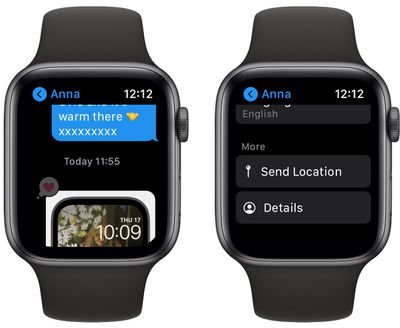
When viewing a message in the Messages app, using Force Touch allowed you to quickly share your location with the message sender or view more details about the contact.
messages
These options can now be found at the very bottom of the message screen, directly below the Instant Replies.

6. Switch Between App Grid View and List View

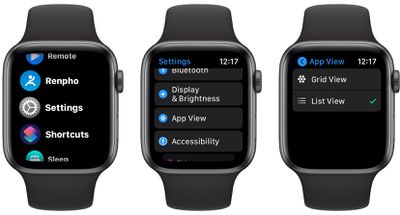
Force Touch in the App View would switch between the default honeycomb-style Grid layout and the alternative List View.
settings
In watchOS 7, you can find both options in the Settings app under App View.

7. Hourly Temperature Forecast and Chance of Rain

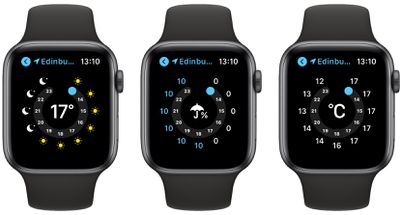
The standard forecast display on the Apple Watch's stock Weather app shows the general weather conditions for the day ahead. Prior to watchOS 7, using Force Touch in the app displayed buttons for switching between weather conditions, chance of rain, and temperature.
weather
Fortunately, you can still access these views just as easily by tapping the 12-hour forecast to cycle through them.

8. Control Camera Settings Remotely

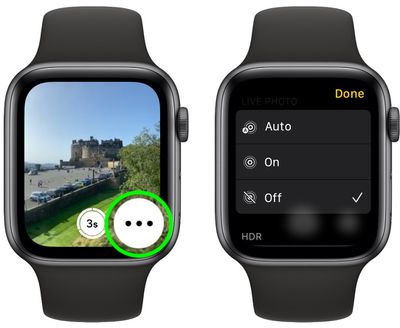
With the Apple Watch Camera app open, Force Touch would reveal a hidden submenu offering access to your iPhone's HDR, Flash, Live Photo, and Flip controls.
camera
In watchOS 7, all of these controls are accessed by tapping the three dots in the bottom-right of the screen, which reveal a vertical scrolling menu.

9. Switch Calendar View

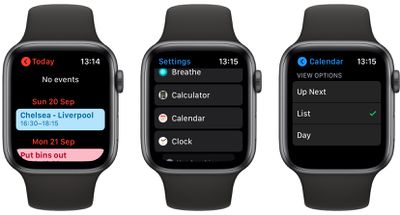
Prior to watchOS 7, changing view options within the Calendar app could be done using Force Touch.
calendar
These options are now found in the Settings app under Calendar -> View Options.

10. Switch and Edit Watch Faces

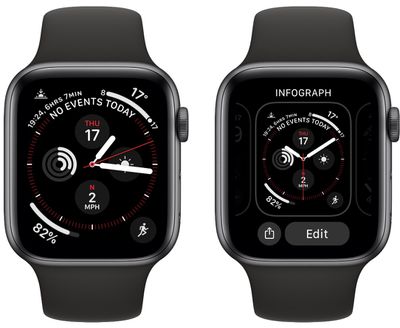
Out of all the changes following the removal of Force Touch, this is almost certainly the least abrasive, and involves an almost identical gesture.
watch face
To switch between watch faces or customize the currently selected one, simply long press on the watch screen to invoke the watch face selector.

Final Thoughts

Force Touch was one of those Apple Watch features that was so discreet and unassuming that this arguably worked against it in the long run. Apple hasn't said why it removed the firm-press gesture in watchOS 7, but it could be that not enough users were aware of it for it to be genuinely useful.

That's a shame, because just like 3D Touch on iPhone, Apple implemented the haptic feedback technology across the entire watchOS interface, putting additional functionality right at your fingertips. Of course, ‌3D Touch‌ went the same way as Force Touch on Apple Watch when the iPhone XR was launched, which some would argue suffered from the same lack of discoverability.

The iPhone XR introduced ‌Haptic Touch‌ to replace ‌‌3D Touch‌‌. While ‌‌Haptic Touch‌‌ (aka long press) is essentially a feedback mechanism, ‌‌3D Touch‌‌ offered genuine input options like Peek and Pop. This change has since expanded to the entire iPhone lineup, which has allowed Apple to remove the capacitive layer integrated into the ‌iPhone‌ display.

Will you miss Force Touch after updating your Apple Watch to watchOS 7? Are there any other Force Touch gestures we missed? Let us know in the comments.


Related Roundup: Apple Watch 12
Buyer's Guide: Apple Watch (Buy Now)
Related Forum: Apple Watch

Popular Stories

apple watch series 3 design

Apple Offers Steps to Fix Daylight Saving Time Bug on Apple Watch

Sunday November 1, 2026 3:34 am PST by
Apple has published a support document describing what to do if your Apple Watch continues to show time that's off by one hour after daylight savings time changes. "This incorrect time appears only on the Always On display when your wrist is down," says Apple. "When you activate the display by tapping it or raising your wrist, the time changes to the correct hour." To fix the issue, Apple says ...
muse apple watch app

Meta's Muse AI Agent Comes to Apple Watch

Monday November 9, 2026 1:55 pm PST by
Meta today updated the Muse app for iOS to add Apple Watch support, which means Muse users can access the proactive AI agent from the watch. The app adds the Muse character to the watch with an option to text it, dictate text to it, or call it. There's also a Muse complication for quick access. Muse is Meta's personal AI agent that can complete tasks for users. It is available as a...
siri recap live rewind

watchOS 27.3 Brings Live Rewind and Siri Recap to Apple Watch

Tuesday November 3, 2026 10:35 am PST by
With the first beta of watchOS 27.3, Apple is introducing new Audio Intelligence features it previewed for the Apple Watch Series 12 and Ultra 4 earlier this year. Powered by the S11 chip, Audio Intelligence includes Live Rewind, Siri Recap, Sound Recognition, and Shazam Music Recognition. Sound Recognition and Shazam are already on the watch, but Live Rewind and Siri Recap are now available ...

Top Rated Comments

81 months ago
Yay for removing a feature I use all the time...
Score: 81 Votes (Like | Disagree)
zorinlynx Avatar
81 months ago
Force Touch / 3D Touch was one of the cooler subtle features Apple introduced that made devices more enjoyable to use, and it was unique to Apple devices. I wonder why Apple felt the need to get rid of it? I still miss it when using my phone; tapping and holding just doesn't feel as cool and interactive as pushing harder.
Score: 53 Votes (Like | Disagree)
81 months ago
Why would anyone accept a vendor disabling a hardware-based feature that was working perfectly fine previously? There’s no reason previous models could not support both a long press and the new options. Not really impressed with apple on this one.
Score: 29 Votes (Like | Disagree)
81 months ago
I loved Force Touch -- it was an ideal way to interact with the Watch and I used it all the time. The new way so far seems cluttered and less intuitive.
Score: 26 Votes (Like | Disagree)
miniyou64 Avatar
81 months ago
They really made me not want to buy this model. And I’m in the market for a new Apple watch...
- no force touch
- no major upgrades
- no redesign (same style as previous 2 cycles)
- no pure black stainless steel (?!!??)

Seriously Apple what is wrong with you guys.

Complacency I think.
Score: 23 Votes (Like | Disagree)
19callum93 Avatar
81 months ago
RIP Force Touch, you’ll be missed 😓
Score: 22 Votes (Like | Disagree)
Latest Stories
The 50+ Best Apple Black Friday Deals Still Available on AirPods, iPads, and More
1 hour ago
Apple's M6 and PROLED MacBook Pro Reach New Low Prices for Black Friday
9 hours ago
The MacRumors Show: iPhone Air 2 and iPhone 18 Are Coming
9 hours ago
Apple Store in Brisbane Reopening Next Month With New Design
9 hours ago
The 60+ Best Black Friday Accessory Deals on iPhone Chargers, TVs, Headphones, and More
10 hours ago
GTA VI Now (Barely) Running on Apple Silicon Macs
10 hours ago
The Best Black Friday Streaming Deals on Apple TV, Disney+, and More
11 hours ago
Apple TV's 'Carême' Wins International Emmy for Best Drama
12 hours ago
iPhone 18 Production Delay Leaves Apple Little Time Before Launch
12 hours ago
The Best Black Friday AirPods Deals Still Available
4 hours ago
The Best Black Friday Deals on Apple Home Products
13 hours ago
The Best Black Friday iPhone Deals Still Available
4 hours ago
The Best Black Friday iPad Deals Still Available
4 hours ago
The Best Black Friday Apple Watch Deals Still Available
4 hours ago
The Best Black Friday AirTag Deals Still Available
4 hours ago
The Best Black Friday Mac Deals Still Available
4 hours ago
iPhone Share of US Smartphone Market Hits 57% as Rivals Slip
14 hours ago
iPhone 20 Pro Rumored to Feature 3D-Printed Titanium Frame
16 hours ago
Apple's Official 2026 Black Friday Offer Starts Rolling Out
1 day ago
Halide Adds Fill Light Feature for iPhone Duo
1 day ago
MacBook Air Black Friday Deals Now Live With Massive $399 Savings
1 day ago
Amazon Discounts All MacBook Neo Models by $99 for Black Friday
1 day ago
Kodak Launches Unique AirTag Rival With E-Ink Display
2 days ago
Here's Why the Apple Store is Going Down
2 days ago
Apple Still Working on Giant Foldable iPad That Could Cost $5,000
2 days ago
iPhones Dominate China's Weak Singles' Day Smartphone Sales
2 days ago
iPhone 20 Pro Could Feature Ceramic in Limited-Edition Model
2 days ago
Apple Faces Korean Regulator Review Over iPhone 16 AI Advertising
2 days ago
Apple Watch Ultra 4 Hits New Best-Ever Price of $649.99 for Black Friday
2 days ago
New Apple Store Opening in India, Download the Special Wallpaper Now
2 days ago
Related Apple News: Travel | Iphone | Technology | Reviews | Local News






























