Skip to Content

These Are the Gestures Used to Control Vision Pro

With the launch of the Vision Pro, Apple published plenty of support documents and tutorials, including an overview of the gestures used to control the headset. Most people have found the gesture-based control to be intuitive, but for those having difficulty, Apple also has some tips on getting the best experience.
apple vision pro gestures

Vision Pro Gestures

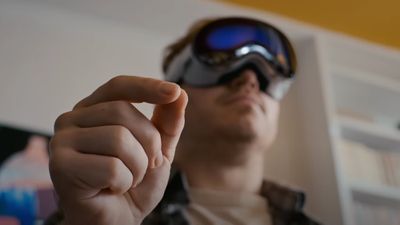
  • Tap Fingers Together - To select an item on the Vision Pro, look at it and then tap your thumb and index finger together. Apple says this is the equivalent of tapping something on the iPhone or clicking something on the Mac.
  • Pinch and Drag - Moving items on Vision Pro can be done by looking at an item and then pinching your thumb and index finger together. Pinch and hold while moving the item, and then let go. Pinching and dragging is used for arranging apps, resizing windows, scrolling, and dragging things from one app to another.
  • Pinch and Flick - Scrolling through content quickly can be done by pinching your thumb and index finger together and then flicking the wrist up or down in a smooth motion. This gesture is used for moving horizontally through apps in the Home View, scrolling long web pages, and browsing images in the Photos app.
  • Pinch for Options - If you pinch and hold on an item in Vision Pro, you can bring up a list of items. Just look at an item, tap your thumb and index finger together, and hold. Once the options appear, you can let go and then tap to select the preferred option.
  • Touch - There are elements in visionOS that can be interacted with directly with the fingers. The virtual keyboard is one such example, as typing can be done by touching on the keys with one finger on each hand.

Gesture Tips

For the best experience with Vision Pro, Apple recommends using it in a well-lit room, without long sleeves or large jewelry, and with your hands visible.

  • Make sure to use Vision Pro in a well-lit area and ensure that the front of the device is clean and free of smudges so that the outward-facing cameras can see your hands.
  • Keep your hands resting comfortably in your lap - there is no need to hold your arm up.
  • Make sure your hands are visible and not hidden under a desk or blanket.
  • Gloves, long sleeves, and large jewelry that covers a significant part or all of the hand can interfere with Vision Pro gesture tracking.
  • Don't cross your hands or cover up your gesturing hand with your other hand.

There are also a range of Accessibility features that can be used for improving the Vision Pro experience in certain cases, with details available on Apple's support website.

Related Roundup: Apple Vision Pro
Buyer's Guide: Vision Pro (Neutral)
Related Forum: Apple Vision Pro
Popular Stories

orrorin glasses 1920x1080 1

$799 Smart Glasses Promise Vision Pro-Style Controls in a 45g Frame

Wednesday November 25, 2026 9:09 am PST by
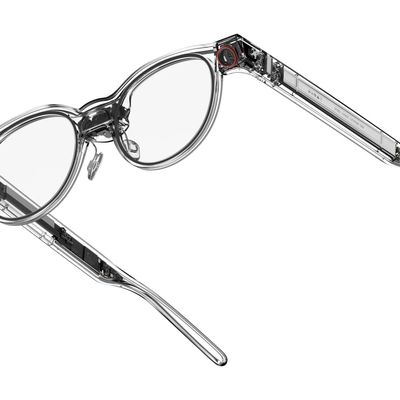
Hong Kong startup Savage Technology has announced its first product, "Orrorin Glasses," promising Vision Pro-style pinch controls and full-color displays for both eyes in a frame weighing just 45 grams. The company describes the glasses as offering "Vision Pro–level interaction" and being around 25 times lighter than Apple's headset, including its external battery. Savage highlights the...
watchos 27

Apple Releases watchOS 27.2.1 and visionOS 27.2.1 With Security Fixes

Monday November 9, 2026 10:08 am PST by
Apple today released new watchOS 27.2.1 and visionOS 27.2.1 updates, with the software coming two weeks after the launch of watchOS 27.2 and visionOS 27.2. According to Apple's release notes, the watchOS update includes security fixes, while the visionOS 27.2.1 update includes security updates and bug fixes. The new software can be installed using the Settings app on each device. ...
General visionOS watchOS and tvOS Betas Feature Redux

Apple Releases First watchOS 27.3, tvOS 27.3 and visionOS 27.3 Betas

Tuesday November 3, 2026 10:07 am PST by
Alongside new betas of iOS 27.3, iPadOS 27.3, and macOS Golden Gate 27.3, Apple has released the first betas of watchOS 27.3, tvOS 27.3, and visionOS 27.3. The betas come a week after the 27.2 software updates were released. Registered developers can download the betas through the Settings app on each device. Two new Apple Intelligence features are coming to the Apple Watch Series 12 and...

Top Rated Comments

red elma Avatar
37 months ago
Make sure your dog/cat is not sitting right next to you while doing all these pinch'n flicking...
Score: 4 Votes (Like | Disagree)
37 months ago
I have some bad news. Gestures don't work in the dark, and especially when you're lying reclined. So there goes my plan for watching movies in bed while my dog is trying to sleep.
Score: 2 Votes (Like | Disagree)
37 months ago
Breaking news…

It has been reported that during a long haul flight a passenger was accused of inappropriately touching a fellow passenger. The victim claims they then started pinching and flicking, so they responded by slapping the passenger.

The accused claims they were composing an email 🥴
Score: 2 Votes (Like | Disagree)
japanime Avatar
37 months ago

For the best experience with Vision Pro, Apple recommends using it in a well-lit room, without long sleeves or large jewelry
So, you've got to take off your wedding band and show some skin? I think we can all see where this is going. 🤣
Score: 2 Votes (Like | Disagree)
Gasu E. Avatar
37 months ago
You can rub your thumb against your index and middle finger to indicate how much you spent on it.
Score: 1 Votes (Like | Disagree)
arkitect Avatar
37 months ago

So, you've got to take off your wedding band and show some skin? I think we can all see where this is going. 🤣
🤣


For the best experience with Vision Pro, Apple recommends using it in a well-lit room, without long sleeves or large jewelry, and with your hands visible.
Hmmm.
And take off your Apple watch as well… I would assume.
Score: 1 Votes (Like | Disagree)
Latest Stories
The 50+ Best Apple Black Friday Deals Still Available on AirPods, iPads, and More
12 hours ago
HomePod Mini 2 in (RED) Seemingly Spotted Ahead of Announcement
9 hours ago
Apple's M6 and PROLED MacBook Pro Reach New Low Prices for Black Friday


20 hours ago
The MacRumors Show: iPhone Air 2 and iPhone 18 Are Coming
20 hours ago
Apple Store in Brisbane Reopening Next Month With New Design
20 hours ago
The 60+ Best Black Friday Accessory Deals on iPhone Chargers, TVs, Headphones, and More
21 hours ago
GTA VI Now (Barely) Running on Apple Silicon Macs
21 hours ago
The Best Black Friday Streaming Deals on Apple TV, Disney+, and More
22 hours ago
Apple TV's 'Carême' Wins International Emmy for Best Drama
23 hours ago
iPhone 18 Production Delay Leaves Apple Little Time Before Launch
23 hours ago
The Best Black Friday AirPods Deals Still Available
16 hours ago
The Best Black Friday Deals on Apple Home Products
1 day ago
The Best Black Friday iPhone Deals Still Available
16 hours ago
The Best Black Friday iPad Deals Still Available
16 hours ago
The Best Black Friday Apple Watch Deals Still Available
15 hours ago
The Best Black Friday AirTag Deals Still Available
15 hours ago
The Best Black Friday Mac Deals Still Available
15 hours ago
iPhone Share of US Smartphone Market Hits 57% as Rivals Slip
1 day ago
iPhone 20 Pro Rumored to Feature 3D-Printed Titanium Frame
1 day ago
Apple's Official 2026 Black Friday Offer Starts Rolling Out
2 days ago
Halide Adds Fill Light Feature for iPhone Duo
2 days ago
MacBook Air Black Friday Deals Now Live With Massive $399 Savings
2 days ago
Amazon Discounts All MacBook Neo Models by $99 for Black Friday
2 days ago
Kodak Launches Unique AirTag Rival With E-Ink Display
2 days ago
Here's Why the Apple Store is Going Down
2 days ago
Apple Still Working on Giant Foldable iPad That Could Cost $5,000
2 days ago
iPhones Dominate China's Weak Singles' Day Smartphone Sales
2 days ago
iPhone 20 Pro Could Feature Ceramic in Limited-Edition Model
2 days ago
Apple Faces Korean Regulator Review Over iPhone 16 AI Advertising
2 days ago
Apple Watch Ultra 4 Hits New Best-Ever Price of $649.99 for Black Friday
2 days ago
Related Apple News: Business | Sport | Iphone | Health | World News