Skip to Content

Vision Pro Not Fitting Well? Here Are Apple's Tips for Improving It

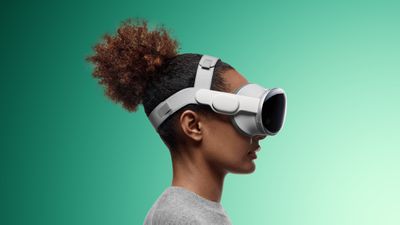
Fit is the most important aspect of the Vision Pro, because if it's not on your head in the right way, it will feel heavy and uncomfortable, plus the displays might look blurry. Apple today published several support documents on getting a good fit with the Vision Pro and what to do if you have light leakage, eye setup issues, and other problems.
Apple Vision Pro Dual Loop Band Teal Feature 2

Selecting a Band

There are two bands for the Vision Pro, the Solo Knit Band and the Dual Loop Band. With either band, the Vision Pro should feel balanced across the cheeks and forehead, and it should be snug but not too tight. A head band that is too tight can cause skin sensitivity, general discomfort, or marks and indentations on the face, but Apple says that some "temporary, light markings" are expected after general usage.

Users should select the band that feels the most comfortable, and then adjust from there.

Solo Knit Band Adjustments

  • Rotate the Fit Dial counterclockwise and pull the device by the frame away from the face to loosen the band if it's too tight. If it won't loosen enough, you might need a larger size.
  • If the band feels too loose, turn it clockwise to tighten it. If it won't tighten more, a different size might be required.
  • If you feel pressure on your forehead, raise the Solo Knit Band by pulling it up slightly on the back of the head.
  • To fix pressure on the cheeks, lower the Solo Knit Band by pulling it slightly down on the back of the head.
  • To relieve pressure across the bridge of the nose, swap to the Light Cushion marked with a + or use the Dual Loop Band.

Dual Loop Band Adjustments

  • If the head band is too tight, hold the Vision Pro to your face and loosen the upper and lower straps of the Dual Loop Band with the other hand. Pull the device by the frame away from your face.
  • To relieve pressure on the forehead, hold the frame, loosen the lower strap, and tighten the upper strap.
  • To relieve pressure on the cheeks, hold the frame, pull down the lower strap, and loosen the upper strap.
  • To relieve pressure across the bridge of the nose, swap to the Light Cushion marked with a + or use the Solo Knit Band.

Light Seal Cushion Fit

  • If your eyelashes brush against the Vision Pro or you get a notification that your eyes are too close, swap to the Light Cushion marked with a +. If that does not fix it, a different Light Seal size might be required.
  • If your eyes are too far from the displays, swap to the thinner Light Seal Cushion. If that does not work, a different Light Seal Size might be required.

Realign Displays

If you feel pressure on the bridge of your nose and adjustments to the band don't help, Apple suggests using the Realign Displays feature under Settings > Eyes and Hands.

To move the displays slightly away from the nose, press the Top Button to move the displays outward. Press and hold the Digital Crown to move the displays inwards for ideal visual alignment.

Fixing Light Leakage

Apple says to determine whether you're experiencing light leakage, you should use the Vision Pro in both a brightly lit and dimly lit room.

If the Vision Pro experience improves in a dimly lit room, there is a light leakage problem that needs to be addressed by adjusting the fit of the Vision Pro head band or choosing a different Light Seal Cushion.

If the dimly lit room does not improve the experience, Apple says there may be light originating from the display causing some reflections within the optical system.

Some light leakage around the nose is normal.

Tips for Getting a Good Fit

  • Apple suggests that facial jewelry like nose rings or eyebrow rings should be removed before you put on Apple Vision Pro.
  • Uneven facial discomfort, such as pressure on the forehead, cheeks, or nose, is an indication that a different Light Seal or Light Seal Cushion might be required. Other signs include light leakage, eyelashes brushing on the display, and alerts about eye position.
  • Make sure that hair does not get caught in either the band or the cable to avoid tugging.
  • The Vision Pro is not designed to be worn by children under the age of 13 and it may not fit.

Solving Eye Setup Issues

If the Vision Pro eye setup feature cannot be completed, Apple has several solutions.

  • Ensure that the fit is correct and follow the directions of any alerts that are shown on the display.
  • If you're experiencing issues with eye setup, Apple warns that eyelash extensions and items near the eyes like rhinestones or glitter can cause problems.
  • Eyes that are too wet or too dry might impact eye setup.
  • Debris on the Vision Pro display or ZEISS Optical Inserts can cause issues.
  • Cosmetic contact lenses are not compatible with Vision Pro and need to be removed.
  • Hard contact lenses might not work with Vision Pro.
  • Medical conditions like eyelid drooping, changes in eye alignment, or uncontrolled eye movements can make it difficult for the Vision Pro to detect your eyes. There are several Accessibility features that can help.

More Help

Apple says that if the fit tips do not help, that users should visit a local Apple Store to get help. It is important to do this quickly because the exchange process must begin within 14 days of receiving the Vision Pro and accessories.
Related Roundup: Apple Vision Pro
Buyer's Guide: Vision Pro (Neutral)
Related Forum: Apple Vision Pro

Popular Stories

orrorin glasses 1920x1080 1

$799 Smart Glasses Promise Vision Pro-Style Controls in a 45g Frame

Wednesday November 25, 2026 9:09 am PST by
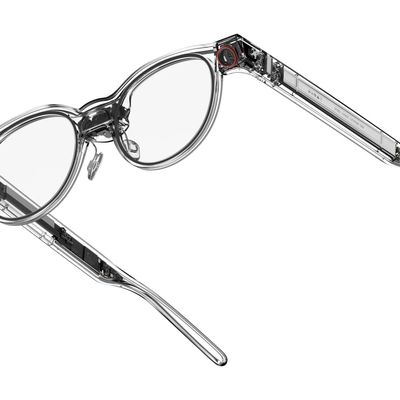
Hong Kong startup Savage Technology has announced its first product, "Orrorin Glasses," promising Vision Pro-style pinch controls and full-color displays for both eyes in a frame weighing just 45 grams. The company describes the glasses as offering "Vision Pro–level interaction" and being around 25 times lighter than Apple's headset, including its external battery. Savage highlights the...
watchos 27

Apple Releases watchOS 27.2.1 and visionOS 27.2.1 With Security Fixes

Monday November 9, 2026 10:08 am PST by
Apple today released new watchOS 27.2.1 and visionOS 27.2.1 updates, with the software coming two weeks after the launch of watchOS 27.2 and visionOS 27.2. According to Apple's release notes, the watchOS update includes security fixes, while the visionOS 27.2.1 update includes security updates and bug fixes. The new software can be installed using the Settings app on each device. ...
General visionOS watchOS and tvOS Betas Feature Redux

Apple Releases First watchOS 27.3, tvOS 27.3 and visionOS 27.3 Betas

Tuesday November 3, 2026 10:07 am PST by
Alongside new betas of iOS 27.3, iPadOS 27.3, and macOS Golden Gate 27.3, Apple has released the first betas of watchOS 27.3, tvOS 27.3, and visionOS 27.3. The betas come a week after the 27.2 software updates were released. Registered developers can download the betas through the Settings app on each device. Two new Apple Intelligence features are coming to the Apple Watch Series 12 and...

Top Rated Comments

37 months ago
I thought this was MACrumors…. But i seem to keep getting redirected to a scuba diving forum…

People are talking about straps for best fit and hand gestures… 🤔
Score: 11 Votes (Like | Disagree)
Velin Avatar
37 months ago
Version two really needs to improve on this. First step: delete the front glass. The digital eyes are creepy as F.

Save weight, improve the internal OLED lenses, cut the price, make this thing much more comfortable and consumer-price friendly while delivering the most lifelike image possible.
Score: 9 Votes (Like | Disagree)
Chuckeee Avatar
37 months ago
Duct Tape. Always the answer when in doubt.
Score: 6 Votes (Like | Disagree)
37 months ago

Is anyone getting a perfect seal down by the nose? I’ve tried on several light seals and bands and light keeps leaking in there.
Ive had alot of water get in before but if you tighten it up… it seems to do the trick.

I guess this is something they will really work on for the second gen… maybe even offer custom moldings.
Score: 6 Votes (Like | Disagree)
37 months ago

Fit is the most important aspect of the Vision Pro, because if it's not on your head in the right way, it will feel heavy and uncomfortable, plus the displays might look blurry. Apple today published several support documents on getting a good fit ('https://support.apple.com/en-us/117730') with the Vision Pro and what to do if you have light leakage ('https://support.apple.com/en-us/HT213953'), eye setup issues ('https://support.apple.com/en-us/HT214019'), and other problems.


Selecting a Band

There are two bands for the Vision Pro, the Solo Knit Band and the Dual Loop Band. With either band, the Vision Pro should feel balanced across the cheeks and forehead, and it should be snug but not too tight. A head band that is too tight can cause skin sensitivity, general discomfort, or marks and indentations on the face, but Apple says that some "temporary, light markings" are expected after general usage.

Users should select the band that feels the most comfortable, and then adjust from there.

Solo Knit Band Adjustments


* Rotate the Fit Dial counterclockwise and pull the device by the frame away from the face to loosen the band if it's too tight. If it won't loosen enough, you might need a larger size.
* If the band feels too loose, turn it clockwise to tighten it. If it won't tighten more, a different size might be required.
* If you feel pressure on your forehead, raise the Solo Knit Band by pulling it up slightly on the back of the head.
* To fix pressure on the cheeks, lower the Solo Knit Band by pulling it slightly down on the back of the head.
* To relieve pressure across the bridge of the nose, swap to the Light Cushion marked with a + or use the Dual Loop Band.

Dual Loop Band Adjustments


* If the head band is too tight, hold the Vision Pro to your face and loosen the upper and lower straps of the Dual Loop Band with the other hand. Pull the device by the frame away from your face.
* To relieve pressure on the forehead, hold the frame, loosen the lower strap, and tighten the upper strap.
* To relieve pressure on the cheeks, hold the frame, pull down the lower strap, and loosen the upper strap.
* To relieve pressure across the bridge of the nose, swap to the Light Cushion marked with a + or use the Solo Knit Band.

Light Seal Cushion Fit


* If your eyelashes brush against the Vision Pro or you get a notification that your eyes are too close, swap to the Light Cushion marked with a +. If that does not fix it, a different Light Seal size might be required.
* If your eyes are too far from the displays, swap to the thinner Light Seal Cushion. If that does not work, a different Light Seal Size might be required.

Realign Displays

If you feel pressure on the bridge of your nose and adjustments to the band don't help, Apple suggests using the Realign Displays feature under Settings > Eyes and Hands.

To move the displays slightly away from the nose, press the Top Button to move the displays outward. Press and hold the Digital Crown to move the displays inwards for ideal visual alignment.
Fixing Light Leakage

Apple says to determine whether you're experiencing light leakage, you should use the Vision Pro in both a brightly lit and dimly lit room.

If the Vision Pro experience improves in a dimly lit room, there is a light leakage problem that needs to be addressed by adjusting the fit of the Vision Pro head band or choosing a different Light Seal Cushion.

If the dimly lit room does not improve the experience, Apple says there may be light originating from the display causing some reflections within the optical system.

Some light leakage around the nose is normal.
Tips for Getting a Good Fit


* Apple suggests that facial jewelry like nose rings or eyebrow rings should be removed before you put on Apple Vision Pro.
* Uneven facial discomfort, such as pressure on the forehead, cheeks, or nose, is an indication that a different Light Seal or Light Seal Cushion might be required. Other signs include light leakage, eyelashes brushing on the display, and alerts about eye position.
* Make sure that hair does not get caught in either the band or the cable to avoid tugging.
* The Vision Pro is not designed to be worn by children under the age of 13 and it may not fit.

Solving Eye Setup Issues

If the Vision Pro eye setup feature cannot be completed, Apple has several solutions.

* Ensure that the fit is correct and follow the directions of any alerts that are shown on the display.
* If you're experiencing issues with eye setup, Apple warns that eyelash extensions and items near the eyes like rhinestones or glitter can cause problems.
* Eyes that are too wet or too dry might impact eye setup.
* Debris on the Vision Pro display or ZEISS Optical Inserts can cause issues.
* Cosmetic contact lenses are not compatible with Vision Pro and need to be removed.
* Hard contact lenses might not work with Vision Pro.
* Medical conditions like eyelid drooping, changes in eye alignment, or uncontrolled eye movements can make it difficult for the Vision Pro to detect your eyes. There are several Accessibility features ('https://support.apple.com/guide/apple-vision-pro/get-started-with-accessibility-features-tan426c48bdc/visionos') that can help.

More Help

Apple says that if the fit tips do not help, that users should visit a local Apple Store to get help. It is important to do this quickly because the exchange process must begin within 14 days of receiving the Vision Pro and accessories.
Article Link: Vision Pro Not Fitting Well? Here Are Apple's Tips for Improving It ('https://www.macrumors.com/guide/vision-pro-fit/')
You’re not wearing it the right way!!!!
Score: 5 Votes (Like | Disagree)
arkitect Avatar
37 months ago

Man oh mighty, this product sure is bringing out the entitlement in people. Can't we all just appreciate it for what it is?
How exactly are people being entitled if they expect a better version?

That makes no sense.

Are we only allowed to uncritically adulate Apple Inc?

Count me out of your Apple circle club.

This is a Beta product. Pointing out its current flaws — of which there are many — does not make us entitled.
Score: 4 Votes (Like | Disagree)
Latest Stories
The 50+ Best Apple Black Friday Deals on AirPods, iPads, MacBooks, and More
1 hour ago
Apple's M6 and PROLED MacBook Pro Reach New Low Prices for Black Friday
1 hour ago
The MacRumors Show: iPhone Air 2 and iPhone 18 Are Coming
1 hour ago
Apple Store in Brisbane Reopening Next Month With New Design
2 hours ago
The 60+ Best Black Friday Accessory Deals on iPhone Chargers, TVs, Headphones, and More
3 hours ago
GTA VI Now (Barely) Running on Apple Silicon Macs
3 hours ago
The Best Black Friday Streaming Deals on Apple TV, Disney+, and More
4 hours ago
Apple TV's 'Carême' Wins International Emmy for Best Drama
4 hours ago
iPhone 18 Production Delay Leaves Apple Little Time Before Launch
5 hours ago
The Best Black Friday AirPods Deals
5 hours ago
The Best Black Friday Deals on Apple Home Products
6 hours ago
The Best Black Friday iPhone Deals
6 hours ago
The Best Black Friday iPad Deals
6 hours ago
The Best Black Friday Apple Watch Deals
6 hours ago
The Best Black Friday AirTag Deals
6 hours ago
The Best Black Friday Mac Deals
6 hours ago
iPhone Share of US Smartphone Market Hits 57% as Rivals Slip
7 hours ago
iPhone 20 Pro Rumored to Feature 3D-Printed Titanium Frame
8 hours ago
Apple's Official 2026 Black Friday Offer Starts Rolling Out
1 day ago
Halide Adds Fill Light Feature for iPhone Duo
1 day ago
MacBook Air Black Friday Deals Now Live With Massive $399 Savings
1 day ago
Amazon Discounts All MacBook Neo Models by $99 for Black Friday
1 day ago
Kodak Launches Unique AirTag Rival With E-Ink Display
1 day ago
Here's Why the Apple Store is Going Down
1 day ago
Apple Still Working on Giant Foldable iPad That Could Cost $5,000
1 day ago
iPhones Dominate China's Weak Singles' Day Smartphone Sales
1 day ago
iPhone 20 Pro Could Feature Ceramic in Limited-Edition Model
1 day ago
Apple Faces Korean Regulator Review Over iPhone 16 AI Advertising
1 day ago
Apple Watch Ultra 4 Hits New Best-Ever Price of $649.99 for Black Friday
1 day ago
New Apple Store Opening in India, Download the Special Wallpaper Now
2 days ago
Related Apple News: Entertainment | Education | Reviews | Travel | Technology





























