Skip to Content

10 Useful iPhone Tips and Tricks You Might Not Know About

Over the years, the iPhone's operating system has gotten complicated. Apple adds new features with every version of iOS, and many of them aren't always obvious, leading to hidden iPhone capabilities you might not be aware of.

10 Useful iPhone Tips and Tricks Feature 2

Turn an App Into a Widget

You can turn most app icons into widgets right from the iPhone's Home Screen. Just long press on an app icon, and select one of the squares from the top to choose a widget size. It works with any Apple or third-party app that has a widget option. Long press again and select the top left icon with four squares to turn it back into a standard app icon.
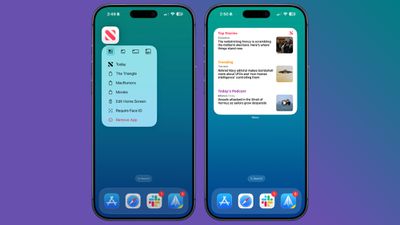
app icons to widgets

See Where You've Been

In the Maps app, you can look back at your location history to see places that you've visited. It's useful if you've been on a weekend trip, found a great restaurant, and want to remember where it was the next time you visit.
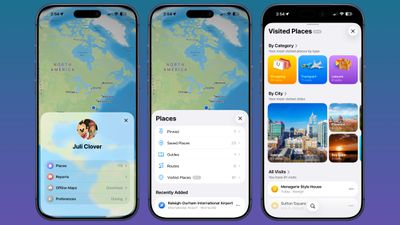
maps app visited places
You can get to this feature by opening up the Maps app, tapping on your profile, selecting Places, and then choosing Visited Places. Places are organized by category like leisure or shopping, and by city.

You can clear your history by scrolling down to the bottom of the interface, or select a period of time for visits to be kept. Go to Settings > Maps > Location > Visited Places to turn it off entirely.

Set Custom Vibrations

You probably know you can set custom sounds for people that call or text, but you can also do the same thing for vibration patterns if you keep your iPhone on silent all the time, as civilized people do.
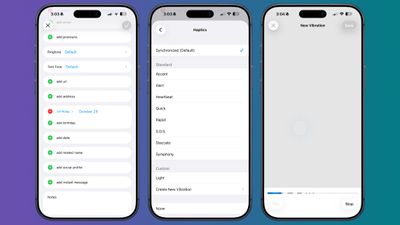
contacts app custom vibration
Important people you message can each have a different vibration pattern, so you know who is texting without having to look at your phone.

To set a vibration pattern for someone, open up the Contacts app and select them. Tap Edit in the upper right corner, then tap on Text Tone or Ringtone. Tap on Haptics and then select Create New Vibration. From there, you can use taps and presses to make your own vibration patterns.

Back Tap Gestures

Back Tap has been around for a long time, but it's easy to forget it exists. You can use it to set a tap on the back of the iPhone to do whatever you want, from snapping a screenshot to activating the flashlight. It even works with Shortcuts you've created.
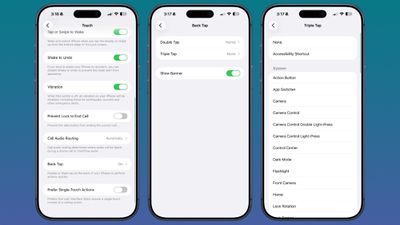
backtap iphone options
Go to Settings > Accessibility > Touch and then scroll down to Back Tap to set it up. You can set actions for a double tap or a triple tap.

Screenshot a Webpage

When you press the side button and volume buttons to take a screenshot, the default is a capture of what's currently on your display. If you want to screenshot a whole webpage or a PDF, there is a way to do it. Take the screenshot as normal, then tap it (if you have full-screen previews off). Select "Full Page" at the top of the interface, and then choose where to save your extra long screenshot.
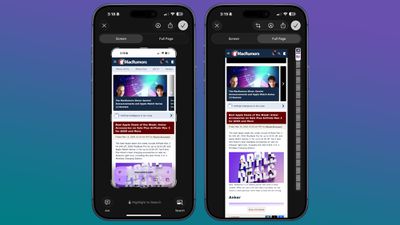
screenshot whole websites

Hide Apps

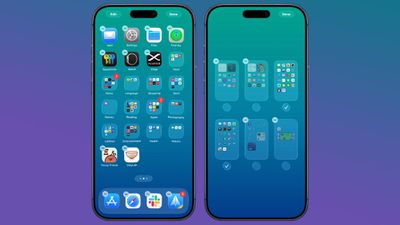
If you have apps that you don't want to show up on the ‌Home Screen‌, you can hide them one by one by long pressing and tapping the Face ID option, or you can hide a whole app page at once. To hide an app page, long press on the ‌Home Screen‌ to enter jiggle mode.

hide app pages
Tap on the dots at the bottom of the display, and then select the app page you want to hide from view. Apps hidden this way don't show up in the Hidden folder in the App Library. You can still find them through Spotlight Search and they're visible in their appropriate App Library category. To unhide a page, follow the same steps and tap the checkbox to bring it back.

Rate Your Pictures

iOS 27 includes support for adding keywords and star ratings to your photos and videos, which makes them easier to find later via search or filters.
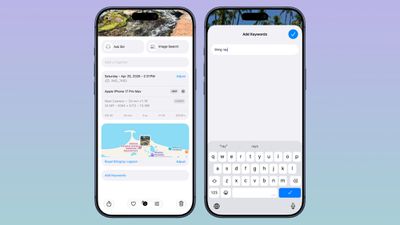
ios 27 photos metadata
You can add any keyword or rate images from one to five stars.

Remove Photos Location Data

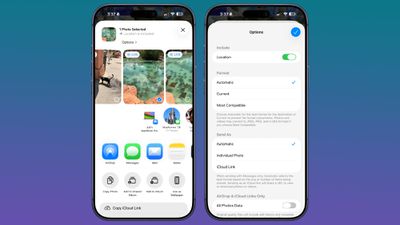
If you're sending a photo to someone, you might want to remove metadata like location first. To do so, select an image in the Photos app, swipe up, and tap on Adjust Location. From there, you can choose No Location.
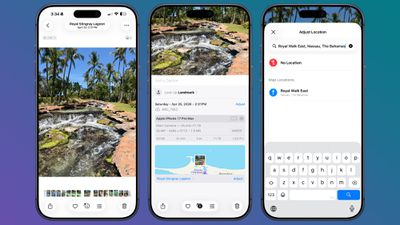
photos app remove metadata 1
Alternatively, when you go to share a photo, you can turn off metadata there. Select a photo, and tap on the Share button. Tap on Options, and toggle off Location.
photos app remove metadata 2

Use a Timer to Turn Off Media

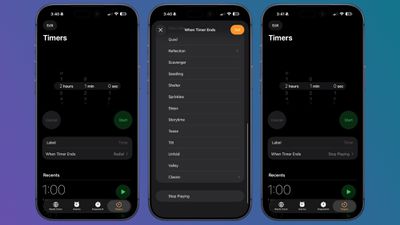
You can use timers to control how long music, podcasts, audiobooks, and other media play for, which is useful if you only want to listen for a short period at night.
timers stop playing media
In the Clock app, tap on Timers. Set a time period, and then tap on the When Timer Ends option. Scroll down and select Stop Playing. When your timer goes off, any media you have playing will stop.

Save a Still From a Video

In ‌iOS 27‌, there's a new feature that lets you save a still from a video without having to capture it as a screenshot. Just open up a video in the ‌Photos‌ app, navigate to the frame you want to save, then tap on the three-dot icon in the upper right of the display. Select the "Save Video Frame as Photo" option to save the image.

More Tips

Have a favorite iPhone tip that most people don't know about? Let us know in the comments below.

Popular Stories

apple design award 2025

Apple Announces 2025 Design Award Winners Ahead of WWDC 2025

Tuesday June 3, 2025 10:14 am PDT by
As we wait for WWDC to kick off next Monday, Apple today announced the winners of its annual Apple Design Awards, recognizing apps and games for their innovation, ingenuity, and technical achievement. The 2025 Apple Design Award winners are listed below, with one app and one game selected per category: Delight and Fun - CapWords (App) and Balatro (Game) Innovation - Play (App) and PBJ -...
1password deal blue

1Password Security Breach: What Was Accessed and What Wasn't

Wednesday November 25, 2026 1:09 pm PST by
Popular password management app 1Password today said it experienced a security breach earlier this month. 1Password says some customer names and email addresses were accessed, but no customer vault contents were compromised. On November 19, 1Password saw indications that an employee's GitHub account had been breached and began investigating. The company says the breached GitHub account was...
apple store down feature

Here's Why the Apple Store is Going Down

Thursday November 26, 2026 5:49 am PST by
Apple's online store is going down for a few hours on a rolling country-by-country basis right now, but do not get your hopes up for new products. Apple takes its online store down for a few hours ahead of Black Friday every year to tease its annual gift card offer with the purchase of select products. The store is down in Australia, New Zealand, and Thailand, right now, and it will...

Top Rated Comments

Mr_Ed Avatar
7 months ago

I doubt anyone who follows an Apple page doesn’t know this already…
TBF, there are new iPhone users (and MR members) all the time, so I expect all levels of knowledge in the crowd. Even with long-time users, most won’t explore and read about all the ins and outs of every feature. Whenever MR posts this type of article I find I do know about most of it, but always find something I had not explored.
Score: 14 Votes (Like | Disagree)
7 months ago

I doubt anyone who follows an Apple page doesn’t know this already…
I'm what you would call a power iPhone user. I learned several things I didn't know with these. I don't have time to read through all the documentation about every feature on the phone. I'd be highly surprised if many people know everything about every possible phone feature.
Score: 10 Votes (Like | Disagree)
Unami Avatar
7 months ago
Nice Tips, as always - keep them coming. I totally forgot about the back tap gesture.

I remember, there once was a long article containing lots of those tricks in one place. Maybe a permanent section with a regularly updated collection (not spread over multiple articles, the comments and the forum) would be a nice feature for the macrumors-site?
Score: 9 Votes (Like | Disagree)
AusMness Avatar
7 months ago
One of my favourite neat tips is dialing *3001#12345#* in the phone app to open FTMinternal for cell info
Score: 7 Votes (Like | Disagree)
7 months ago
I liked learning you can do a "screen" shot of an entire web page. Probably won't use this much but nice to know I can easily.
Score: 6 Votes (Like | Disagree)
tonywalker23 Avatar
7 months ago

TBF, there are new iPhone users (and MR members) all the time, so I expect all levels of knowledge in the crowd. Even with long-time users, most won’t explore and read about all the ins and outs of every feature. Whenever MR posts this type of article I find I do know about most of it, but always find something I had not explored.
Amen. To quote my profession, no matter how much seminary training you get, never forget to preach to the person who just walked in and sits in the back pew.
Score: 5 Votes (Like | Disagree)
Latest Stories
The 50+ Best Apple Black Friday Deals Still Available on AirPods, iPads, and More
6 hours ago
HomePod Mini 2 in (RED) Seemingly Spotted Ahead of Announcement
3 hours ago
Apple's M6 and PROLED MacBook Pro Reach New Low Prices for Black Friday
14 hours ago
The MacRumors Show: iPhone Air 2 and iPhone 18 Are Coming
14 hours ago
Apple Store in Brisbane Reopening Next Month With New Design
14 hours ago
The 60+ Best Black Friday Accessory Deals on iPhone Chargers, TVs, Headphones, and More
15 hours ago
GTA VI Now (Barely) Running on Apple Silicon Macs
15 hours ago
The Best Black Friday Streaming Deals on Apple TV, Disney+, and More
16 hours ago
Apple TV's 'Carême' Wins International Emmy for Best Drama
17 hours ago
iPhone 18 Production Delay Leaves Apple Little Time Before Launch
17 hours ago
The Best Black Friday AirPods Deals Still Available
9 hours ago
The Best Black Friday Deals on Apple Home Products
18 hours ago
The Best Black Friday iPhone Deals Still Available
9 hours ago
The Best Black Friday iPad Deals Still Available
9 hours ago
The Best Black Friday Apple Watch Deals Still Available
9 hours ago
The Best Black Friday AirTag Deals Still Available
9 hours ago
The Best Black Friday Mac Deals Still Available
9 hours ago
iPhone Share of US Smartphone Market Hits 57% as Rivals Slip
19 hours ago
iPhone 20 Pro Rumored to Feature 3D-Printed Titanium Frame
21 hours ago
Apple's Official 2026 Black Friday Offer Starts Rolling Out
2 days ago
Halide Adds Fill Light Feature for iPhone Duo
2 days ago
MacBook Air Black Friday Deals Now Live With Massive $399 Savings
2 days ago
Amazon Discounts All MacBook Neo Models by $99 for Black Friday
2 days ago
Kodak Launches Unique AirTag Rival With E-Ink Display
2 days ago
Here's Why the Apple Store is Going Down
2 days ago
Apple Still Working on Giant Foldable iPad That Could Cost $5,000
2 days ago
iPhones Dominate China's Weak Singles' Day Smartphone Sales
2 days ago
iPhone 20 Pro Could Feature Ceramic in Limited-Edition Model
2 days ago
Apple Faces Korean Regulator Review Over iPhone 16 AI Advertising
2 days ago
Apple Watch Ultra 4 Hits New Best-Ever Price of $649.99 for Black Friday
2 days ago
Related Apple News: South Africa | Politics | World News | Buyers Guide | Business