Skip to Content

How to Use Apple's New Intercom Feature

Alongside the HomePod mini, Apple introduced a new Intercom feature that's designed to let Apple device owners communicate with one another throughout the home, sending messages to specific rooms, areas, or people.
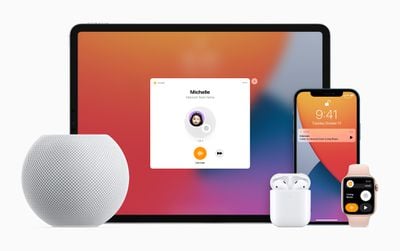
Apple HomePod mini iPad iPhone applewatch airpods intercom
Intercom works with the ‌HomePod‌, ‌HomePod‌ mini, iPhone, iPad, Apple Watch, AirPods, and even CarPlay, so you can dictate a voice message on any of your devices that you can have delivered to a single person in the family or all family members. Intercom is primarily designed as a feature for the ‌HomePod‌ and ‌HomePod‌ mini.

We have a demo and walkthrough video on the new feature:

How to Set Up Intercom

After updating to ‌HomePod‌ software 14.2 and iOS 14.2, Intercom can be set up in the Home app. Intercom works if you have a ‌HomePod‌ or another compatible device, and there is no dedicated interface on the iPhone for using Intercom outside of the Home app.

  1. Install HomePod 14.2 software.
  2. Open up the Home app.
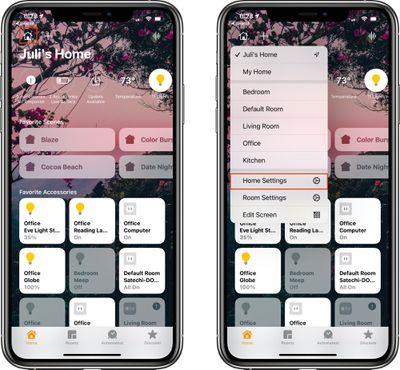
  3. Tap on the little house icon in the upper left corner. intercomsetup1
  4. Tap on "Home Settings."
  5. Scroll down to "Intercom" and tap it. intercomsetup2
  6. Adjust your notification settings and select the people in the home who are able to use the Intercom feature.
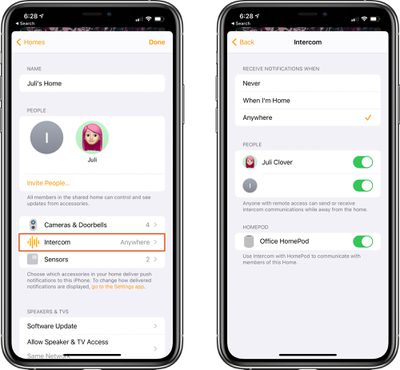
Those who have remote access to your Home app can send or receive Intercom messages even when away from home, with those messages displaying as audio notifications on iPhone and Apple Watch.

Note that anyone who wants to be able to use Intercom will need to be added as a person with access to the home. This can be done by entering the Home Settings screen and tapping on "Invite People."

Intercom Requirements

Using the Intercom feature on ‌HomePod‌, iOS devices, ‌CarPlay‌, and AirPods requires the HomePod 14.2 software update or later and iOS and iPadOS 14.2 or later. On Apple Watch, it appears to work with watchOS 7.1 and later.

How to Use Intercom to Send a Message to a HomePod

Intercom messages can be sent to the HomePods throughout a home using Siri on iPhone, ‌iPad‌, Apple Watch, another ‌HomePod‌, and more. To send an Intercom message, just activate ‌Siri‌ on your iPhone, ‌iPad‌, Apple Watch, ‌CarPlay‌, or AirPods and then say "Intercom" and your message.
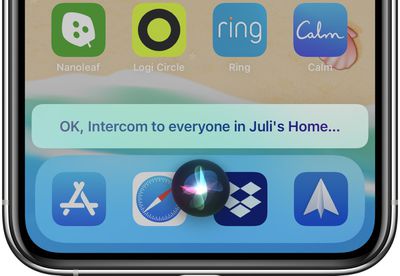
intercommessagesiri
So if you wanted to tell everyone that dinner is ready, just say "Intercom, dinner is ready" and the message "Dinner is ready" will be relayed to all of the HomePods in the Home.

Other commands like "Hey ‌Siri‌, tell everyone dinner is ready" also work as an alternative phrase for communicating through Intercom.
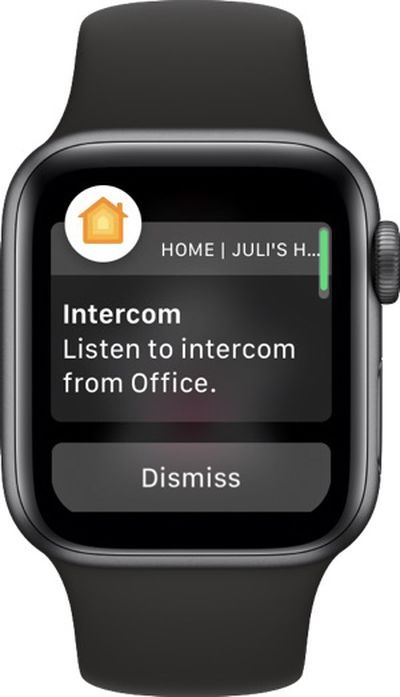
intercomapplewatch
In the Home app on iPhone and ‌iPad‌, there's also an option to tap on the small waveform in the upper right corner to record a message that's then sent to Intercom devices in the home.
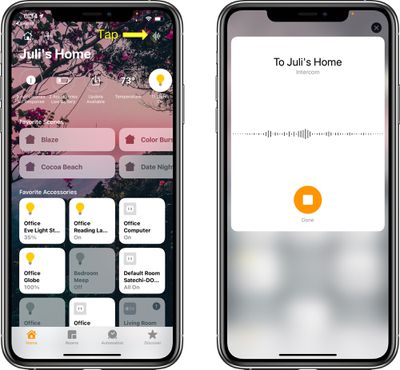
intercomwaveform

How to Use Intercom to Send a Message From a HomePod to Another Device

You can use the ‌HomePod‌ to send a message to other HomePods in the home or to the devices that belong to members of the family.

It's as simple as activating ‌Siri‌, saying "Intercom" and then the message, with the message able to be sent to every person in the family regardless of who's at home. It will play on ‌HomePod‌ speakers in the house as well as on individual iPhones, iPads, and Apple Watches.

How to Send a Message to a Specific Room

If you have HomePods in separate rooms, you can direct a message to that room by activating ‌Siri‌ and then saying "Intercom [room name] [message]."
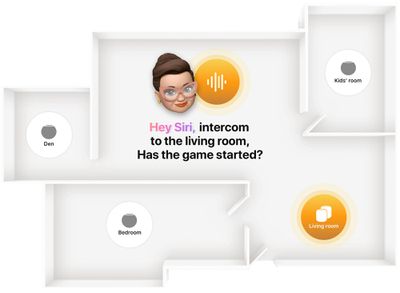
homepodminiintercom2
So for example if you wanted to tell everyone in the living room that dinner is ready, you would say "Hey ‌Siri‌, intercom living room dinner is ready."

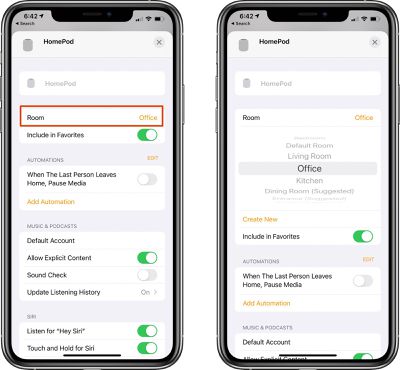
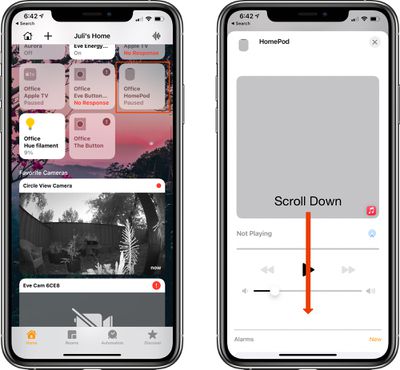
Note that to use the room command, HomePods need to be correctly assigned to a room in the Home app. Assigning or changing a room can be done by following these steps:

  1. Open the Home app.
  2. Select the ‌HomePod‌ or ‌HomePod‌ mini from the device list.
  3. Long press on the ‌HomePod‌ icon. homekitroom1
  4. Tap on the gear icon at the bottom of the interface that pops up or scroll down forcefully.
  5. Tap on "Room." homekitroom2fixed
  6. Select a room from the list of available rooms or tap "Create New."
  7. When done, close the interface by tapping the "X" at the top of the window.
How to Reply to an Intercom Message

If you receive an Intercom message in one room of the house and want to send a message back, you can activate ‌Siri‌ and then say "reply" along with your message.

So if you received an Intercom message that said "Dinner's ready," you can say "Hey ‌Siri‌ reply I'm on my way" to send a message right back.

Devices Compatible With Intercom

You can use iPhones, iPads, Apple Watches, and AirPods to send Intercom messages to the members of your household, and you can even send messages through ‌CarPlay‌ if you're driving.

Note that if your devices are using different languages, such as Spanish for the ‌HomePod‌ and English for the iPhone, Intercom may not function properly.

Guide Feedback

Have questions about Intercom or want to offer feedback on this guide? Send us an email here.

Related Roundups: HomePod, HomePod mini 2

Popular Stories

AirPods Max and HomePod mini Red Mock 2

Apple Bringing Back (PRODUCT)RED With Red HomePod Mini 2 and AirPods Max 2

Monday November 23, 2026 11:27 am PST by
Apple plans to release (PRODUCT)RED versions of the HomePod mini 2 and AirPods Max 2, reports Bloomberg. The new products will be part of Apple's annual fundraiser for The Global Fund to Fight AIDS, Tuberculosis and Malaria in developing countries. The red HomePod mini 2 and AirPods Max 2 could be introduced on World AIDS Day, which falls on Tuesday, December 1. The HomePod mini will have ...
AirPods Max and HomePod mini Red Mock 2

Apple to Release Four (RED) Products by Next Week

Tuesday November 24, 2026 6:33 am PST by
Bloomberg's Mark Gurman this week reported that Apple plans to release (PRODUCT)RED versions of the existing AirPods Max 2 and HomePod mini 2 on or around Tuesday, December 1, which is World AIDS Day. The new color will likely be the only change. AirPods Max 2 and HomePod mini 2 in (PRODUCT)RED (concept) Gurman said the (PRODUCT)RED version of the HomePod mini 2 will have a red mesh exterior, ...
Four HomePod Mini 2 Surround Sound

Does HomePod Mini 2 Have Improved Sound? Here's What Reviews Say

Wednesday November 4, 2026 6:52 am PST by
Apple's press release for the HomePod mini 2 last month touted "rich sound" and "advanced computational audio," but it did not explicitly mention if the second-generation model has better sound compared to the original. A few early reviews of the speaker, however, said that audio quality has in fact improved. Apple's tech specs pages for both the HomePod mini 2 and the original HomePod mini...

Top Rated Comments

mr.steevo Avatar
80 months ago
I’m not activating this.

I foresee my children gleefully sending fart sounds throughout the house.

At least that’s what I’d have to tell my wife.
Score: 26 Votes (Like | Disagree)
80 months ago

Or just walk a few steps closer to the person and tell them
Or...some of us have multi story homes where not everybody is in the same room or on same level. It’s weird you would say that, given the obvious of how this feature is intended for separation and convenience where not everyone is a ‘few steps away‘. (But then Again, you wouldn’t say that if you were actually purchasing this product, which you’re obviously not.)
Score: 13 Votes (Like | Disagree)
Apple_Robert Avatar
80 months ago
As a prospective buyer of the mini, this excellent article is very helpful. Thanks, Juli
Score: 12 Votes (Like | Disagree)
Vjosullivan Avatar
80 months ago

It can be surprisingly hard sometimes to find a clear guide to using things like this.
It really shouldn’t need such a detailed walk through to use something that should be so simple.
Score: 9 Votes (Like | Disagree)
LeadingHeat Avatar
80 months ago
This is a great walkthrough! Thanks. I’m definitely looking forward to scaring the heck out of my dog when I see on the camera that she’s jumping off the couch when I’m gone.
Score: 9 Votes (Like | Disagree)
macduke Avatar
80 months ago

Or just walk a few steps closer to the person and tell them
I’ll be sure to do that as I’m driving home to tell the kids to get washed up for the dinner I’m bringing home, to tell them to go to the bathroom and put their shoes on to hop in the car because I’m almost home, or to come help me carry in groceries. Not to mention that my house is big enough that I can’t even yell at the top of my lungs from one end to the other. Or you could use it between different buildings on your property like an external garage or workshop. Not everybody lives in a $3000/mo 400sqft studio apartment in some huge city.
Score: 5 Votes (Like | Disagree)
Latest Stories
The 50+ Best Apple Black Friday Deals Still Available on AirPods, iPads, and More
12 hours ago
HomePod Mini 2 in (RED) Seemingly Spotted Ahead of Announcement
9 hours ago
Apple's M6 and PROLED MacBook Pro Reach New Low Prices for Black Friday
19 hours ago
The MacRumors Show: iPhone Air 2 and iPhone 18 Are Coming
20 hours ago
Apple Store in Brisbane Reopening Next Month With New Design
20 hours ago
The 60+ Best Black Friday Accessory Deals on iPhone Chargers, TVs, Headphones, and More
21 hours ago
GTA VI Now (Barely) Running on Apple Silicon Macs
21 hours ago
The Best Black Friday Streaming Deals on Apple TV, Disney+, and More
22 hours ago
Apple TV's 'Carême' Wins International Emmy for Best Drama
22 hours ago
iPhone 18 Production Delay Leaves Apple Little Time Before Launch
23 hours ago
The Best Black Friday AirPods Deals Still Available
15 hours ago
The Best Black Friday Deals on Apple Home Products
1 day ago
The Best Black Friday iPhone Deals Still Available
15 hours ago
The Best Black Friday iPad Deals Still Available
15 hours ago
The Best Black Friday Apple Watch Deals Still Available
15 hours ago
The Best Black Friday AirTag Deals Still Available
15 hours ago
The Best Black Friday Mac Deals Still Available
15 hours ago
iPhone Share of US Smartphone Market Hits 57% as Rivals Slip
1 day ago
iPhone 20 Pro Rumored to Feature 3D-Printed Titanium Frame
1 day ago
Apple's Official 2026 Black Friday Offer Starts Rolling Out
2 days ago
Halide Adds Fill Light Feature for iPhone Duo
2 days ago
MacBook Air Black Friday Deals Now Live With Massive $399 Savings
2 days ago
Amazon Discounts All MacBook Neo Models by $99 for Black Friday
2 days ago
Kodak Launches Unique AirTag Rival With E-Ink Display
2 days ago
Here's Why the Apple Store is Going Down
2 days ago
Apple Still Working on Giant Foldable iPad That Could Cost $5,000
2 days ago
iPhones Dominate China's Weak Singles' Day Smartphone Sales
2 days ago
iPhone 20 Pro Could Feature Ceramic in Limited-Edition Model
2 days ago
Apple Faces Korean Regulator Review Over iPhone 16 AI Advertising
2 days ago
Apple Watch Ultra 4 Hits New Best-Ever Price of $649.99 for Black Friday
2 days ago
Related Apple News: Health | Entertainment | Culture | News | Politics