

Apple in iOS 14 and watchOS 7 introduced a new Sleep Tracking feature that's designed to help you monitor how much sleep you're getting each night with Apple Watch and improve your sleep habits through bedtime reminders and a winding down process.
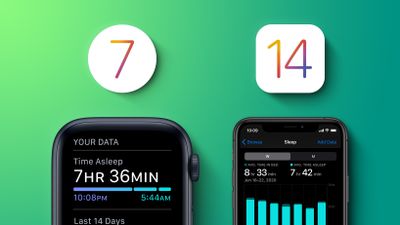
This guide walks through all of the Sleep Tracking functionality available on the iPhone and the Apple Watch in Apple's 2020 software updates.
Sleep Schedule
In the Health app on the iPhone or in the Apple Watch, you can set up a Sleep Schedule with the amount of sleep you want to get each night and your standard sleep and wake up goals.
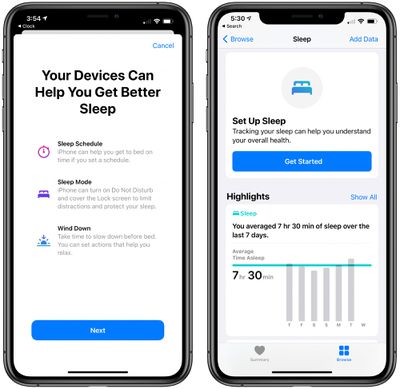
The first step of setting a Sleep Schedule is to set a Sleep Goal, which lets the Health app on iPhone (and Apple Watch) recommend a bedtime and provide a wake-up alarm. It also lets you know if you've hit your sleep goals for the night.
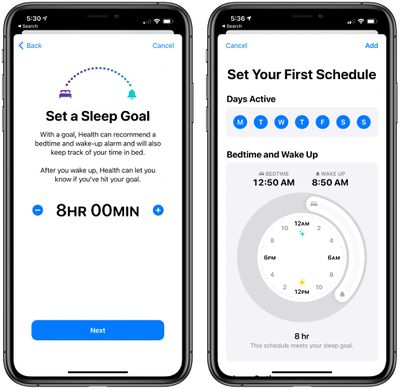
From there you'll want to set up a schedule with the time that you want to go to bed and the time that you want to wake up. Based on the sleep goal you set in the step before, the Health app will let you know if your chosen times will result in adequate sleep.
You can use the same Sleep Schedule every day or choose different schedules for different days. With this feature, you can have a set schedule for workdays and a different schedule for weekends.
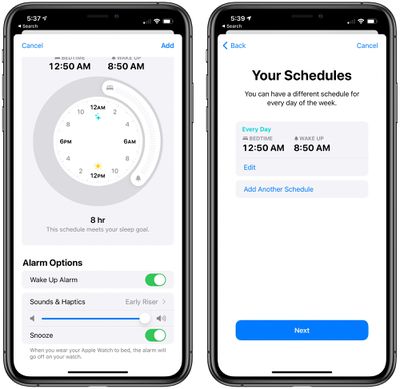
Setting a Sleep Schedule allows you to enable or disable a Wake Up Alarm, and you can customize the sound and whether you want haptic feedback. If you're wearing an Apple Watch for Sleep Tracking, the alarm will go off on the watch instead of on the iPhone. Adjusting Sleep Schedule options can be done in the Health app, or, more conveniently, in the Clock app under Alarm.
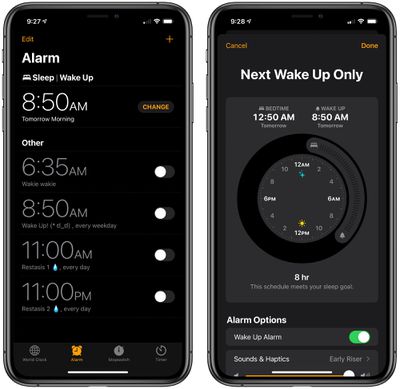
- How to Set a Sleep Goal on iPhone and Apple Watch
- How to Adjust Your Wake Up Alarm on iPhone and Apple Watch
- How to Set a Sleep Schedule on iPhone and Apple Watch
Sleep Mode
Sleep Mode is an optional mode that goes along with the Sleep Schedule feature. When enabled, it will simplify your Lock Screen at your chosen bedtime, hiding notifications and turning on Do Not Disturb.
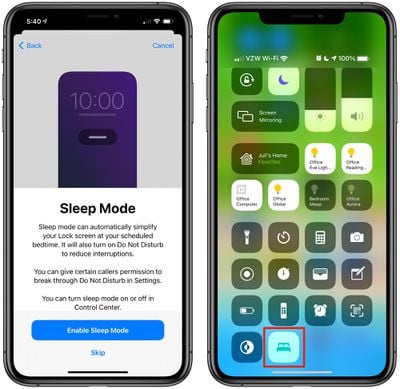
Sleep Mode can be set to turn on and off automatically to match your Sleep Schedule, but it can also be toggled on or off in the Control Center.
Wind Down
Wind Down accompanies Sleep Mode and Sleep Schedule as an optional feature. If enabled, Wind Down allows Sleep Mode to begin before bedtime to help reduce distractions and help you relax.
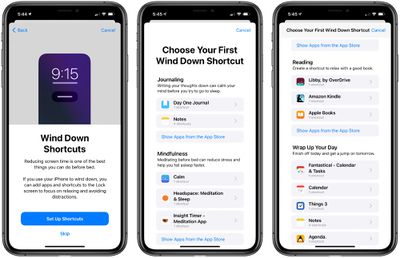
Like Sleep Mode, Wind Down turns on Do Not Disturb, and it can also surface Shortcuts to apps or features that you might want to use as part of your night time routine. If you read before bed, for example, the app might suggest your reading app, or if you like to meditate, it suggests your favorite meditation app.
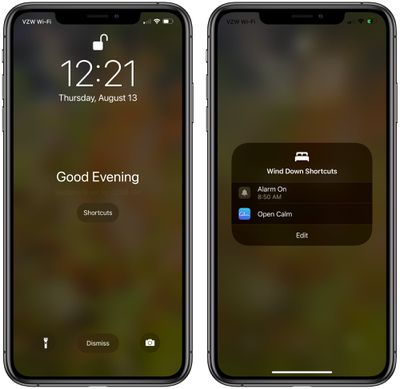
You need to set these Shortcuts up when activating and customizing the Wind Down feature. The Health app surfaces relevant options based on the selection of apps that you have installed for before bed activities like journaling, meditating, listening to music, listening to a Podcast, reading, checking off tasks on the calendar, yoga, and more.
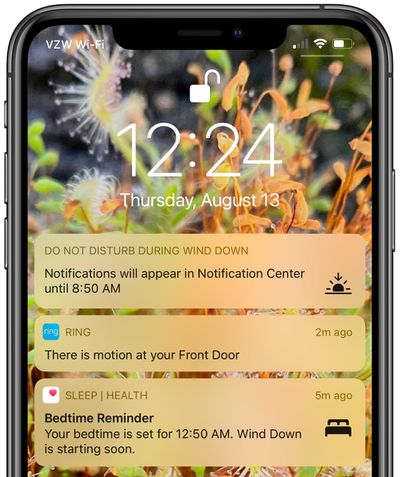
When Wind Down activates at a set time ahead of your set bedtime, it will provide a the time, a note about when bedtime is, and a link to the Shortcuts that you've set up so you can go about your pre-bedtime routine.
Sleep Tracking
Sleep Tracking, which keeps track of how long you sleep each night and wakes you up with a haptic alarm, is available if you have an Apple Watch. You can set up Sleep Tracking on Apple Watch through the Health app, and it uses the same setup process as all of the features above.
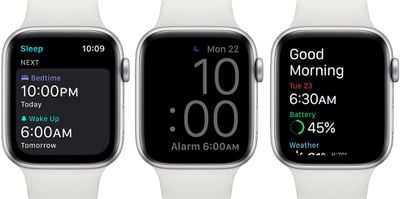
With Sleep Tracking enabled, the Apple Watch dims and locks itself based on your Sleep Schedule so it won't wake you up during the night. Sleep data from the Apple Watch can be viewed in the Health app on the iPhone. If your Sleep Schedule is set up with a bedtime and a wakeup time, all you need to do is make sure your watch is charged up and ready to wear at night. Sleep tracking happens automatically during the night as long as your Apple Watch has battery.
Apple Watch also lets you view summaries of your Sleep Schedule, it will notify you about Wind Down and bedtime settings, and it shows some of the sleep tracking data that's listed in the Health app.
Waking Up
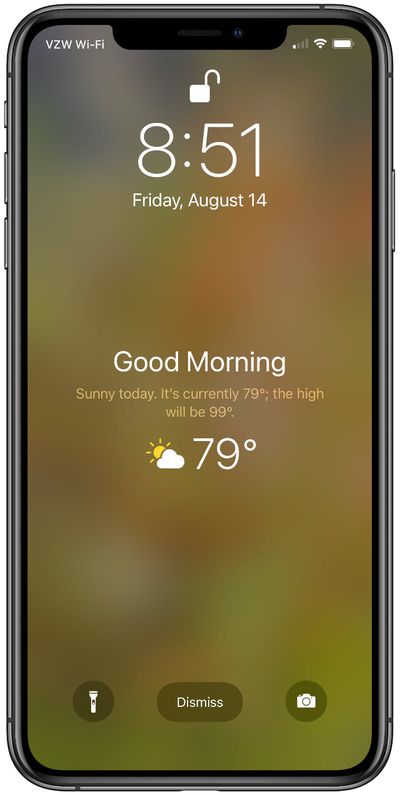
When you wake up in the morning, the alarm that's set will go off on either the iPhone or the Apple Watch and the iPhone will offer up a "Good Morning" message with the time and the weather forecast.
Setup Summary
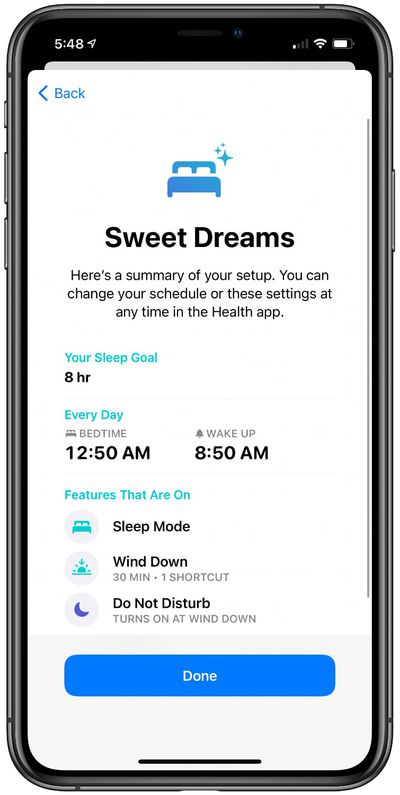
If you've used the setup process in the Health app, at the end, the iPhone provides you with a rundown of all of your settings. From there, the Sleep Schedule, Wind Down, and Sleep Tracking features work automatically when you go to bed each night. Changes can be made in the Sleep section of the Health app.
Third-Party Sleep Sources
It's worth noting that if you have a device that also contributes sleep data to the Health app, such as the Apple-owned Beddit sleep monitor, this data can be used in lieu of the Apple Watch to power Apple's Sleep Mode features and sleep data section in the Health app.
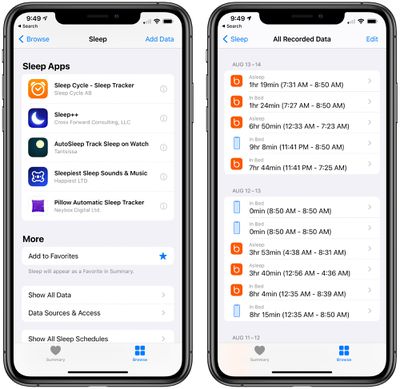
Sleep data can also be contributed by third-party sleep tracking apps for the iPhone and the Apple Watch.
Viewing Sleep Data
Sleep data collected by the Apple Watch can be viewed in the Sleep section of the Health app. The Health app displays data on a weekly or monthly basis, allowing you to see your sleep trends over time.
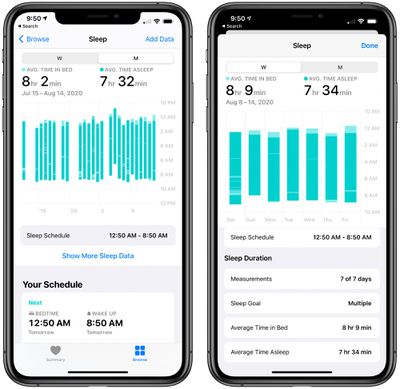
The Apple Watch collects sleep time, time in bed, and heart rate, but it doesn't provide data beyond that. Some other fitness trackers include information on light sleep, deep sleep, and other parameters, but the Apple Watch sleep tracking functionality does not.
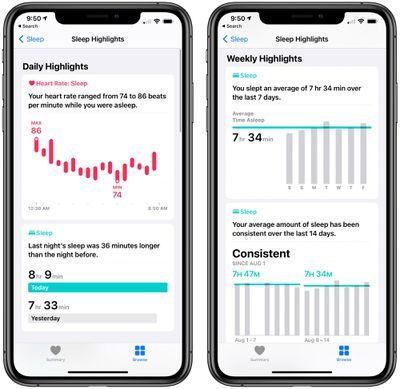
The Sleep section of the Health app offers charts on sleep length over time, heart rate while sleeping, and weekly, monthly, and yearly highlights. It also shows average sleep time over the past week and has a chart on sleep consistency over time.
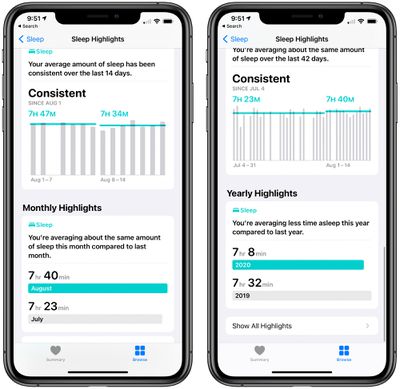
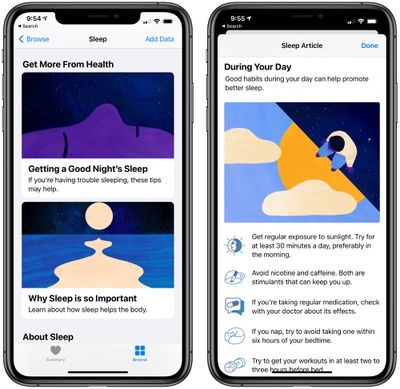
Along with this data, Apple offers articles that iPhone users can take advantage of to improve their sleep such as "Why Sleep is so Important" and "Getting a Good Night's Sleep" with sleep tips and info.
Battery Level Notifications for Apple Watch
iOS 14 and watchOS 7 include new notifications that are designed to let you better track the battery level of your Apple Watch so that it can be used both during the day and at night. There's a notification when the battery level is low and another notification that's sent when an Apple Watch has reached its full charge level so you know when it can be removed from the charger for a night's sleep.
Battery usage when sleep tracking varies, but the feature appears to use somewhere around 30 percent battery during the night.
Features You Can Use Without Apple Watch
The actual sleep tracking feature that measures how long you've slept is limited to the Apple Watch, but all of the other related features like Sleep Mode and Wind Down are available even if you don't have a watch.
As mentioned up above, you can get started setting these up in the Health app. Just open up the Health app, tap Browse, scroll down to Sleep, and then tap it. From there, tap on "Get Started" to set parameters that include a sleep goal, a schedule, and an alarm.
Guide Feedback
Have questions about the sleep related features in iOS 14 and watchOS 7, know of a feature we left out, or or want to offer feedback on this guide? Send us an email here. If you want to know more about what's coming in iOS 14, make sure to check out our iOS 14 roundup.






























