Skip to Content

iOS 16: Everything New With Notes and Reminders

The iOS 16 update focuses primarily on the Lock Screen and new features for apps like Mail, Messages, and Photos, but Apple did make some small changes to the Notes and Reminders app, adding a handful of new options.
ios 16 notes
This guide highlights all of the new features in the Notes and Reminders apps for iOS 16, which is available now.

Notes

There are some quality of life improvements for the Notes app, most notably an option to lock notes with the same passcode used to lock your iPhone.

iPhone Quick Note

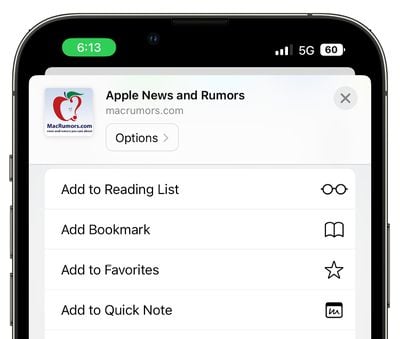
The Share Sheet has gained an "Add to Quick Note" option so you can create Quick Notes on iPhone. Add to Quick Note is an option across the iOS operating system, in first and third-party apps. You can create Quick Notes with Safari links, images, and more.
ios 16 notes quick note
Quick Notes used to be an iPad-only feature introduced in iPadOS 15, but iOS 16 brings them to the iPhone as well. On iPad, you can create Quick Notes from the Lock Screen, but on iPhone, the Share Sheet interface is required.

Updated Smart Folders

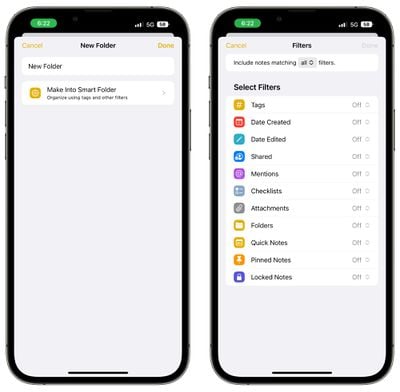
There are new Smart Folder filters available for better note organization. Rules can be created for Date Created, Date Modified, Shared, Mentions, Checklists, Attachments, Folder, Quick Notes, Pinned Notes, and Locked Notes.
notes smart folder options ios 16
Smart Folders used to be based solely on tags, so this is a notable update to the way notes are organized.

Lock Notes With Passcode

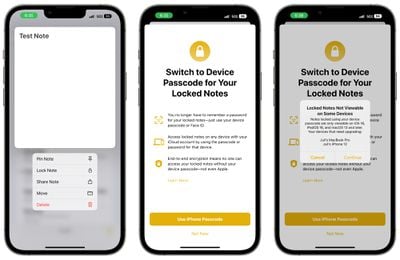
Rather than selecting a specific passcode for a locked note, you can instead lock your notes with your iPhone's passcode. That makes more sense than thinking up a standalone password, because you're not likely to forget your iPhone passcode.
ios 16 passcode locked notes
Notes locked with a passcode can be automatically unlocked with Face ID and the feature does not need to be enabled, plus you can access your locked notes across all of your devices by using the passcode for the device you're using.

Note that notes locked with your passcode can only be viewed on devices running iOS 16, iPadOS 16, or macOS Ventura. Devices running older versions of iOS and macOS will not be able to view passcode-locked notes.

Grouping by Date

In your list of notes and your gallery view, Notes are now grouped by chronological categories like Today and Yesterday to make it easier to find your most recent notes.
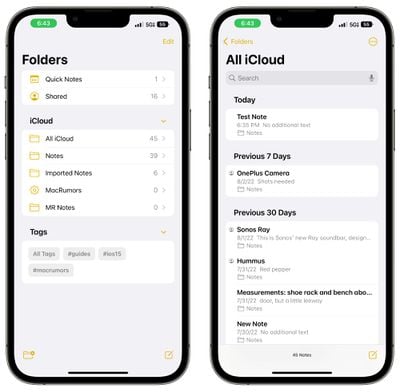
notes ios 16 date organization

Filters

When using Smart Folders or the Tag Browser, you can opt to filter for any or all of the criteria that you've chosen.
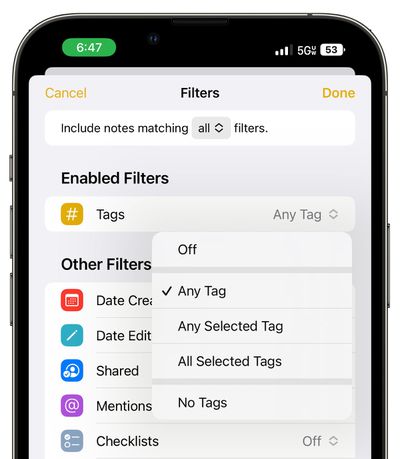
ios 16 notes filters any all

Reminders

Pinned lists, list templates, and the completed smart list bring some notable improvements for those who use the Reminders app on a regular basis.

Pinned Lists

The lists that you use most often can be pinned to the top of the Reminders app for easy access. Pinned lists show up right alongside Reminder app sections like Today, Scheduled, and Flagged.
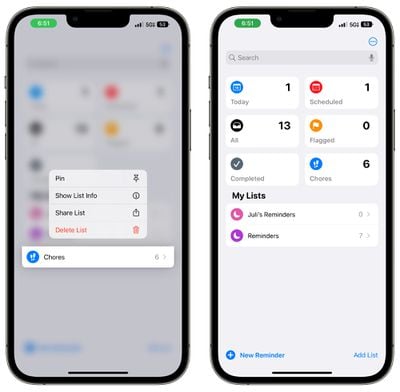
ios 16 pin reminder

Completed Smart List

Apple has added a whole new "Completed" section to the Reminders app that aggregates all of the reminders that you have checked off and finished. It is organized in sections that include Previous 7 Days and Previous 30 Days, then further back, it organizes reminders into months and years.
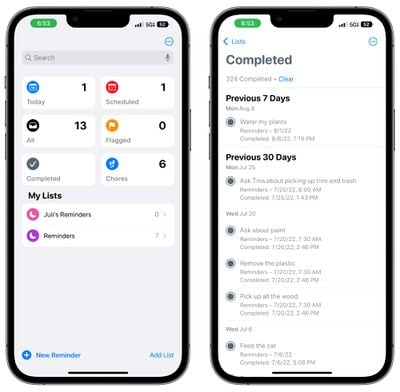
ios 16 completed reminders
Completed reminders can be cleared out by tapping on the "Clear" button at the top of the app, or they can be deleted individually by swiping.

List Templates

If you have a list that you reuse often like a grocery list or a packing list, you can save it as a template so it can be reused anytime. When creating a new list, the template section shows up as an option so you can choose your previously created templates.
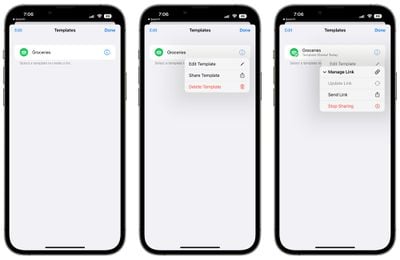
ios 16 reminders templates
You can go into the Templates section of the Reminders app and make any template shareable. From there, you can copy a link and send it to other people.
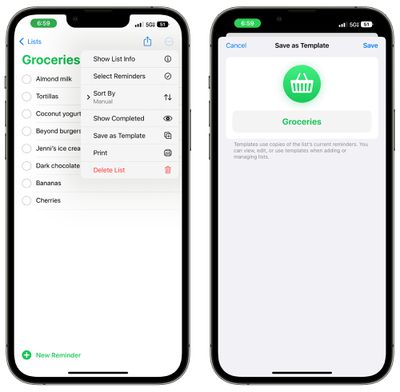
ios 16 reminders save as template
Others are also able to share templates with you, and those templates can be imported into the Reminders app.

Scheduled and Today List Improvements

Grouping by time and date is designed to make it easier to view and add reminders. The Today List is now grouped by Morning, Afternoon, and Night for a better division of the day.
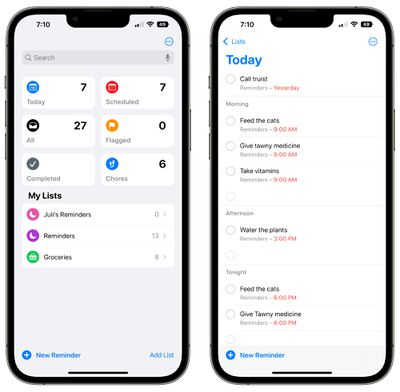
ios 16 reminders today organization
The Scheduled List has week and month groups for longer-term organization.

Improved List Groups

Any list group can be tapped to display a combined view of both the lists and the reminders that are inside.

Shared List Notifications

When tasks are added or completed in a shared list, you can opt to receive a notification.

Enhanced Notes

Notes added to reminders now support underlining, bold, and strikethrough text, plus bullet points can be used.

Filters

You can opt to filter for any or all of the criteria in a custom smart list or the tag browser.

Collaboration

Both Notes and Reminders work with the new collaboration feature that Apple implemented in iOS 16. You can send an invitation to collaborate to someone in Messages or FaceTime, and everyone on the thread is added to the Note or Reminder that you're working with.

Guide Feedback

Have questions about Notes and Reminders in iOS 16, know of a feature we left out, or want to offer feedback on this guide? Send us an email here.


Related Forum: iOS 16

Popular Stories

apple design award 2025

Apple Announces 2025 Design Award Winners Ahead of WWDC 2025

Tuesday June 3, 2025 10:14 am PDT by
As we wait for WWDC to kick off next Monday, Apple today announced the winners of its annual Apple Design Awards, recognizing apps and games for their innovation, ingenuity, and technical achievement. The 2025 Apple Design Award winners are listed below, with one app and one game selected per category: Delight and Fun - CapWords (App) and Balatro (Game) Innovation - Play (App) and PBJ -...
1password deal blue

1Password Security Breach: What Was Accessed and What Wasn't

Wednesday November 25, 2026 1:09 pm PST by
Popular password management app 1Password today said it experienced a security breach earlier this month. 1Password says some customer names and email addresses were accessed, but no customer vault contents were compromised. On November 19, 1Password saw indications that an employee's GitHub account had been breached and began investigating. The company says the breached GitHub account was...
apple store down feature

Here's Why the Apple Store is Going Down

Thursday November 26, 2026 5:49 am PST by
Apple's online store is going down for a few hours on a rolling country-by-country basis right now, but do not get your hopes up for new products. Apple takes its online store down for a few hours ahead of Black Friday every year to tease its annual gift card offer with the purchase of select products. The store is down in Australia, New Zealand, and Thailand, right now, and it will...

Top Rated Comments

drumcat Avatar
56 months ago
Reminders is the ultimate grocery/shopping list. I call mine "Shopping", and it works great with Siri:

"Add (item) to the Shopping list" and then I forget a lot less when I go. And I don't want to be at the nasty grocery store long anyhow. Great setup for us.

edit: Shout out to the one "disagree". LMAO.
Score: 13 Votes (Like | Disagree)
Mac47 Avatar
56 months ago
What they really need is a version of Notes for Apple Watch.
Score: 6 Votes (Like | Disagree)
Will Co Avatar
56 months ago
Nice. I use reminders extensively and these features are welcome additions.
Score: 5 Votes (Like | Disagree)
TrueBlou Avatar
56 months ago
Notes is definitely among my most used apps, but Reminders, now that I really should use more than I do.
I’ve still got the old (now bad habit) way of just adding ‘reminders’ to my Calendar. Which is fine, it works, but man my calendar’s bound to be stuffed with unnecessary, old random nonsense going back a decade or more. At least if I use Reminders it’s easier to get rid of the old crud.

Score: 4 Votes (Like | Disagree)
Razorpit Avatar
56 months ago
Notes is a dangerous app to use. There’s no backing up of a note. One wrong move and things can be gone forever. I use Pages instead. At least with Pages things get backed up with Time Machine.

Score: 3 Votes (Like | Disagree)
56 months ago
All these Notes improvements are neat, but I would give my left ear for the ability to reorder lists by drag and drop.
Score: 3 Votes (Like | Disagree)
Latest Stories
The 50+ Best Apple Black Friday Deals Still Available on AirPods, iPads, and More
8 hours ago
HomePod Mini 2 in (RED) Seemingly Spotted Ahead of Announcement
5 hours ago
Apple's M6 and PROLED MacBook Pro Reach New Low Prices for Black Friday
15 hours ago
The MacRumors Show: iPhone Air 2 and iPhone 18 Are Coming
15 hours ago
Apple Store in Brisbane Reopening Next Month With New Design
16 hours ago
The 60+ Best Black Friday Accessory Deals on iPhone Chargers, TVs, Headphones, and More
17 hours ago
GTA VI Now (Barely) Running on Apple Silicon Macs
17 hours ago
The Best Black Friday Streaming Deals on Apple TV, Disney+, and More
18 hours ago
Apple TV's 'Carême' Wins International Emmy for Best Drama
18 hours ago
iPhone 18 Production Delay Leaves Apple Little Time Before Launch
19 hours ago
The Best Black Friday AirPods Deals Still Available
11 hours ago
The Best Black Friday Deals on Apple Home Products
20 hours ago
The Best Black Friday iPhone Deals Still Available
11 hours ago
The Best Black Friday iPad Deals Still Available
11 hours ago
The Best Black Friday Apple Watch Deals Still Available
11 hours ago
The Best Black Friday AirTag Deals Still Available
11 hours ago
The Best Black Friday Mac Deals Still Available
11 hours ago
iPhone Share of US Smartphone Market Hits 57% as Rivals Slip
21 hours ago
iPhone 20 Pro Rumored to Feature 3D-Printed Titanium Frame
22 hours ago
Apple's Official 2026 Black Friday Offer Starts Rolling Out
2 days ago
Halide Adds Fill Light Feature for iPhone Duo
2 days ago
MacBook Air Black Friday Deals Now Live With Massive $399 Savings
2 days ago
Amazon Discounts All MacBook Neo Models by $99 for Black Friday
2 days ago
Kodak Launches Unique AirTag Rival With E-Ink Display
2 days ago
Here's Why the Apple Store is Going Down
2 days ago
Apple Still Working on Giant Foldable iPad That Could Cost $5,000
2 days ago
iPhones Dominate China's Weak Singles' Day Smartphone Sales
2 days ago
iPhone 20 Pro Could Feature Ceramic in Limited-Edition Model
2 days ago
Apple Faces Korean Regulator Review Over iPhone 16 AI Advertising
2 days ago
Apple Watch Ultra 4 Hits New Best-Ever Price of $649.99 for Black Friday
2 days ago
Related Apple News: South Africa | Local News | Politics | Technology | Buyers Guide




























