Skip to Content

Magnifier in iOS 14 Gets Overhauled UI and New Features, Can Be Added to Home Screen

In every version of iOS, Apple adds new Accessibility features and improves others, and iOS 14 is no exception. The Magnifier tool, designed by those with visual issues who need assistance, has new capabilities in iOS 14.
magnifier1

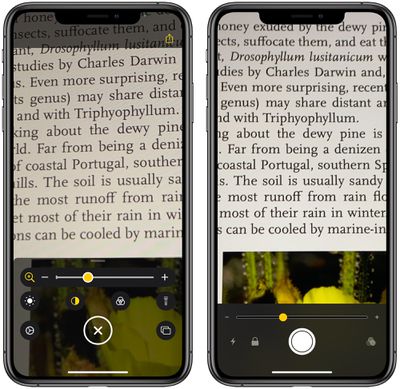
iOS 14 Magnifier interface on left, iOS 13 Magnifier interface on right

Updated Interface

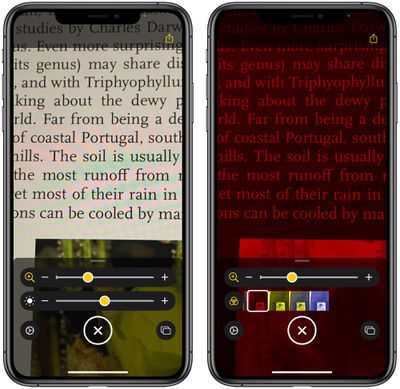
The app features an updated interface that makes controls more readily available and offers clarity on what each tool does. There are options for adjusting brightness and contrast, or adding a filter to change what's being magnified to a color that's easier for an individual to see.
magnifier2
All of the controls can be rearranged to best meet a user's needs, and the filter options can be customized so you can set the one that you need and toggle it on with a tap.

In a dark area, the flashlight can be toggled on with a tap, and the magnification level can be easily controlled with a slider bar. Many of these features were available in the prior version of the app, but multi-shot, an option for capturing more than one photo at once, is new.

Multi-Shot

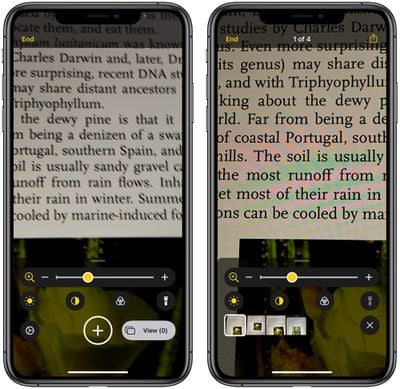
With a new multi-shot option, Magnifier users can take multiple photos at one time, capturing something like different pages of a menu, and then review them all at once, rather than having to take single shots that need to be reviewed one by one.
magnifier4

Adding Magnifier to Home Screen

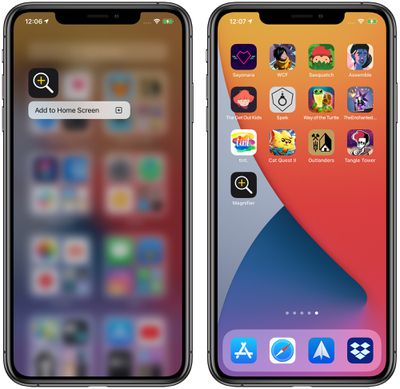
For frequent Magnifier users, an app icon to activate the Magnifier function can be added to the Home Screen by accessing the App Library, searching for Magnifier, and then dragging it over to one of the app pages or long pressing and choosing "Add to ‌Home Screen‌." The feature can continue to be accessed with a triple tap on the side button as well.
magnifier3
To find Magnifier in App Library, make sure it's turned on by opening up Settings, tapping on Accessibility, choosing Magnifier, and then toggling it to the on position.

More Accessibility Info

The changes to the Magnifier app are small but significant, making the app customizable for each user and streamlining the use process. Apple also added several useful new Accessibility features to iOS 14, such as Back Tap for manually activating some iPhone features and Sound Recognition for recognizing sounds like water running, sirens, alarms, and more. Additional detail on the new Accessibility features can be found in our iOS 14 roundup.


Related Forum: iOS 14

Popular Stories

Apple TV Sign Language Interpretation

New Apple TV Sign Language Feature Announced

Tuesday November 10, 2026 8:54 am PST by
Apple today announced a new accessibility feature for the Apple TV app that gives viewers the option to watch supported movies and shows with on-screen sign language interpretation. An interpreter will appear in the bottom-right corner of the screen, with the experience said to have been designed and tested by Deaf and native signers. The feature is available in the Apple TV app on devices...
apple design award 2025

Apple Announces 2025 Design Award Winners Ahead of WWDC 2025

Tuesday June 3, 2025 10:14 am PDT by
As we wait for WWDC to kick off next Monday, Apple today announced the winners of its annual Apple Design Awards, recognizing apps and games for their innovation, ingenuity, and technical achievement. The 2025 Apple Design Award winners are listed below, with one app and one game selected per category: Delight and Fun - CapWords (App) and Balatro (Game) Innovation - Play (App) and PBJ -...
Apple 2026 Black Friday Event Hero

Apple's Official 2026 Black Friday Offer Starts Rolling Out

Thursday November 26, 2026 8:37 am PST by
Apple's annual four-day Black Friday through Cyber Monday shopping event is now live in Australia, New Zealand, and Thailand, and it will continue to roll out across Europe, the U.S., and Canada as the calendar turns to Friday, November 27 around the world. In the U.S., Apple's terms and conditions say the promotion begins on November 27 at 12 a.m. Pacific Time and ends on November 30 at...

Top Rated Comments

Chester Stone Avatar
83 months ago
Why is the newer (iOS 14) graphic always on the left in your articles? 🤔

It's easier to understand progression by putting old on left, new on right, because our eyes are reading the words from your article left-to-right.

It's as if you post the new graphic for readers, then think, "Oh, I need to compare what this used to be like," and, as an afterthought, post the second image. But for those of us that didn't even know the original feature was there, we look at the two photos and can't tell old from new. (esp. if the new looks subjectively worse)

This is confusing for your readers. When you give your writing an edit pass, please think about how readers will consume it.
Score: 18 Votes (Like | Disagree)
rk-apple Avatar
83 months ago
Every year I use magnifier more and more...
Score: 7 Votes (Like | Disagree)
zorinlynx Avatar
83 months ago
Magnifier is such a useful feature, I always wondered why it was hidden away so much. Glad to see it getting some attention and that it's being brought to the forefront!
Score: 7 Votes (Like | Disagree)
MacCheetah3 Avatar
83 months ago

Magnifier opens on triple clicking my home button.

What replaced triple click on iPhones without home button?
Side button triple press.
Score: 2 Votes (Like | Disagree)
83 months ago

... I have other apps that can do that now and also tell you what denomination of money you are holding.
sounds good if yr app could work with minimal user input.

like:
1 open app
2 input how much you have in the foreign currency (this is the only user input)
3 wave iPhone above the currency to understand what currency it is
4 provides a graph of how that currency has changed over the course of a preset number of months
5 app converts the amount of foreign currency to a preset other currency (like USD or whatever).

worth: about USD 6 in app store.
will sell 100's of thousands.
Score: 1 Votes (Like | Disagree)
JosephAW Avatar
83 months ago
I'm still waiting for a live OCR where you wave your magnifier over part of a page of text and when it stitches the entire page together in memory it can read it back to you. That and object recognition. I have other apps that can do that now and also tell you what denomination of money you are holding.
Score: 1 Votes (Like | Disagree)
Latest Stories
The 50+ Best Apple Black Friday Deals Still Available on AirPods, iPads, and More
1 hour ago
Here Are the Best Apple Black Friday Leftover Deals You Can Get Today
1 minute ago
HomePod Mini 2 in (RED) Seemingly Spotted Ahead of Announcement
11 hours ago
Apple's M6 and PROLED MacBook Pro Reach New Low Prices for Black Friday
22 hours ago
The MacRumors Show: iPhone Air 2 and iPhone 18 Are Coming
22 hours ago
Apple Store in Brisbane Reopening Next Month With New Design
22 hours ago
The 60+ Best Black Friday Accessory Deals on iPhone Chargers, TVs, Headphones, and More
23 hours ago
GTA VI Now (Barely) Running on Apple Silicon Macs
23 hours ago
The Best Black Friday Streaming Deals on Apple TV, Disney+, and More
1 day ago
Apple TV's 'Carême' Wins International Emmy for Best Drama
1 day ago
iPhone 18 Production Delay Leaves Apple Little Time Before Launch
1 day ago
The Best Black Friday AirPods Deals Still Available
17 hours ago
The Best Black Friday Deals on Apple Home Products
1 day ago
The Best Black Friday iPhone Deals Still Available
17 hours ago
The Best Black Friday iPad Deals Still Available
17 hours ago
The Best Black Friday Apple Watch Deals Still Available
17 hours ago
The Best Black Friday AirTag Deals Still Available
17 hours ago
The Best Black Friday Mac Deals Still Available
17 hours ago
iPhone Share of US Smartphone Market Hits 57% as Rivals Slip
1 day ago
iPhone 20 Pro Rumored to Feature 3D-Printed Titanium Frame
1 day ago
Apple's Official 2026 Black Friday Offer Starts Rolling Out
2 days ago
Halide Adds Fill Light Feature for iPhone Duo
2 days ago
MacBook Air Black Friday Deals Now Live With Massive $399 Savings
2 days ago
Amazon Discounts All MacBook Neo Models by $99 for Black Friday
2 days ago
Kodak Launches Unique AirTag Rival With E-Ink Display
2 days ago
Here's Why the Apple Store is Going Down
2 days ago
Apple Still Working on Giant Foldable iPad That Could Cost $5,000
2 days ago
iPhones Dominate China's Weak Singles' Day Smartphone Sales
2 days ago
iPhone 20 Pro Could Feature Ceramic in Limited-Edition Model
2 days ago
Apple Faces Korean Regulator Review Over iPhone 16 AI Advertising
2 days ago
Related Apple News: Iphone Duo Control Center Tap Access | How To | Watchos | Iphone Duo Activate Standby Mode When Not Charging | Aqara Camera Hub G350





























