Skip to Content

10+ macOS Tahoe Features You Might Have Missed

Apple's new Liquid Glass design has received most of the attention in news about macOS Tahoe, but there are quite a few new features that make the Mac better than ever, including some that are not super obvious. We've rounded up 10 useful ‌macOS Tahoe‌ features that you should know about.

macOS Tahoe 26 Thumb

Customize the Menu Bar

With ‌macOS Tahoe‌, you have more control over the layout of your menu bar. You can rearrange the menu bar, remove things you're not using, and add Control Center widgets for quick access to your most used settings.

menu bar control center items macos
To customize your menu bar, go to System Settings > Menu Bar > Menu Bar Controls, or open Control Center, click on Edit Controls, and click on the "+" in the menu bar. You can uncheck boxes to remove items, and use the Add Controls option to add new options from both first and third-party apps.

Customize Your Mac's Lock Screen Font

‌macOS Tahoe‌ lets you customize the clock that appears on your Mac's Lock Screen. You can't adjust size like you can in iOS 26, but you can change the font style and thickness.
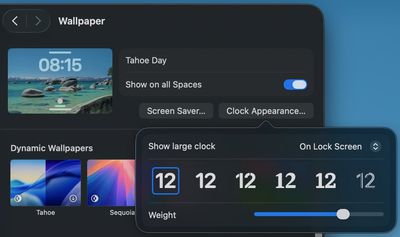
tahoe clock lock screen
To adjust your clock, go to System Settings > Wallpaper > Clock Appearance. You can choose from six different font styles, and adjust the weight with a slider. You can opt to have the clock show on your Lock Screen or on the Lock Screen and Screen Saver.

Live Activities

If you have an iPhone and a Mac, Live Activities can now sync between your devices. When you have an active Live Activity on your iPhone, like an in-progress flight, an upcoming Uber ride, or a live sports game, it will automatically show up in your Mac's menu bar through the iPhone Mirroring feature.
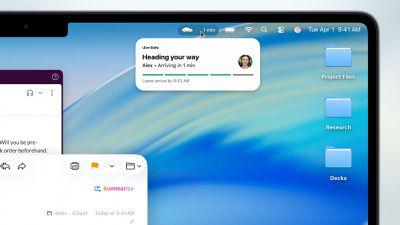
live activities macos
Live Activities sync automatically with iPhone Mirroring enabled, and you can turn it on with the iPhone Mirroring Mac. You can click on any Live Activity to open the associated iPhone app through iPhone Mirroring.

See Your Clipboard History

Spotlight now incorporates clipboard history, tracking what you copy and paste. It's erased every eight hours so nothing is saved longterm, but it's useful if you need to find something you copied earlier in the day.

spotlight clipboard macos
To get to your clipboard, press Command + Spacebar to open Spotlight, then press Command + 4 to swap over to the clipboard view. Click on any item to copy it.

Clipboard history is off by default, so you do need to turn it on in the Spotlight section of System Settings before you can use it.

Streamline Spotlight Search Results

When you're using Spotlight to search for something in an app, ‌macOS Tahoe‌ lets you add filters directly in the search bar. Open up Spotlight, type in a search term, and then click on a filter at the top to narrow down the results. If you want to find PDFs you've been sent in the Mail app, for example, you can type in PDF and then click on Mail.
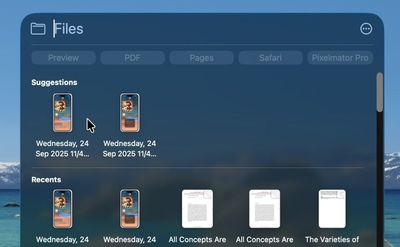
spotlight search files macos
A quicker way to search is to type in the app name, like Mail, press the tab key, and then type in your second filter term like PDF.

Search Websites Faster

You can use Spotlight to perform searches on websites without having to open up Safari and navigate to the site first. Just type a website name like Etsy or Amazon, press Tab, and type what you want to search for.

Search Your Tabs

When you search in Spotlight, the results include the Safari tabs that you have open. If you tend to have dozens of tabs open at once, it can be a good way to find the specific tab you're looking for rather than clicking through them one-by-one. Open tabs show up at the top of the list when you enter a relevant search term.

Use Quick Keys

Quick Keys are shortcuts that let you perform actions in Spotlight using just a few characters. With a Quick Key, you can type in a couple of letters to do a task that you repeat often, such as sending someone a message or opening up an app.

spotlight quick keys
To use it, open up Spotlight by pressing Command + Spacebar, then press Command + 3 to get to Actions. Type in the action that you want, like Open ChatGPT, and then when it appears, click on the Add Quick Key option.

From there, you can type between 1 and 12 letters as your shortcut, such as "gpt." The next time you want to execute that action, just type the Quick Key phrase.

Create Automations

‌macOS Tahoe‌ has iOS-style Shortcut automations that can run automatically based on time, system events, or other triggers, which is functionality that was not previously available.
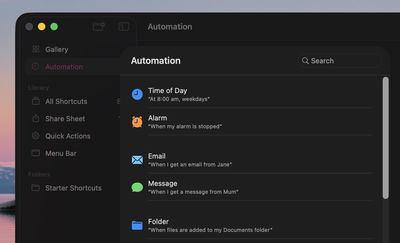
shortcuts automations
Open the Shortcuts app, click on the Automation option in the side bar, and then click on the "+" button to create an automation. Triggers include time of day, when an app opens, when a display or accessory is connected, when a Focus mode activates, when the battery gets to a certain level, when you save a file to a specific folder, and more.

Safari Picture in Picture

Picture-in-picture has been available in Safari for several years, but ‌macOS Tahoe‌ brings easier activation, new controls, and customization options.
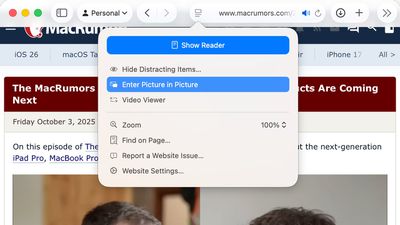
safari picture in picture
In an article where there's a video, click on the Page Menu icon in the left side of the URL bar to enter picture-in-picture mode. You can now access playback controls for skipping forward and backward, and you can skip ads directly from the picture-in-picture window.

See Your Spotlight History

You can see your past Spotlight searches and actions in ‌macOS Tahoe‌, which makes it easy to get back to something that you did before.

macos 26 spotlight history
With Spotlight open, press on the up arrow to scroll through your past queries.

Gaming Low Power Mode

‌macOS Tahoe‌ updates Low Power Mode so that it's optimized for gaming, giving you a way to extend your gameplay sessions. You can set Low Power Mode to turn on automatically when your Mac is not plugged in, or let your Mac manage its power intelligently.

Whenever Low Power Mode is activated, it won't impact gameplay by lowering game performance.

Game Overlay

When you're playing a game in ‌macOS Tahoe‌, you can tap Command + ESC to bring up a new Game Overlay. From the Game Overlay, you can view achievements and leaderboards, connect with friends, and adjust settings like brightness and volume.
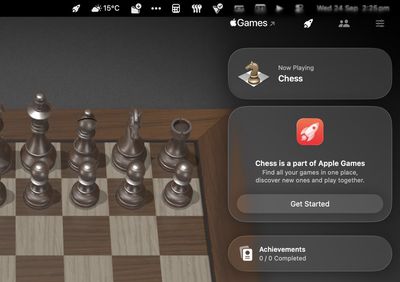
macos game overlay
‌macOS Tahoe‌ packs these useful features alongside its eye-catching visual redesign. Whether you're customizing your workspace, streamlining your workflow with Quick Keys, or automating repetitive tasks, these features can make your Mac experience significantly more productive. Take some time to explore these capabilities--you might find your new favorite Mac feature hiding in plain sight.

Read More

For more on what's new in ‌macOS Tahoe‌, check out our dedicated roundup.

Related Roundup: macOS Tahoe
Related Forum: macOS Tahoe

Popular Stories

apple design award 2025

Apple Announces 2025 Design Award Winners Ahead of WWDC 2025

Tuesday June 3, 2025 10:14 am PDT by
As we wait for WWDC to kick off next Monday, Apple today announced the winners of its annual Apple Design Awards, recognizing apps and games for their innovation, ingenuity, and technical achievement. The 2025 Apple Design Award winners are listed below, with one app and one game selected per category: Delight and Fun - CapWords (App) and Balatro (Game) Innovation - Play (App) and PBJ -...
1password deal blue

1Password Security Breach: What Was Accessed and What Wasn't

Wednesday November 25, 2026 1:09 pm PST by
Popular password management app 1Password today said it experienced a security breach earlier this month. 1Password says some customer names and email addresses were accessed, but no customer vault contents were compromised. On November 19, 1Password saw indications that an employee's GitHub account had been breached and began investigating. The company says the breached GitHub account was...
Apple 2026 Black Friday Event Hero

Apple's Official 2026 Black Friday Offer Starts Rolling Out

Thursday November 26, 2026 8:37 am PST by
Apple's annual four-day Black Friday through Cyber Monday shopping event is now live in Australia, New Zealand, and Thailand, and it will continue to roll out across Europe, the U.S., and Canada as the calendar turns to Friday, November 27 around the world. In the U.S., Apple's terms and conditions say the promotion begins on November 27 at 12 a.m. Pacific Time and ends on November 30 at...

Top Rated Comments

15 months ago
And if you don’t like any of these I found out if you factory erase your Mac via recovery assistant it will reinstall Sequoia by default not Tahoe.
Score: 20 Votes (Like | Disagree)
15 months ago
Fugly OS. Hard pass. About to throw my new iPhone across the room in frustration with the laggy, low contrast, unnecessary ornaments and effects that clutter the screen and take up far too much real estate. Not gonna do that to my daily driver, no way.
Score: 13 Votes (Like | Disagree)
ThomasJL Avatar
15 months ago
What a mess! It can be summarized in one word: unintuitive.
Score: 12 Votes (Like | Disagree)
kagharaht Avatar
15 months ago
The TV App has an awesome feature. Search from your library and when the results shows up, you select it and TV App crashes...so you can report it to Apple for me.
Score: 11 Votes (Like | Disagree)
turbineseaplane Avatar
15 months ago

I just want to access the ability to bookmark in one click... PLEASE!!!
Sorry that requires an M5 chip and a new neural processor

-Tim
Score: 10 Votes (Like | Disagree)
15 months ago
After reading this article: whoop-dee-do... 🥱
Score: 10 Votes (Like | Disagree)
Latest Stories
The 50+ Best Apple Black Friday Deals Still Available on AirPods, iPads, and More
11 hours ago
HomePod Mini 2 in (RED) Seemingly Spotted Ahead of Announcement
8 hours ago
Apple's M6 and PROLED MacBook Pro Reach New Low Prices for Black Friday
18 hours ago
The MacRumors Show: iPhone Air 2 and iPhone 18 Are Coming
18 hours ago
Apple Store in Brisbane Reopening Next Month With New Design
19 hours ago
The 60+ Best Black Friday Accessory Deals on iPhone Chargers, TVs, Headphones, and More
20 hours ago
GTA VI Now (Barely) Running on Apple Silicon Macs
20 hours ago
The Best Black Friday Streaming Deals on Apple TV, Disney+, and More
21 hours ago
Apple TV's 'Carême' Wins International Emmy for Best Drama
21 hours ago
iPhone 18 Production Delay Leaves Apple Little Time Before Launch
22 hours ago
The Best Black Friday AirPods Deals Still Available
14 hours ago
The Best Black Friday Deals on Apple Home Products
22 hours ago
The Best Black Friday iPhone Deals Still Available
14 hours ago
The Best Black Friday iPad Deals Still Available
14 hours ago
The Best Black Friday Apple Watch Deals Still Available
14 hours ago
The Best Black Friday AirTag Deals Still Available
14 hours ago
The Best Black Friday Mac Deals Still Available
14 hours ago
iPhone Share of US Smartphone Market Hits 57% as Rivals Slip
1 day ago
iPhone 20 Pro Rumored to Feature 3D-Printed Titanium Frame
1 day ago
Apple's Official 2026 Black Friday Offer Starts Rolling Out
2 days ago
Halide Adds Fill Light Feature for iPhone Duo
2 days ago
MacBook Air Black Friday Deals Now Live With Massive $399 Savings
2 days ago
Amazon Discounts All MacBook Neo Models by $99 for Black Friday
2 days ago
Kodak Launches Unique AirTag Rival With E-Ink Display
2 days ago
Here's Why the Apple Store is Going Down
2 days ago
Apple Still Working on Giant Foldable iPad That Could Cost $5,000
2 days ago
iPhones Dominate China's Weak Singles' Day Smartphone Sales
2 days ago
iPhone 20 Pro Could Feature Ceramic in Limited-Edition Model
2 days ago
Apple Faces Korean Regulator Review Over iPhone 16 AI Advertising
2 days ago
Apple Watch Ultra 4 Hits New Best-Ever Price of $649.99 for Black Friday
2 days ago
Related Apple News: Reviews | Motoring | Entertainment | Sport | Business