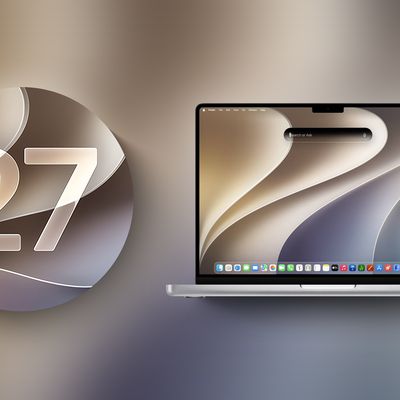
Apple released macOS Golden Gate to the public today, which means anyone with a compatible Mac can download it. The new version of macOS requires an Apple chip, so if you have a Mac with an M1 or later or a MacBook Neo, you can upgrade.

macOS Golden Gate includes Siri AI, and the Mac is the only device that people in the EU can try Siri AI with. It also brings a long list of performance improvements, updates to Liquid Glass, and new Apple Intelligence features for apps like Photos, Calendar, Reminders, Home, and Safari.
Liquid Glass
Apple added a Liquid Glass slider in macOS 27, which means you can adjust the transparency level. You can select a clearer version of Liquid Glass that lets some of the background show through, or a more opaque version for improved legibility. Since it's a slider, you can also pick something in between.
Apple tweaked the overall opacity of Liquid Glass, and it better diffuses complex content behind navigation bars and buttons. Darkened edges and brighter specular highlights add more depth and separation for different UI elements.
Toolbars, Sidebars, and Windows
Uniform toolbars in apps make text headings and groups of controls more legible, and Apple has cut back on the number of icons that are used in menu interfaces. Windows have the same corner radius for more consistency, and you'll notice that app corners are not as dramatically rounded.
Changes to window shadows and the Liquid Glass updates make it a lot easier to tell which window is active when you have several apps open.
Sidebars no longer float and are edge-to-edge, which is a less distracting design. Sidebar icons once again use color, too.
Siri AI
Siri AI is the biggest change in macOS Golden Gate. Siri is smarter, more capable, and functions like a chatbot. On the Mac, you can ask Siri anything using the Spotlight interface that comes up with Command + Space. Spotlight is now a unified "Search or Ask" bar where you can search for files, apps, and other content, or ask Siri to complete tasks or answer queries.
You can also interact with Siri using the dedicated Siri app, which is where you can view past conversations and start new conversations. Siri conversations sync across all of your devices, and the Siri app is cross-platform.
Siri can see what's on your screen and access your personal information like emails, messages, and photos to answer questions. Siri can also search the web and complete tasks in apps for you. It's a huge change from the prior version of Siri, and Siri can handle far more than it could before.
We have more on some of the tasks you can complete with Siri in our Siri AI guide.
Visual Intelligence
Apple brought the iPhone's Visual Intelligence feature to the Mac in macOS 27. You can ask Siri questions about what's on your screen with Visual Intelligence, choosing the entire screen or just a portion.
Visual Intelligence on the Mac works when you press Command + Shift + Space or Command + Shift + 6 to capture one area of the display. If you press Command + Shift + 5 (also used for recording your display and capturing screenshots), you can click on the Visual Intelligence icon to get an adjustable selection square for selecting an area of the screen.
Siri can search for images, summarize, translate, identify objects, add information from the screen to apps like Calendar or Reminders, answer questions about what you're looking at, and more. Visual Intelligence on Mac has all of the same features as Visual Intelligence on iPhone, and it includes the new Visual Intelligence features like telling you nutritional information for food or splitting out a bill.
Write with Siri
There is a system-wide Write with Siri feature that goes beyond the Apple Intelligence Writing Tools available in macOS Tahoe. Siri can compose entire emails or messages for you, give you feedback on your writing, change out words, and complete other editing tasks.
To use Write with Siri on Mac, right-click in an app and choose the Ask Siri option. If you select text before the right-click, you can ask Siri for editing help. If you have a blank document, you can ask Siri to generate something for you. When drafting emails or messages, Siri can analyze your past communications and generate something in your own writing style.
Apple also expanded spell correction in macOS Golden Gate, and your Mac will give you grammar suggestions and fixes.
iPhone Mirroring
You can resize the iPhone Mirroring window in macOS Golden Gate, dragging at the corner to make a window larger or smaller. Depending on the app, you may be limited to a portrait iPhone aspect ratio, but other apps support iPad or landscape layouts.
It's a feature Apple likely added for the iPhone Duo, but it's nice to have for any iPhone.
Shortcuts
It's easier for anyone to create a Shortcut in just a few minutes in macOS Golden Gate. The Shortcuts app on Mac opens to an interface that lets you describe what you want a shortcut to do using natural language.
AI creates the shortcut for you, and you can refine it with further natural language commands or manually edit it. You can activate your shortcuts through the app or with Siri commands.
Safari Extensions
Safari has a customizable extension feature in macOS Golden Gate, and you can use the Describe Extension option to type in what you want an extension to do. The extension is created using AI and is available to use right away.
To use it, click on the settings icon on the right side of the URL bar and choose the Describe Extension option. Some Apple examples:
- Display a reading time estimate as a badge on the extension
- Close duplicate tabs pointing to the same URL when I click the extension
- Highlight this word
- Create a 3-minute focus timer for the page
- Set the minimum font size to 14pt
- Every time I open a new tab, draw me a flower
- Highlight and show the dimensions of webpage elements when I click them
- Enter design mode for a website so that I can edit the contents
- Save this recipe
Safari Tab Grouping and Notifications
Safari also has an intelligent tab grouping feature. Tabs in related categories are automatically grouped together in the tab view.
You can also set Safari to monitor a webpage for updates, with Hourly, Daily, Weekly, and Monthly checks available. When you set this feature up, you'll get a notification when the content on the webpage changes.
Performance Improvements
In addition to introducing Siri and new Apple Intelligence features, macOS Golden Gate cleans up underlying code. Apple made multiple refinements to speed up performance.
Animations and interactions are faster and smoother, and you'll notice a difference when scrolling Safari and other apps, opening Mission Control and Spaces, and using other Mac interface elements.
AirDrop transfers complete more quickly, browsing through files on attached network devices is faster, and window positioning is more stable when using external displays. Messages also sync faster and more reliably across devices.
Apple rebuilt its search foundation for Spotlight, Photos, Mail, and Messages, and indexing is quicker. When you search for something recent, it's more likely to come up right away than before, and in Mail, there's a ranking system that surfaces the emails you're most likely looking for. Mail search indexing is more reliable than before, and Spotlight search suggestions are more relevant.
How to Install
macOS Golden Gate can be installed through the System Settings app on your Mac. Just go to General > Software Update.
Full System Requirements
macOS Golden Gate runs on Macs with an M1 chip or later, plus the A18 Pro MacBook Neo. Intel Macs do not support macOS Golden Gate and won't get the new features.
Every Mac that runs macOS Golden Gate supports Apple Intelligence and Siri AI, but some on-device Siri processing features for selecting a natural voice and getting upgraded dictation require an M3 or later.