Skip to Content

Use These iPhone Features to Stay Safer

The iPhone has quite a few built-in safety features that are designed to help keep you safe, and with New Year's Eve parties approaching, it may be worth a refresher on what your iPhone can do and the options you can enable to protect yourself.
FindMy Feature

Stolen Device Protection

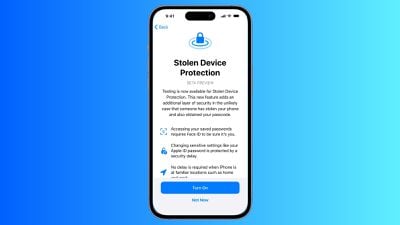
Stolen Device Protection keeps your data safe in case someone steals your iPhone and also happens to know your passcode. Earlier this year, there were reports about thieves spying on a victim's passcode before stealing an iPhone, giving them access to Find My, iCloud Keychain passwords, banking accounts, and more.
ios stolen device protection
With Stolen Device Protection, Face ID or Touch ID authentication is required to view passwords in ‌iCloud‌ Keychain, turn off Lost Mode, erase content and settings, use saved Safari payment methods, and apply for or view an Apple Card. Authentication and an hour-long waiting period is required for changing an Apple ID password, changing an iPhone passcode, removing ‌Face ID‌/‌Touch ID‌, and turning off ‌Find My‌.

Stolen Device Protection is actually an iOS 17.3 feature, so there are some extra steps to use it. You'll need to download and install the iOS 17.3 public beta from Apple's beta software website and follow the instructions. It's a little bit of a hassle, but if you're going to be out in public and drinking, Stolen Device Protection is worth the effort just in case.

Note: Apple does not recommend installing beta software on a primary device, and there is a chance that the install could cause issues with your iPhone. We have not seen reports of iOS 17.3 causing problems, but it is worth weighing the benefits and downsides before opting for a beta.

Messages Check In

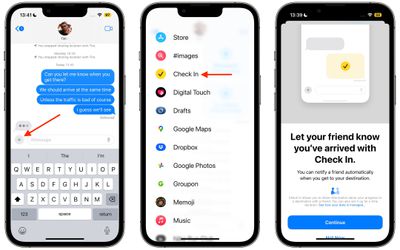
If you're going out somewhere, you can use the Check In feature in Messages to let a trusted friend or family member know where you're going and when you should arrive.
messages check in
When you head out, turn on Check In, and it will keep track of your progress. If you stop along the way, Messages will ping you to see what's going on, and if you do not respond, helpful information like your battery level, location, route traveled, location of last iPhone unlock, and cellular status will be shared with the trusted person.

Check In is a feature that ensures someone is keeping an eye on you from afar, and if you're in an accident, accosted, or otherwise in trouble, it gives detailed information that can be used to find you.

Use Find My

You can also give a trusted friend or family member access to your location through the ‌Find My‌ app. Go to ‌Find My‌, choose the People tab, and tap Share My Location.
find my friends precision finding
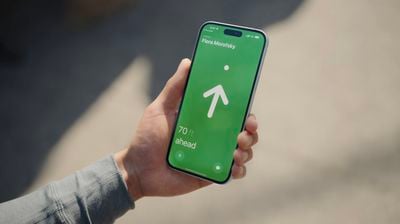
With the iPhone 15 and the second-generation Ultra Wideband chip, ‌Find My‌ can be used to track down your friends in a crowd if you're in a place like a concert venue. Note that both people need to have an iPhone 15 model.

Medical ID

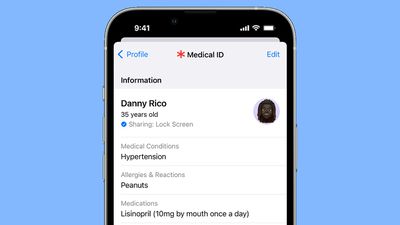
Make sure your medical information is up to date in the Health app. Tap on your profile and then go to Medical ID to update your information.
iphone medical id
This is a quick way for someone to see your name, age, allergies, and emergency contacts, and it's data that can be viewed when your iPhone is locked.

Safety Check

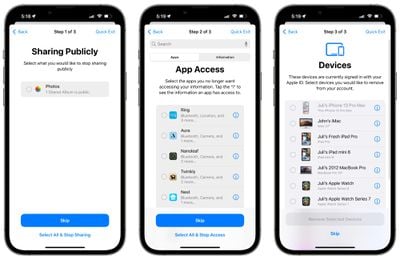
It's a good idea to use the iPhone's Safety Check feature every now and then to see who you're sharing data with and who can track you. Open up the Settings app, go to Privacy and Security, scroll down, and tap on Safety Check.
ios 16 manage sharing 2
In an emergency, you can use the Emergency Reset option, but for a check up, you'll want to tap on Manage Sharing & Access. It will show you who can see your location, which apps have access to your location data, who you share photo albums with, who you share notes with, all devices logged in to your ‌Apple ID‌, and more.

Features to Know About

  • Emergency SOS - If you press and hold on the side button and either volume button on the iPhone, you can call emergency services surreptitiously. There's also an option to press five times on the side button to call, which is an even easier method. Adjust your SOS settings by going to Settings > Emergency SOS.
  • Emergency SOS on Apple Watch - To contact emergency services on the Apple Watch, hold down the side button until the emergency call slider appears, and then drag it to make the call.
  • Crash Detection - Crash Detection contacts local emergency services if a crash is detected. It's on by default, but double check that it's enabled under Settings > Emergency SOS > Call After Severe Crash.
  • Satellite SOS - In a remote area where you don't have signal, you can use satellite connectivity to get help in an emergency. It's a feature available on the iPhone 14 and 15 models, and note that you will need to be outside and have a line of sight to the sky for the best connectivity.
  • Use Siri - You can ask Siri to call 911 (or your local emergency number).
  • Text 911 - Need to get help while staying quiet? You can text 911 in the United States by opening up the Messages app and typing 911 in the "To" field. This works on Apple Watch too.

Other Safety Tips

Know of other safety tips iPhone users should be aware of? Share them in the comments below.

Popular Stories

1password deal blue

1Password Security Breach: What Was Accessed and What Wasn't

Wednesday November 25, 2026 1:09 pm PST by
Popular password management app 1Password today said it experienced a security breach earlier this month. 1Password says some customer names and email addresses were accessed, but no customer vault contents were compromised. On November 19, 1Password saw indications that an employee's GitHub account had been breached and began investigating. The company says the breached GitHub account was...
apple design award 2025

Apple Announces 2025 Design Award Winners Ahead of WWDC 2025

Tuesday June 3, 2025 10:14 am PDT by
As we wait for WWDC to kick off next Monday, Apple today announced the winners of its annual Apple Design Awards, recognizing apps and games for their innovation, ingenuity, and technical achievement. The 2025 Apple Design Award winners are listed below, with one app and one game selected per category: Delight and Fun - CapWords (App) and Balatro (Game) Innovation - Play (App) and PBJ -...
ipad pro prime

Apple Has iPads Running macOS Internally, Says Gurman

Wednesday November 25, 2026 4:55 am PST by
Apple has iPads running macOS internally and has had them "for some time," according to Bloomberg's Mark Gurman, although he says no work is currently being done to bring the Mac operating system to iPads. Speaking on his latest Power On podcast, Gurman said there is "no work being done to consumerize macOS on the iPad." Rather, Apple will continue to bring Mac features and apps like Final Cut ...

Top Rated Comments

38 months ago
Please, DO NOT install beta software on an iPhone you need and use daily, especially in a life or death situation. You are just asking for issues. I’m actually kinda shocked macrumors is suggesting it to people like it’s nothing.
Score: 22 Votes (Like | Disagree)
jclo Avatar
38 months ago

Please, DO NOT install beta software on an iPhone you need and use daily, especially in a life or death situation. You are just asking for issues. I’m actually kinda shocked macrumors is suggesting it to people like it’s nothing.
I typically agree with this and do not normally recommend beta software on primary devices, but I wanted to let people know that it's an option. NYE is a major drinking holiday and I do think this is something that should be turned on if you're out in a bar or around unfamiliar people.

I'll add a note to use caution with betas. We have been running this beta since it came out and have not had issues, and I haven't seen reports, but it's true that it's a risk.
Score: 9 Votes (Like | Disagree)
coffeemilktea Avatar
38 months ago

with New Year's Eve parties approaching

Stolen Device Protection is actually an iOS 17.3 feature, so there are some extra steps to use it
Installing beta software to stay safe during a New Year's Eve party is a big-brain 200 IQ move for sure. :p

Personally, my plan is to just eat a big dinner and then go to bed early. :cool:
Score: 8 Votes (Like | Disagree)
podycust Avatar
38 months ago
Why are you even listing Stolen device protection a feature that’s only available on beta version of iOS like it’s available already?

Which you should not be recommended to average user to install beta software!
Score: 6 Votes (Like | Disagree)
38 months ago
Also turn off control center access when locked so they can’t put in it airplane mode.
Score: 5 Votes (Like | Disagree)
Apple_Robert Avatar
38 months ago
I like the features I see listed and plan on using them once 17.3 is officially released. As for New Years Eve, I plan on spend the evening with my fellow MR nerds.
Score: 5 Votes (Like | Disagree)
Latest Stories
The 50+ Best Apple Black Friday Deals on AirPods, iPads, MacBooks, and More
32 minutes ago
Apple's M6 and PROLED MacBook Pro Reach New Low Prices for Black Friday
37 minutes ago
The MacRumors Show: iPhone Air 2 and iPhone 18 Are Coming
43 minutes ago
Apple Store in Brisbane Reopening Next Month With New Design
1 hour ago
The 60+ Best Black Friday Accessory Deals on iPhone Chargers, TVs, Headphones, and More
2 hours ago
GTA VI Now (Barely) Running on Apple Silicon Macs
2 hours ago
The Best Black Friday Streaming Deals on Apple TV, Disney+, and More
3 hours ago
Apple TV's 'Carême' Wins International Emmy for Best Drama
4 hours ago
iPhone 18 Production Delay Leaves Apple Little Time Before Launch
4 hours ago
The Best Black Friday AirPods Deals
5 hours ago
The Best Black Friday Deals on Apple Home Products
5 hours ago
The Best Black Friday iPhone Deals
5 hours ago
The Best Black Friday iPad Deals
5 hours ago
The Best Black Friday Apple Watch Deals
5 hours ago
The Best Black Friday AirTag Deals
5 hours ago
The Best Black Friday Mac Deals
5 hours ago
iPhone Share of US Smartphone Market Hits 57% as Rivals Slip
6 hours ago
iPhone 20 Pro Rumored to Feature 3D-Printed Titanium Frame
8 hours ago
Apple's Official 2026 Black Friday Offer Starts Rolling Out
1 day ago
Halide Adds Fill Light Feature for iPhone Duo
1 day ago
MacBook Air Black Friday Deals Now Live With Massive $399 Savings
1 day ago
Amazon Discounts All MacBook Neo Models by $99 for Black Friday
1 day ago
Kodak Launches Unique AirTag Rival With E-Ink Display
1 day ago
Here's Why the Apple Store is Going Down
1 day ago
Apple Still Working on Giant Foldable iPad That Could Cost $5,000
1 day ago
iPhones Dominate China's Weak Singles' Day Smartphone Sales
1 day ago
iPhone 20 Pro Could Feature Ceramic in Limited-Edition Model
1 day ago
Apple Faces Korean Regulator Review Over iPhone 16 AI Advertising
1 day ago
Apple Watch Ultra 4 Hits New Best-Ever Price of $649.99 for Black Friday
1 day ago
New Apple Store Opening in India, Download the Special Wallpaper Now
2 days ago
Related Apple News: World News | Politics | Opinion | Iphone | Business































