Skip to Content

Get Ready for the New Year With These iPhone Maintenance Tips

December is coming to an end and 2023 will be upon us in just a couple of weeks. With holiday breaks and vacations coming up, the end of the month is a great time to sit down and do a little bit of iPhone maintenance to get ready for the new year.
New Years iPhone Maintenance Feature
If you're like many of us here at MacRumors, you have a lot of cruft in the form of photos that need to be cleaned up, old apps to be deleted, contacts to clear out, and more, so we thought we'd round up some useful suggestions on iPhone organization and optimization that can save space and make your device feel less cluttered.

Clear Out Old Photos

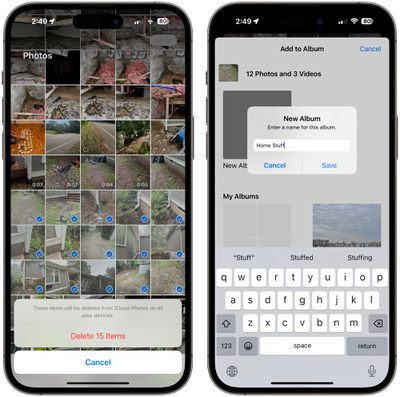
I bought a house this year, and I have about a thousand photos of peeling paint on the ceiling, marks on the floor, downed trees, efflorescence in the crawl space, rain gutters overflowing, and dozens of other little home issues that one photographs. If you're in the same situation, now's a good time to organize those images into albums, pull them off of the iPhone into a dedicated album on your Mac or other device, or delete them.
delete organize photos ios
On iPhone, just open up the Photos app, select everything that's unnecessary, and add it to an album with the Share Sheet or delete it. You can also move it over to something like the Files app to keep a copy that doesn't clutter your ‌Photos‌ app, which is what I'm going to do.

Get Rid of Old/Duplicate Contacts

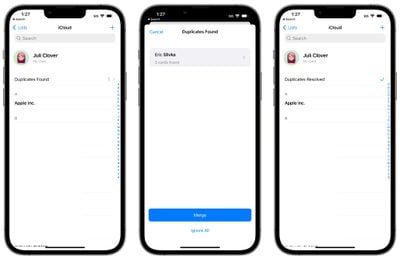
iOS 16 added a handy feature for merging contacts if you have duplicates. Just open up the Contacts app and it will let you know right at the top if there are duplicates, which can be merged with a tap.
ios 16 merge duplicate contacts
If you have old contacts you no longer talk with, this is also a good time to go through and delete anything that's irrelevant to clean up your Contacts list.

Delete Unused Apps

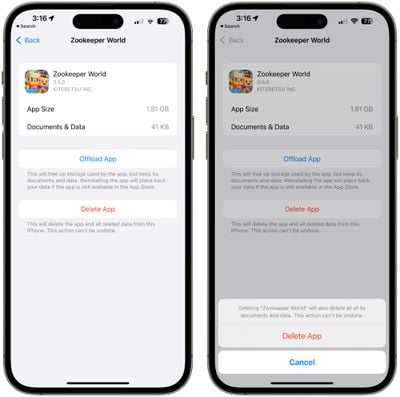
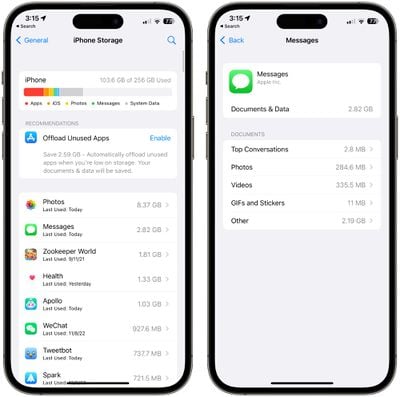
Apple gives you a bunch of ways to get rid of apps you're no longer using, but perhaps the most efficient way is to simply open up the Settings app, go to General, and choose iPhone Storage. From there, you can see what's taking up a lot of room and you can get rid of what you're no longer using to save both Home Screen space on your iPhone and storage space.
ios delete unused apps

Delete Old Messages

Old iMessages, especially those with a lot of images, can take up a surprising amount of space. While you're deleting apps, check out Settings > General > iPhone Storage > Messages to see what's eating up the most space in the app. From there, tap into a category like photos or videos to delete old content.
manage app storage messages
Note that it can take some time to load your photos and videos.

Clean Up Old Reminders and Notes

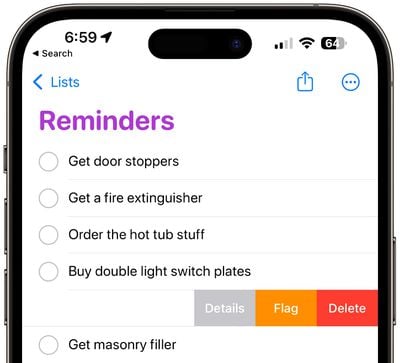
While going through photos, messages, and unused apps, it's probably also a good idea to clear out old Notes and Reminders from those apps, respectively.
manage reminders ios
I'm not good at keeping on top of Notes in particular, and it can get cluttered with content that I no longer need. It's not a big deal, but it feels refreshing to empty it out every now and then. Deleting notes is as simple as opening up the Notes app and swiping to the left, and the same is true of Reminders.

Review Your Notification Settings

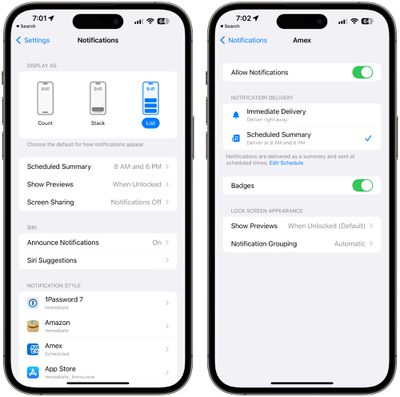
Over the course of the year, it's easy to download apps, forget about them, and brush off the excess notifications you start receiving that you don't really need. Deleting apps solves the problem, but you may have apps you want to keep that you don't need notifications from.
ios manage notifications
In Settings > Notifications, you can manage all of your apps, deciding which can send notifications and which can't. Clearing out notifications can lead to less distraction, and it's also useful to add apps to App Summary so you only hear from them once a day.

Check Up on Battery Usage

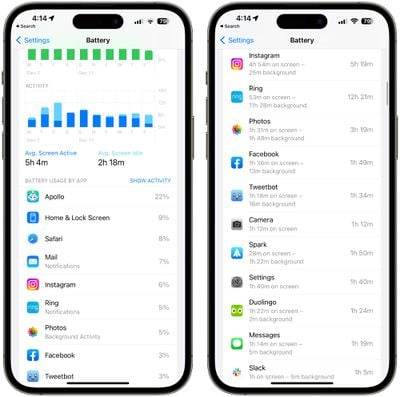
It's a good idea to look in on your battery usage every now and then so you can see what apps are eating battery life and where you're spending your time to see if there are areas where changes can be made.
ios battery usage info
Under Settings > Battery you can see the last 24 hours and the last 10 days of app usage, with a breakdown of which apps used the most battery life. It lets you know if battery was drained through active use or background activity, which can be helpful if you're looking to maximize battery.

If you have apps like ‌Photos‌ or Weather that are updating in the background when you don't really need them to, you can turn off background updates. Go to General > Background App Refresh to toggle on background refresh on a per app basis.

More Tips

There are plenty more management categories you can delve into, with some suggestions for organization and updating below.

  • Go through your files in iCloud Drive, Dropbox, Box, or any other cloud service that you use.
  • Clean up your email inbox, deleting old emails to save space and to get to inbox zero.
  • Do a checkup on 1Password or your password management app to update any old passwords, close out old accounts, or get rid of data you no longer need.
  • Rearrange apps into folders for a more organized ‌Home Screen‌.
  • Go through your ‌Home Screen‌ and Lock Screen widgets to make sure everything is still relevant and nothing is there that's not in use.
  • Update locations in the Weather app to clear out old vacation spots or other weather information you don't need.
  • Update your Favorites in Maps.
  • Update your Apple Music playlists.
  • Update all your apps and make sure software updates are installed on all devices.
  • Install HomeKit firmware updates on any devices that need updating.

Have a Suggestion?

What's on your list for year-end iPhone maintenance and updating? Let us know in the comments below.


Popular Stories

apple design award 2025

Apple Announces 2025 Design Award Winners Ahead of WWDC 2025

Tuesday June 3, 2025 10:14 am PDT by
As we wait for WWDC to kick off next Monday, Apple today announced the winners of its annual Apple Design Awards, recognizing apps and games for their innovation, ingenuity, and technical achievement. The 2025 Apple Design Award winners are listed below, with one app and one game selected per category: Delight and Fun - CapWords (App) and Balatro (Game) Innovation - Play (App) and PBJ -...
1password deal blue

1Password Security Breach: What Was Accessed and What Wasn't

Wednesday November 25, 2026 1:09 pm PST by
Popular password management app 1Password today said it experienced a security breach earlier this month. 1Password says some customer names and email addresses were accessed, but no customer vault contents were compromised. On November 19, 1Password saw indications that an employee's GitHub account had been breached and began investigating. The company says the breached GitHub account was...
apple store down feature

Here's Why the Apple Store is Going Down

Thursday November 26, 2026 5:49 am PST by
Apple's online store is going down for a few hours on a rolling country-by-country basis right now, but do not get your hopes up for new products. Apple takes its online store down for a few hours ahead of Black Friday every year to tease its annual gift card offer with the purchase of select products. The store is down in Australia, New Zealand, and Thailand, right now, and it will...

Top Rated Comments

52 months ago
Or buy a 512GB iPhone and hoard everything under the sun
Score: 24 Votes (Like | Disagree)
RedTheReader Avatar
52 months ago
I'd personally never delete old messages, but that's just me. Even those old verification texts are on my phone.
Score: 20 Votes (Like | Disagree)
bradbomb Avatar
52 months ago
If someone has either "iCloud Photo Library" or "Messages in the Cloud" on, the tips on photos and messages can do more harm than good as deletions sync to all devices.
Score: 13 Votes (Like | Disagree)
japanime Avatar
52 months ago

If you're like many of us here at MacRumors, you have a lot of cruft in the form of photos that need to be cleaned up, old apps to be deleted, contacts to clear out, and more
None of those things are the definition of "cruft."
Score: 9 Votes (Like | Disagree)
TheYayAreaLiving 🎗️ Avatar
52 months ago
Excellent tips! I will just buy a new iPhone in the Spring of 2023. I'm a hoarder. :rolleyes:
Score: 6 Votes (Like | Disagree)
52 months ago
How about a physical clean up too?

My microphone was barely working for months, until I found that I needed to clean out the microphone (and speaker) grille at the bottom of my iPhone. It was clogged with dirt after 3 years of use.

Also, it’s a great idea to carefully clean out the fluff from the lightning port every now and then. I’ve found that if you regularly plug a physical cable in, it slowly compacts over time fluff that accumulates in the lightening port, especially if you generally keep your phone in your pocket.
Score: 6 Votes (Like | Disagree)
Latest Stories
The 50+ Best Apple Black Friday Deals Still Available on AirPods, iPads, and More
8 hours ago
HomePod Mini 2 in (RED) Seemingly Spotted Ahead of Announcement
5 hours ago
Apple's M6 and PROLED MacBook Pro Reach New Low Prices for Black Friday
15 hours ago
The MacRumors Show: iPhone Air 2 and iPhone 18 Are Coming
15 hours ago
Apple Store in Brisbane Reopening Next Month With New Design
16 hours ago
The 60+ Best Black Friday Accessory Deals on iPhone Chargers, TVs, Headphones, and More
17 hours ago
GTA VI Now (Barely) Running on Apple Silicon Macs
17 hours ago
The Best Black Friday Streaming Deals on Apple TV, Disney+, and More
18 hours ago
Apple TV's 'Carême' Wins International Emmy for Best Drama
18 hours ago
iPhone 18 Production Delay Leaves Apple Little Time Before Launch
19 hours ago
The Best Black Friday AirPods Deals Still Available
11 hours ago
The Best Black Friday Deals on Apple Home Products
19 hours ago
The Best Black Friday iPhone Deals Still Available
11 hours ago
The Best Black Friday iPad Deals Still Available
11 hours ago
The Best Black Friday Apple Watch Deals Still Available
11 hours ago
The Best Black Friday AirTag Deals Still Available
11 hours ago
The Best Black Friday Mac Deals Still Available
11 hours ago
iPhone Share of US Smartphone Market Hits 57% as Rivals Slip
21 hours ago
iPhone 20 Pro Rumored to Feature 3D-Printed Titanium Frame
22 hours ago
Apple's Official 2026 Black Friday Offer Starts Rolling Out
2 days ago
Halide Adds Fill Light Feature for iPhone Duo
2 days ago
MacBook Air Black Friday Deals Now Live With Massive $399 Savings
2 days ago
Amazon Discounts All MacBook Neo Models by $99 for Black Friday
2 days ago
Kodak Launches Unique AirTag Rival With E-Ink Display
2 days ago
Here's Why the Apple Store is Going Down
2 days ago
Apple Still Working on Giant Foldable iPad That Could Cost $5,000
2 days ago
iPhones Dominate China's Weak Singles' Day Smartphone Sales
2 days ago
iPhone 20 Pro Could Feature Ceramic in Limited-Edition Model
2 days ago
Apple Faces Korean Regulator Review Over iPhone 16 AI Advertising
2 days ago
Apple Watch Ultra 4 Hits New Best-Ever Price of $649.99 for Black Friday
2 days ago
Related Apple News: Buyers Guide | Entertainment | Local News | Culture | Mac






























