Skip to Content

iPhone Handoff in iOS 27: How It Works, Pricing, and Carrier Support

Apple in iOS 27 introduced iPhone Handoff, a new eSIM feature that allows you to use the same number on two iPhones and seamlessly swap between them. The number is only active on one iPhone at a time, so it's not like having two independently active lines.
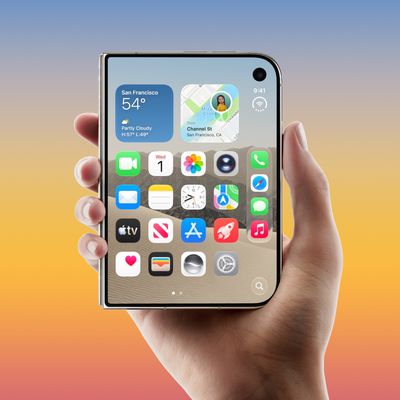
iPhone Handoff Feature
It's also different from Apple's existing Handoff feature for continuing an app task on another Apple device. Here's what you need to know about the new iPhone Handoff feature.

What Moves Between the Two iPhones?

When you switch phones with iPhone Handoff, your calls, voicemail, messages (including iMessage, RCS, SMS, and MMS) and Find My location move to the active iPhone. You'll see a "Switched to this iPhone" message on the screen to confirm the change.

Other data synced with iCloud will automatically update across your devices, and third-party apps work across both devices, though some third-party apps may require a separate sign-in or take time to sync. Any banking apps you use may also ask you to approve access on the other device.

What Do You Need for iPhone Handoff?

Both iPhones must be running iOS 27 or later. They'll also need to be:

  • Connected to Wi-Fi
  • Sharing the same Apple Account
  • Using Messages in iCloud for messages sync
  • Signed into FaceTime and iMessage with the same Apple Account

iPhone Handoff works with Dual SIM as long as both eSIMs are from carriers that support iPhone Handoff. Both eSIMs must be set up for iPhone Handoff separately, one at a time. Once set up, both eSIMs switch together simultaneously when you unlock your iPhone.

Which Carriers Support iPhone Handoff?

iPhone Handoff is available through T-Mobile in the United States and Telekom in Germany. Verizon (U.S.) and EE (U.K.) will support iPhone Handoff later this year.

AT&T has so far not committed to supporting iPhone Handoff, with a company spokesperson recently pointing to the carrier's existing eSIM activation and transfer options instead.

How Much Does iPhone Handoff Cost?

T-Mobile is charging customers $5 per month to use iPhone Handoff.

In Germany, Deutsche Telekom is charging €6.95 per month for iPhone Handoff, but only on plans that do not already include multi-SIM functionality. An added multi-SIM costs €6.95 per month (one is included with the current MagentaMobil L plan and two with XL).

No other carriers have announced pricing yet.

How Do You Set It Up?

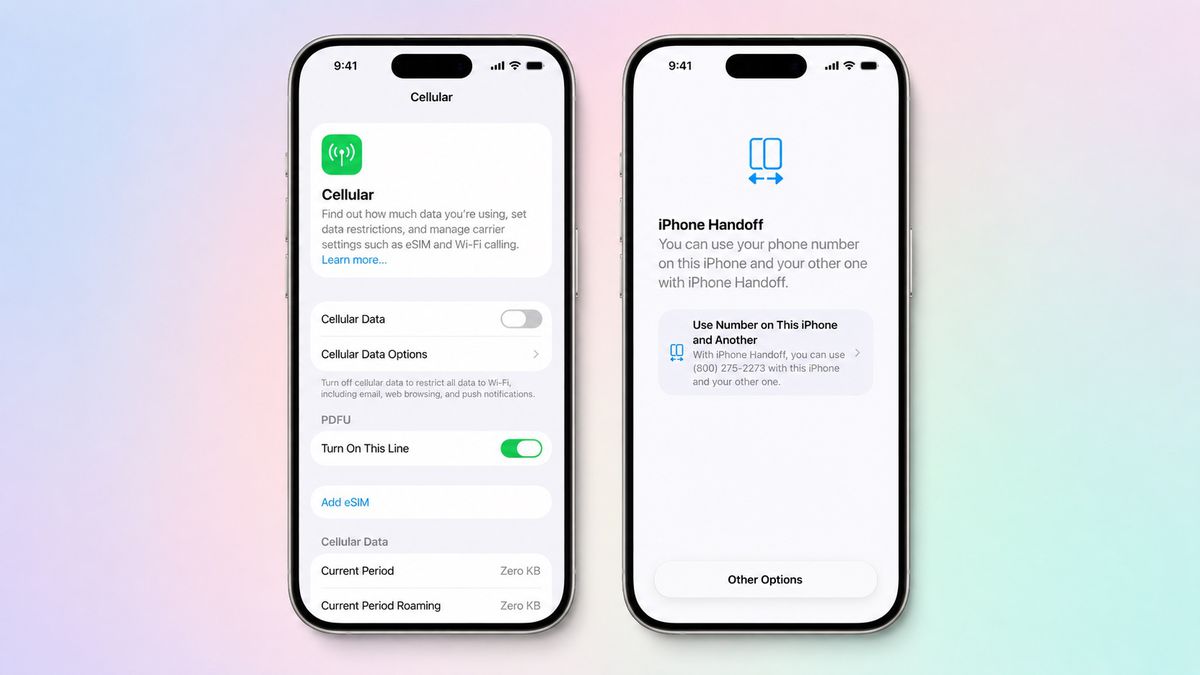
iPhone Handoff can be enabled when setting up a new iPhone. At the "Set Up Cellular" screen, choose "Use Number on This iPhone and Another," then follow the prompts on both phones.

If both iPhones are already set up, open Settings ➝ Cellular on the phone you want to add. Tap Set Up Cellular or Add eSIM, choose Use Number on This iPhone and Another, and follow the prompts. You then get to choose which device is your main iPhone (ideally, the one you use most often) and which is your secondary iPhone.
iPhone Handoff iOS 27 Feature
After setup, unlock either phone to make your number active on it.

What Should You Know Before Switching?

If you have an Apple Watch, it won't switch its pairing to the other device when your phone number moves, so make sure you pair it with the iPhone you expect to use most. Also, some Wallet items, including certain transit passes and IDs, may only work on one device at a time.

Carrier account management and some services like Call Forwarding and Caller ID will remain tied to your main iPhone.

Can I Replace an iPhone That Uses iPhone Handoff?

Yes, but you need to transfer the eSIM from either iPhone to the replacement device. The below steps should be followed while your new iPhone is placed next to your existing devices that use iPhone Handoff.

  1. On your new iPhone (replacement), open the Settings app.
  2. Tap Cellular and then tap Set up Cellular or Add eSIM.
  3. Select an iPhone and tap Continue.
  4. Tap Transfer. (If your carrier doesn't support eSIM transfer from a companion iPhone, you must enroll in iPhone Handoff again: On your iPhone that you are transferring the eSIM from, tap Continue, and follow the onscreen prompts.)
  5. Tap Continue.
  6. Follow the onscreen prompts on both devices.

The eSIM will deactivate on the old iPhone you transferred from.

What If I Want to Stop Using iPhone Handoff?

If you want to stop using iPhone Handoff at any time, you need to contact your carrier. Simply deleting an eSIM from your iPhone may not stop the carrier from charging you for the service.

Related Roundups: iOS 27, iPadOS 27
Related Forum: iOS 27

Popular Stories

iphone duo yellow hand

Apple Adds Facial Unlock Option on iPhone Duo in iOS 27.3

Monday November 16, 2026 10:17 am PST by
Apple today added a new option for unlocking the iPhone Duo using the front-facing camera, giving device users multiple ways to access their content. The feature is available in the second iOS 27.3 beta. The option to unlock with facial recognition is only available on the Lock Screen, and authentication via Touch ID is still needed for Apple Pay purchases, adding passwords and logins, and...
bug security vulnerability issue fix larry

Here's What Apple Fixed in iOS 27.2.1 and macOS 27.2.1

Monday November 9, 2026 3:07 pm PST by
The iOS 27.2.1, iPadOS 27.2.1, and macOS 27.2.1 updates Apple released today fix a handful of security vulnerabilities. With the security fixes implemented, it's a good idea to update as soon as you can. A bug with iMessage could let a remote attacker join a group chat to receive its messages, and another could let users see messages sent before they joined a group chat. Most of the...
iOS 27

Apple Releases iOS 27.2.1 With Bug Fixes

Monday November 9, 2026 10:09 am PST by
Apple today released iOS 27.2.1, a minor update to the iOS 27 operating system. iOS 27.2.1 comes two weeks after the launch of iOS 27.2. iOS 27.2.1 includes addresses bugs and patches security vulnerabilities according to Apple's release notes for the update. You can download iOS 27.2.1 over the air by going to Settings > General > Software Update. Apple has also released iOS 26.7.3...

Top Rated Comments

9 weeks ago
I setup my primary personal iPhone 18 Pro Max and secondary iPhone Air on iPhone Handoff via T-Mobile just days ago.

It’s absolutely fantastic and to be honest the best money saving feature I’ve experienced from Apple in ages.

Saving money because I was able to cancel the separate line and service that was keeping the Air activated.

Now when I feel like switching phones, all my calls and messages continue to arrive and be returned on my same main personal number.

Fast, easy, automatic. Nothing to do, just pickup whatever phone I want and go on with my day.
Score: 20 Votes (Like | Disagree)
9 weeks ago

can you help me explain a use case please? Maybe if I use dual SIM for work and private phone during the day and want to switch devices to only private SIM for the evening and weekends? But why not just deactivate / focus mode on the phone with dual SIM?
I have an iPhone Duo, I also have an older iPhone 15. I’m planning a beach day. Which phone do you really think id rather take with me?

Likewise.. I’m going to a music festival.
Score: 16 Votes (Like | Disagree)
turbineseaplane Avatar
9 weeks ago
I don't understand the rationale for making this a monthly ongoing fee from the carrier side.

Only one device would ever be active on their network at a time, unlike adding an Apple Watch plan for instance.

A one time fee I could understand here, but not an ongoing one.
This feels like gouging.
Score: 6 Votes (Like | Disagree)
9 weeks ago
can you help me explain a use case please? Maybe if I use dual SIM for work and private phone during the day and want to switch devices to only private SIM for the evening and weekends? But why not just deactivate / focus mode on the phone with dual SIM?
Score: 5 Votes (Like | Disagree)
Big_D Avatar
9 weeks ago

That is an interesting thought. I have a personal Pro and a work 17e. My employer (300,000 people worldwide) would never allow any of us to move the sim from my work phone to my personal phone. That is an absolute no-no.
The same here, 500 employees. Company devices for company data, private devices for private data. Having company data on a private phone is a disciplinary offence and we are not allowed to put personal apps or data on company devices.

The nice thing is, when I leave the office, I can leave the company phone and company number in the office and I just have my private number.
Score: 4 Votes (Like | Disagree)
Adamsal Avatar
9 weeks ago

Apple in iOS 27 introduced iPhone Handoff, a new eSIM feature that allows you to use the same number on two iPhones and seamlessly swap between them. The number is only active on one iPhone at a time, so it's not like having two independently active lines.


It's also different from Apple's existing Handoff feature for continuing an app task on another Apple device. Here's what you need to know about the new iPhone Handoff feature.

What Moves Between the Two iPhones?

When you switch phones with iPhone Handoff, your calls, voicemail, messages (including iMessage, RCS, SMS, and MMS) and Find My location move to the active iPhone. You'll see a "Switched to this iPhone" message on the screen to confirm the change.

Other data synced with iCloud will automatically update across your devices, and third-party apps work across both devices, though some third-party apps may require a separate sign-in or take time to sync. Any banking apps you use may also ask you to approve access on the other device.

What Do You Need for iPhone Handoff?

Both iPhones must be running iOS 27 or later. They'll also need to be:

* Connected to Wi-Fi
* Sharing the same Apple Account
* Using Messages in iCloud for messages sync
* Signed into FaceTime and iMessage with the same Apple Account

iPhone Handoff works with Dual SIM as long as both eSIMs are from carriers that support iPhone Handoff. Both eSIMs must be set up for iPhone Handoff separately, one at a time. Once set up, both eSIMs switch together simultaneously when you unlock your iPhone.

Which Carriers Support iPhone Handoff?

iPhone Handoff is available through T-Mobile in the United States and Telekom in Germany. Verizon (U.S.) and EE (U.K.) will support iPhone Handoff later this year.

AT&T has so far not committed to supporting iPhone Handoff, with a company spokesperson recently pointing to the carrier's existing eSIM activation and transfer options instead.

How Much Does iPhone Handoff Cost?

T-Mobile is charging customers $5 per month to use iPhone Handoff.

In Germany, Deutsche Telekom is charging €6.95 per month for iPhone Handoff, but only on plans that do not already include multi-SIM functionality. An added multi-SIM costs €6.95 per month (one is included with the current MagentaMobil L plan and two with XL).

No other carriers have announced pricing yet.

How Do You Set It Up?

iPhone Handoff can be enabled when setting up a new iPhone. At the "Set Up Cellular" screen, choose "Use Number on This iPhone and Another," then follow the prompts on both phones.

If both iPhones are already set up, open Settings ➝ Cellular on the phone you want to add. Tap Set Up Cellular or Add eSIM, choose Use Number on This iPhone and Another, and follow the prompts. You then get to choose which device is your main iPhone (ideally, the one you use most often) and which is your secondary iPhone.


After setup, unlock either phone to make your number active on it.

What Should You Know Before Switching?

If you have an Apple Watch, it won't switch its pairing to the other device when your phone number moves, so make sure you pair it with the iPhone you expect to use most. Also, some Wallet items, including certain transit passes and IDs, may only work on one device at a time.

Carrier account management and some services like Call Forwarding and Caller ID will remain tied to your main iPhone.

Can I Replace an iPhone That Uses iPhone Handoff?

Yes, but you need to transfer the eSIM from either iPhone to the replacement device. The below steps should be followed while your new iPhone is placed next to your existing devices that use iPhone Handoff.
[LIST=1]
* On your new iPhone (replacement), open the Settings app.
* Tap Cellular and then tap Set up Cellular or Add eSIM.
* Select an iPhone and tap Continue.
* Tap Transfer. (If your carrier doesn't support eSIM transfer from a companion iPhone, you must enroll in iPhone Handoff again: On your iPhone that you are transferring the eSIM from, tap Continue, and follow the onscreen prompts.)
* Tap Continue.
* Follow the onscreen prompts on both devices.

The eSIM will deactivate on the old iPhone you transferred from.

What If I Want to Stop Using iPhone Handoff?

If you want to stop using iPhone Handoff at any time, you need to contact your carrier. Simply deleting an eSIM from your iPhone may not stop the carrier from charging you for the service.
Article Link: iPhone Handoff in iOS 27: How It Works, Pricing, and Carrier Support ('https://www.macrumors.com/guide/iphone-handoff-how-it-works-carrier-support-cost/')
Great for people that would like to use two devises and well overdue, I wish they would do it for the watches.
Score: 4 Votes (Like | Disagree)
Latest Stories
The 50+ Best Apple Black Friday Deals Still Available on AirPods, iPads, and More
58 minutes ago
Apple's M6 and PROLED MacBook Pro Reach New Low Prices for Black Friday
8 hours ago
The MacRumors Show: iPhone Air 2 and iPhone 18 Are Coming
9 hours ago
Apple Store in Brisbane Reopening Next Month With New Design
9 hours ago
The 60+ Best Black Friday Accessory Deals on iPhone Chargers, TVs, Headphones, and More
10 hours ago
GTA VI Now (Barely) Running on Apple Silicon Macs
10 hours ago
The Best Black Friday Streaming Deals on Apple TV, Disney+, and More
11 hours ago
Apple TV's 'Carême' Wins International Emmy for Best Drama
11 hours ago
iPhone 18 Production Delay Leaves Apple Little Time Before Launch
12 hours ago
The Best Black Friday AirPods Deals Still Available
4 hours ago
The Best Black Friday Deals on Apple Home Products
13 hours ago
The Best Black Friday iPhone Deals Still Available
4 hours ago
The Best Black Friday iPad Deals Still Available
4 hours ago
The Best Black Friday Apple Watch Deals Still Available
4 hours ago
The Best Black Friday AirTag Deals Still Available
4 hours ago
The Best Black Friday Mac Deals Still Available
4 hours ago
iPhone Share of US Smartphone Market Hits 57% as Rivals Slip
14 hours ago
iPhone 20 Pro Rumored to Feature 3D-Printed Titanium Frame
16 hours ago
Apple's Official 2026 Black Friday Offer Starts Rolling Out
1 day ago
Halide Adds Fill Light Feature for iPhone Duo
1 day ago
MacBook Air Black Friday Deals Now Live With Massive $399 Savings
1 day ago
Amazon Discounts All MacBook Neo Models by $99 for Black Friday
1 day ago
Kodak Launches Unique AirTag Rival With E-Ink Display
2 days ago
Here's Why the Apple Store is Going Down
2 days ago
Apple Still Working on Giant Foldable iPad That Could Cost $5,000
2 days ago
iPhones Dominate China's Weak Singles' Day Smartphone Sales
2 days ago
iPhone 20 Pro Could Feature Ceramic in Limited-Edition Model
2 days ago
Apple Faces Korean Regulator Review Over iPhone 16 AI Advertising
2 days ago
Apple Watch Ultra 4 Hits New Best-Ever Price of $649.99 for Black Friday
2 days ago
New Apple Store Opening in India, Download the Special Wallpaper Now
2 days ago
Related Apple News: Sport | Reviews | Entertainment | South Africa | Ipad